@kevinhao/pi-spark
Pi package for a compact TUI, clean transcript, credits, presets, recap, metrics, naming, and session resources
Package details
Install @kevinhao/pi-spark from npm and Pi will load the resources declared by the package manifest.
$ pi install npm:@kevinhao/pi-spark- Package
@kevinhao/pi-spark- Version
0.30.0- Published
- Nov 1, 2026
- Downloads
- 217/mo · 191/wk
- Author
- kevinhao
- License
- MIT
- Types
- extension, theme
- Size
- 5.2 MB
- Dependencies
- 8 dependencies · 5 peers
Pi manifest JSON
{
  "image": "https://raw.githubusercontent.com/haoyiqiang/pi-extensions/main/packages/pi-spark/assets/cover.png",
  "themes": [
    "./themes"
  ],
  "extensions": [
    "./index.ts"
  ]
}
Security note
Pi packages can execute code and influence agent behavior. Review the source before installing third-party packages.
README

@kevinhao/pi-spark
Pi package that polishes your daily experience.
Install
# Install this package from npm (recommended)
pi install npm:@kevinhao/pi-spark
# Or install all extensions from this monorepo
pi install git:github.com/haoyiqiang/pi-extensions
Reload or restart Pi after installation.
Features
Compact TUI: editor and footer
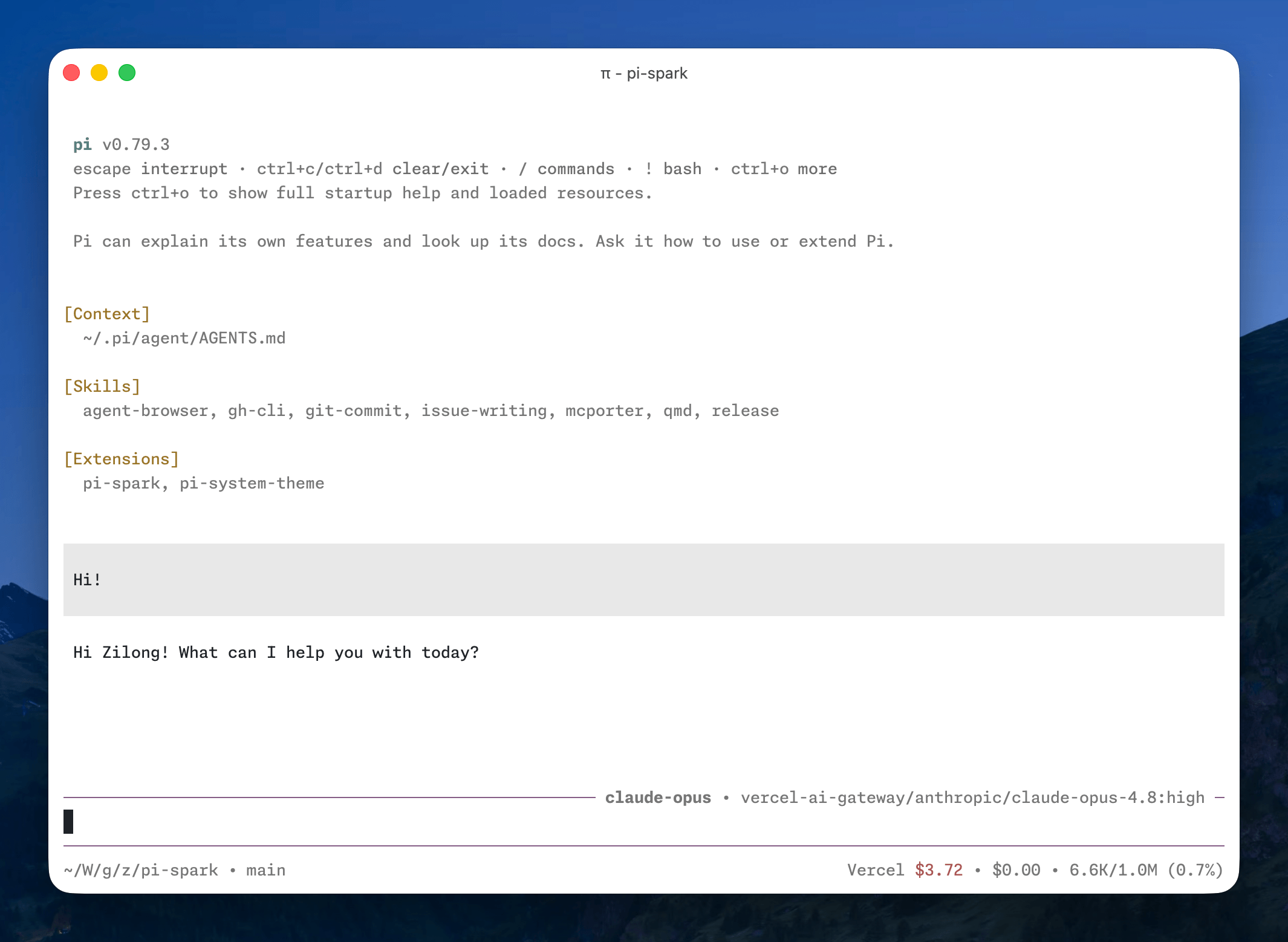
pi-spark ships with a custom editor and footer, replacing the default ones. The compact TUI gives you a calm experience without distraction.
- The editor shows a working indicator inspired by Amp, the elapsed time since you sent the message, and the current model on the top border. If you use presets, the active preset appears there too.
- The footer shows session information, extension statuses, cost, and context usage on one line. Set
styletop10kfor a lean powerlevel10k left prompt (OS icon, fish-shortened path,on, and branch). That style needs a Nerd Font.

Earlier pi-spark releases included a custom fullscreen renderer. Pi 0.84.0 now provides fullscreen mode natively, with a sticky editor and footer and an independently scrollable transcript, so pi-spark has retired its workaround. Enable Pi's fullscreen mode in
/settings, withpi --tui-mode fullscreen, or in Pi'ssettings.json:{ "tuiMode": "fullscreen" }When upgrading, remove the retired
fullscreenfield fromspark.json.
Credits
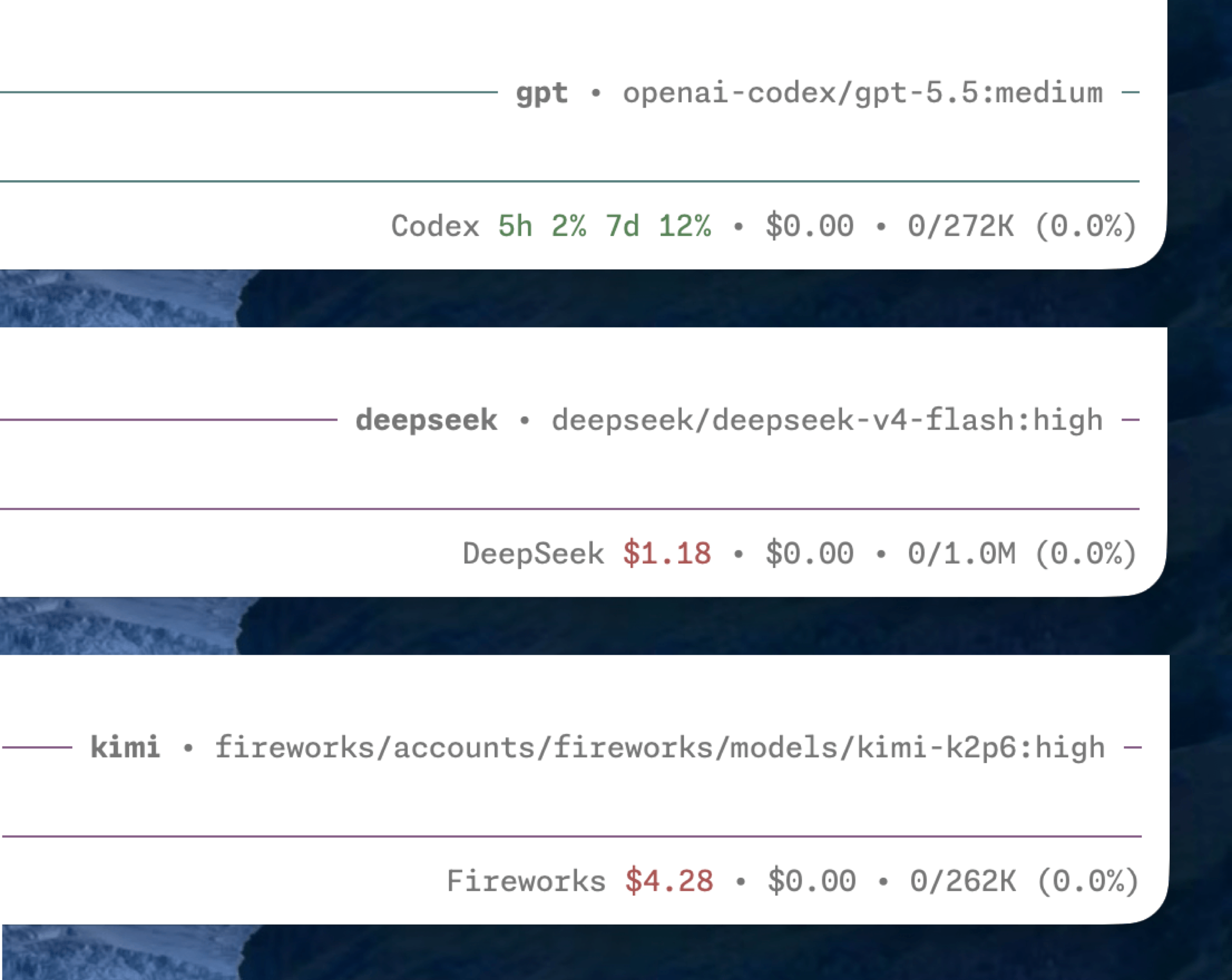
pi-spark shows the active provider's credit balance or rate-limit usage in the status line, so you can keep an eye on what's left without leaving the terminal.
- Supported providers: DeepSeek, Fireworks, Kimi Code, Moonshot, OpenAI Codex, OpenRouter, and Vercel AI Gateway.
- Most provider fetching follows CodexBar. Fireworks is the exception: its balance sits behind an internal gRPC API, reverse-engineered from the
firectlbinary (see Reverse-Engineering Fireworks Credits).
OpenAI Codex banked resets
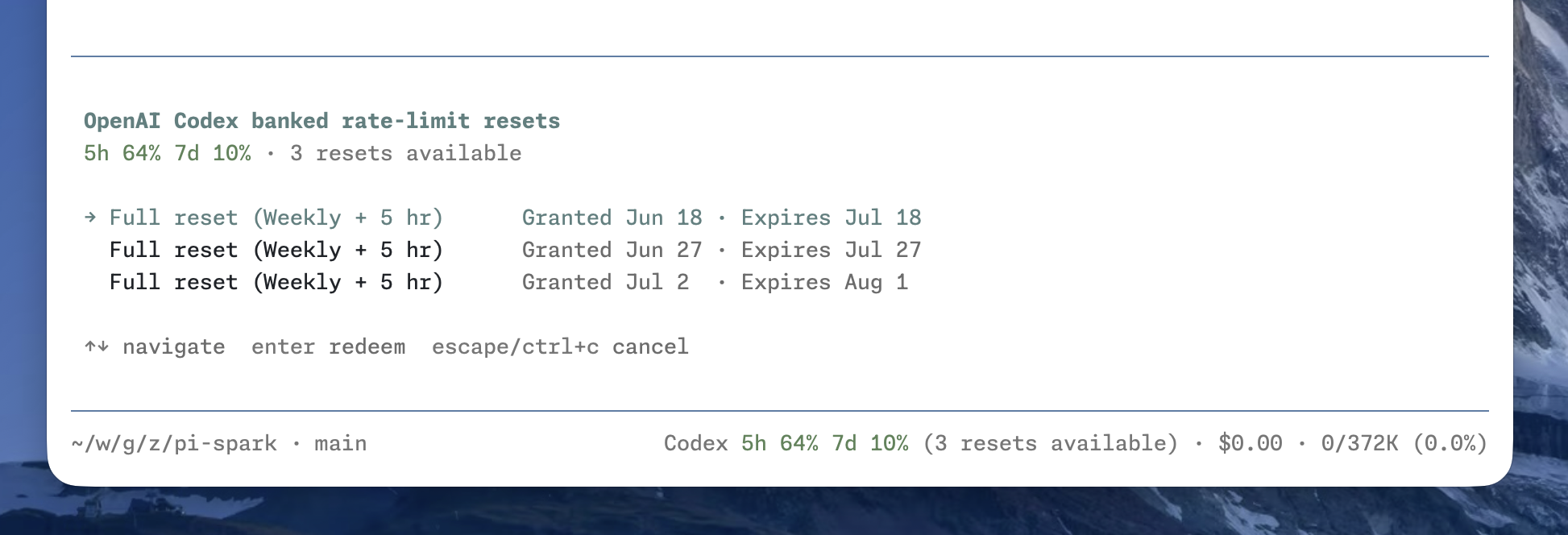
Banked rate-limit resets are saved benefits that can reset eligible Codex usage windows when redeemed. When available, their count appears after the usage windows. Run /codex-resets to inspect each reset and its expiration date, then select one to redeem. See OpenAI Codex Banked Rate-Limit Resets for the underlying behavior and internal APIs.
Peak/off-peak pricing
Pi does not currently support time-based pricing, so its cost estimates can be inaccurate for providers with peak/off-peak rates, such as DeepSeek. pi-spark updates model cost metadata so subsequent usage calculations reflect the current rate.

Presets
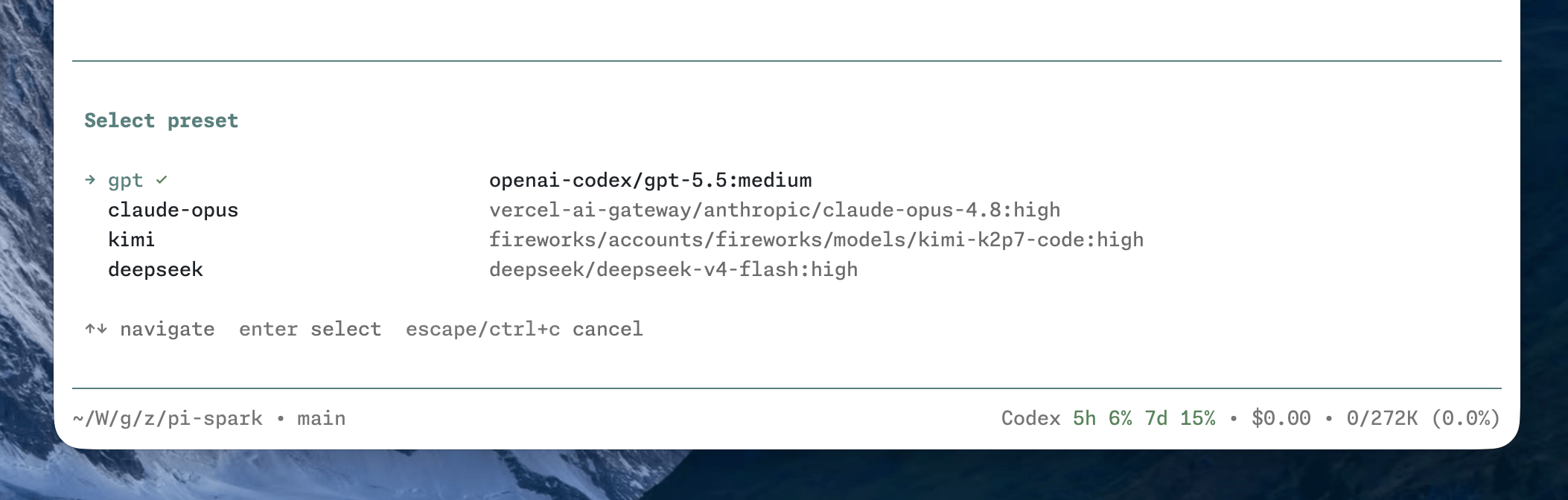
pi-spark lets you define named model presets in spark.json (see Configuration), so you can switch between models and thinking levels without retyping provider details. The active preset is shown on the editor's top border.
- Switch interactively with
/preset, or jump straight to one with/preset <name>. - Start pi on a given preset with
pi --preset <name>. - Cycle presets with
ctrl+super+p(forward) andctrl+shift+super+p(backward);superiscommandon macOS and needs a terminal that forwards it.
Clean mode
Clean mode collapses an entire agent run into one duration header, leaving the final answer visible. Press F2 or run /clean to expand the hidden narration, tool calls, and extension work entries. Shift+F2 expands or collapses all action groups.
- The run stays expanded while the agent is working and collapses after
agent_settled, unless you manually changed it during that run. - Fullscreen TUI supports clicking the run header, action groups, and individual tool summaries.
- Run
/config:spark→ Clean mode → Detailed settings to configure folding and activity rows. - Set
cleanModetofalseto disable all folding. An existingextensions/pi-clean-mode/config.jsonis read only whenspark.jsondoes not setcleanMode. - Remove
npm:pi-clean-modeif it is still installed, or its commands and shortcuts will conflict.
Metrics
pi-spark shows session elapsed time and token-generation telemetry through Pi's native notifications. The editor border shows the total wait, for example ⏱ 47s, and it keeps counting across turns.
on-stop(default): the transcript stays quiet during the run. When the agent settles, one native notification reports elapsed time, blended TPS, TTFT, tokens, stalls, and cost. If no TPS sample is available, it still reports elapsed time.live: one native notification is emitted at the end of every turn. A multi-turn run also gets a final⏱ <duration>notification.- Metrics do not register a custom entry renderer or write display entries into the session.
- Run
/config:spark→ Metrics to toggle telemetry or selectlive/on-stop. An existingextensions/pi-metrics/config.jsonis used only whenspark.jsondoes not setmetrics.
Session resources
Typing # at a token boundary opens a tabbed picker above the spark editor. It lists files, web URLs, and PR/MR links collected from successful tool results in the current session. Enter inserts a normal reference such as #src/index.ts; it does not read the file again or add hidden context.
- The picker stays outside the spark editor, so the two no longer replace each other.
- Run
/config:spark→ Session resources to enable or disable the picker. - Set
resourcestofalseto disable it. An oldextensions/pi-session-resources/config.jsonwith"enabled": falseis used only whenspark.jsondoes not setresources. - Remove
npm:pi-session-resourcesif it is still installed, or the command names conflict.
Session naming
Naming is now a Spark feature, migrated from pi-naming.
- The first real user input in a new, unnamed session generates a title in the background. Automatic naming attempts once, never overwrites an existing title, and ignores extension-injected input.
/rename [name]applies an explicit name or generates one from all user messages on the current branch. Later corrections take precedence; procedural follow-ups such as “continue” do not replace the main topic.- Run
/config:spark→ Session naming → Detailed settings to configure naming; the same feature menu provides a reset action. - Naming renames the Pi session only. Set
naming: falseto disable automatic and manual naming; legacynaming.targetskeys are accepted and ignored. - Naming uses the current Pi model/authentication and makes a separate background request. OpenAI Codex requests use isolated UUIDv7 sessions and clean them up afterwards. Generated names obey the length limit; explicit names are not truncated.
- Manual requests supersede pending automatic requests. Session changes invalidate pending results and errors.
Spark no longer renames tmux windows, tmux sessions or Orca tabs, and no longer depends on @kevinhao/pi-terminal-mux. A pane proves no exclusive ownership of its window, session or tab, and subagents now launch in detached tmux sessions, so terminal naming had no target it could safely rewrite.
Migrating from pi-naming
Remove the old extension to avoid duplicate commands and automatic requests:
pi remove npm:pi-namingAlso remove any explicit old entrypoint from extension lists, then /reload. If installed in project scope, remove the corresponding local package declaration too. This repository no longer loads or publishes the standalone package; previously published npm versions are not changed.
When neither global nor project spark.json defines naming, Spark reads <agent-dir>/extensions/pi-naming/config.json as a read-only fallback. Any canonical section, including {} or false, takes precedence over the entire legacy config. The config menu writes only spark.json, preserves other features, and writes the project file when that file explicitly owns naming; otherwise it writes the global file. Invalid naming settings or unreadable configuration disable naming rather than unexpectedly starting model requests.
To enable naming in isolated Pi subagents, explicitly load the installed Spark entrypoint in their extension allowlist. This also loads Spark's other features: disable unwanted features in the applicable spark.json. Installing Spark only in the parent does not bypass child isolation.
Recap
pi-spark generates a short recap of the current session after it goes idle, or on demand, inspired by Claude Code's session recap.
- A recap is generated automatically once the session stays idle past
recap.idleinspark.json. - Run
/recapto generate one manually at any time. - The recap generation can use its own model, configured separately from your working model.

Configuration
Run /config:spark to open the unified configuration panel. Select a feature to toggle it, change common editor/footer/metrics options, or edit its complete settings as validated JSON (including credits providers, naming, presets, and recap). Changes are saved immediately and preserve other features. The panel writes the project file when it explicitly owns the selected feature; otherwise it writes the global file. Run /reload after saving to apply all changes. This is the only configuration entrypoint: the former feature-specific commands and aliases, including /clean config, have been removed. Operational commands such as /clean, /rename, /preset, and /recap remain.
pi-spark reads config from <agent-dir>/extensions/pi-spark/config.json and from the current project's .pi/extensions/pi-spark/config.json. Project config overrides matching global fields. A retired spark.json in the agent directory or .pi/ is read only when the new file is absent. The agent directory respects PI_CODING_AGENT_DIR. See config.example.json for naming defaults.
For example:
{
  "editor": {
    "spinner": "dots"
  },
  "footer": false,
  "presets": {
    "claude-opus": {
      "provider": "anthropic",
      "model": "claude-opus-4-8",
      "thinkingLevel": "high"
    },
    "gpt": {
      "provider": "openai-codex",
      "model": "gpt-5.5",
      "thinkingLevel": "medium"
    }
  },
  "recap": {
    "idle": "5m",
    "provider": "openai-codex",
    "model": "gpt-5.4-mini",
    "thinkingLevel": "off"
  }
}
References
All fields are optional. Each top-level feature runs with the defaults below unless you turn it off.
| Field | Value (or false) |
Description |
|---|---|---|
cleanMode |
CleanModeConfig |
Collapses one agent run into a duration header and action groups. |
credits |
CreditsConfig |
Shows the active provider's credit balance or rate-limit usage in the status line. |
editor |
EditorConfig |
Shows a working indicator and the current model on the editor's top border. |
footer |
FooterConfig |
Shows session info, extension statuses, cost, and context usage. |
metrics |
MetricsConfig |
Shows elapsed time and TPS, TTFT, token, and cost telemetry through native notifications. |
naming |
NamingConfig |
Automatic titles and /rename for the Pi session. |
resources |
{} |
Enables the # session resource picker. Set it to false to disable the picker. |
presets |
{ [name]: Preset } |
Defines named model presets, keyed by name. |
recap |
RecapConfig |
Generates a session recap when idle or on demand. |
CleanModeConfig
| Field | Default | Description |
|---|---|---|
enabled |
true |
Master switch. cleanMode: false also disables the feature. |
autoExpandWhileRunning |
true |
Expands work while the agent is running and collapses it after settlement. |
showRunHeader |
true |
Shows the duration header above the final answer. |
enableActionGroups |
true |
Groups tool calls into collapsible action summaries. |
showActivityArea |
true |
Shows current activity above the editor. |
activityRows |
4 |
Maximum activity rows, from 1 to 20. |
animateActivity |
true |
Animates the activity marker. |
hideThinking |
true |
Hides thinking blocks in clean mode. |
hideExtensionEntries |
true |
Collapses informational extension work entries with the run. |
CreditsConfig
All supported providers are enabled by default. Set a provider to false to disable its credits status and pricing updates, or to true to override a global false in project config.
{
  "credits": {
    "providers": {
      "fireworks": false,
      "openai-codex": true
    }
  }
}| Field | Value | Description |
|---|---|---|
providers |
partial map of provider IDs to booleans | Enables or disables credits for individual providers. Valid IDs: deepseek, fireworks, kimi-coding, moonshotai, moonshotai-cn, openai-codex, openrouter, and vercel-ai-gateway. |
EditorConfig
The spinner field is optional and defaults to tildes. thinkingLevelIndicator is also optional and defaults to border.
| Field | Value | Description |
|---|---|---|
spinner |
dots |
⠋, ⠙, ⠹, ⠸, ⠼, ⠴, ⠦, ⠧, ⠇, ⠏ |
lights |
○, ● |
|
tildes (default) |
∼, ≈, ≋, ≈, ∼ |
|
pulse |
·, •, ●, •, · |
|
thinkingLevelIndicator |
border (default) |
Uses the thinking-level color for the editor border. |
model |
Uses the thinking-level color for the model name and the dim color for the editor border. |
FooterConfig
The statusPosition field is optional and defaults to inline.
| Field | Value | Description |
|---|---|---|
statusPosition |
inline (default) |
Shows extension statuses on the same line as session info, cost, and context usage. |
below |
Moves extension statuses to a new line below. | |
style |
default (default) |
Shortened path, branch, and session name, separated by ·. |
p10k |
Lean powerlevel10k left prompt. The path stays fish-shortened. Requires a Nerd Font. Omits the session name. On Linux the OS icon is the distro logo, falling back to Tux for unknown distros. |
MetricsConfig
| Field | Value | Description |
|---|---|---|
display |
on-stop (default) |
Emits one summary line after the agent settles. |
live |
Emits one line at the end of each turn. |
Set metrics to false to disable both the elapsed label and telemetry.
NamingConfig
All fields are optional. automaticNaming and manualNaming default to true.
title field |
Default | Meaning |
|---|---|---|
maxLength |
15 |
Maximum generated Unicode code points. |
preferredLength |
10 |
Requested preferred length; must not exceed maxLength. |
language |
"auto" |
Dominant message language, or a language such as "English". Independent of UI locale. |
instructions |
"" |
Additional naming style instructions, not a template or executable code. |
timeoutMs |
10000 |
Request timeout; positive safe integer no greater than 2147483647. |
maxTokens |
2048 |
Output budget, capped by the model limit; reasoning and title share it. |
effort |
"low" |
minimal, low, medium, high, xhigh or max. |
Length and token limits are independent positive safe integers. For longer English titles, use maxLength: 60, preferredLength: 40, language: "English". Unknown naming fields and invalid values are rejected. Run /reload after configuration changes.
Preset
Each preset must set all three fields.
| Field | Value | Description |
|---|---|---|
provider |
string | Provider ID, e.g., anthropic. |
model |
string | Model ID, e.g., claude-opus-4-8. |
thinkingLevel |
ModelThinkingLevel |
Thinking level for the preset. |
RecapConfig
All fields are optional. If the recap model configuration is incomplete, pi-spark falls back to the session's main model. thinkingLevel defaults to off (clamped to the model), so recap stays cheap regardless of your working thinking level.
| Field | Value | Description |
|---|---|---|
idle |
number (ms) or duration string | How long the session must stay idle before a recap is generated. Accepts a millisecond number or a parse-duration string (e.g., "5m"); minimum 5000 ms, defaults to 5 minutes. |
provider |
string | Provider ID for the recap model. |
model |
string | Model ID for the recap model. |
thinkingLevel |
ModelThinkingLevel |
Thinking level for the recap model. Defaults to off. |
ModelThinkingLevel
Valid values: off, minimal, low, medium, high, xhigh, max.
Turn off the features you don't like
All features are enabled by default. Set a specific feature to false in spark.json to disable it.
For example, to disable the customized footer:
{
  "footer": false
}
Themes
pi-spark ships with two custom themes inspired by GitHub's VS Code themes:
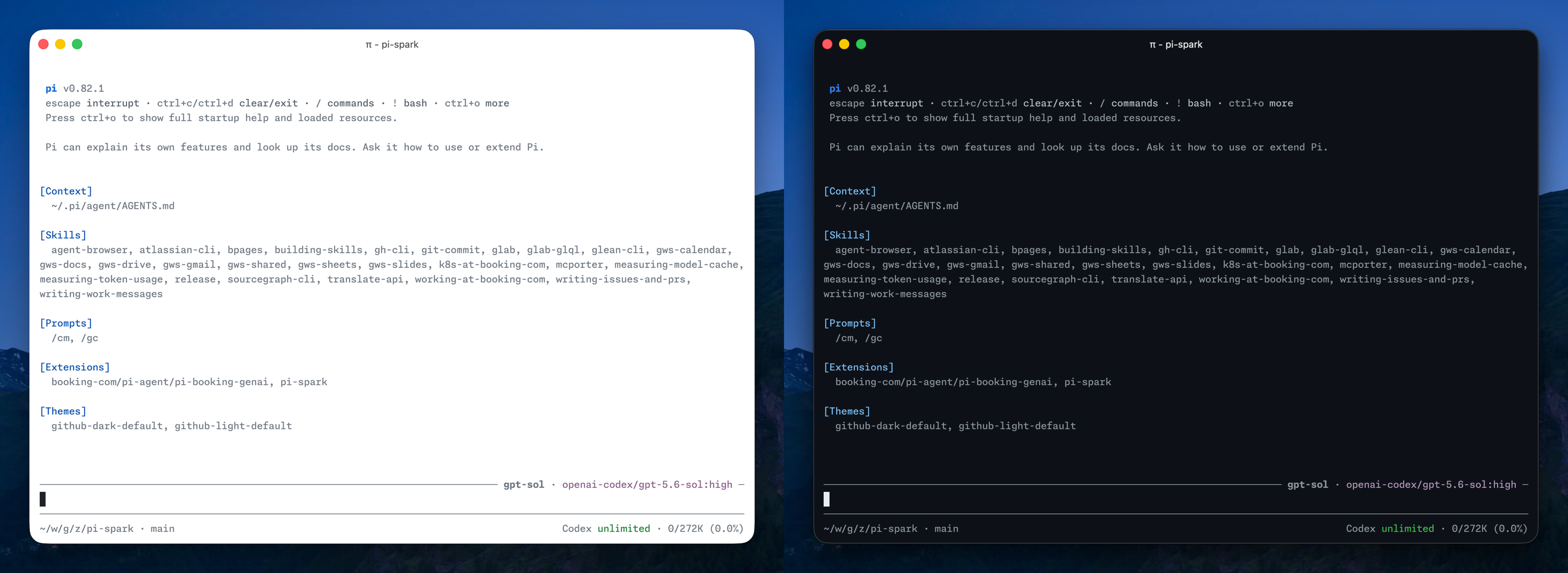
Select either theme in /settings, or configure automatic switching between them:
{
  "theme": "github-light-default/github-dark-default"
}
Development
Run the package checks from the monorepo root:
npm install
npm run typecheck --workspace pi-spark
npm run check --workspace pi-spark
pi-spark is based on zlliang/pi-spark and is maintained and released from this monorepo.