@kkkiio/pi-advisor
A pi extension for asynchronous Advisor review with /advisor
Package details
Install @kkkiio/pi-advisor from npm and Pi will load the resources declared by the package manifest.
$ pi install npm:@kkkiio/pi-advisor- Package
@kkkiio/pi-advisor- Version
0.2.0- Published
- Jul 18, 2026
- Downloads
- 86/mo · 30/wk
- Author
- kkkiio
- License
- Apache-2.0
- Types
- extension
- Size
- 198.6 KB
- Dependencies
- 0 dependencies · 5 peers
Pi manifest JSON
{
  "extensions": [
    "./extensions/advisor.ts"
  ],
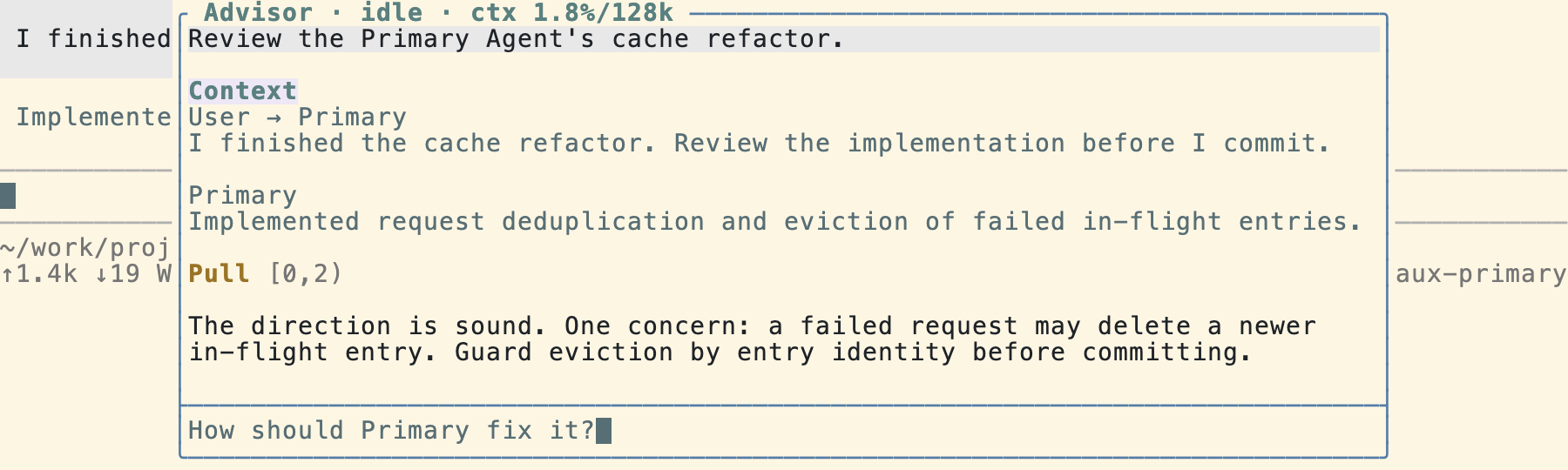
  "image": "https://raw.githubusercontent.com/kkkiio/pi-advisor/main/docs/assets/advisor-overview.png"
}
Security note
Pi packages can execute code and influence agent behavior. Review the source before installing third-party packages.
README
Advisor
Advisor is a session-persistent second agent that works alongside the Primary Agent. It asynchronously reviews the Primary Agent's work, gives the user a Second Opinion, and, with user confirmation or during a Watch Run, delivers useful insights to the Primary Agent.
Installation
# Install from npm
pi install npm:@kkkiio/pi-advisor

# Or install from a local path
pi install ./path/to/pi-advisor
After installation, set the Advisor model.
/advisor:model openai-codex/gpt-5.6-sol
Goals
Advisor goals
- Review: Identify bugs, design issues, workflow problems, and their root causes, then give the user an independent reviewer's Second Opinion. Advisor acts as a reviewer and does not implement features itself.
- Guide: Help the Primary Agent escape tunnel vision. Advisor supplies high-value facts, key files, APIs, constraints, and sequencing guidance to get it past obstacles, then applies a reviewer's perspective so it can inspect and correct its work before finishing.
Product experience goal
- Keep background review quiet, relevant, traceable, and observable without disrupting the Primary Agent's workflow.
Usage
/advisor [<message>]
Ask Advisor.
- Without an argument: Open the Advisor Overlay and focus its input box so you can type a message directly.
- With an argument: Open the Advisor Overlay and immediately start Ask Advisor with that message.
Message behavior depends on Advisor's current state:
- Advisor is idle: Start a new Ask Advisor run. The first Ask after the Primary Agent enters a new user turn automatically includes Ask Context: the Primary user text message and any currently visible Primary assistant text that follows it, including streaming text but excluding thinking, tool calls, tool results, and custom messages. Subsequent Asks within the same Primary user turn do not repeat the Ask Context.
- Advisor is running (during Ask Advisor or Watch Run): Steer the active run with the message. Only the user's input is sent; Ask Context is not included.
Every Ask started while Advisor is idle tells Advisor the current position in the Primary Transcript and whether the Primary Agent is running. When a question requires more history, tool activity, or newer progress, Advisor can Pull the Primary Transcript itself, so the user does not need to copy context manually.
The Primary context sent to Advisor appears in a Context block in the Advisor Overlay. Its compact header avoids duplicate message counts; expanding the block reveals the exact <primary-context> payload. When no new Ask Context text is attached, a position-only XML payload records the transcript position and Primary Agent state without repeating prior text.
Ask Advisor and Watch Run share the same Advisor, and the Advisor Transcript remains continuous between them. Advisor does not have the write or edit tools; when changes are needed, it delegates them to the Primary Agent through a Second Opinion or Advice.
/advisor:handoff [instructions]
Send the latest completed Ask Advisor Second Opinion to the Primary Agent as a user message. When instructions are omitted, the default instruction asks the Primary Agent to use the Second Opinion as reference context.
The Primary Agent receives the message immediately when idle. If it is busy, the message is queued as a follow-up.
Handoff message format:
Here is the latest Advisor Second Opinion I want you to use. <instructions>

Original Advisor request:
<Ask Advisor prompt>

Advisor Second Opinion:
<latest completed Ask Advisor answer>
If Advisor is still processing the previous Ask, handoff waits for it to finish before sending the message. If no Ask Advisor Second Opinion has been completed, the user receives a clear notice. Handoff does not clear the Advisor Transcript.
/advisor:watch
Start an asynchronous Watch Run. Advisor follows the Primary Agent's progress and decides when the review is complete. You can cancel it early with /advisor:watch-off.
During a Watch Run, Advisor automatically selects a delivery channel based on the intent of its Advice:
- Hint (accelerating information): Correct API usage, a better algorithm, and similar guidance are delivered promptly through Steer to reduce wasted effort.
- Concern (risk or challenge): Potential bugs, architectural concerns, and similar issues are delivered through Follow-up after the Primary Agent finishes its current work, preserving its flow.
Outside a Watch Run, Advisor does not send Advice on its own. You can still use /advisor to ask it to send a specific insight, or /advisor:handoff to pass along the latest completed Second Opinion.
/advisor:watch-off
Cancel the current Watch Run while preserving the Advisor instance and its existing Advisor Transcript.
/advisor:new
Start a fresh Advisor conversation: clear the Advisor Transcript, Ask Context injection history, Second Opinion history, and input draft. If a Watch Run is active, cancel it first. The Overlay opens with its input focused so the new conversation is ready to use.
/advisor:model [model]
Set the model used by Advisor.
/advisor:thinking [level]
Set the thinking level used by Advisor.
Advisor Overlay
The Overlay opens automatically after /advisor, /advisor:new, or /advisor:watch. It appears as a top-center panel and shows Advisor's review process in real time as prefixed transcript blocks: user messages, Ask Context, tool calls such as Pull, Hint, and Concern, and Advisor responses. The Overlay header shows Advisor's status and context-window usage, for example Advisor · thinking · ctx 0.1%/128k. When content extends beyond the visible area, ↑N ↓M scroll indicators appear.
A separate input box at the bottom of the Overlay accepts messages and control commands. A visible Overlay always owns keyboard focus; close it before returning to the Primary input. The Overlay input box supports these six control commands: /advisor:watch, /advisor:watch-off, /advisor:handoff, /advisor:new, /advisor:model, and /advisor:thinking.
Overlay controls:
Alt+/: Open the Overlay with focus, or close it and return focus to the Primary input.Esc: Close the Overlay and return focus to the Primary input.- Closing the Overlay preserves its transcript, active Watch Run, and input draft.
- Scroll the open Overlay transcript with ↑/↓, PgUp/PgDn, or the mouse wheel.
- Use Pi's
app.tools.expandkeybinding (Ctrl+O by default) to switch every Context and Pull block between a five-visual-line preview and the complete text payload sent to Advisor. - When work finishes while the Overlay is closed, a notification tells you to press
Alt+/to view it.
After the user interrupts the Primary Agent, Advisor does not automatically wake it.
Limitations
- No disk persistence for the Advisor Transcript yet: The Advisor Transcript is kept in memory only for the current session and is not saved when the session closes. This keeps the initial release simple while the disk-persistence design remains undecided.
Configuration
The configuration file is located at ~/.pi/agent/advisor.json:
{
  "model": "openai-codex/gpt-5.6-sol",
  "thinking": "high"
}
The thinking level can be chosen with /advisor:thinking or set with /advisor:thinking <level>; when omitted, Advisor uses its built-in default.
Acknowledgments
This project was inspired by pi-btw, oh-my-pi, and pi-omplike-advisor.