@kky42/pi-flow
Multi-backend subagents and dynamic workflow orchestration for pi.
Package details
Install @kky42/pi-flow from npm and Pi will load the resources declared by the package manifest.
$ pi install npm:@kky42/pi-flow- Package
@kky42/pi-flow- Version
2.0.0- Published
- Jul 10, 2026
- Downloads
- 1,281/mo · 480/wk
- Author
- kky42
- License
- MIT
- Types
- extension
- Size
- 591.2 KB
- Dependencies
- 1 dependency · 5 peers
Pi manifest JSON
{
  "extensions": [
    "./index.ts"
  ],
  "image": "https://raw.githubusercontent.com/kky42/pi-flow/main/assets/subagents.png"
}
Security note
Pi packages can execute code and influence agent behavior. Review the source before installing third-party packages.
README
pi-flow


Multi-backend subagents and dynamic workflow orchestration for pi.
pi-flow gives pi two coordination primitives:
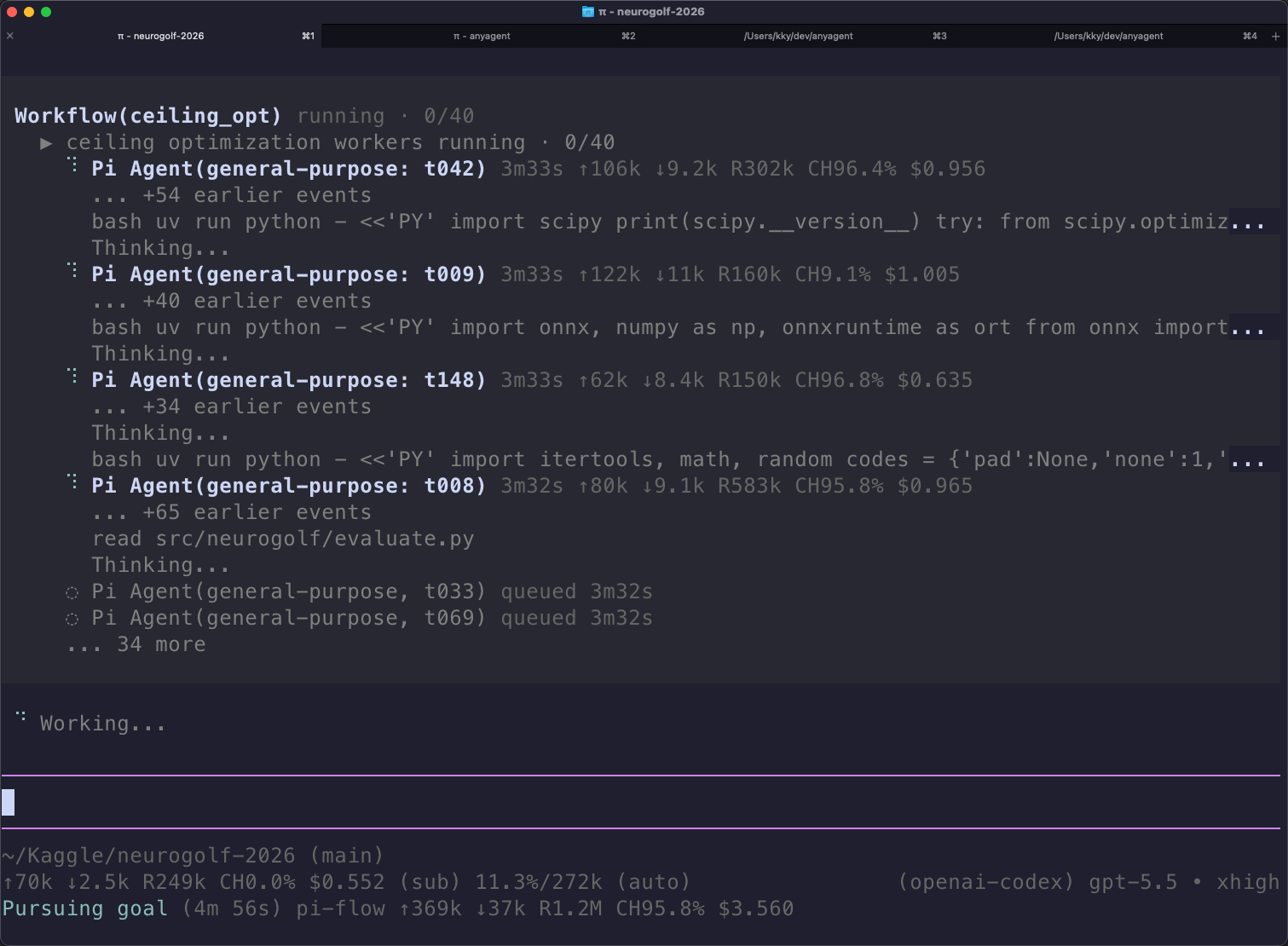
Agent— launch one subagent for a scoped task; optionally create/continue it with a caller-chosensession_key.workflow— run a small trusted JavaScript workflow that fans work out through many subagents, optionally across different agent harnesses.
Supported subagent backends:
- Pi child sessions
- Codex CLI via
codex exec - Claude Code via
claude -p
pi install npm:@kky42/pi-flow
Why pi-flow?
A single agent harness is good at many tasks, but hard problems often benefit from parallel context gathering, adversarial review, and model diversity. pi-flow lets the pi main agent route each lane to the backend that fits best.
                         user request
                             │
                             ▼
                    ┌──────────────────┐
                    │  pi main agent   │
                    │  coordinator     │
                    └───────┬──────────┘
                            │ Agent / workflow
        ┌───────────────────┼───────────────────┐
        ▼                   ▼                   ▼
┌───────────────┐   ┌───────────────┐   ┌────────────────┐
│ Pi subagent   │   │ Codex subagent│   │ Claude subagent│
│ local tools   │   │ codex exec    │   │ claude -p      │
│ cheap summary │   │ broad search  │   │ UI/frontend    │
└───────┬───────┘   └───────┬───────┘   └───────┬────────┘
        └───────────────────┼───────────────────┘
                            ▼
                    ┌──────────────────┐
                    │ synthesis in pi  │
                    └──────────────────┘
Use it when you want to:
- Add subagents and dynamic workflows to pi. Delegate repository exploration, broad search, review, and synthesis to fresh isolated child agents, or explicitly continue a child with
session_key. - Mix Pi, Codex, and Claude Code backends. Different harnesses and models have different tool behavior, prompts, strengths, and blind spots. Combining them can improve adversarial review, idea generation, and complex problem solving.
- Scale wide fan-out without losing inspectability. Large audits and research tasks can be split into many bounded subagent lanes. The extension queues lanes under a shared concurrency cap and surfaces progress in the TUI.
- Use each subscription/model where it shines. Example routing:
- internet/resource-heavy search → Codex + a fast GPT model
- frontend or product UI work → Claude Code + Opus/Sonnet
- local file summarization → Pi + DeepSeek V4 Flash
- backend implementation → Pi + a stronger coding model
Define subagents
pi-flow ships one built-in profile:
general-purpose— broad research, code search, and multi-step investigation.
Add your own profiles as Markdown files in ~/.pi/agent/subagents/<name>.md. The filename becomes the subagent_type used by Agent and workflow agent() calls.
For example, add ~/.pi/agent/subagents/explorer.md if you want an opt-in read-only search profile:
---
description: Fast read-only search agent for locating code and mapping repositories.
backend: pi
tools: read, grep, find, ls, bash
model: inherit
thinking: high
---

Search and analyze existing files without creating, editing, deleting, or installing anything. Report concise findings with relevant files and symbols.
Frontmatter fields:
description— required; shown in pi's available-agent roster.backend—pi(default),codex, orclaude.tools— pi backend only; child-session tool allowlist.Agentandworkfloware always removed from pi-backed children.model/thinking— optional; useinheritor a backend-supported value.- Markdown body — profile prompt appended to the selected backend.
External backend examples:
---
description: Broad code review through Codex CLI.
backend: codex
model: gpt-5.4-mini
thinking: high
---

Review the diff for correctness, missed edge cases, and test gaps.
---
description: UI and product review through Claude Code.
backend: claude
model: opus
thinking: high
---

Review frontend changes for UX, accessibility, and architecture regressions.
External profiles run local CLI commands in no-approval mode (codex exec ... --dangerously-bypass-approvals-and-sandbox, claude ... --dangerously-skip-permissions). Use them only in trusted repositories.
Use subagents
Ask pi naturally:
Use the general-purpose subagent to map this repo without editing files, then summarize the important files.
Or call the tool shape directly from an agent/tooling context:
Agent({
  description: "Map repo",
  subagent_type: "general-purpose",
  prompt: "Map the project purpose, key directories, scripts, tests, and caveats. Do not edit files.",
});
Subagents start fresh in the same working directory when session_key is omitted. Parent messages and tool results are not inherited, so fresh prompts should be self-contained. If a child needs follow-up, choose a stable session_key; pi-flow maps it to the backend-native session internally and persists direct-Agent mappings in the parent session.
Agent({
  description: "Draft solution",
  subagent_type: "general-purpose",
  session_key: "worker",
  prompt: "Create the first draft.",
});

Agent({
  description: "Revise draft",
  subagent_type: "general-purpose",
  session_key: "worker",
  prompt: "Reviewer feedback: tighten the argument and update the draft.",
});
Use workflows
Use workflow when a task should fan out to several subagents, use different backends, or synthesize multiple independent findings. Workflow agent(prompt, opts) uses the same spawn core as Agent, including subagent_type and optional session_key continuation for worker/reviewer loops.
You normally do not write workflow files by hand. Ask pi in natural language and the main agent can create the workflow, run it, and summarize the result:
Run a workflow to review this PR from several independent angles and synthesize the findings.
If you want to reuse a workflow, ask pi to save it:
Create and save a reusable workflow for release review, then run it on this repo.
Saved workflows are trusted JavaScript under the hood. Global workflows live in ~/.pi/agent/workflows/*.js; trusted project workflows live in .pi/workflows/*.js. After a workflow is saved, invoke it by name in natural language. Inline workflow runs can also be resumed by replay from the returned scriptPath and runId.
Runtime guardrails
Direct Agent calls and workflow agent() calls share one global concurrency cap and one wall-clock timeout guardrail:
pi --max-concurrent-subagents 4 --subagent-timeout-ms 600000
Set --subagent-timeout-ms to 0 to disable the timeout. Values are milliseconds.
Validation
Fast local checks:
npm run check
Real-model E2E checks are intentionally manual because they use live Pi/Codex/Claude backends. When changing session continuation, run:
npm run e2e:session-key-resume -- --backend all --timeout-ms 300000