@kmiyh/pi-undo-redo
Pi extension that adds branch-aware /undo and /redo for agent-driven file changes
Package details
Install @kmiyh/pi-undo-redo from npm and Pi will load the resources declared by the package manifest.
$ pi install npm:@kmiyh/pi-undo-redo- Package
@kmiyh/pi-undo-redo- Version
1.0.0- Published
- Apr 17, 2026
- Downloads
- 152/mo · 13/wk
- Author
- kmiyh
- License
- MIT
- Types
- extension
- Size
- 129.2 KB
- Dependencies
- 0 dependencies · 2 peers
Pi manifest JSON
{
  "extensions": [
    "./src/index.ts"
  ]
}
Security note
Pi packages can execute code and influence agent behavior. Review the source before installing third-party packages.
README
@kmiyh/pi-undo-redo
Warning: this extension is currently in testing mode and should be treated as experimental.
@kmiyh/pi-undo-redo is a Pi extension that adds reliable, branch-aware /undo and /redo commands for file changes made by the agent.
It does not automatically restore or roll back files just because you move around the /tree. Instead, /tree only changes which branch-local undo/redo history is active. Actual file restoration happens when you explicitly run /undo or /redo.
What this extension does
- adds
/undo - adds
/redo - tracks file mutations made through Pi's built-in
edit,write, andbashtools - groups changes by one completed agent run
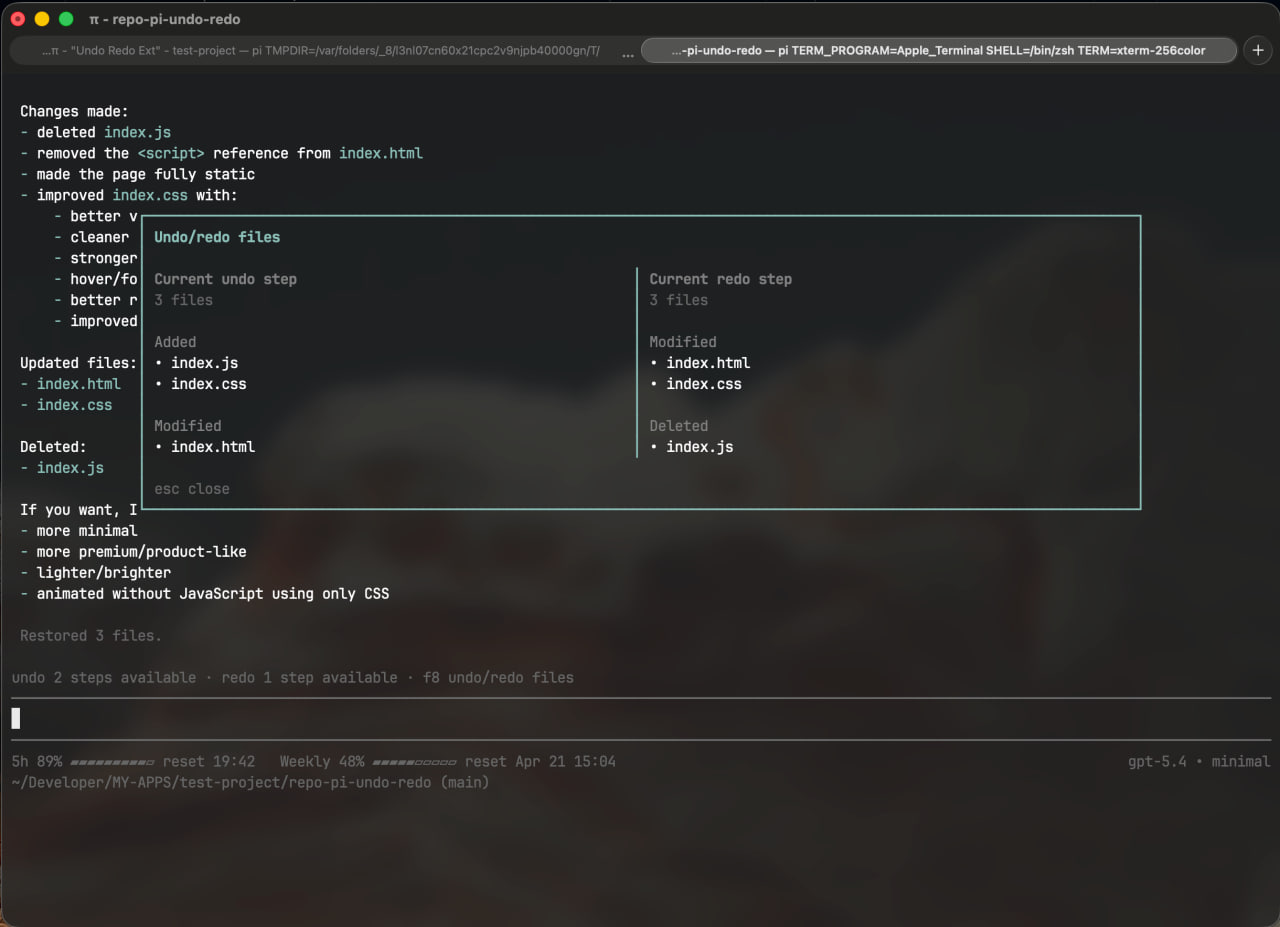
- shows current undo/redo availability in a small status widget above the editor
- keeps undo/redo history local to the current
/treebranch - can ask whether to sync tracked files after switching branches when the workspace diverges
- rolls back partially applied restore attempts on failure
- persists history across restarts and
/reload - cleans up old snapshot blobs automatically
Installation
pi install npm:@kmiyh/pi-undo-redo
How it works
1. One step = one finished agent run
A single user request can trigger several tool calls.
For example, if Pi:
- edits
src/app.ts - writes
src/app.css - edits
src/app.tsagain
all of that is stored as one undo step.
That means:
- one
/undoreverts the whole step - one
/redoreapplies the whole step
This keeps the workspace consistent instead of undoing files one by one.
2. It stores snapshots before and after changes
For every tracked file mutation, the extension stores:
- the file state before the change
- the file state after the change
Those snapshots are saved outside the session JSONL, while the session stores only the step/action metadata. This keeps history persistent without bloating the session file.
3. Undo/redo is branch-aware
Undo/redo history is derived from the current session branch.
If you navigate with /tree:
- the active undo/redo stack switches to the selected branch
/treeitself does not perform undo or redo for you- if tracked files do not match the selected branch, the extension can ask whether it should sync tracked files to that branch
So /redo does not jump between branches. Branch changes still happen through /tree, while actual undo/redo restoration still happens through /undo and /redo.
4. Undo/redo restores tracked files exactly
When you run /undo or /redo, the extension restores the tracked files to the recorded snapshot for that step.
That means manual edits, manual deletions, manual moves, manual renames, and manual replacements in those tracked files are discarded by the restore, so the workspace really returns to the selected undo/redo state.
In other words, undo/redo always reapplies the extension's tracked history for those files instead of trying to preserve later manual changes.
5. It shows lightweight status in the UI
Above the editor, the extension shows:
- how many undo steps are available
- how many redo steps are available
- a hint that
F8opens the undo/redo files window
This keeps the status line short while still surfacing the important actions.
6. It can show undo and redo files side by side
The extension can open a small modal that shows both:
- the current undo step
- the current redo step
They are displayed side by side, and each side groups files as:
- Added
- Modified
- Deleted
You can open it with:
F8
Current scope
This version tracks file changes made through:
editwrite- agent-driven
bash
It does not provide full undo coverage for:
- external tools run outside Pi
- unrelated manual files that were never part of tracked history
- third-party mutating tools outside Pi
Automatic behaviors
Automatic branch sync prompt
After /tree navigation, if the tracked workspace does not match the selected branch, the extension asks whether it should sync tracked files now.
Automatic snapshot cleanup
Snapshot garbage collection runs automatically:
- after new steps are recorded, when internal blob count or blob size thresholds are exceeded
- on session start as a rare fallback if cleanup has not run for a long time
Local development
npm install
npm run typecheck
pi -e ./src/index.ts
License
MIT