@kreeger/pi-edit-split
A side-by-side diff preview for the pi-coding-agent edit tool.
Package details
Install @kreeger/pi-edit-split from npm and Pi will load the resources declared by the package manifest.
$ pi install npm:@kreeger/pi-edit-split- Package
@kreeger/pi-edit-split- Version
0.1.0- Published
- Jun 18, 2026
- Downloads
- not available
- Author
- kreeger
- License
- MIT
- Types
- extension
- Size
- 145 KB
- Dependencies
- 0 dependencies · 2 peers
Pi manifest JSON
{
  "extensions": [
    "./src/index.ts"
  ]
}
Security note
Pi packages can execute code and influence agent behavior. Review the source before installing third-party packages.
README
pi-edit-split
A side-by-side diff preview for the pi-coding-agent edit tool. It shows
what changes will be made before they're applied, rendered as a split view
(old vs new) when your terminal is wide enough, or falling back to unified
and compact modes on narrower screens.
It uses fuzzy matching to handle typographic quotes, dashes, and spaces, and strips UTF-8 BOM characters before processing. The preview computation runs asynchronously and non-blocking.
How it looks
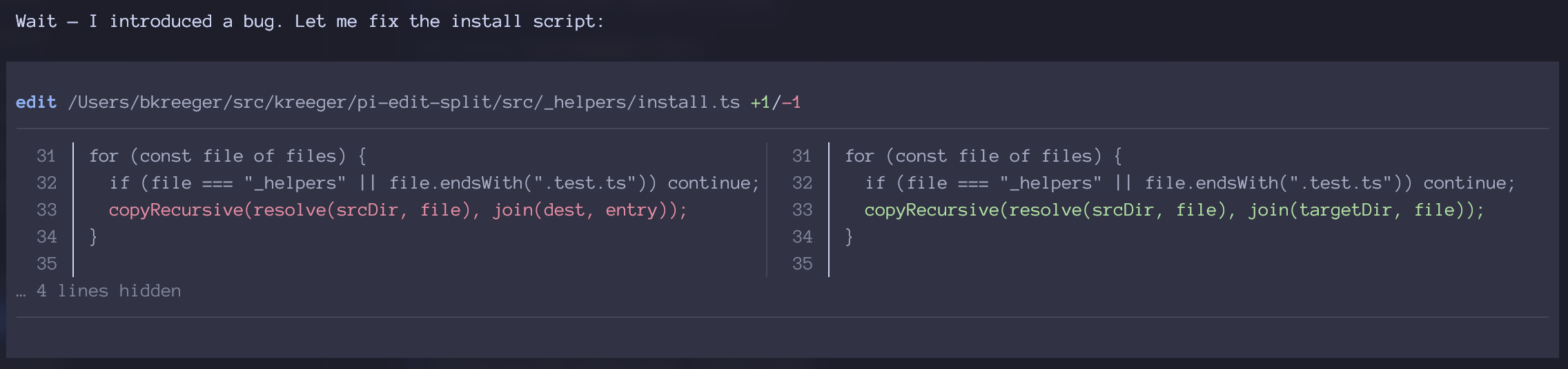
The edit tool preview replaces pi's default diff output with a side-by-side comparison. Context lines appear on both sides, removed lines in red on the left, added lines in green on the right, and line numbers are shown for reference.
How it works
flowchart LR
    subgraph pi["pi-coding-agent"]
        EDIT["edit tool"]
        API["Extension API"]
    end

    subgraph split["pi-edit-split extension"]
        PREVIEW["Preview renderer<br/>(async, non-blocking)"]
        PATCH["Unified patch parser"]
        PAIR["Line pairer<br/>(LCS diff)"]
        RENDER["DiffRenderer<br/>(split/unified/compact)"]
    end

    API -- registerTool --> EDIT
    EDIT -- renderCall --> PREVIEW
    PREVIEW -- generate patch --> PATCH
    PATCH -- parse hunks --> PAIR
    PAIR -- pair lines --> RENDER
    EDIT -- renderResult --> RENDER
    RENDER -- render(width) --> pi
On tool registration, pi-edit-split wraps pi's built-in edit tool.
When the tool is called, it reads the target file, applies the edits
in-memory to generate a diff, and renders a live preview. The actual
file modification is delegated to pi's original edit tool execution.
Two rendering modes adapt to terminal width:
- Split view (width >= 120): Side-by-side old/new with a vertical divider. Each cell shows line numbers and content.
- Unified diff (narrower): Standard unified format, delegated to
pi's built-in
renderDiff.
Features
- Side-by-side diff — split view when terminal width >= 120 chars
- Unified diff — standard unified format on narrower screens
- Fuzzy matching — normalizes typographic quotes, dashes, and spaces for more reliable text matching
- BOM handling — strips UTF-8 BOM before processing
- Async preview — preview computation runs non-blocking
- Collapsible hunks — shows first change + context, hides the rest
Installation
Install from the git repository using pi install:
pi install git@github.com:kreeger/pi-edit-split.git
Pass the repository URL directly as a single argument.
If you've cloned the repository locally, you can also install from the local path:
pi install /path/to/pi-edit-split
After installation, restart your pi session. The edit preview appears automatically — there's no activation step needed.
Verify it is installed
ls ~/.pi/agent/extensions/pi-edit-split/
You should see TypeScript source files. The pi agent loads extensions from this directory at startup.
Configuration
No configuration needed — pi-edit-split activates automatically as a drop-in replacement for the built-in edit tool renderer.
Development
Setup
Clone the repository and install dependencies:
git clone git@github.com:kreeger/pi-edit-split.git
cd pi-edit-split
npm install
Running tests
npm test
Tests live alongside source files (.test.ts). They run with Vitest.
There are tests for the patch parser, line pairing (LCS diff), the
preview renderer, and the DiffRenderer component.
Deploying your changes
The deploy script copies the source files (minus test files) to
~/.pi/agent/extensions/pi-edit-split/. Use it to push local changes
into pi without publishing to npm:
npm run deploy
Restart your pi session to pick up changes.
Architecture notes
index.ts— Extension entry point. Wraps pi'sedittool, wires up async preview computation, and renders the DiffRenderer component.preview.ts— Reads the target file, applies edits in-memory, generates a unified patch, and computes the preview result. Includes fuzzy text matching and BOM handling.pairing.ts— Lines the diff from two sides using LCS-based alignment. Groups consecutive removes and adds into matched pairs.patch-parser.ts— Parses unified diff hunks into structuredParsedHunkobjects with line numbers and types.diff-component.ts— The TUIComponentthat renders the diff. Chooses split/unified/compact mode based on available width.types.ts— Shared TypeScript interfaces for hunks, lines, cells, rows, and preview state.
License
MIT