@larose/pi-web
A focused, lightweight web UI for Pi
Package details
Install @larose/pi-web from npm and Pi will load the resources declared by the package manifest.
$ pi install npm:@larose/pi-web- Package
@larose/pi-web- Version
0.8.0- Published
- Oct 1, 2026
- Downloads
- 1,349/mo · 118/wk
- Author
- larose
- License
- AGPL-3.0-or-later
- Types
- extension
- Size
- 1.2 MB
- Dependencies
- 1 dependency · 0 peers
Pi manifest JSON
{
  "image": "https://unpkg.com/@larose/pi-web/screenshots/session.png",
  "extensions": [
    "./extensions"
  ]
}Security note
Pi packages can execute code and influence agent behavior. Review the source before installing third-party packages.
README
Pi Web
Pi, in your browser.
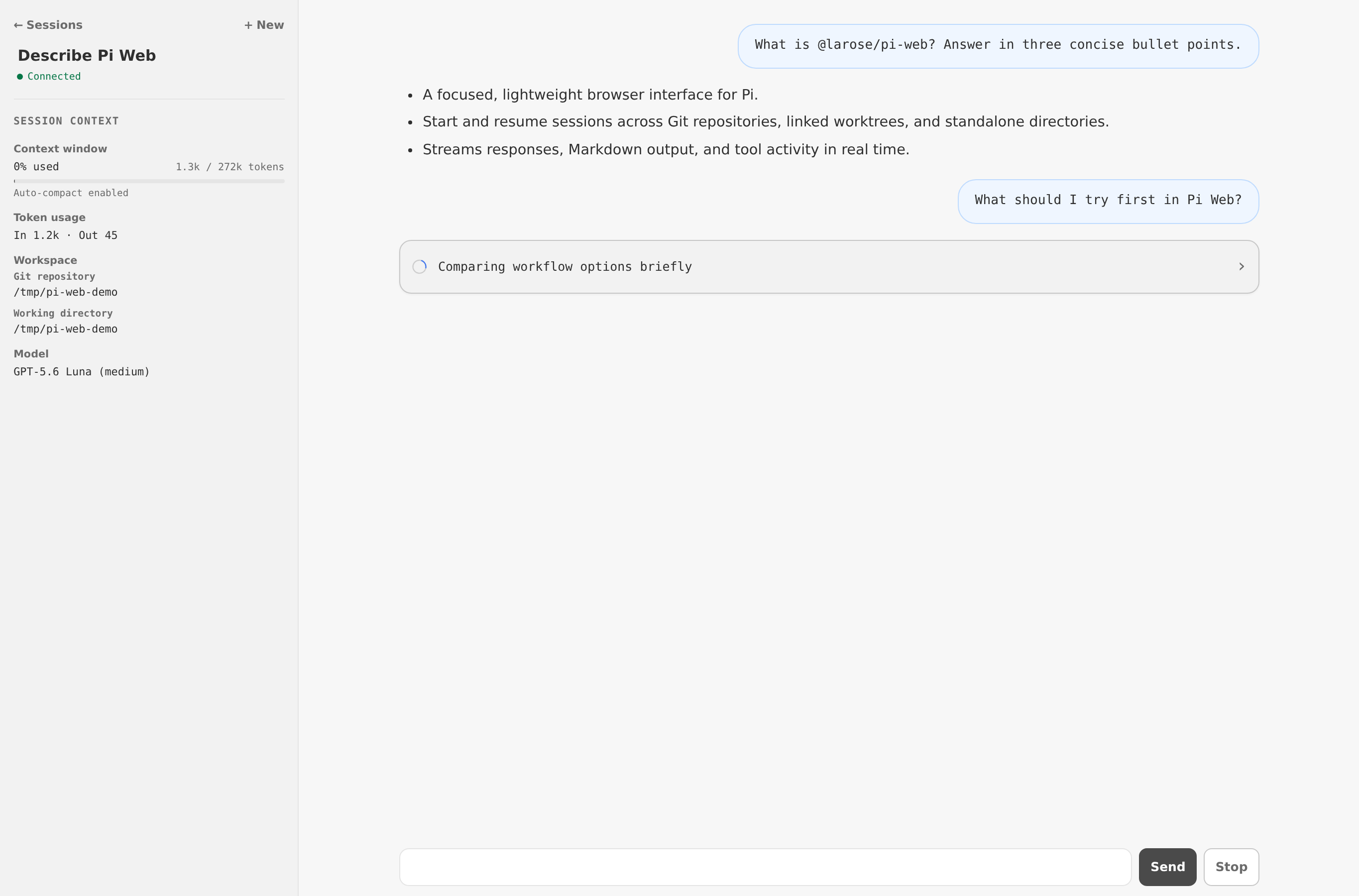
@larose/pi-web is a focused, lightweight web UI for Pi.
Screenshots
Sessions

Conversation
Run
Start the local Pi Web server:
npx @larose/pi-webBy default, the server listens at http://127.0.0.1:31415. Open that address in a browser, or set PI_WEB_PORT to use another port. For use from another machine, see Remote access.
The server and any active work continue if you close or refresh the browser. Press Ctrl+C in the terminal to stop the server.
Features
- Create, resume, rename, and delete sessions. New on a session page creates an empty session in the exact same directory and opens it in the current tab.
- Navigate remembered projects in a searchable sidebar, or browse recent sessions across projects.
- Work in standalone directories or Git repositories and linked worktrees.
- Follow streaming responses, rendered Markdown, and live tool activity.
- Steer ongoing work or queue a follow-up, with visible pending messages and keyboard shortcuts.
- Choose models and thinking levels, monitor token usage, and compact context.
- Use Pi extensions, commands, prompt templates, skills, dialogs, notifications, and widgets.
- Open working directories in VS Code, locally or through Remote - SSH.
Git
Select a repository in the sidebar to browse Worktrees, Other branches, or Orphaned sessions whose checkouts are unavailable. Expand a checkout to see its sessions; search includes branch names, paths, and sessions. Each row shows Last activity: the newest session modification time for a worktree, falling back to commit time when it has no session activity; branches use commit time. Hover the timestamp for its exact date and time. The project toolbar creates sessions in the primary checkout, while checkout and subdirectory actions use their own directory.
New worktree automatically fetches configured remotes before offering local and remote starting branches, with each branch’s latest commit hash, subject, and age. It suggests the known remote default branch (preferring origin, otherwise a sole remote), without assuming the branch is named main. New branches start at the reviewed commit; if the starting branch changes before creation, reopen the dialog to review it again. Existing-branch mode remains limited to unoccupied local branches.
If fetching fails, choose Retry fetch or explicitly Continue with available branches; the latter keeps a Not refreshed warning because cached remote refs may be stale. Repositories without remotes can use local branches normally. Fetch remote in the project toolbar also refreshes remote information. Neither action pulls, updates local branch tips, nor changes the primary checkout’s files.
The session detail sidebar shows the checkout’s Branch, or Detached · , alongside its repository, worktree, and working directory.
New worktree creates a checkout and session under <repository>/.pi/worktrees/<directory>. Choose an existing local branch, or create a new branch from an explicit local starting branch. Branch names and directory names are independent, so release/next can use directory release-next. Branches already checked out cannot be checked out again.
Delete worktree asks once before force-removing the checkout and deleting its attached local branch, including modified/untracked files and unmerged commits. Saved sessions are kept; remote branches are unchanged. Detached worktrees have no local branch to delete. Primary, locked, startup, and active-session checkouts remain protected, and changed checkout/branch identities require a fresh review. If checkout removal succeeds but branch deletion fails, the branch is kept and the partial result is reported. Delete branch likewise warns upfront before deleting a local branch even if it has unmerged commits.
Remembered projects
Projects remain in the sidebar after their last session is deleted. Pi Web stores only a version and canonical project paths in <Pi agent directory>/pi-web-projects.json, with owner-only permissions; Git metadata and availability are recomputed. Existing sessions seed the initial list when the file is absent. Newly used destinations and Add project extend it.
Loading the homepage removes confirmed-missing directories from both the list and its saved file, so they are not checked again as remembered projects. This also applies to paths on unmounted drives. Permission/Git errors instead show an unavailable project. Saved session history is never deleted by pruning. Malformed history files are preserved with a warning; remembering continues in memory until the file problem is corrected and the server restarted.
Browser behavior and support
| Capability | Pi Web behavior |
|---|---|
| New session | Creates an independent empty session, without replacing or aborting the source runtime. Uses the normal Pi startup/trust flow; does not inherit the source conversation. |
| Missing checkout | Saved history remains readable. Restore its working directory and reload before continuing. Sessions do not record former Git branch identity, so select the retained branch explicitly rather than relying on automatic recovery. |
| Recreate worktree | Use Other branches → Create worktree. Reusing the original directory name restores the destination, not uncommitted files or historical filesystem contents. |
| Git management | Local branches and checkouts only. Use Git for fetching, remote deletion, switching, renaming, merging, and rebasing. |
| Project navigation | URL-based project/view selection; searches and expanded rows are in-memory, not persistent preferences. |
| Message delivery | While working, Steer / Enter delivers after the current turn’s tool calls finish; Follow up / Alt+Enter waits until current work finishes. When idle, either shortcut sends normally. Shift+Enter inserts a newline. Pi’s existing steering/follow-up delivery settings control batching. |
| Pending messages | Both queues are labeled and individual messages can be removed with ×. Queues survive browser disconnects/reloads while the server runs, but not server shutdown. No pending-message editing, Alt+Up retrieval, or custom TUI keybindings. Alt+Enter is used across browser platforms. |
| Abort | Abort / Escape interrupts work and restores both queues as plain text alongside the current draft; delivery modes are not preserved in the restored text. Completed tool actions and file changes are not undone. Escape dismisses an active completion popup or dialog first, without also aborting. |
| Compaction and retry | Delivery follows the public Pi SDK’s current streaming state. Unlike the TUI, Web has no separate compaction-time queue: Pi rejects ordinary prompts during compaction, and Web restores their text so you can retry afterwards. Extension commands still execute immediately. During retry/non-streaming windows, the SDK’s normal prompt semantics apply. |
Remote access
Pi Web composes with established remote-development tools instead of reimplementing them: SSH provides authentication and encrypted transport for browser access, while VS Code Remote - SSH opens remote workspaces.
Browser access
Pi Web has no built-in authentication and listens only on 127.0.0.1. To access it from another machine, create an SSH tunnel:
ssh -N -L 127.0.0.1:31415:127.0.0.1:31415 user@serverThen open http://127.0.0.1:31415 locally. Do not expose the Pi Web port directly to a network.
VS Code
Session pages can open their working directory in a new VS Code window. When Pi Web runs remotely, set the VS Code Remote - SSH target in ~/.pi/agent/pi-web.json on the Pi Web host:
{
  "vscode": {
    "remote": "user@devbox.example"
  }
}
The target must be available to VS Code on your local machine, typically through its ~/.ssh/config. For a one-off override, run:
npx @larose/pi-web --vscode-remote <ssh-target>Security
Anyone with access to Pi Web can operate Pi as the OS user running the Pi Web process, including access to that user's files.
License
Licensed under AGPL-3.0-or-later.