@larose/pi-web
Pi, in your browser
Package details
Install @larose/pi-web from npm and Pi will load the resources declared by the package manifest.
$ pi install npm:@larose/pi-web- Package
@larose/pi-web- Version
0.5.0- Published
- Sep 12, 2026
- Downloads
- 224/mo · 224/wk
- Author
- larose
- License
- AGPL-3.0-or-later
- Types
- extension
- Size
- 1.1 MB
- Dependencies
- 1 dependency · 0 peers
Pi manifest JSON
{
  "extensions": [
    "./extensions"
  ],
  "image": "https://unpkg.com/@larose/pi-web/screenshots/session.png"
}Security note
Pi packages can execute code and influence agent behavior. Review the source before installing third-party packages.
README
Pi Web
Pi, in your browser.
@larose/pi-web gives Pi a focused, lightweight home in the browser.
Screenshots
Sessions

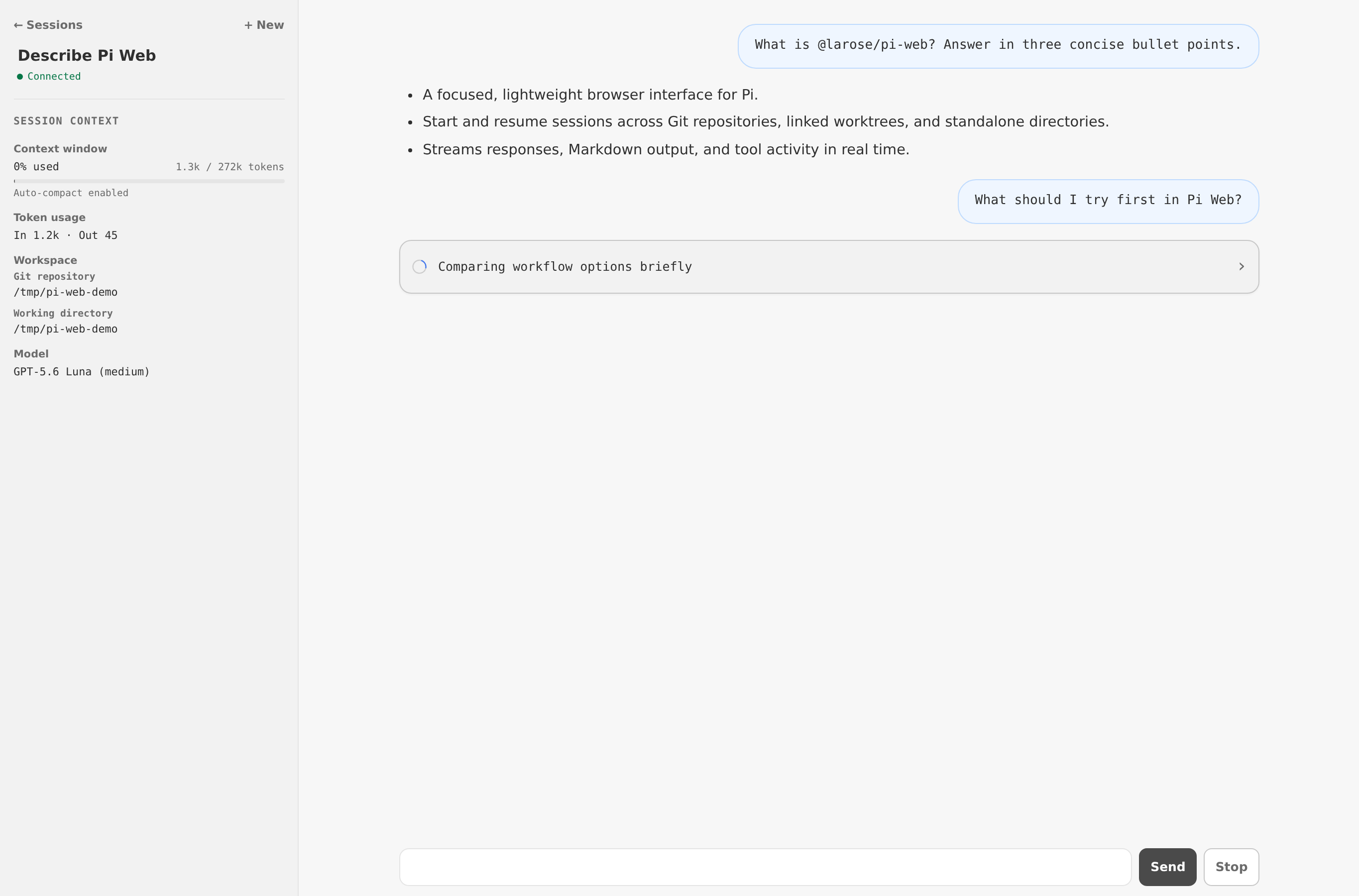
Conversation
Install and run
Node.js 22.19 or newer is required.
npm install --global @larose/pi-web
pi-web
Open http://127.0.0.1:31415. Set PI_WEB_PORT (or PORT) to use another port.
The Pi package's /pi-web command shows separate-terminal launch instructions; it does not start the server.
Server output
Pi Web writes concise operational logs to stdout. An active session has a hosted runtime currently tracked by the server; it need not be generating a response or have a browser connected. Runtime lifecycle transitions are followed by the current active-session count:
[pi-web] Session activated: 8f3a2c1d-2b4e-4d1a-9c7f-6e5084a31290
[pi-web] Active sessions: 1
[pi-web] Session deactivated: 8f3a2c1d-2b4e-4d1a-9c7f-6e5084a31290 (idle for 10 minutes)
[pi-web] Active sessions: 0
The homepage represents related but distinct states: gray means inactive, solid blue means active and idle, and blue with a halo means working. Session, managed-worktree, and explicit project-trust changes are also logged after they succeed. Routine requests, browser connections, prompts, responses, tools, and streaming events are not logged.
Operational logs include full session IDs, absolute project and worktree paths, branch names, and explicit trust decisions. They do not include session titles or conversation content. A process manager may retain stdout according to its own logging policy.
Features
- Start, resume, rename, and delete Pi sessions from the browser.
- Browse recent sessions across Git repositories, linked worktrees, and standalone directories.
- Create sessions in an existing checkout or create a linked worktree and session together.
- Use extension commands, prompt templates, skills, dialogs, notifications, and widgets.
- Follow streaming responses, Markdown output, tool activity, token usage, and model context.
- Select available models and thinking levels, and compact context from the session panel.
Git workspaces
Choose a Git repository, checkout, and working directory when starting a session. Pi Web can create managed linked worktrees under <repository>/.pi/worktrees/ and excludes that location through Git's local metadata without changing the project .gitignore.
Removing a managed worktree keeps its branch and saved Pi sessions. Git refuses removal when the checkout contains modified or untracked files. Standalone directories work without Git.
Security
Pi Web listens only on 127.0.0.1 and has no remote-access mode. Treat browser access as local shell access: Pi's tools use your filesystem permissions and configuration from ~/.pi/agent (or PI_CODING_AGENT_DIR).
Pi Web starts each working directory as untrusted. When project resources are present, it honors Pi's saved trust decision and defaultProjectTrust setting. If the policy is ask, the session page blocks runtime startup until you choose whether to trust the folder. Approval permits project settings, packages, skills, prompts, and extension code to load and run with your user permissions. A session-only choice remains in server memory; selecting “Remember” writes the folder decision to Pi's existing trust.json store. Denied projects run without those project resources and show a warning in the composer.
Pi Web does not load project extensions before this browser trust gate, so it cannot run extension-provided project_trust handlers. This is an intentional compatibility gap until Pi exposes a presentation-neutral pre-trust resolver.
External Markdown images are not loaded automatically. Closing or refreshing the browser does not stop active work; stopping the server does.
Interface compatibility
| Pi capability | Pi Web support |
|---|---|
| Prompting, steering, follow-up queue, abort | Supported |
| Session deletion | Supported for idle sessions; deletion is permanent rather than trash-based |
| Model and thinking-level selection | Supported in Session context |
| Manual context compaction | Supported in Session context |
| Extension commands, prompts, skills, dialogs, notifications, widgets | Supported |
| Session tree navigation and forking | Not yet supported; typed commands show a local explanation |
| Provider login and interactive settings | Terminal interface only |
| Session export and sharing | Not yet supported |
| Arbitrary extension TUI components | Not supported; Pi Web renders the portable extension UI protocol only |
Unsupported built-in slash commands are handled locally and are not sent to the model. Extension commands with the same name take precedence.
License
Licensed under AGPL-3.0-or-later.