@lazco/pi-recap
Pi extension: /recap and /summary show where the conversation stands, in a popup, without adding to the session
Package details
Install @lazco/pi-recap from npm and Pi will load the resources declared by the package manifest.
$ pi install npm:@lazco/pi-recap- Package
@lazco/pi-recap- Version
0.3.0- Published
- Oct 21, 2026
- Downloads
- 493/mo · 15/wk
- Author
- oncloud
- License
- AGPL-3.0-or-later
- Types
- extension
- Size
- 102.5 KB
- Dependencies
- 1 dependency · 3 peers
Pi manifest JSON
{
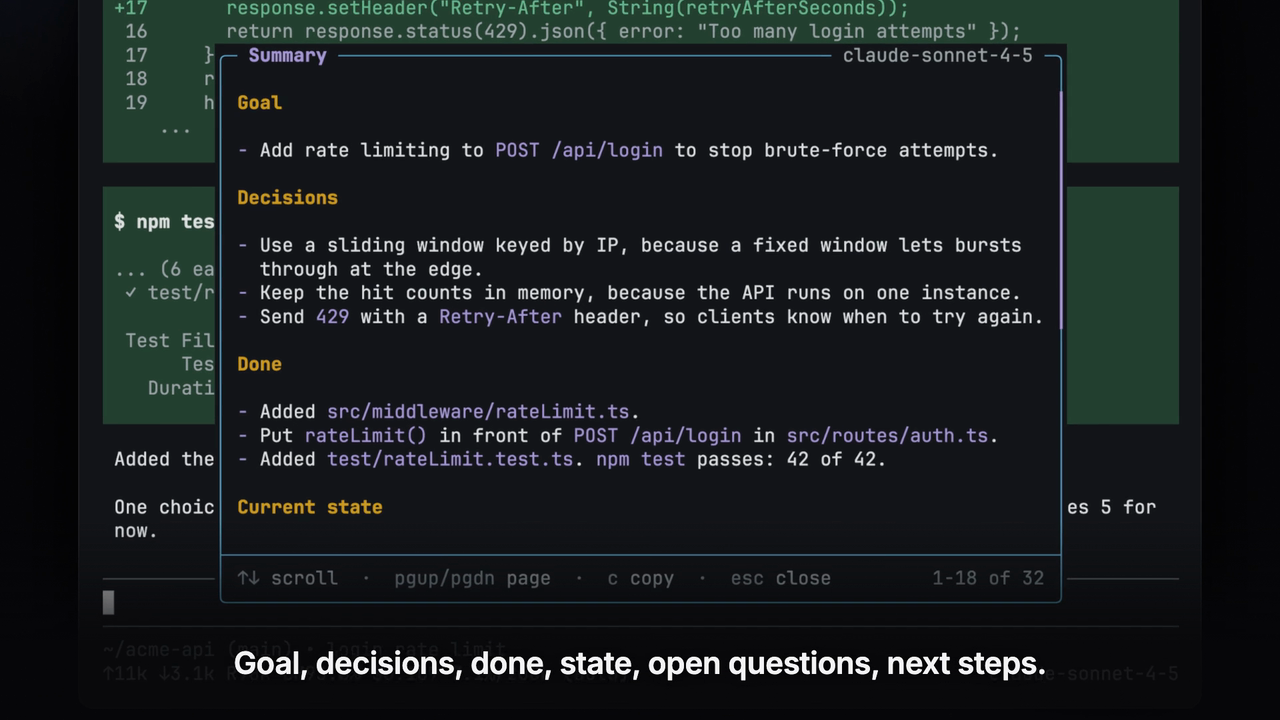
  "image": "https://lazco-public-15298932ec.pub.t4.txg1.lazco.cloud/pi-recap/summary.png",
  "video": "https://lazco-public-15298932ec.pub.t4.txg1.lazco.cloud/pi-recap/Demo.mp4",
  "extensions": [
    "./src/index.ts"
  ]
}
Security note
Pi packages can execute code and influence agent behavior. Review the source before installing third-party packages.
README
pi-recap
Pi extension: /recap and /summary show where the conversation stands, in a popup, without adding to the session.


Demo video · Installation · Usage · What the model reads · Settings · Limitations
Highlights
- Two views.
/recapshows 3 lines at most./summarywrites a handoff record in 6 sections. - Zero tokens in the session. A separate model call writes the text, and only the popup shows it.
- One key to copy. Press
cto copy the result as Markdown, for a pull request, an issue, or a handoff note. - Your choice of model. A setting sends the call to a smaller, cheaper model.
- Instructions per run. Text after the command adds instructions for one run, for example
/recap focus on git changes.
Demo video
The 60-second video shows the install, /recap, /summary, the copy key, and the model setting.
Click the image to play the video.
Installation
You need pi and Node.js 22.19.0 or later.
pi install npm:@lazco/pi-recapThen run /reload in pi.
To check the install, run pi list.
The list of user packages shows npm:@lazco/pi-recap.
Usage
In a pi session that has messages, type one of the two commands:
| Command | Use it when | The popup shows |
|---|---|---|
/recap |
You come back to a session and do not remember where you were. | Goal, Now, Your turn |
/summary |
You hand work to another person or session, or write a pull request or an issue. | 6 sections, from the goal to the next steps |
A popup opens over the chat.
While the model reads the conversation, a spinner shows how many messages it reads.
If the model shows its thinking, the newest line of it shows under the spinner.
The text shows as the model writes it.
Press Esc to close the popup.
If the model still writes, Esc also stops it.
The text does not go into the session.
The text uses the language of your newest message.
To set a fixed language, use the language setting.
/recap
The popup shows text like this:
Goal: Add rate limiting to
POST /api/loginto stop brute-force attempts.Now: The agent added
src/middleware/rateLimit.tswith aRetry-Afterheader, and all 42 tests pass.Your turn: Pick the limit: 5 or 10 tries per minute per IP.
- Goal: what you want.
- Now: what the agent did last, or what it does now.
- Your turn: what waits on you: a question that you did not answer, or a step that the agent asked you to do or confirm. The model leaves out this line when nothing waits.
/summary
The record has these sections, in this order:
- Goal
- Decisions, each with its reason
- Done
- Current state
- Open questions, including steps that wait on you and risks that the agent warned about
- Next steps
The model leaves out a section that has nothing to say.
Popup keys
| Key | Action |
|---|---|
↑ ↓ j k, mouse wheel |
Scroll one line |
PgUp PgDn Space |
Scroll one page |
Home End g G |
Go to the top or the bottom |
c |
Copy the text as Markdown, after the model finishes |
Esc Enter q |
Close the popup |
Esc during loading also stops the model call.
The top right corner of the popup shows the name of the model that wrote the text.
Warnings
A warning at the top of the popup tells you what the model did not get, so you can tell a thin result from a thin conversation. The popup shows a warning when:
- the conversation is larger than
maxInputChars, with the count of older messages that are left out and the count of your older messages that stay - a message is longer than 20000 characters, so the model gets only its start and its end
- a message of yours contains an image, which the model does not see
- the configured model is not available, so the session model wrote the text
- a custom prompt has a placeholder that nothing fills
- the model stopped at its output limit, so the text can end early
There is no warning when the model shows no thinking. The rules behind the first three warnings are in What the model reads.
RPC mode
In RPC mode, there is no popup.
Send the command as a prompt command, for example {"type": "prompt", "message": "/recap"}.
The client gets notify records of the type extension_ui_request, in this order:
Reading <N> messages with <model-id>…, withnotifyType"info".- Each warning, with
notifyType"warning". The output limit warning comes after the model call instead. - The text as Markdown, with
notifyType"info". If the model call fails, the error, withnotifyType"error".
The prompt response, with disposition "handled", comes after the last record.
The RPC abort command does not stop the model call.
What the model reads
Each run builds one text from the session and sends it to the model with the instructions. The rules below say what goes in, in the order they apply.
Source.
The text comes from the current branch of the session, from the first message to the newest one.
After /tree, that is the branch you are on.
Messages from before a compaction are in it, because the extension reads the session file, not the compacted context.
Text only.
Only what you typed and the text of the agent replies go in, as User: and Agent: lines.
Tool calls, tool results, thinking, images, the system prompt, and messages from extensions do not.
A message of yours that is only an image is left out, and a warning says how many messages had images.
A skill run shows as the command you typed, for example /skill:<name> <args>, without the skill file.
Progress notes. When the agent writes several messages in one turn, the last one usually reports the result, and the ones before it are notes such as "Now I run the tests". A note under 300 characters is left out. A longer message stays, so a report that a short notice follows is not lost. The turn after your newest message is kept whole, because the agent can still be working on it.
Long messages.
A message longer than 20000 characters keeps 20000 of them: two thirds from its start and one third from its end, with a […cut…] marker between them.
This stops one pasted log from taking the whole budget.
A warning says how many messages were cut.
The budget.
The text is at most maxInputChars characters, 240000 by default.
When the session is larger, the text holds three parts:
- Your first message, cut to a quarter of the budget at most, because it says what the session is for.
- From the part that does not fit, your messages only, each cut to 1000 characters, together at most a quarter of the budget, newest first. A marker before them says how many turns are left out, and that the agent replies to these messages are not there.
- The newest messages that fill the rest of the budget.
The count in the spinner is the number of messages in parts 1 and 3.
The reasons behind a decision in the cut part can be missing from the summary, because only your side of it is there.
A warning shows the counts.
To keep the whole session, raise maxInputChars.
The agent state. When the agent is idle, the instructions say so. When the agent is still working, your newest message is in the text and the unfinished reply is not. The instructions then tell the model that this message is in progress, so the recap says what the agent works on instead of listing it as open.
Settings
The settings file is ~/.pi/agent/recap.json.
The file is optional.
Each command run reads the file again, so an edit applies without /reload.
This example sends the call to a smaller model and sets the output language:
{
  "model": "anthropic/claude-haiku-4-5",
  "language": "English"
}
Model and output
| Field | Default | Value |
|---|---|---|
model |
null |
"<provider>/<model-id>", or null for the session model |
thinking |
null |
off, minimal, low, medium, high, xhigh, or max for both commands, or null for low in /recap and medium in /summary |
maxInputChars |
240000 |
The max size of the conversation text, from 1000 to 2000000. See the budget. |
language |
null |
The output language, for example "Traditional Chinese", or null to match your messages |
If pi cannot find the model, or the model has no API key, the command uses the session model and shows a warning.
Which model and thinking level
A small, fast model is enough for both commands. The defaults come from tests on real sessions, described in docs/evaluation.md. In short:
- Gemini 3.8 Flash made no error about the latest state in 48 outputs and missed few facts. It is the better choice when you set a model.
- Claude Haiku 5.5 is cheaper and its recap is faster, but it reported a finished step as open in about one output of four, because at
mediumit often skips its thinking. /recapreads only the latest state, solowis as accurate asmediumthere and faster./summaryatmediumkeeps more facts than atlow, for about 5 seconds more with Gemini 3.8 Flash. Setthinkingtolowif speed matters more than completeness.highmade the summary twice as slow without fewer errors.
Prompts
All prompt fields default to null.
| Field | Value |
|---|---|
appendPrompt |
Extra instructions for both commands |
recapAppendPrompt |
Extra instructions for /recap only |
summaryAppendPrompt |
Extra instructions for /summary only |
recapPrompt |
A full custom prompt for /recap |
summaryPrompt |
A full custom prompt for /summary |
To write a custom prompt, see docs/custom-prompts.md.
If the file has bad JSON or a bad field, the command shows an error and stops.
Limitations
- No print or JSON mode. These modes have no UI, so the commands do nothing.
- Text only. A detail that is only in a tool result, an image, or a short progress note can be missing from the result. The rules are in What the model reads.
- Long sessions are cut. Past
maxInputChars, the agent replies from the middle of the session are left out, and the reasons behind the decisions there with them. The warning shows the counts, and a largermaxInputCharskeeps more. - No unfinished replies. While the agent works, its unfinished reply is not in the conversation. The recap then only says what the agent works on.
- The model can still be wrong. A small model sometimes reports a finished step as open. The tests in docs/evaluation.md show how often, per model.
- Each run costs tokens. Each run is a new model call. The extension asks for no prompt cache, but a provider can still apply one.
- Nothing is saved. Press
cbefore you close the popup to keep the text.
Contributing
To report a bug or ask a question, open an issue on GitHub. The build, test, and release steps are in AGENTS.md.