@leblancfg/pi-fusion
Parallel agentic planning and test-time compute scaling for pi coding agents.
Package details
Install @leblancfg/pi-fusion from npm and Pi will load the resources declared by the package manifest.
$ pi install npm:@leblancfg/pi-fusion- Package
@leblancfg/pi-fusion- Version
0.3.0- Published
- Jun 19, 2026
- Downloads
- 428/mo · 428/wk
- Author
- leblancfg
- License
- MIT
- Types
- extension
- Size
- 136.6 KB
- Dependencies
- 0 dependencies · 2 peers
Pi manifest JSON
{
  "extensions": [
    "./dist/extensions/pi-fusion/index.js"
  ],
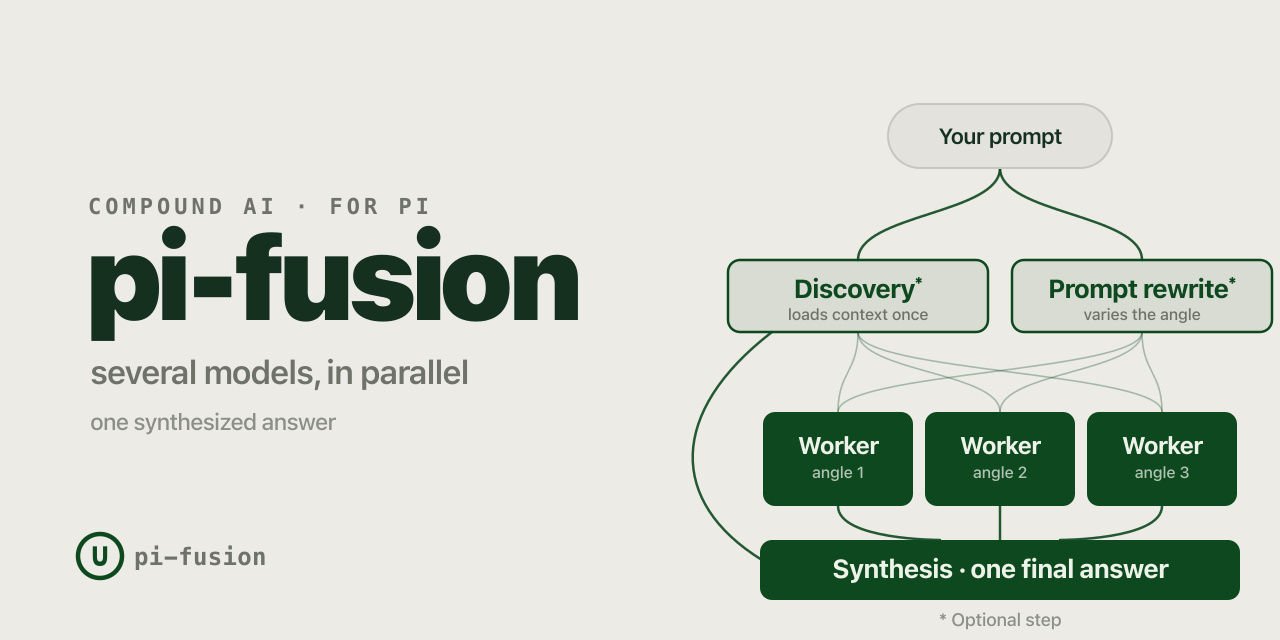
  "image": "https://raw.githubusercontent.com/leblancfg/pi-fusion/main/docs/assets/social-preview.png"
}
Security note
Pi packages can execute code and influence agent behavior. Review the source before installing third-party packages.
README
pi-fusion
How to install
Install as a global pi package from npm:
pi install npm:@leblancfg/pi-fusion
Or install directly from the GitHub repository:
pi install git:github.com/leblancfg/pi-fusion
Open pi and turn it on from the settings pane:
/fusion
pi-fusion adds a planning fanout to pi. Before the normal pi turn starts, it runs an (optional) discovery agent, rewrites variations of the prompt into complementary angles, fans out to planner workers, then injects their notes back into the main thread, that acts as a synthesis step.
Combining independent model responses has been shown to outscore the individual frontier models on many benchmarks. Because independent passes behave differently, the synthesis model can reuse the useful disagreement instead of betting everything on one path through the problem.
In some cases, you can get better performance than frontier models with better price and latency.
N.B. OpenRouter has a hosted Fusion router (openrouter/fusion) that runs a multi-model panel and
judge behind one API route. pi-fusion is similar. It runs local pi subprocesses against your working
tree, and hands their notes to the synthesis model you already chose. You control all configuration of
how this happens, including whether the planning subprocesses get all tools or only read-only tools.
%%{init: {"theme":"base","themeVariables":{"fontFamily":"Inter, system-ui, sans-serif","lineColor":"#0E481F","primaryColor":"#0E481F","primaryTextColor":"#EEF3EA","primaryBorderColor":"#0E481F"}}}%%
flowchart LR
  U([Your prompt]) --> D["Discovery (optional)"]
  U --> R["Prompt rewrite (optional)"]
  D --> W1[Worker #1]
  D --> W2[Worker #2]
  D --> W3[Worker #3]
  R --> W1
  R --> W2
  R --> W3
  W1 --> A["Synthesis (pi actor turn)"]
  W2 --> A
  W3 --> A
  D --> A
  A --> O([One final turn])
  classDef solid fill:#0E481F,stroke:#0E481F,color:#EEF3EA;
  classDef outline fill:#E7ECE6,stroke:#0E481F,color:#0E481F;
  classDef pill fill:#E3E2DC,stroke:#C7C7C0,color:#16301F;
  class U,O pill;
  class D,W1,W2,W3,A solid;
  class R outline;
Why this exists
Coding agents often make the first plausible plan they see. That is fine for chores. It gets
sketchier when a task has hidden coupling. pi-fusion makes multiple model calls at inference time,
merged back into one synthesized response. Other words in the litterature mention compound inference
systems, inference-time scaling, test-time compute, model panels, multi-agent deliberation, and
Mixture-of-Agents.
Not all reasoning has to happen as one long serial chain inside the most expensive model. Some of it can run in parallel across slightly cheaper or dumber models, then get compressed into a single final turn.
OpenAI's o1 write-up made the test-time-compute axis feel obvious: give a model more thinking budget, and it can do better. The next step in that direction is to ask the question: what if some of that budget is more calls, more samples, or more agents instead of one longer hidden chain?
A few useful breadcrumbs:
- Berkeley BAIR's "The Shift from Models to Compound AI Systems" defines compound AI systems as systems that use multiple interacting components: model calls, retrievers, tools, or control logic.
- Chen et al., "Are More LLM Calls All You Need?", studies scaling laws for compound inference systems that aggregate multiple LM calls.
- Snell et al., "Scaling LLM Test-Time Compute Optimally", frames inference-time compute as its own scaling axis.
- Brown et al., "Large Language Monkeys", shows repeated sampling can amplify weaker models, sometimes cost-effectively.
- Wang et al., "Mixture-of-Agents", shows multiple LLM agents can improve final answer quality when their outputs are aggregated.
My own evals point in the same direction for a subset of coding tasks: parallel planner calls can be cheaper, faster wall-clock, and better than sending everything straight to the biggest model. Not always. The whole point of this repo is to make that claim easy to test instead of treating it like a vibes-based architectural diagram.
What you see
In TUI mode, a fused turn shows a live pane:
- Discovery loads shared context once.
- Workers appear as vertical splits, each with its own prompt angle.
- Synthesis starts after the planning bundle is ready.
Useful controls:
/fusion   open settings
Esc       cancel the fanout and fall back to a normal turn
1-9       focus one worker column
0 / Tab   return to split view
p         show or hide rewritten worker prompts
And a little one-character status bar that marks whether the next turn is armed or not.
When to use it
Good fit:
- "Find the bug, but I am not sure where it lives."
- "Plan this refactor before touching files."
- "Review this unfamiliar area and suggest the smallest safe change."
- "Compare a few implementation paths before we commit to one."
Bad fit:
- Tiny edits where startup latency costs more than the task.
- Prompts with images. The synthesis turn can see them; discovery and workers currently cannot.
- Fully non-interactive runs where you need progress output on stdout.
pi-fusionstays quiet there so it does not corrupt print/JSON output.
Configure it
Open the settings pane:
/fusion
| Row | What it changes |
|---|---|
| Next turn | Arms fusion for the next eligible user prompt, then turns off. |
| Presets | Saves the current pane settings, loads saved ones, or deletes. |
| Workers | Sets worker count and opens per-worker model settings. |
| Agent tools | Switches discovery/workers between all tools and read-only. |
| Discovery | Picks the context-loading model and reasoning effort. |
| Rewrite | Toggles prompt rewriting before worker fanout. |
| Synthesis | Picks the synthesis model and reasoning effort. |
| Save and close | Persists settings in the pi session. |
Presets are user-defined snapshots of the settings pane. There are no built-in
profiles, because those would go stale and hide assumptions. Save your own from
/fusion → Presets. Global presets live in ~/.pi/agent/fusion.json;
project presets live in .pi/fusion.json and override global presets with the
same name. See docs/presets.md for the full format and
examples.
The status bar uses a compact union marker: ∪̸ means fusion is off, and ∪ means the next eligible
turn is armed.
For local development, load the TypeScript entrypoint directly:
pi -e ./extensions/pi-fusion/index.ts
The published package uses the pi.extensions field in package.json; there is no separate index.json manifest.
CLI flags exist for repeatable starts:
pi --fusion-workers 4 \
  --fusion-discovery-model anthropic/claude-haiku-4-5 \
  --fusion-worker-model anthropic/claude-sonnet-4-5 \
  --fusion-synthesis-model openai/gpt-5.2-codex
Use current or omit a model flag to keep the main session model. Reasoning values are:
current, off, minimal, low, medium, high, xhigh
Prompt Customization
You can fully customize all the prompts used by pi-fusion. On first run, default prompts are automatically written to your global fusion.json file (~/.pi/agent/fusion.json). You can see and edit them there, or override them on a per-project basis.
Where prompts are stored
pi-fusion reads prompts from two locations:
| Scope | Path | Use it for |
|---|---|---|
| Global | ~/.pi/agent/fusion.json |
Default templates used across all projects. |
| Project | .pi/fusion.json |
Project-specific templates to share with your team. |
Project-level prompts override global prompts per field. pi-fusion searches upward from the current working directory for an existing .pi/fusion.json or .git directory, so launching pi from a subdirectory still finds repo-level config. For example, a project file can override only worker while keeping your global discovery, rewrite, and actor templates.
JSON format
Add a "prompts" section at the top level of your fusion.json:
{
  "version": 1,
  "prompts": {
    "discovery": "...",
    "rewrite": "...",
    "worker": "...",
    "synthesis": "..."
  },
  "presets": {
    "cheap-planners": {
      "description": "Fast worker fanout, current model as synthesis",
      "settings": {
        ...
      }
    }
  }
}
Available Prompts & Placeholders
Each prompt supports simple {{placeholder}} templating. You can rearrange, rewrite, or completely re-format the instruction text, as long as you preserve the template tags you want to substitute.
1. Discovery Prompt (prompts.discovery)
This prompt guides the discovery agent to explore your codebase.
- Placeholders:
{{cwd}}: Working directory of your project.{{task}}: Your original prompt.{{recentContext}}: Pre-formatted recent conversation history.{{toolGuidance}}: Pre-formatted guidance for the selected planner tool mode.
2. Prompt Rewrite (prompts.rewrite)
This prompt is used to ask the rewrite model to generate worker prompts.
- Placeholders:
{{workerCount}}: The number of parallel workers.{{task}}: Your original prompt.{{recentContext}}: Pre-formatted recent conversation history.
3. Worker Prompt (prompts.worker)
This prompt runs on each parallel worker.
- Placeholders:
{{cwd}}: Working directory of your project.{{task}}: Your original prompt.{{assignedPrompt}}: The rewritten prompt variation generated for this worker.{{discoveryContext}}: Context loaded and handed off by the discovery agent.{{workerName}}: Slot index/name (e.g.#1,#2).{{discoveryGuidance}}: Pre-formatted guidance on how to use the discovery context.{{toolGuidance}}: Pre-formatted guidance for the selected planner tool mode.{{recentContext}}: Pre-formatted recent conversation history.
4. Synthesis Prompt (prompts.synthesis)
This prompt formats the final planning bundle injected into the synthesis turn.
- Placeholders:
{{task}}: Your original prompt.{{discoveryContext}}: Context loaded by the discovery agent.{{variations}}: List of worker prompt variations.{{workerOutputs}}: Outputs and plans produced by each worker.{{imageNote}}: A note telling the synthesis step that workers did not see attached images (if any).
💡 Important: The synthesis prompt template should contain
<!-- pi-fusion:synthesis-prompt -->so that subsequent conversation turns know a fused turn has finished and bypass fusion automatically. If a custom synthesis prompt omits it, pi-fusion prepends the marker defensively.
Commands
/fusion                 # open floating settings pane
/fusion status
/fusion on              # arm fusion for the next eligible user prompt
/fusion off
/fusion preset list
/fusion preset save cheap-planners
/fusion preset save-project repo-review
/fusion preset cheap-planners
/fusion workers 4
/fusion tools all
/fusion tools read-only
/fusion discovery-model anthropic/claude-haiku-4-5
/fusion discovery-model current
/fusion discovery-thinking low
/fusion discovery-thinking current
/fusion worker-model google/gemini-3.5-flash
/fusion worker-model current
/fusion worker-thinking medium
/fusion worker-thinking current
/fusion synthesis-model openai/gpt-5.5
/fusion synthesis-model current
/fusion synthesis-thinking high
/fusion synthesis-thinking current
/fusion output 12000
/fusion context 16000
/fusion resume 8000
/fusion timeout 600000

/fusion-transcript                 # view the latest run's full archived transcript
/fusion-transcript list            # list archived runs in this session
/fusion-transcript <run-id>        # view a specific run
/fusion-transcript <run-id> --write transcript.md   # export to a file
/fusion model ... is still accepted as an alias for /fusion worker-model ....
Startup flags
pi --fusion-enabled
pi --fusion-disabled
pi --fusion-preset cheap-planners
pi --fusion-workers 3
pi --fusion-planner-tools all
pi --fusion-discovery-model anthropic/claude-haiku-4-5
pi --fusion-discovery-thinking low
pi --fusion-worker-model google/gemini-3.5-flash
pi --fusion-worker-thinking medium
pi --fusion-synthesis-model openai/gpt-5.5
pi --fusion-synthesis-thinking high
pi --fusion-output-bytes 12000
pi --fusion-context-bytes 16000
pi --fusion-resume-bytes 8000
pi --fusion-timeout-ms 600000
Fusion is off by default. Use --fusion-enabled to start with the next eligible turn armed;
--fusion-disabled forces it off. After a fused turn starts, pi-fusion automatically disarms
itself. --fusion-model remains as a backwards-compatible alias for --fusion-worker-model. Use
--fusion-preset NAME to load a preset from ~/.pi/agent/fusion.json or .pi/fusion.json at
startup. Planner subprocesses get all tools by default; use /fusion tools read-only or
--fusion-planner-tools read-only to restore the original narrow read/search/list tool set.
What gets sent where
When fusion is armed, the next idle, non-command user input consumes that arm and:
- opens a live discovery pane in TUI mode;
- runs query rewriting in parallel with discovery;
- replaces discovery with live worker splits after discovery finishes;
- starts standalone
pisubprocesses in JSON print mode; - disables extensions in subprocesses with
--no-extensionsto avoid recursive fusion; - gives discovery and workers either all normal tools (default) or only read/search/list tools (
read,grep,find,ls); - gives query rewriting no tools;
- injects shared discovery context into every worker prompt;
- asks workers for concise planning markdown;
- inserts the final planning bundle into the synthesis turn's system prompt via
before_agent_start.
The user's message stays untouched in the session. /tree and /fork still show the original
prompt, and the planning bundle does not accumulate across turns. Fusion then returns to off
automatically, so the following prompt runs normally unless you arm it again.
Session archive & resume
Everything happens inside a single pi session file, so a fused turn stays auditable and resumable — which matters for production and long-running workloads.
Each fused turn writes two things into the session tree:
- A full archive. The complete, untruncated discovery, rewrite, and worker transcripts are saved
as
pi-fusion-archivecustomentries (chunked only for storage, never semantically truncated). pi's context builder never feedscustomentries to the model, so the archive is full-fidelity without ever inflating the context window. Each run gets a sortablerun-id. - A bounded handoff. A single
custom_messagecarries a budgeted summary of the worker conclusions plus a pointer to the archiverun-id. This is the only fusion content that resumed and subsequent turns actually see, capped byfusion-resume-bytes(default8000).
The result: when you resume a session, the model gets a useful, compact handoff instead of the raw
sub-agent dumps, but the full transcripts are still on disk for audit, display, or export. Inspect
them any time with /fusion-transcript (optionally --write <path> to export). Because the archive
lives in custom entries, it survives resume but is filtered out of normal /tree conversation
flow.
The synthesis turn itself still sees a larger slice of worker output (fusion-output-bytes); only
the durable, in-context handoff is clamped by fusion-resume-bytes.
Bypasses
Fusion is skipped for:
- slash commands and prompt templates (
/...); - user bash (
!...); - extension-injected input;
- steering or follow-up messages queued while the agent is running;
- prompts that are already fusion synthesis prompts;
- any turn where fusion is off/disarmed.
These skips keep the extension predictable and avoid recursion.
Context budget
Worker output inserted into the synthesis turn is capped per worker (fusion-output-bytes, default
12000). Recent conversation context sent to discovery and workers is capped separately
(fusion-context-bytes, default 16000). Discovery tool-result context is bounded before being
shared downstream.
Three byte budgets keep the three audiences separate:
fusion-output-bytes(default12000) — worker output inserted into the synthesis turn's prompt.fusion-resume-bytes(default8000) — worker conclusions kept in context for resumed and subsequent turns (the durable handoff).fusion-context-bytes(default16000) — recent conversation sent down to discovery and workers.
Full worker transcripts are stored in the session file as non-context archive entries (see
Session archive & resume). They are recoverable via /fusion-transcript
but never enter the context window automatically.
Rough edges
- Discovery, rewrite, and worker planning block the turn until the fanout finishes, times out, or
you cancel with
Esc. - Discovery and workers are subprocesses, not true pi session forks. They receive a truncated text snapshot of recent conversation. Their full output is archived into the parent session afterward rather than as live sub-sessions.
- Discovery and workers do not see attached images.
- Worker subprocesses still load normal pi context files such as
AGENTS.md, but not extensions. - The live split pane only appears in TUI mode. Print, JSON, and RPC modes still run fusion without that UI.
- Print, JSON, and RPC modes intentionally get no progress output. stdout is the consumed payload in those modes.
- Malformed
fusion.jsonfiles are ignored instead of crashing the extension; fix the JSON syntax if presets or prompts are missing unexpectedly. - Some providers hide reasoning streams, so a worker column may show no reasoning even with reasoning enabled.
- Discovery and worker tool access defaults to all tools. Use read-only planner tools for safer planning passes when you do not want subprocesses to run write-capable tools.
- The current pipeline uses two LLM round trips before the synthesis turn. A lighter mode may exist later, but the explicit flow is better for testing right now.
Development
pnpm install
pnpm run check
Useful narrower checks:
pnpm test
pnpm run typecheck
pnpm run smoke
Project shape:
extensions/pi-fusion/
  fusion.ts   # pure logic: settings, prompts, parsing, bypass
  index.ts    # subprocess fanout, lifecycle hooks, commands
  ui.ts       # TUI settings pane and live worker panel
tests/        # node:test tests for fusion.ts
scripts/      # smoke test
Package shape
This package is standalone. It declares one pi extension:
{
  "pi": {
    "extensions": ["./extensions/pi-fusion/index.ts"]
  }
}
Links
- Docs site: https://leblancfg.com/pi-fusion/
- pi package gallery: https://pi.dev/packages/@leblancfg/pi-fusion
- pi extension docs: https://pi.dev/docs/extensions
- Issues: https://github.com/leblancfg/pi-fusion/issues