@liuovo/pi-tools-ui
Compact, reason-first tool output for pi with configurable layouts, live status, and diffs on demand.
Package details
Install @liuovo/pi-tools-ui from npm and Pi will load the resources declared by the package manifest.
$ pi install npm:@liuovo/pi-tools-ui- Package
@liuovo/pi-tools-ui- Version
0.0.6- Published
- Sep 30, 2026
- Downloads
- 474/mo · 250/wk
- Author
- liuovo
- License
- MIT
- Types
- extension
- Size
- 3.4 MB
- Dependencies
- 1 dependency · 3 peers
Pi manifest JSON
{
  "extensions": [
    "./index.ts"
  ]
}
Security note
Pi packages can execute code and influence agent behavior. Review the source before installing third-party packages.
README
pi-tools-ui
这是基于 mikeyobrien/pi-tidy-tools
中的 pi-tidy-tools 扩展进行二次开发的独立仓库,并非上游官方项目。
原作者为 Mikey O'Brien,原始代码的 MIT 许可证及版权声明保留在 LICENSE 中。
本仓库仅提取上游的 packages/pi-tidy-tools 及其必需的
vendor/pi-tidy-core 源码快照,不包含 bots、footer、memory、subagents 等其他扩展。
初始代码来自上游提交
da148ac7f33371d9855632ea62f288ba929357d0,
对应包版本 0.4.2。目前已完成独立项目适配,后续在此基础上开发。
This is an independent derivative of pi-tidy-tools, not an official upstream
release. It is published separately as @liuovo/pi-tools-ui, with its own
version history. The original /tidy commands and configuration paths are
retained for compatibility. The usage documentation below describes the
inherited extension features.
See what your Pi agent is doing at a glance. Restyles Pi's
built-in tools (read write edit bash grep find ls) into compact,
configurable blocks — a two-line default plus optional one-line reasoning and
result layouts — so the transcript reads like a narrative, not a wall of boxes.
Install
After the first npm release, install this derivative with Pi:
pi install npm:@liuovo/pi-tools-uiDo not enable the npm package together with a local copy or the upstream extension: they register the same tools and commands.
To develop locally, install dependencies and load this copy (Node.js 22.19.0+):
cd ~/code/me/pi-tools-ui
npm ci
pi -e ./index.ts
To keep using the local copy across sessions:
pi install ~/code/me/pi-tools-uiDo not enable both this copy and the upstream npm extension at once: they
register the same tools and commands. Local source edits take effect after
/reload or a restart. To remove this copy later:
pi remove ~/code/me/pi-tools-uiUsing the optional pi-fff integration? Run
/tidy pi-fff teardownbefore removing pi-tidy-tools or pi-fff — see Optional pi-fff execution.
Before and after
The same successful read, grep, and edit calls rendered by native Pi and
pi-tidy-tools:
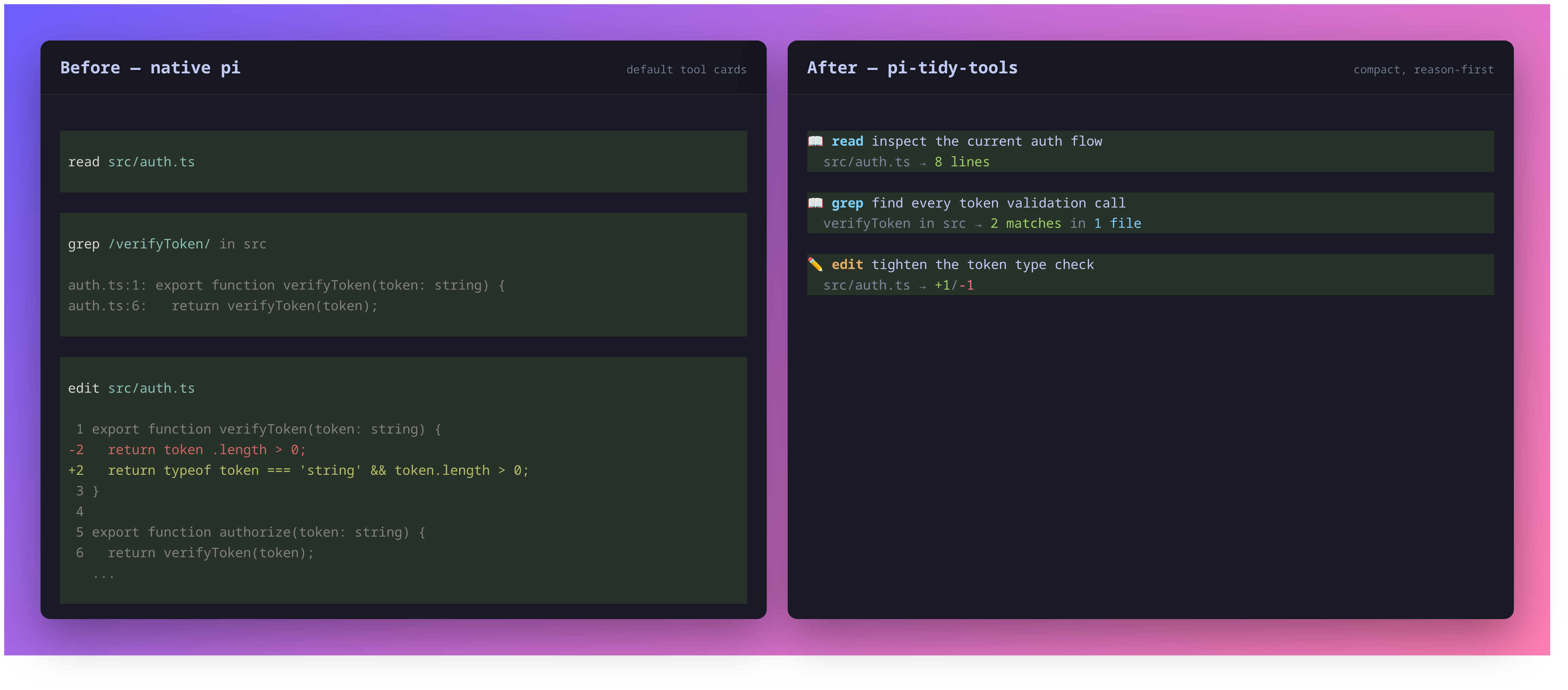
- Line 1 — tool icon/name and the model's goal/reasoning; running calls add a live dot.
- Line 2 — the concrete target (path/command/pattern) and a colored result summary.
By default, execution delegates to Pi's built-in tools unchanged; only the schema and rendering change. The optional pi-fff integration can substitute FFF search execution behind the same tidy presentation.
In action
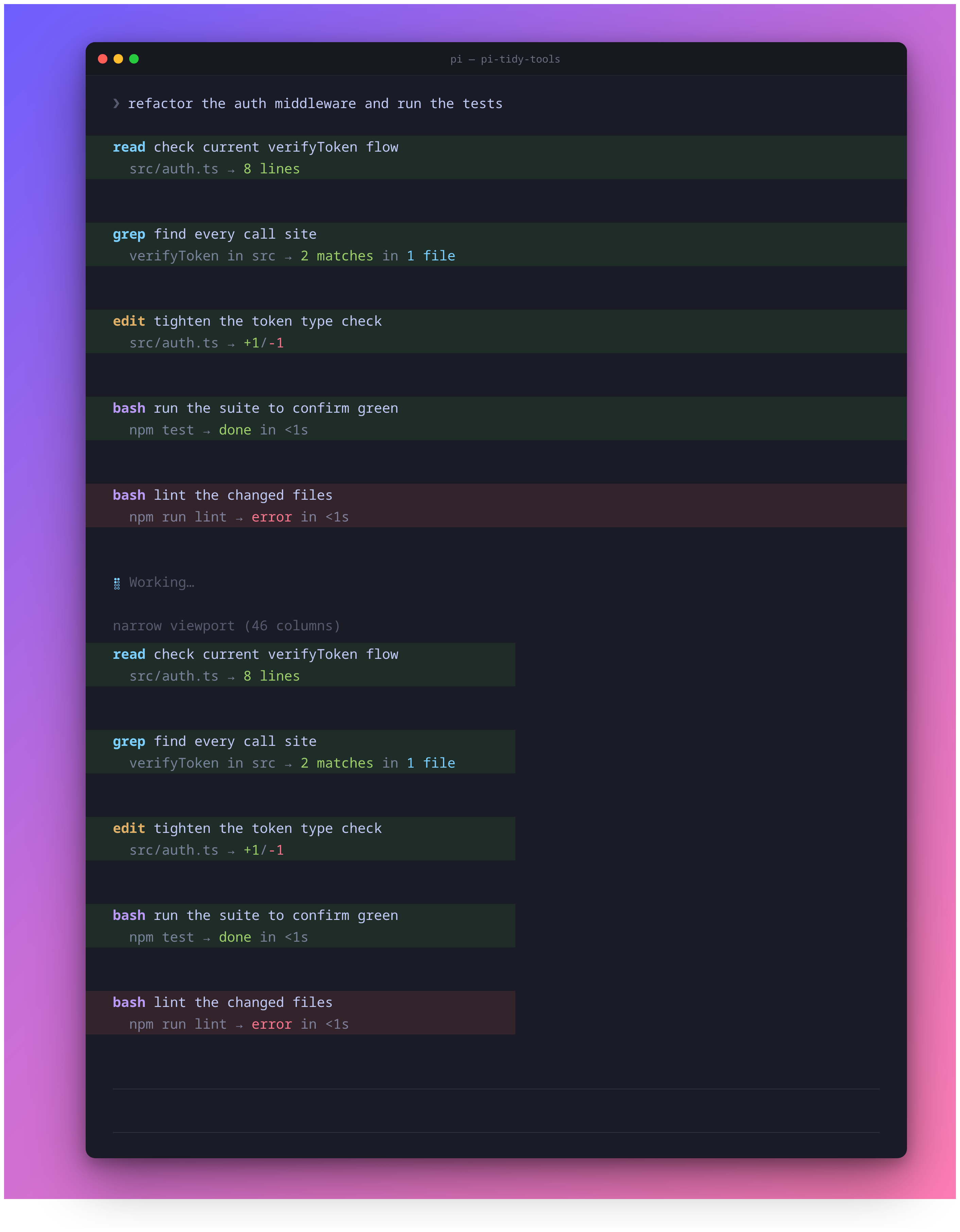
Reasoning headline
In default and reasoning modes, each wrapped tool gains a required reasoning
parameter that the model fills with the goal behind the call (not a restatement
of the file or command, which is already shown). result mode leaves the native
tool schema unchanged and does not request reasoning.
Expand for detail (ctrl+o)
Collapsed blocks show the two-line summary. Expanding a tool (ctrl+o,
app.tools.expand) appends its full output:
- edit — the colored, line-numbered diff
- write — the written content with line numbers
- bash — the full (multi-line) command input, then its output
- read/grep/… — the raw result text
/diff — last-turn changes
/diff (or ctrl+shift+o) recaps successful edit/write changes from the
immediately preceding turn as colored line-by-line diffs, including new files and
whole-file overwrites.
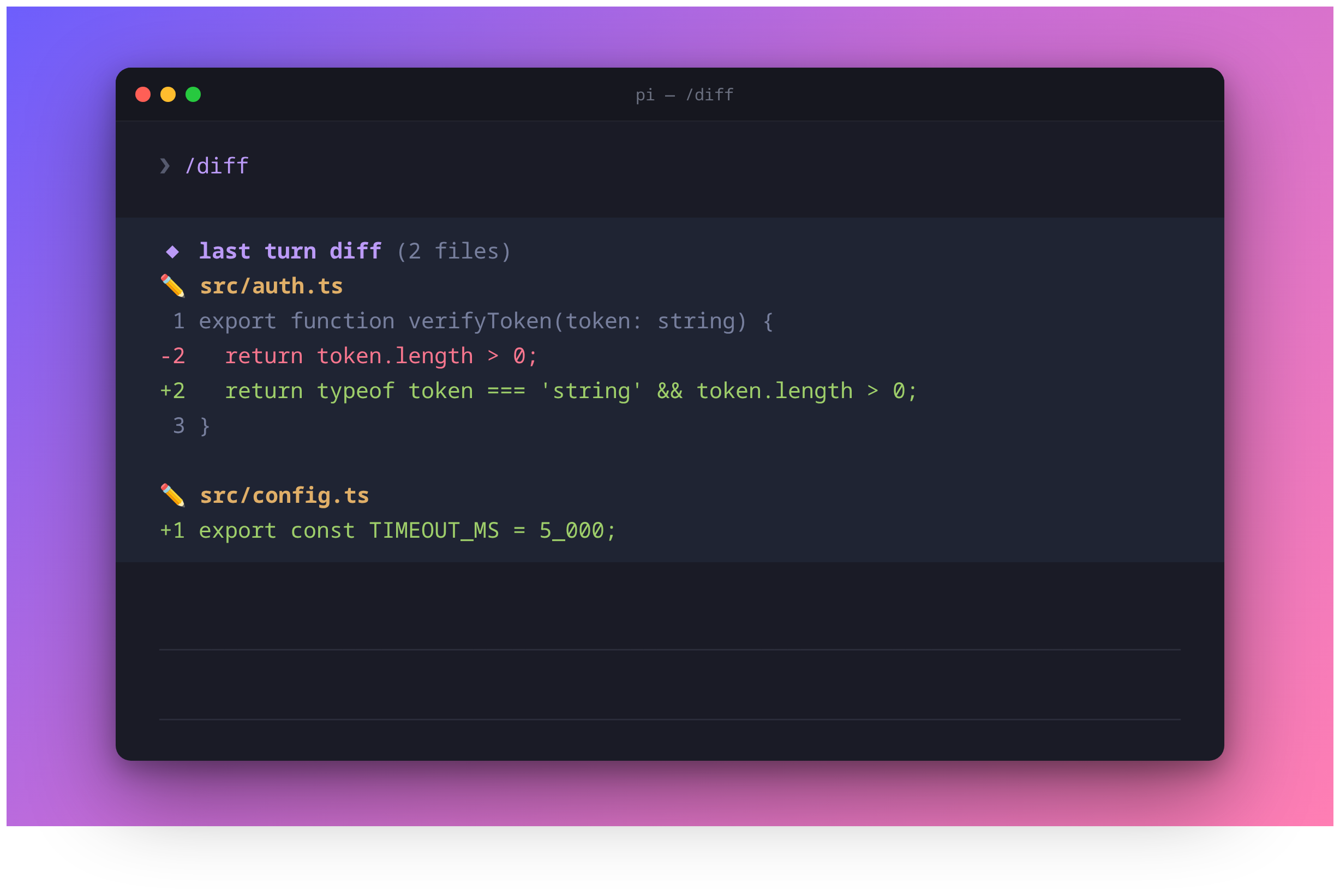
ctrl+shift+oalso maps to the built-inapp.tree.filter.cycleBackward; in the main transcript it triggers/diff. Rebind inkeybindings.jsonif you prefer.
Configure with /tidy
The extension is enabled by default. Use the management command to change or inspect its startup state:
/tidy on
/tidy off
/tidy toggle
/tidy status
/tidy mode default
/tidy mode reasoning
/tidy mode result
/tidy mode status
/tidy icons on
/tidy icons off
/tidy icons status
Layout modes:
default— reasoning headline, then target and result on line tworeasoning— one line with the reasoning and summarized resultresult— one line with the target and summarized result; no reasoning parameter is requested

A successful state, layout, or icon change is saved to
~/.pi/agent/pi-tidy-tools.json and reloads Pi's extensions immediately. While
disabled, /tidy remains available, but all seven tool overrides, reasoning
prompts, diff hooks, /diff, its shortcut, and custom rendering are absent.
Icon visibility is a top-level JSON boolean and defaults to true when missing,
malformed, unreadable, or not a boolean:
{
  "icons": false
}
/tidy icons off persistently removes only the decorative category icons 📖,
✏️, and ⚡ from tidy tool blocks, plus the decorative ◆ heading and file
category icons from /diff. It does not reserve an empty icon column. The
semantic running dot, hanging detail indent, and result arrow stay visible, as
do colors, names, summaries, expansion, and compact layouts. Settled success
and failure use Pi's native state backgrounds without redundant inline marks.
/tidy icons on|off reloads after a change; status is read-only and repeated
values do not write or reload.
For temporary or managed environments, PI_TIDY_TOOLS overrides only whole
extension enablement. It accepts on/off, true/false, yes/no, or
1/0. Unset the variable before using /tidy on|off|toggle; /tidy status
reports when the override is active. There is no environment override for icon
visibility, so /tidy icons on|off remains available while PI_TIDY_TOOLS
controls enablement. A missing, unreadable, or malformed enablement config
defaults to enabled.
Optional pi-fff execution
pi-fff is optional and remains a separately installed Pi package — it is not bundled by, or a peer dependency of, pi-tidy-tools. When set up, FFF's fast fuzzy search executes behind tidy's presentation. Two capability profiles are supported, both on Pi 0.80.6+ and with no upper version bound:
- Legacy (
pi-fff0.1.12+) — pi-fff ownsread/grepexecution; tidy owns their schema and rendering. - Scoped (
@ff-labs/pi-fff0.6.0+) — FFF executes tidy-presentedgrepandfind, native tidyreadis unchanged, and the rawffgrep/fffindnames stay hidden.
pi install npm:@ff-labs/pi-fff@0.11.0       # user scope; verified with Pi 0.86.1
# or: pi install -l npm:@ff-labs/pi-fff@0.11.0  # project scope
# Legacy remains supported: pi install npm:pi-fff@0.1.12
Restart Pi, then explicitly let tidy manage pi-fff registration:
/tidy pi-fff setup
/tidy pi-fff status
/tidy pi-fff teardown
Setup previews every discovered user/project settings change and requires
confirmation; teardown restores the exact prior entries. /tidy pi-fff status
always reports a truthful ownership state.
The latest tested combination is Pi 0.86.1 + @ff-labs/pi-fff 0.11.0.
Its home-scan, symlink-following, and home-scan warning flags are forwarded
unchanged, including explicit false values. Use tools-and-ui (default) or
tools-only; FFF's override mode conflicts with managed tidy tool names.
Verified version tuples — and how newer releases are promoted from
forward-compatible/unverified — are tracked in the
verification policy.
Always run /tidy pi-fff teardown before removing pi-tidy-tools or pi-fff.
The full integration contract — settings and sidecar mechanics, every ownership state, the verification policy and release matrix, drift recovery, manual restoration, and editor caveats — lives in docs/pi-fff.md.
Styling
Mirrors a clean, theme-agnostic palette + icon mapping:
| Tools | Icon | Color |
|---|---|---|
read grep find ls |
📖 | toolTitle |
write edit |
✏️ | toolTitle |
bash |
⚡ | toolTitle |
- Paths collapse
$HOME→~ editshows+adds/-dels; textwriteshows line count;bashshows status + elapsed timegrepshowsN matches in M files;find/lsshow file or entry counts- Tool blocks start at the left edge without a decorative border or outer indent
- Every line is truncated to the live terminal width (ANSI-aware) so nothing wraps
- Pi's native pending/success/error background colors remain, without restoring its padding or extra spacing
Foregrounds and diffs use Pi's semantic theme colors; pending/success/error
backgrounds remain native. system, light, dark, and custom themes apply to
running and settled cards. Newly recorded /diff messages store raw changes and
recolor with the current theme. Older messages containing precolored rows remain
readable but cannot be fully recolored.
Codemode parent/child cards (Pi 0.99+)
Codemode uses one compact inline card: a one-line parent heading followed by
indented two-line child tools, matching the basic tools' goal/target hierarchy.
There is no bottom status widget or separate /tidy calls screen. Ctrl+O expands
the whole card, including the children's bounded output/diff previews. Script
source and script output appear last, only when expanded.
codemode 修正配置并验证 → 3 calls · 1 error · 8s
  edit 修正超时配置
    src/config.ts → +2/-1
  read 确认配置内容
    src/config.ts → 24 lines
  bash 验证修改是否通过测试
    npm test → exit 1 in 8s
The parent title comes from an explicit // reasoning: <goal> comment at the
start of the script (after an optional first // @options: line). The model is
instructed to include this comment; without it the title falls back to
“执行工具脚本”. The native schema and raw-JavaScript grammar are unchanged.
Children use their existing reasoning and target fields. Icons follow /tidy icons; the parent/child layout remains two-line for children in all tidy modes.
Completed cards omit zero running/error counts; failures remain visible in the
parent summary and the failed child's result line. A successful script can still
contain failed children, so its native background may be green with red child
status text.
The plugin wraps the public official codemode factory and reuses its executor,
loadout preparation, tool exposure, settings, script storage, and result protocol.
It does not implement another sandbox or change permission checks. Codemode remains
inactive until selected through defaultTools, --tools, or the host API.
No synthetic messages or UI-only output are sent to the model. Successful nested
edit/write operations still participate in the last-turn /diff.
The observer retains at most 256 calls including parents per batch. The card shows eight children when collapsed and up to 256 records when expanded. Reasoning, targets and summaries are capped at 240 characters; each child output preview is capped at 2,048 characters/24 lines, with a 32,768-character preview budget per batch. Expanded script source and output each have an 8,192-character/80-line display cap. Omitted data is marked, and supplied full-output paths remain visible when expanded.
Versioned raw display records are stored in result details, independently for
each parent card, so previous cards survive subsequent turns, reloads and theme
changes. Old native records remain readable; missing child output is labeled
Output not recorded, and missing hierarchy is not inferred. Session/branch
changes clear live state. Unfinished children become incomplete/cancelled, and
late authoritative completion events replace inferred closure without accepting
duplicate ends. RPC/JSON/print modes never open terminal widgets or overlays.
On hosts without the public codemode factory, only the existing basic-tool
rendering is installed.
Structured results
On newer hosts, bash summaries prefer structured exit codes, durations, and truncation information. Expanded cards show the full-output path when supplied. Only bounded summary metadata is copied into display details: the programmatic output (up to 1 MiB in Pi 0.99) is not duplicated into cards. Tools without these fields keep the text-based fallback. Tool output schemas, results, errors, and usage remain owned by the source tool.
The existing generate_image backend remains grok-build. Failures are now marked
as errors on Pi 0.99+, and thrown on legacy hosts. The separate Pi ModelRuntime
image-backend phase is not included in this change.
Scope
The seven basic tools and the official codemode parent card are restyled. Direct MCP / third-party calls keep their own renderers; when invoked inside codemode, their observed activity is summarized within that parent card. The plugin does not replace foreign executors or implement model routing or classifier decisions.
Troubleshooting
| Symptom | Fix |
|---|---|
/tidy on|off|toggle appears to have no effect |
The PI_TIDY_TOOLS environment variable overrides the config file. Unset it first; /tidy status reports when the override is active. |
ctrl+shift+o cycles the tree filter instead of running /diff |
The shortcut doubles as Pi's built-in app.tree.filter.cycleBackward; only the main transcript triggers /diff. Rebind in keybindings.json if you prefer. |
/tidy pi-fff status reports recovery-pending |
An interrupted setup/teardown awaits Pi's reload. Run /reload; the next startup finalizes the transition at a safe boundary. |
Status reports unsafe partial registration; reload required |
Tool ownership is unknown after a replay failure. Run /reload before trusting any read/grep/find claim. |
| Autocomplete or a custom editor stopped working alongside legacy pi-fff | Legacy pi-fff 0.1.12 installs a custom autocomplete editor that is last-writer-wins with other custom editors. Disable one editor feature and /reload — see editor caveats. |
| Removed pi-fff or pi-tidy-tools without running teardown | Follow the manual restoration steps in docs/pi-fff.md. |
Local development
From this repository root, quick-test the extension:
pi -e ./index.tsOr install the local package through ~/.pi/agent/settings.json:
{
  "packages": ["/absolute/path/to/pi-tools-ui"]
}
Develop
Run from this repository root; no sibling repository or workspace is needed:
npm ci
npm test
npm run check
npm run test:pack
Development dependencies remain on Pi 0.80.6 to check the legacy baseline. For the separate offline Pi 0.99.1+ host smoke, point to an installed package:
PI_TOOLS_UI_HOST_ROOT=/path/to/node_modules/@earendil-works/pi-coding-agent \
  npm run test:host-smoke
This uses isolated temporary settings and a scripted model stream, and disables
fetch. It exercises real extension loading, codemode, structured errors, nested
/diff, native theme invalidation, compact parent/child rendering, unified expansion,
script storage, reload, and non-TUI execution without model charges.
Installed-package checks also passed for Pi 0.99.1 with legacy pi-fff 0.1.12 and
scoped @ff-labs/pi-fff 0.11.0 in user/project/combined scope. These checks alone do
not promote those tuples to verified; the full release/TUI policy still applies.
Optional quality gates: npm run test:coverage and npm run test:mutation.
The pi-fff integration scripts are retained; installed/release/TUI checks
need registry access and install their fixtures in temporary directories.
The vendored core is checked in directly, not regenerated from a sibling package.
发布到 npm
本项目使用 bumpp 管理版本号、Git 提交和标签,
再由 npm publish 发布 @liuovo/pi-tools-ui。
publishConfig.access 已设为 public,不需要购买 npm 私有包服务。
GitHub 仓库是否私有与 npm 包可见性无关:发布后,打包的源码、README 和图片均公开可下载。
发版开发环境请使用 Node.js ^22.18.0 || ^24.11.0 || >=26.0.0 中同时满足本包要求的版本;
推荐 Node.js 24.11+。这是 bumpp 的开发依赖要求,不改变扩展本身的 Node.js 22.19.0+ 要求。
首次配置后,先提交这些修改并推送到 main,确保工作区干净且已配置 origin。
在自己的终端登录 npm(不要把密码、Token 或验证码写入仓库):
npm login --registry=https://registry.npmjs.org/
npm whoami --registry=https://registry.npmjs.org/ # 应为 liuovo
npm run release
首次发版在交互菜单中选择 0.1.0(minor);仓库中的 0.0.0 是尚未发布的起始版本,
上游 0.4.2 仅表示代码来源,不作为本包版本。后续同样运行 npm run release,选择 patch、minor 或 major。
确认后会依次:
- 通过
preversion执行类型检查、测试和解包加载检查。 - 同步更新
package.json和package-lock.json。 - 创建
chore: release vX.Y.Z提交和vX.Y.Z标签,并推送到 GitHub。 - 执行
npm publish;prepublishOnly会再次检查最终版本的包,随后按 npm 提示完成身份验证。
取消 bumpp 确认不会发布。bumpp 不生成 changelog 或 GitHub Release;CHANGELOG.md 的 Unreleased 节记录二开变更,后面的旧版本记录来自上游。
提交标签和 npm 发布不是原子操作:如果推送成功但 npm 发布失败,先确认该版本尚未发布,
解决身份验证等问题后运行 npm publish 重试即可,不要再次运行 npm run release 升版本。
只检查、不发布:
npm run release:check
npm publish --dry-run
Regenerating screenshots
docs/comparison.png, docs/demo.png, docs/diff.png, and docs/modes.png are
generated from real renderer output (no hand-typed ANSI). docs/demo.png
shows icons-off output at normal and narrow widths: the scripts run the
built-in tools, render them through the actual extension (or native Pi cards for
the comparison), and screenshot the result via headless Chrome.
bash docs/comparison.sh # native vs tidy comparison
bash docs/demo.sh       # full tidy transcript
bash docs/diff.sh       # /diff last-turn recap
bash docs/modes.sh      # layout-mode comparison
All four generators require Google Chrome/Chromium and ImageMagick.