@llblab/pi-codex-usage
Pi extension for Codex subscription usage and an optional Fast toggle
Package details
Install @llblab/pi-codex-usage from npm and Pi will load the resources declared by the package manifest.
$ pi install npm:@llblab/pi-codex-usage- Package
@llblab/pi-codex-usage- Version
0.12.0- Published
- Oct 2, 2026
- Downloads
- 1,463/mo · 497/wk
- Author
- llblab
- License
- MIT
- Types
- extension
- Size
- 133.6 KB
- Dependencies
- 1 dependency · 4 peers
Pi manifest JSON
{
  "image": "https://github.com/llblab/pi-codex-usage/raw/main/banner.jpg",
  "extensions": [
    "./index.ts"
  ]
}
Security note
Pi packages can execute code and influence agent behavior. Review the source before installing third-party packages.
README
pi-codex-usage
Pi extension for ChatGPT Codex usage limits and a local Fast toggle
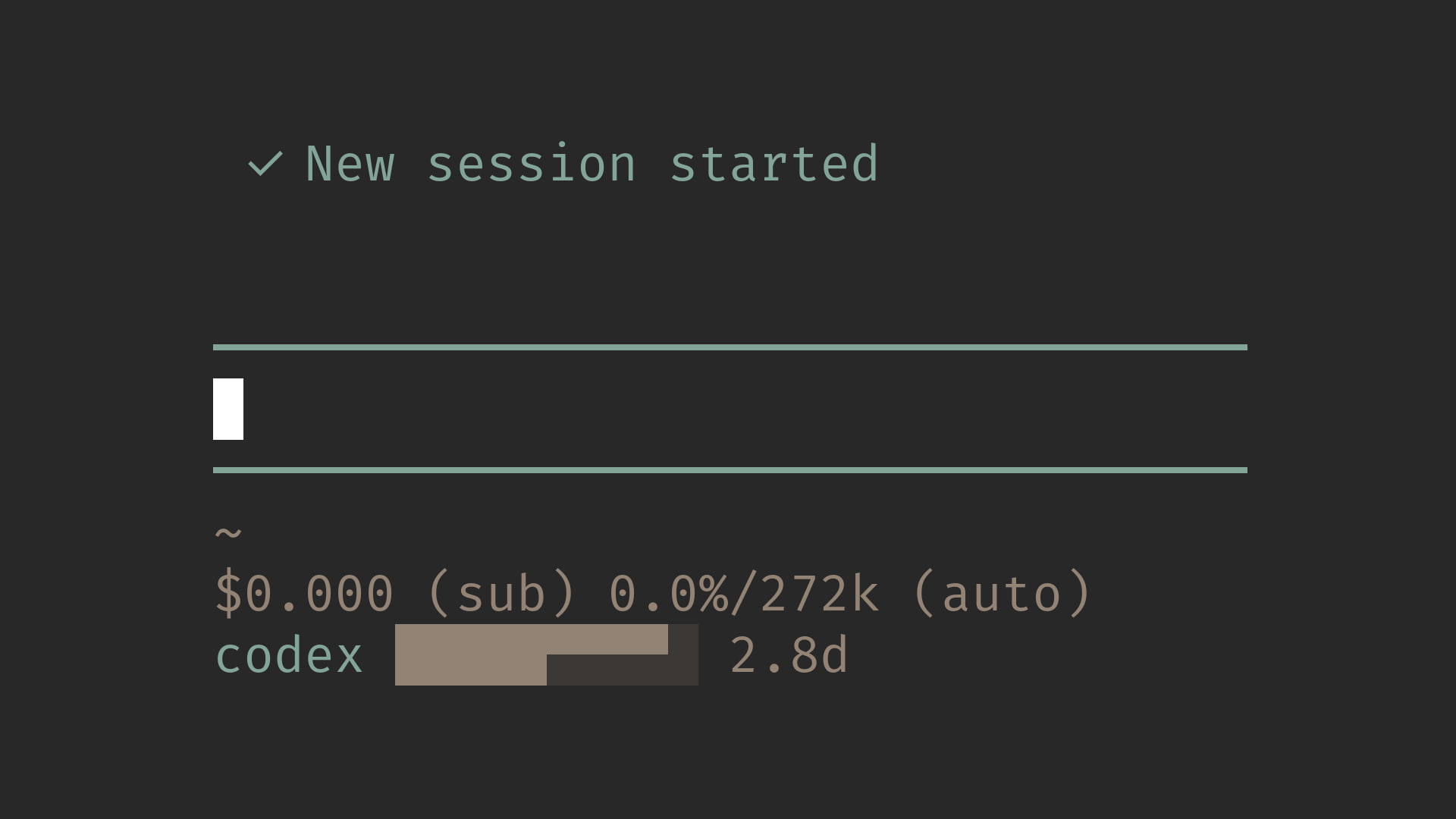
This extension owns usage state + usage mode: zero-configuration quota reporting, plus an optional per-model Fast preference. Shared command arbitration and JSONC editing belong to @llblab/pi-command-fast, a normal dependency, not another Pi extension.
This repository is a minimal fork of narumiruna/pi-extensions/extensions/pi-codex-usage. It keeps the auth and quota-fetching path, but intentionally narrows the interface to the Codex quota windows returned by OpenAI.
Start Here
Features
- Shows two counter-moving half-height markers in the statusline bar while Codex usage is loading, then keeps the bar fresh (the countdown ticks locally)
- Keeps the last usable bar visible during ordinary refreshes instead of replacing known quota with a loading state
- Statusline output adapts to the response: weekly-only limits show an explicit remaining percentage and reset countdown, while dual-window limits keep the compact themed bar
- All Codex subscription models share the primary
codexquota and status label - When
pi-telegramis available, the same compact value appears ascodex: <value>in the/startmenu status text for active OpenAI Codex subscription models - Additional returned quota buckets are ignored
- Pi OpenAI Codex provider auth is used first
- Codex CLI app-server remains available as a fallback
- Missing auth, subscription, plan, or quota windows are shown as
n/a, not as an error - Successful updates briefly redraw the bar only when a 5% segment changes
- Network/provider failures keep the last good bar (up to an hour), then show
error - Any number of Pi instances share one request stream, see Shared Refresh
- Quota display requires no configuration;
/fastoptionally toggles priority service for the active native Codex model
Install
Requires Pi ≥1.0.0 and Node ≥22.19.0. Every declared Pi package peer follows the 1.0.0 minimum.
From npm:
pi install npm:@llblab/pi-codex-usageFrom git:
pi install git:github.com/llblab/pi-codex-usageDevelopment
The shared @llblab/pi-command-fast@^0.1.0 dependency now resolves from npm; no sibling library checkout is required.
npm ci
npm run validate
For explicitly local library experiments, a temporary folder link reads the library's built dist/, not TypeScript source directly. Rebuild after source edits and restore the registry dependency/lock before publishing; see Backlog.
Fast mode
/fast takes no arguments and dispatches by the current provider, not model names or OAuth eligibility. For any openai-codex model, it stores only serviceTier: "priority" in Pi's canonical models.json (honoring PI_CODING_AGENT_DIR):
{
  "providers": {
    "openai-codex": {
      "modelOverrides": {
        "your-current-model": { "serviceTier": "priority" }
      }
    }
  }
}
OFF removes only serviceTier; it never writes "default". JSONC comments and unrelated configuration survive. There is no separate Fast config or model allowlist. State follows provider/model selection and survives restart; manual edits are read on lifecycle refresh and each request.
When this and Claude Usage are loaded, their shared library registers one /fast, in either load order, even with separate physical dependency copies. A session-scoped WeakMap avoids cross-session dispatch; shutdown releases registrations for reload (Pi retains the session manager). Unrelated providers receive a concise unsupported-provider message. Invalid arguments show Usage: /fast; success is silent.
Enabled native requests receive service_tier: "priority" only when the payload matches the current model and has no existing tier. The existing terminal status redraws immediately without fetching quota, for example:
codex ██████▀▀▀▀ 6d fastThe lowercase fast suffix uses the existing dim/countdown theme role and is applied at the final terminal boundary, including loading, percentages/credits, n/a, and errors. Telegram values and quota polling/auth/leadership are unchanged.
Pi 1.0.0 accepts the extra override but does not propagate it to native request options, so a small before_provider_request adapter remains necessary; no replacement provider or transport is registered. Its public command API cannot hide/unregister commands by current model, so /fast stays listed and checks the provider at invocation. Backend capability and actual priority service are not guaranteed by a stored preference or suffix: an earlier authorized sample sent priority but received default. Priority service may have different provider pricing.
Statusline
Regular Codex usage:
codex ██████▀▀▀▀ 6dWhen OpenAI returns only the weekly window, the status shows the exact rounded remaining percentage and reset countdown directly:
codex 67% 7dWhen both windows exist, the ten-character bar encodes two twenty-step limits at once: the top quadrants show the 5-hour limit and the bottom quadrants show the weekly limit, with each step representing 5%. If either quota window is exhausted, the bar keeps its shape but switches to the error background color.
Before the first usable Codex report arrives, two half-height markers move through the same fixed-width themed bar. The upper 5-hour marker travels opposite the lower weekly marker; both reverse smoothly at the ends, and each loader run randomly starts from one of the two mirrored endpoint phases. Their motion distinguishes loading from 100% remaining quota while preserving the normal bar background. A first report claiming both windows are completely unused is treated as provisional for 15 seconds and retried every second by the refreshing instance before it is published, because providers can briefly emit zeroed windows while initializing. Once a usable report exists, refresh requests preserve that last good bar.
When the weekly reset time is available, it follows either the single-window percentage or the dual-window bar. More than a day remains is shown in 144-minute day-tenth steps such as 7d, 6.9d, 6.6d, 5.1d, 5d, 3.7d, 3d, 2d, 1.9d, 1.5d, and 1.1d, rounded upward to the next tenth. At 24 hours and below it switches to upward-rounded 6-minute hour-tenth steps such as 24h, 23.7h, 20.1h, 20h, 19.9h, 1.4h, 1.3h, 1.2h, 1.1h, and 1h. Under an hour it switches to floored minutes, and under a minute to seconds. After the reset timestamp passes, 0s is held until the next successful quota refresh reports the new weekly window.
Business accounts that return credits instead of Codex rate-limit windows show the rounded remaining percentage. When the response includes a credit reset cycle, its countdown is shown after the percentage:
codex 81% 2.8dWhen the 5-hour window is exhausted and exposes its own reset time, the statusline adds the 5-hour reset before the weekly reset:
codex ▄▄▄▄▄⠀⠀⠀⠀⠀ 5h/7dThe ten-character dual bar stays unchanged. The first countdown is the 5-hour reset, and the second countdown after / is the weekly reset.
Unavailable because Codex auth or subscription quota is not available:
codex n/aRuntime failure, such as a network or provider error:
codex errorShared Refresh
index.ts is a re-export-only Pi entrypoint; lib/extension.ts composes the live extension. lib/usage-store.ts owns cross-instance quota coordination, lib/query.ts owns provider requests, lib/usage.ts owns quota normalization, lib/status.ts and lib/status-format.ts own lifecycle and terminal display, lib/telegram.ts adapts the optional Telegram row, and lib/fast.ts owns Codex Fast semantics and the native payload bridge; the shared library owns JSONC and command arbitration. Domain tests live under tests/ with matching names; integration tests name the domain whose boundary they exercise.
All Codex models and instances coordinate through ~/.pi/agent/tmp/pi-codex-usage/usage.json (quota percentages and timestamps only, no tokens). The Claude extension uses its own independent file at ~/.pi/agent/tmp/pi-claude-usage/usage.json.
Previous per-bucket cache directories are no longer read or written; there is no migration. Restart all previously running instances when upgrading to stop them writing the old layout.
- The instance that last updated the file is the leader and refreshes it every minute
- Every other instance only reads the file (re-checking every ≤30s) and redraws when it changes
- Leadership is never cached in memory: before each usage request (including retries and fallbacks), the instance re-reads the file and checks its
owner, uniqueclaimId, and 90s lease. Publication rechecks that claim under the lock; a superseded success or failure is discarded. Failed locks or unwritten claims never authorize a request - If the file is 90 seconds old (leader is closed, busy, or asleep), the first follower that obtains the mutex takes over: it re-reads the JSON, writes itself as the leader with a fresh timestamp, releases the mutex, then fetches from the server and publishes under the mutex after rechecking its claim. Its next refresh is one minute later; JSON writes remain atomic renames
- Claiming and publication use a non-waiting transaction in
mutex.sqlite, through Node's built-innode:sqlite(Node ≥22.19.0, the existing package minimum). It stores no quota or leadership records and needs no extra package or service. The OS releases the lock when the connection closes or the process dies; there is no timeout-based lock stealing - Failures are written to the file with an exponential backoff (1 to 5 minutes; 5 to 30 minutes on HTTP 429) that applies to all instances
- Instances without data yet show the loading bar and re-check every second until the leader publishes
Coordination assumes a local filesystem and cooperating instances on the same machine. Never delete or replace mutex.sqlite while instances are running. Network requests do not hold the mutex; a process paused inside a short critical section keeps it until it resumes or exits, so other writers retry later without blocking the TUI. This preserves exclusion instead of stealing a live lock.
Upgrade: Close all old instances before starting updated ones. The legacy lock files are ignored; old and new locking protocols must not run together. Cached usage.json data needs no migration.
Telegram Status Menu
If @llblab/pi-telegram is loaded with the public status-line provider API, this extension registers an optional /start menu status row. The row is shown only while the active model uses the OpenAI Codex subscription provider:
codex: ██████▀▀▀▀ 6dThe value is the same compact quota bar plus weekly reset countdown used by the terminal statusline, always with the codex label. If pi-telegram is absent, older, or the active model is not a Codex subscription model, no Telegram row is added.
Auth
The extension tries usage sources in this order:
- Pi's
openai-codexprovider auth codex app-server --listen stdio://
OpenAI API keys are not ChatGPT Codex subscription auth and do not expose these quotas.
License
MIT. See LICENSE.