@llblab/pi-telegram
Better Telegram DM bridge extension for π
Package details
Install @llblab/pi-telegram from npm and Pi will load the resources declared by the package manifest.
$ pi install npm:@llblab/pi-telegram- Package
@llblab/pi-telegram- Version
0.7.2- Published
- May 6, 2026
- Downloads
- 3,072/mo · 1,244/wk
- Author
- llblab
- License
- MIT
- Types
- extension
- Size
- 752 KB
- Dependencies
- 0 dependencies · 4 peers
Pi manifest JSON
{
  "extensions": [
    "./index.ts"
  ],
  "image": "https://github.com/llblab/pi-telegram/raw/main/screenshot.png"
}
Security note
Pi packages can execute code and influence agent behavior. Review the source before installing third-party packages.
README
pi-telegram
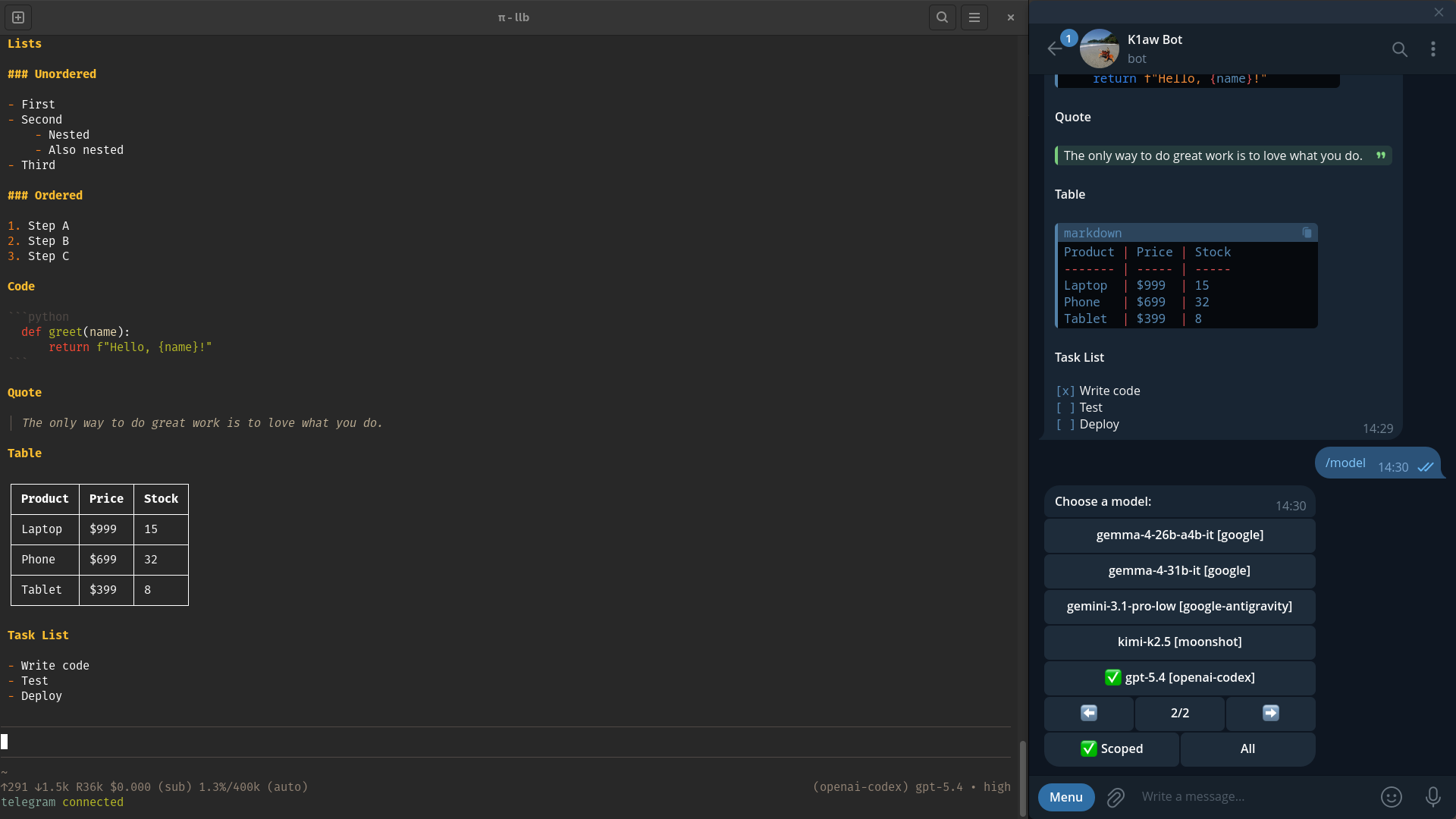
This repository is an actively maintained fork of badlogic/pi-telegram. It started from upstream commit cb34008460b6c1ca036d92322f69d87f626be0fc and has since diverged substantially.
Start Here
Key Features
- Telegram Controls:
/startopens the inline application menu with command help, available π prompt templates, status rows, model, thinking, and queue sections;/stop,/abort,/next, and/continueprovide queue-clear, queue-preserve, force-next, and queued-resume semantics respectively; model-switch continuation turns still use the control lane when a restart needs to resume safely. - Interactive UI: Manage your session directly from Telegram. Inline buttons expose an application menu for switching models, choosing model pages from the pagination indicator, adjusting reasoning (thinking) levels, and inspecting or mutating the waiting queue; model scope/pagination controls stay at the top of the model menu, the Queue button shows the current item count, and command emoji are reused on matching controls such as model and thinking.
- In-flight Model Switching: Change the active model mid-generation. The agent gracefully pauses, applies the new model, and restarts its response without losing context.
- Smart Message Queue: Messages sent while the agent is busy are queued and previewed in the π status bar, and queued turns can be reprioritized or removed with Telegram reactions or the queue section of the inline application menu.
- Mobile-Optimized Rendering: Tables and lists are formatted for narrow screens, table padding accounts for emoji grapheme and wide Unicode display width, and Telegram-originated runs prompt the assistant to prefer narrow table columns for phone readability. Markdown is correctly parsed and split to fit Telegram's limits without breaking HTML structures or code blocks, block spacing stays faithful to the original Markdown with readable heading separation, supported absolute links stay clickable, and unsupported link forms degrade safely.
- File Handling & Attachments: Send images and files to the agent, transcribe or transform inbound files with configured attachment handlers, or ask π to generate and return artifacts. Inbound downloads and outbound attachments are size-limited by default, and outbound files are delivered automatically via the
telegram_attachtool. - Streaming Responses: Closed Markdown blocks stream back as rich Telegram HTML while π is generating, and the still-growing tail stays readable until the final fully rendered reply lands.
Install
From npm:
pi install npm:@llblab/pi-telegram
From git:
pi install git:github.com/llblab/pi-telegram
Configure
1. Telegram Bot
- Open @BotFather
- Run
/newbot - Pick a name and username
- Copy the bot token
2. Configure the extension in π
Start π, then run:
/telegram-setup
Paste your bot token when prompted. If a bot token is already saved in ~/.pi/agent/telegram.json, the setup prompt shows that stored value by default. Otherwise it prefills from the first configured environment variable in TELEGRAM_BOT_TOKEN, TELEGRAM_BOT_KEY, TELEGRAM_TOKEN, or TELEGRAM_KEY. The saved config file is written atomically with private 0600 permissions.
3. Connect this π session
/telegram-connect
The bridge is session-local: only one π instance polls Telegram at a time. /telegram-connect records polling ownership in ~/.pi/agent/locks.json; live ownership moves require confirmation, while /new and same-cwd process restarts resume automatically.
4. Pair your account from Telegram
- Open the DM with your bot in Telegram
- Send
/start
The first user to message the bot becomes the exclusive owner of the bridge. The extension will only accept messages from this user.
Usage
Once paired, simply chat with your bot in Telegram. All text, images, and files are forwarded to π.
Telegram Commands & Controls
Use these inside the Telegram DM with your bot:
/start: Pair the first Telegram user when needed, register bridge bot commands, and open the inline application menu with command help, available π prompt templates, status rows, and controls./compact: Start session compaction (only works when the session is idle)./next: Dispatch the next queued turn (aborts π first if busy)./continue: Enqueue a prioritycontinueprompt. It waits like normal Telegram work when π is busy and can trigger prompt/skill handling that listens forcontinue./stop: Abort the active run and clear all waiting Telegram queue items./abort: Abort the active run without touching the queue.
Prompt-template commands: π prompt templates are mapped to Telegram-safe aliases (fix-tests.md becomes /fix_tests) and shown as compact command-only rows between the built-in commands and status rows in /start. They are not registered in the Telegram bot command menu, keeping the bot menu focused on bridge controls. Sending /template_name args from Telegram expands the matching π prompt-template file and queues the expanded prompt like normal Telegram work.
Hidden compatibility shortcuts: /help and /status open the same main application menu, /model opens the model section, /thinking opens the thinking section, and /queue opens the queue section. They are intentionally not shown in the bot command menu.
Telegram command admission is explicit: /compact, /queue, /stop, /abort, /next, /help, /start, /status, /model, and /thinking execute immediately. /continue is a command shortcut that enqueues a priority Telegram prompt containing continue. Prompt-template commands expand before queueing and then follow normal prompt-queue rules. Synthetic model-switch continuation turns still enter the high-priority control lane so they can resume before normal queued prompts when π becomes safe to dispatch.
Pi Commands
Run these inside π, not Telegram:
/telegram-setup: Configure or update the Telegram bot token./telegram-status: Check bridge status, connection, polling, execution, queue, and recent redacted runtime/API failure events./telegram-connect: Start polling Telegram updates in the current π session, acquire the singleton lock, or interactively move ownership here from another live instance./telegram-disconnect: Stop polling in the current π session and release the singleton lock.
Queue, Reactions, and Media
- If you send more Telegram messages while π is busy, they enter the default prompt queue and are processed in order.
- Very long text messages that Telegram appears to split automatically are coalesced through a short conservative debounce and forwarded to π as one prompt when the first chunk is near Telegram's text limit, currently using a 3600-character threshold. Commands, bot messages, media groups, and normal short follow-ups are not coalesced.
👍,⚡️,❤️, and🕊move a waiting prompt into the priority prompt queue, behind control actions but ahead of default prompts. Removing the last priority reaction sends it back to its normal queue position, and adding a priority reaction again gives it a fresh priority position.👎,👻,💔, and💩remove a waiting turn from the queue. Telegram Bot API does not expose ordinary DM message-deletion events through the polling path used here, so queue removal is bound to removal reactions.- Reactions apply to any waiting Telegram turn, including text, voice, files, images, and media groups. For media groups, a reaction on any message in the group applies to the whole queued turn.
- If you edit a Telegram message while it is still waiting in the queue, the queued turn is updated instead of creating a duplicate prompt. Edits after a turn has already started may not affect the active run.
- Telegram replies to earlier text or caption messages are forwarded as
[reply]context for normal prompts, while slash commands still parse from the new message text only. - Inbound images, albums, and files are saved to
~/.pi/agent/tmp/telegram. Unhandled local file paths are included in the prompt, handled attachment output is injected into the prompt text, and inbound images are forwarded to π as image inputs. Inbound downloads default to a 50 MiB limit and can be adjusted withPI_TELEGRAM_INBOUND_FILE_MAX_BYTESorTELEGRAM_MAX_FILE_SIZE_BYTES. - Queue reactions depend on Telegram delivering
message_reactionupdates for your bot and chat type.
Inbound Attachment Handlers
telegram.json can define ordered attachmentHandlers for common preprocessing such as voice transcription. Matching handlers run after download and before the Telegram turn enters the π queue. If a matching handler fails, the next matching handler is tried as a fallback.
{
  "attachmentHandlers": [
    {
      "type": "voice",
      "template": "/path/to/stt1 --file {file} --lang {lang=ru}"
    },
    {
      "mime": "audio/*",
      "template": "/path/to/stt2 --file {file} --lang {lang=ru}"
    }
  ]
}
Matching supports mime, type, or match; wildcards like audio/* are accepted. Handlers use template: a string is one command, and an array is ordered composition. Template placeholders are substituted into command args, not shell text: {file} is the downloaded file path, {mime} is the MIME type, {type} is the Telegram attachment type, and defaults or inline defaults such as {lang=ru} can provide additional values. Examples use explicit flag-style CLIs for readability; positional script forms are also supported when the script itself supports them. Local attachments stay in the prompt under [attachments] <directory> with relative file entries; successful handler stdout is added under [outputs]; failed handlers record diagnostics and fall back to the next matching handler. The portable command-template contract is documented in docs/command-templates.md; Telegram-specific handler config is documented in docs/attachment-handlers.md.
Requesting Files
If you ask π for a file or generated artifact (e.g., "generate a shell script and attach it"), π can call the telegram_attach tool, and the extension will send the file alongside its next Telegram reply. telegram_attach is the only π tool registered by pi-telegram; use it for ordinary files, not for Telegram-native voice or buttons. Outbound attachments default to a 50 MiB limit and can be adjusted with PI_TELEGRAM_OUTBOUND_ATTACHMENT_MAX_BYTES or TELEGRAM_MAX_ATTACHMENT_SIZE_BYTES.
Assistant-Authored Outbound Actions
Assistant replies can include hidden outbound blocks. telegram_voice and telegram_button are not π tools; they are assistant-authored HTML comments that the bridge removes from Telegram text and handles after agent_end. Recognized blocks must start at column zero on a top-level line outside fenced code, quotes, and lists, so documentation examples remain literal. The agent writes normal Markdown; the extension owns voice generation, button markup, callback routing, and delivery.
Voice
Voice blocks synthesize their text and upload it as a native Telegram sendVoice OGG/Opus message. Use body form for multiline text, text="..." for explicit one-line text with optional attributes, and the colon shorthand for a one-line voice with no attributes. The spoken text may be a concise companion summary, but it does not have to follow that format; write what you want spoken and keep it TTS-friendly:
Full technical answer stays readable as text.

<!-- telegram_voice lang=ru rate=+30%
Text to synthesize as a Telegram voice message.
-->

<!-- telegram_voice lang=ru rate=+30% text="Short spoken companion summary." -->

<!-- telegram_voice: Short spoken companion summary. -->
Outbound voice is disabled unless a matching outboundHandlers[] entry is configured. Multiple telegram_voice blocks in one reply are synthesized and sent independently, preserving each block's attributes. The bridge uses the same command-template contract as inbound attachment handlers: split the template into args, substitute placeholders, execute without a shell, and use stdout as the result channel for a single template.
A TTS plus MP3-to-OGG setup can be expressed as template: [...]. The bridge provides {text}, {mp3}, and {ogg} to every step; top-level args/defaults apply to all steps unless a step defines private values, the default command timeout applies automatically, and each step's stdout is passed to the next step's stdin by default. Use "output": "ogg" when the artifact path should come from the generated {ogg} value instead of final stdout:
{
  "outboundHandlers": [
    {
      "type": "voice",
      "template": [
        "/path/to/tts --text {text} --lang {lang=ru} --rate {rate=+30%} --write-media {mp3}",
        "ffmpeg -y -i {mp3} -c:a libopus -b:a 32k -ar 16000 -ac 1 -vbr on {ogg}"
      ],
      "output": "ogg"
    }
  ]
}
Buttons
Button blocks attach inline quick replies to the final text. Use one independent telegram_button block per action. If the prompt should equal the label, use the colon shorthand. If the prompt differs, use the inline prompt="..." attribute for one-line prompts or the body form for multiline prompts:
I can continue.

<!-- telegram_button label="Show risks"
List the main risks first.
-->

<!-- telegram_button label=Continue prompt="Continue with the current plan." -->

<!-- telegram_button: OK -->
Button prompts are routed back into the normal Telegram queue as prompt turns. Keep the opening comment unclosed until the body-ending --> for body-form buttons. Closed heads must use prompt="..." or the colon shorthand to create a button. Unknown inline-button callbacks that do not belong to pi-telegram are forwarded to π as [callback] <data> so other extensions can namespace and handle their own Telegram buttons without polling the bot themselves; see the Callback Namespace Standard. Outbound handler details are documented in docs/outbound-handlers.md.
Streaming
The extension streams assistant previews back to Telegram while π is generating.
Rich previews are sent through editable messages because Telegram drafts are text-only. Closed top-level Markdown blocks can appear with formatting before the answer finishes, while the still-growing tail remains conservative and readable until the preview is replaced with the fully rendered Telegram HTML reply. Editable preview messages are also attached as replies to the source Telegram prompt when possible.
Status bar
The π status bar shows the current bridge state plus queued Telegram turns as compact previews. Busy labels distinguish states such as active, dispatching, queued, tool running, model, and compacting.
telegram queued +3: [⚡ write a shell script…, summarize this image…, 📎 2 attachments]
Notes
- Replies to Telegram prompts are sent as Telegram replies to the source message when possible; if the source message is unavailable, delivery falls back to a normal message
- Long replies are split below Telegram's 4096 character limit without intentionally breaking Telegram HTML formatting; only the first split message is attached as a Telegram reply to the source prompt
- Temporary inbound Telegram files are cleaned up on later session starts
License
MIT