@martintrojer/mu
A persistent, observable crew of pi agents running in one tmux or herdr session per workstream, coordinated through a built-in task DAG.
Package details
Install @martintrojer/mu from npm and Pi will load the resources declared by the package manifest.
$ pi install npm:@martintrojer/mu- Package
@martintrojer/mu- Version
1.3.2- Published
- Sep 13, 2026
- Downloads
- 807/mo · 372/wk
- Author
- martintrojer
- License
- MIT
- Types
- package
- Size
- 5.9 MB
- Dependencies
- 9 dependencies · 0 peers
Security note
Pi packages can execute code and influence agent behavior. Review the source before installing third-party packages.
README
mu
A small, opinionated control plane for a crew of AI coding agents working in parallel. Tmux panes, a typed task DAG, isolated VCS workspaces per agent, an audit log — and a dashboard for seeing what the crew is doing right now.
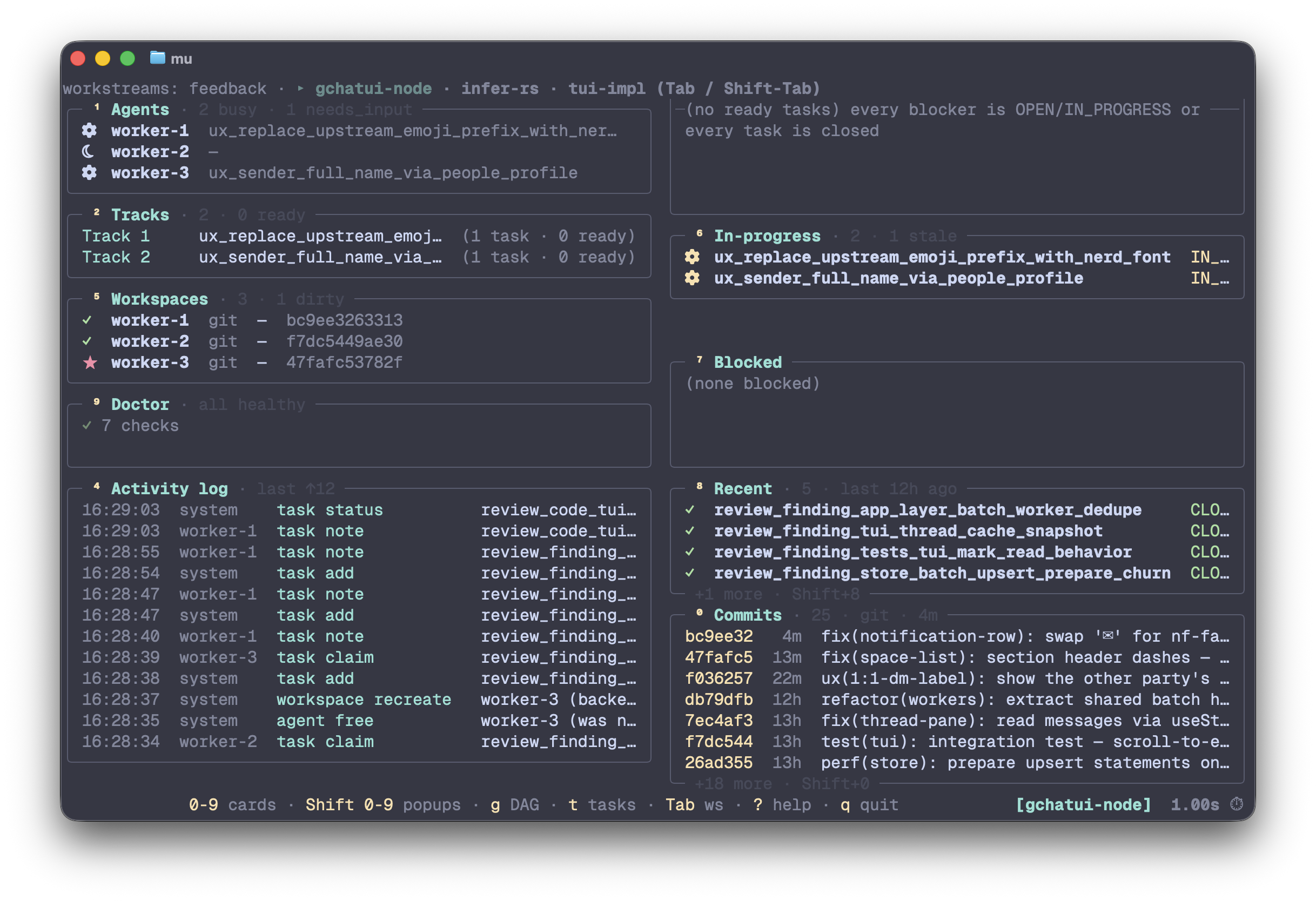
mu (no args) — read-only dashboard: agents, tracks, ready /
in-progress / blocked tasks, log tail, workspaces, doctor.
The core loop is: plan work as a DAG, spawn a small crew, and watch handoffs happen in tmux:
mu workstream init auth-refactor
mu task add --title "Design auth" --impact 80 --effort-days 2
mu task add --title "Build auth"  --impact 80 --effort-days 5 --blocked-by design_auth

mu agent spawn worker-1 --workspace
mu agent send worker-1 'Pick up the next ready task and design the auth module.'
mu                         # dashboard
Need one quick helper without the DAG? mu agent spawn scout-1 -w scratch gives you a low-ceremony agent you can still send/read/wait
on.
Nothing here is a black box. Agents are multiplexer panes you can attach to yourself, tasks live in a SQLite DAG, and workspaces are real jj workspaces / sl shares / git worktrees on disk. mu persists state and coordinates handoffs; the model still decides what to do.
For the full copy-paste flow, see Quick start.
What mu is
- Parallelism that doesn't trip over itself. Per-agent VCS workspaces plus a task DAG with deterministic parallel-track detection keep agents off each other's toes.
- A durable coordination layer. One SQLite registry records agents, tasks, ownership, notes and workspaces. A single append-only ops log records every change ever made to them, so panes can die and humans can come back later.
- Stay out of the model's way. Mu coordinates handoffs; it does
not choose models, providers, or thinking effort.
--cli <key>uppercases to$MU_<KEY>_COMMAND, so your shell rc owns the agent command. - Scriptable without scraping text. Every read path that matters has
--json, and every state change goes through a typed CLI verb; the dashboard is for humans, not the API. - A low-ceremony escape hatch. The reserved
scratchworkstream is there when you want one driveable helper without committing to a full task graph.
What mu is NOT
- Not a build tool. mu doesn't compile, test, or deploy anything.
- Not a chat protocol. Agents communicate via the work graph and the activity log, never agent-to-agent messaging.
- Not a verifier.
task close --evidence "tests pass"records the claim; mu doesn't run the tests. - Not a replacement for pi-subagents.
Mu agents are driveable panes; pi-subagents is for one-shot
focused delegation. See vs
pi-subagents. - Not a hosted service. Local-first SQLite.
- DB-undoable, not substrate-undoable. Every change is captured as ops
under one group, so
mu undo <group> --yesreverses exactly that one action — not your other workstreams. Killed panes and freed workspace dirs are NOT replayed; they aren't portable state.
When mu earns its overhead
Use mu for — multi-phase investigations; tasks worth gating with
review; parallel audit or implementation/reviewer splits with isolated
workspaces; anything where "what was decided and why" needs to outlive
a single agent's scrollback. Use scratch for the lighter adjacent
case: one helper or background watcher you still want to drive and
observe.
Don't use mu for — tiny direct edits; quick local inspection;
one-shot focused delegation where you only need a returned answer
(use pi-subagents); single-context work where durable coordination
adds ceremony.
Install
# 1. The CLI.
npm install -g @martintrojer/mu
mu --version

# 2. The skill (teaches your coding agent how to drive mu).
npx skills add martintrojer/mu          # auto-detects pi / claude-code / codex / etc.
# Add -g to install globally (~/.<agent>/skills/), -y to skip prompts.
Requirements:
- Node 22.12–24 (see
.nvmrc), matchingenginesinpackage.json. - A terminal multiplexer: tmux ≥ 3.0, or herdr
(
mu doctorreports which one is active). Spawn, send, read and status detection work on both; the remaining herdr gaps are narrow and listed in docs/USAGE_GUIDE.md § 20. - pi (the agent CLI mu orchestrates)
- For
--workspace: jj, sl, or git on PATH (or--backend none)
Optional — murmur, for more than one machine. Every coding agent on every machine in one attention-sorted list. mu deliberately does not track hosts or watch other machines; murmur does both, as a separate binary that owns the ssh egress.
# on every node that runs agents
npm install -g @martintrojer/murmur
murmur init          # this node's identity
murmur link pi       # the agent-side extension that reports state

# then, on whichever machine you watch from
murmur peer add dev  # an ssh target; identity is discovered
murmur peer list     # which hosts are reachable, and when last seen
Nothing to configure on mu's side: mu already exports
MU_MANAGED_AGENT / MU_AGENT_NAME / MU_WORKSTREAM
into every pane it spawns, so murmur marks those agents
orchestrated — "crew" — and hides them unless they are blocked or
crashed, since a supervisor consumes anything else. Useful for
picking a host before spawning a remote worker, and for spotting a
blocked agent on a machine you are not looking at.
Update: npm install -g @martintrojer/mu@latest for the CLI;
npx skills update mu for the skill.
Install from source (hacking on mu itself):
git clone https://github.com/martintrojer/mu
cd mu
npm install -g .                        # `prepare` script auto-builds; `mu` lands on $PATH
npx skills add ./skills/mu              # local-path source format
More install patterns (alias-to-dist for fastest dev iteration) in docs/USAGE_GUIDE.md § 1 Setup.
TUI dashboard
Bare mu in a TTY launches the read-only dashboard across all
workstreams; mu state --tui -w <workstream> is the explicit
single/multi-workstream form. Non-TTY callers and scripts keep the
static/help path, and mu state --json is the API.
The dashboard has ten cards: Commits, Agents, Tracks, Ready, Activity
log, Workspaces, In-progress, Blocked, Recent, and Doctor. Drill into
any numbered card fullscreen with Shift+0-Shift+9; g opens the
full DAG and t opens the all-tasks list. ? shows the complete
keymap. Keyboard and mouse both work: navigate with keys, double-click
cards or rows to drill, and scroll popup bodies with the mouse wheel.
The TUI is read-only by design. y yanks the canonical mu command
for the focused row to your clipboard; you run it in a shell, so every
mutation still goes through a short-lived typed CLI invocation. The
one exception is user-driven: t inside a commit/show drill suspends
mu's alt-screen and hands off to tuicr -r <sha>, then restores the
dashboard when tuicr exits.
Quick start
# Make sure you're inside a multiplexer. tmux is the common path;
# herdr works too (mu picks whichever it detects).
tmux

# Initialize the workstream (creates mux session mu-auth-refactor)
mu workstream init auth-refactor

# Plan the work as a DAG. IDs auto-derive from titles.
mu task add --title "Design auth module" --impact 80 --effort-days 2
mu task add --title "Build auth"         --impact 80 --effort-days 5 --blocked-by design_auth_module
mu task add --title "Review auth"        --impact 60 --effort-days 1 --blocked-by build_auth

# Spawn a crew with isolated workspaces.
mu agent spawn worker-1   --workspace
mu agent spawn reviewer-1 --workspace --role read-only

# Human home base: interactive read-only TUI across every workstream
# (same dashboard is explicit with: mu state --tui -w auth-refactor).
mu

# Agent/script API: static state stays explicit and JSON-friendly.
mu state -w auth-refactor --json

# Inside an agent's pane, the agent claims and closes tasks
# without ever knowing its own name (mu reads $TMUX_PANE).
mu task claim design_auth_module
mu task note  design_auth_module "DECISION: JWT, 24h expiry, refresh via cookie"
mu task close design_auth_module --evidence "design doc reviewed by reviewer-1"

# Subscribe to events instead of polling.
mu log --tail

# Cleanup. Dry-run without --yes; writes tombstone ops rather than
# erasing history, so `mu undo <group> --yes` still reverses it.
mu workstream teardown --yes
Worked end-to-end scenarios (first 5 minutes, the dispatch loop, laptop ↔ devserver, undo, drift): USAGE_GUIDE § 0. Common scenarios. Full tour: docs/USAGE_GUIDE.md.
Portability and handoff
State lives in one SQLite DB, and every change to it is captured as an op in an append-only log — so it travels, and it merges.
Multi-machine sync
Each machine keeps its own DB. They exchange append-only JSONL segments through any folder something else keeps in step (Syncthing, rsync, a USB stick — mu never runs the transport). Setup is one env var on each machine; there is no peer list, no daemon, no import step, and concurrent edits on two machines converge.
export MU_SYNC_DIR=$HOME/Sync/mu   # same folder on every machine
mu task add auth_fix -w app -t "Fix the auth redirect" -i 80 -e 2
#   → the next `mu` command on the other machine already sees it
mu sync                            # peer status, if you want to check
Never put MU_DB_PATH inside MU_SYNC_DIR — a live WAL database
is three mutually-consistent files and a file-syncer will corrupt it.
mu doctor fails on it. Full walkthrough:
USAGE_GUIDE § Multi-machine sync.
For disaster recovery, mu rebuild <file> replays the whole ops log
into a fresh DB and prints the swap command; mu undo <group> reverts
one past action by emitting inverse ops.
For a safety copy before anything destructive, mu db backup <file>
writes a VACUUM INTO copy of the whole DB. To read the graph out for
review or grep, every verb takes --json.
Remote workers
An agent can run on another machine with no mu changes and no remote backend: the pane is local, the process is remote.
ssh dev 'git -C ~/repo worktree add ~/ws/worker-1'
mu agent spawn worker-1 -w big --command \
  'ssh dev -t "cd ~/ws/worker-1 && pi --approve"'
# ... claim and send exactly as for a local agent, then collect:
git fetch "ssh://dev/~/ws/worker-1" HEAD && git cherry-pick FETCH_HEAD
Local and remote agents mix freely in one workstream. You create the
remote workspace yourself (--workspace is local-only) and mu keeps
no record of it, so read
skills/mu/REMOTE_WORKERS.md first — it
covers the traps, including the one where your own agent blocks your
git fetch behind a misleading Permission denied.
vs pi-subagents
pi-subagents |
mu |
|
|---|---|---|
| Best for | "Send this focused task to a specialist, return a result" | "Keep a driveable agent/persistent crew in a multiplexer" |
| Lifetime | one-shot per task | from off-the-cuff scratch helper to long-lived crew |
| Substrate | pi subprocess + result files |
tmux/herdr panes running pi sessions |
| Built-in task graph | no | yes: parallel-tracks union-find with diamond-merge |
| Drivable from outside pi | no (extension-only) | yes (mu is a real CLI) |
The two play well together. Use pi-subagents when you want one
focused answer back. Use mu's reserved scratch workstream when you
want a low-ceremony helper you can keep talking to. For coordinated
multi-agent work, graduate from scratch to a named workstream + task
DAG. See docs/USAGE_GUIDE.md.
Documentation
- docs/USAGE_GUIDE.md — practical tour of every verb. Start here.
- skills/mu/SKILL.md — what an LLM running inside an agent pane sees: the in-pane working loop, subscribe-vs-poll pattern.
- skills/mu/REMOTE_WORKERS.md — running agents on another machine over ssh: the recipe, and the traps that cost real debugging time.
- docs/ARCHITECTURE.md — module map, reconciliation algorithm, schema seam (surrogate INTEGER PKs + the SDK boundary discipline).
- docs/VOCABULARY.md — canonical terms; source of truth for every word in code, docs, error messages.
- docs/VISION.md — the load-bearing pillars
- the prior-runtime retrospective.
- docs/ROADMAP.md — what's next + the anti-feature pledges + explicitly-rejected ideas.
- CHANGELOG.md — release notes.
License
MIT.