@martintrojer/murmur
Agent state across every machine you work on, in one view.
Package details
Install @martintrojer/murmur from npm and Pi will load the resources declared by the package manifest.
$ pi install npm:@martintrojer/murmur- Package
@martintrojer/murmur- Version
0.5.1- Published
- Sep 16, 2026
- Downloads
- 1,868/mo · 382/wk
- Author
- martintrojer
- License
- MIT
- Types
- package
- Size
- 5.3 MB
- Dependencies
- 4 dependencies · 0 peers
Security note
Pi packages can execute code and influence agent behavior. Review the source before installing third-party packages.
README
murmur
Every coding agent you have running, on every machine, in one list.
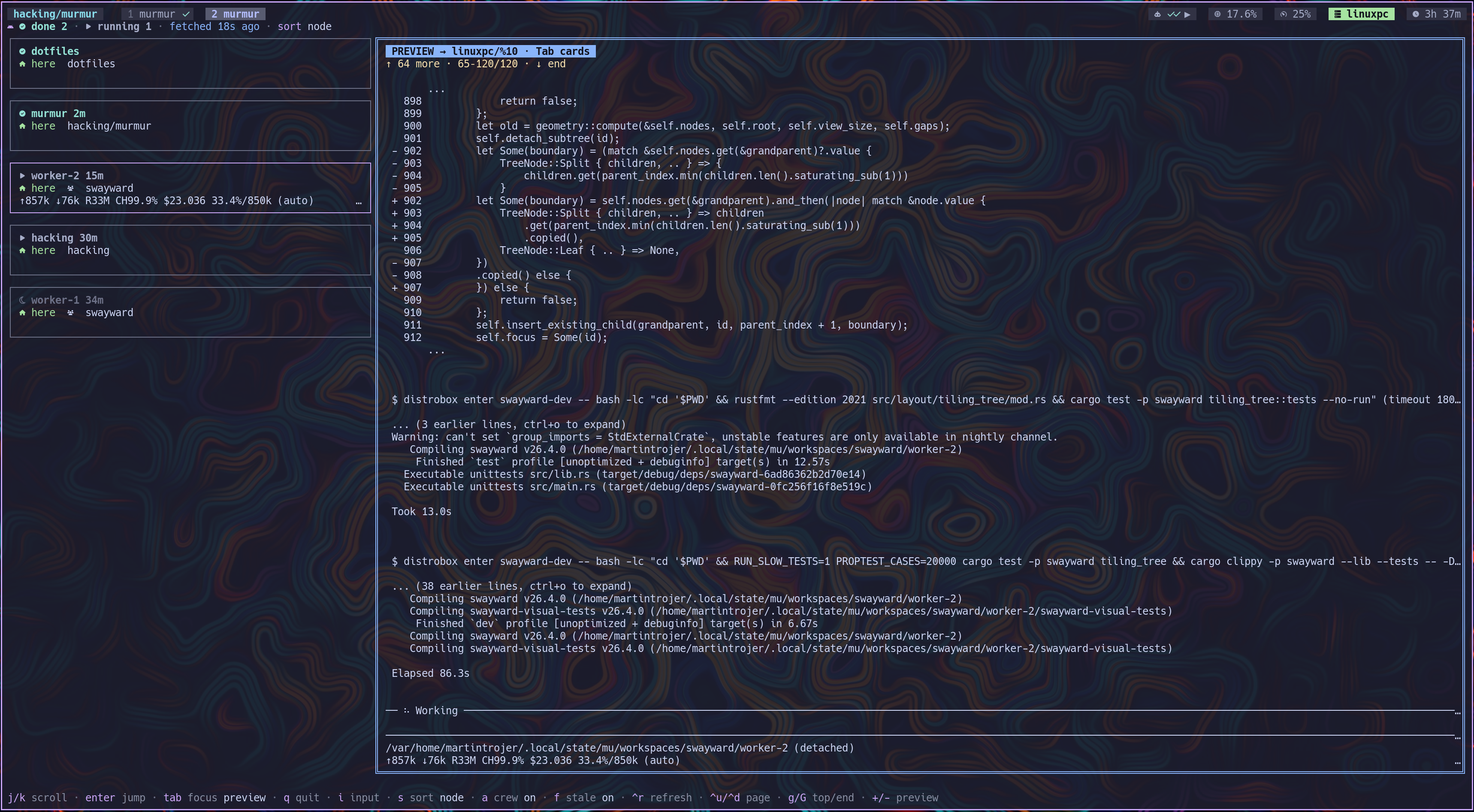
One agent is blocked waiting on you. Which machine is it on? murmur answers that and jumps you there.
Talk to any agent without leaving the dashboard—even when it runs on another
machine. Press i, write a prompt, and send it straight to the selected tmux
pane over SSH. Press ctrl-e to stop the agent. The dashboard stays open, so
you can move between agents without moving between terminals.
Surfaces
| Command | Job |
|---|---|
murmur status |
Attention-state rollups plus the total crew count for a tmux status bar |
murmur pick |
fzf jump list — type to narrow, enter jumps, ctrl-a / --all toggles crew |
murmur dash |
Watch and talk to local or remote agents without leaving the dashboard |
Orchestrated (crew) agents stay hidden from state rollups unless they are
blocked or crashed—their supervisor consumes anything else. murmur status
also emits their total as a separate crew record, including those urgent
agents. Local jump is a window switch; remote jump opens over ssh (or your
--jump-command).
murmur dash wants a Nerd Font and a Catppuccin
Mocha terminal. Press ? for its shortcut panel. / filters cards by agent,
workstream, session, host, or state; c toggles compact one-line rows. Press
i to compose a prompt for the selected local or remote agent. In input mode,
enter sends, ctrl-e stops the agent, and escape returns to the dashboard.
s node sort is local cards first, then remotes A–Z.
Install
Needs tmux, pi, fzf, and
Node 20+. Multi-machine: ssh access, murmur on each node.
On every node that runs agents:
npm install -g @martintrojer/murmur
murmur init      # this node's identity
murmur link pi   # install the agent-side extension
Agents must run inside tmux. A tmux server plus pane id is the address;
without one there is nothing to jump to. Remote agents need tmux on the remote
too — the jump uses
ssh -t <host> env LC_CTYPE=C.UTF-8 tmux attach unless you override it.
Add focus hooks so looking at a finished agent clears its badge — see docs/setup.md. Wire Codex / Cursor / opencode notify hooks in the same file.
PREFIX G returns you to the dash from anywhere: it switches to the running
dash, or leaves a murmur-controlled remote session so the local client comes
back on its own — see
docs/setup.md.
Watch more than one machine
murmur peer add devbox
murmur doctor            # is peering mutual?
bind -N "agent state picker" a display-popup -E -w 80% -h 60% "murmur pick"
bind -N "go to murmur dash" G run-shell -b "murmur dash --goto"
Peering is one-way until both sides add each other. Hard ssh cases (second
factor / BatchMode, MaxSessions 1, Eternal Terminal): SSH.md.
What it is / is not
- Is: a state layer over tmux — reported from inside the agent, pulled peer-to-peer over ssh. No daemon. Current snapshot only; a peer answer is replaced whole, and absence means absence. Nothing murmur stores or sends is read out of a terminal; the one exception is cosmetic, and the dashboard labels it: for an agent that reports no model or context, the selected card falls back to summarising that pane's own output.
- Is not: an orchestrator (
muplaces work), a remote terminal, or a multiplexer replacement.
Docs
| Doc | For |
|---|---|
| docs/setup.md | Hooks, harness notify, peers, doctor, jump |
| SSH.md | Auth, session caps, control masters |
| ARCHITECTURE.md | Model, design choices, gaps |
| docs/VOCABULARY.md | Protocol and identity terms |
| AGENTS.md | Repo gate for agents working on murmur |
0.5.1. Ready for daily use. Known gaps live at the end of ARCHITECTURE.md.