@maxiaochao/pi-background-tasks
Session-scoped background shell tasks with completion notifications for Pi.
Package details
Install @maxiaochao/pi-background-tasks from npm and Pi will load the resources declared by the package manifest.
$ pi install npm:@maxiaochao/pi-background-tasks- Package
@maxiaochao/pi-background-tasks- Version
0.3.0- Published
- Nov 3, 2026
- Downloads
- 628/mo · 414/wk
- Author
- maxiaochao
- License
- unknown
- Types
- extension
- Size
- 5.6 MB
- Dependencies
- 0 dependencies · 4 peers
Pi manifest JSON
{
  "extensions": [
    "./extensions/background-tasks.ts"
  ]
}
Security note
Pi packages can execute code and influence agent behavior. Review the source before installing third-party packages.
README
Pi Background Tasks
Run shell commands in the background, then notify the main agent of completion and the captured log location. These are local processes, not subagents.
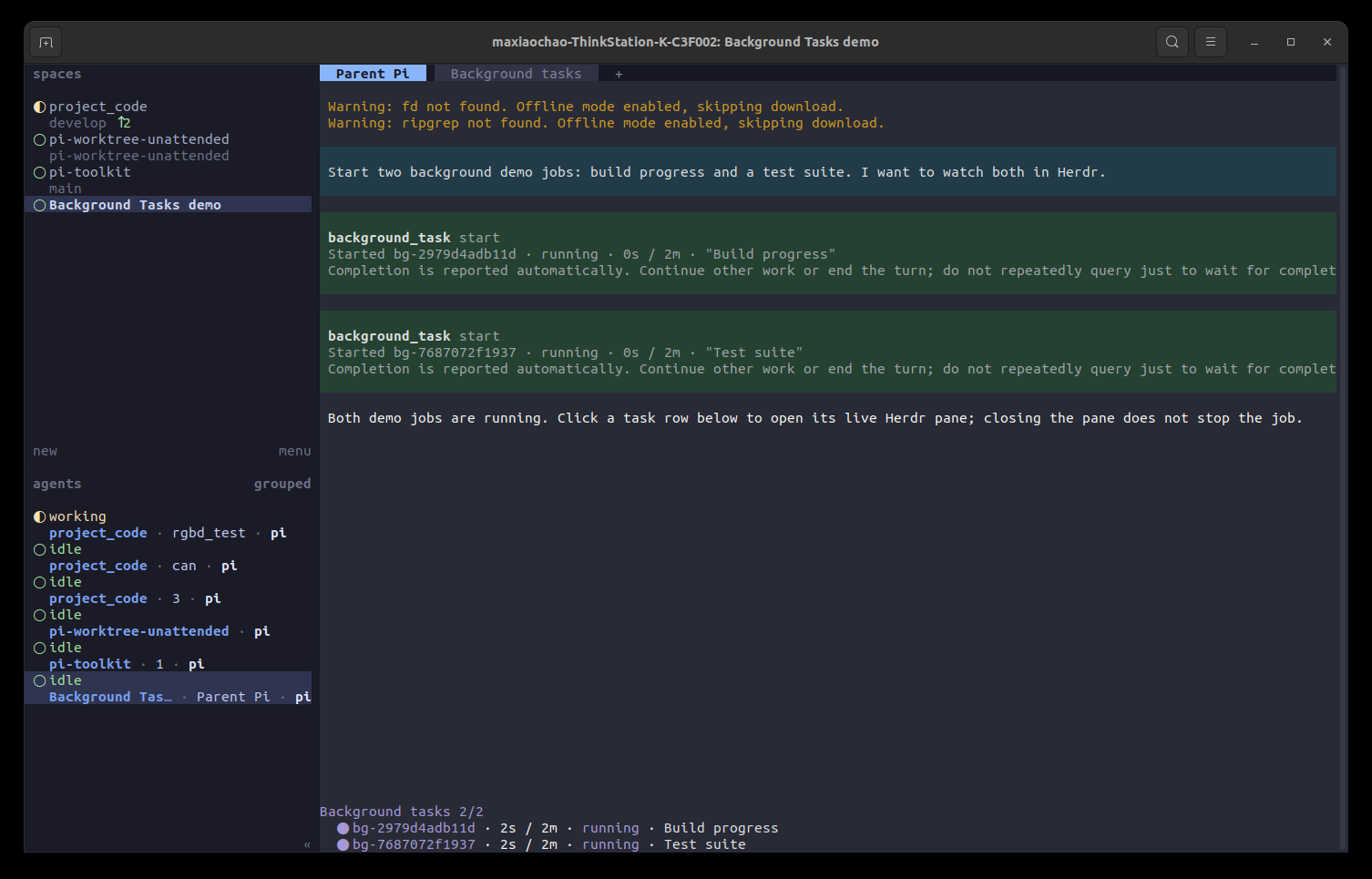
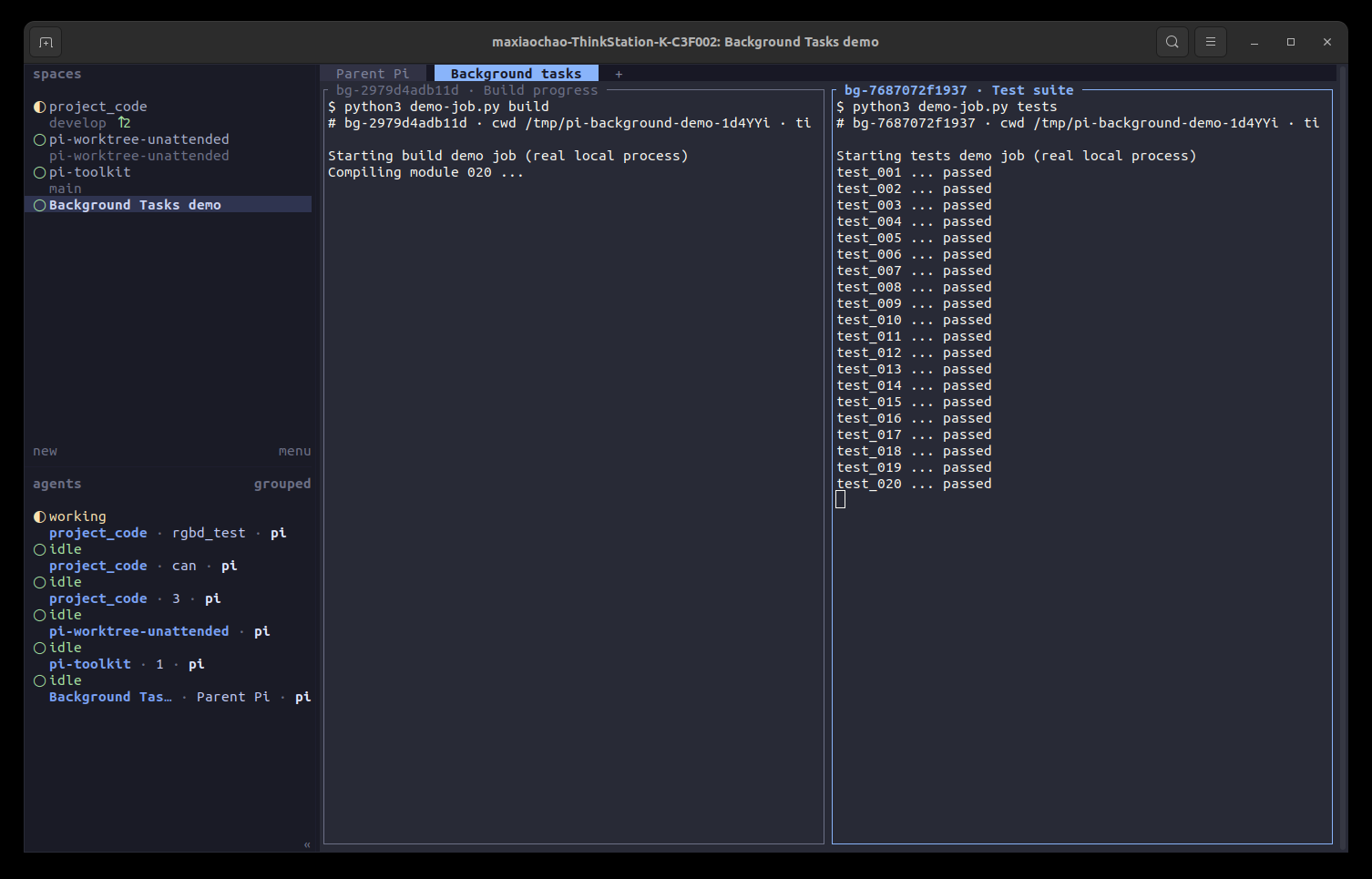
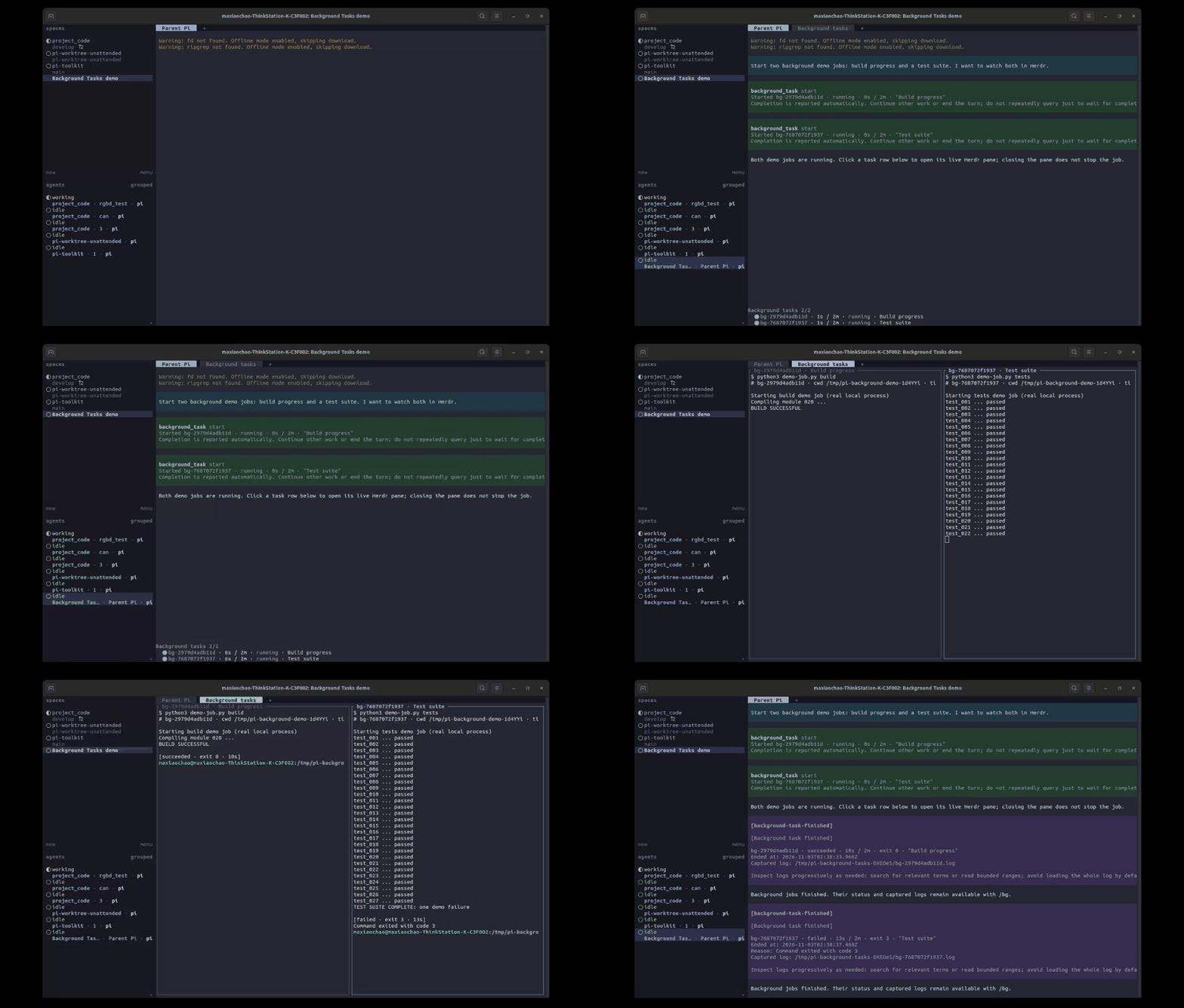
Watch the full recording (WebM).
The recording uses an offline fixture provider to start two real local demo jobs: an in-place build counter and a streaming test log. It captures the production extension in a real Pi TUI and a temporary Herdr workspace, including clicks on both widget rows, the exact pane focus, success/failure results, and automatic tab cleanup. No paid model or user credentials are used.
Why
A command such as sleep 60; python3 ... can spend most of its time waiting to check a build log. A normal Bash call keeps waiting for that command. This package returns a task ID immediately so the main agent can do other work.
It uses Pi's public createLocalBashOperations() backend for shell execution and process-group cancellation. It adds session ownership, bounded logs, status, and completion messages. It neither replaces Bash nor starts another model. Inside Herdr, it also opens a read-only pane per task so the user can watch the command and its live output; the command still runs locally, not in that pane.
Completion delivery follows oh-my-pi's yield-queue approach: retain results, combine them at a safe boundary, and filter consumed results before delivery. This package uses Pi's public extension API, not patched host code; a local idle retry covers busy operations that expose no final agent boundary. Prompt timing is informed by OMP’s background-start notice, but delivery is deliberately different: this package sends status and log paths only, not OMP-style automatic command-output injection. Agents inspect captured logs progressively when needed.
Install and update
Requires Pi 1.3.0 or later.
pi install npm:@maxiaochao/pi-background-tasks
pi update npm:@maxiaochao/pi-background-tasks
The complete @maxiaochao/pi-toolkit package bundles and enables Background Tasks by default. Choose either the toolkit or this standalone package; do not install both, because the tool and /bg command would be registered twice.
Agent tool
background_task({ action: "start", command: "sleep 10; printf 'checks complete\\n'", description: "Delayed check", timeout: 120 })The tool is fixed to exposure: "model-only": the model calls it directly; Codemode and other tools cannot call it. There is no exposure setting.
The tool declaration describes automatic completion notifications, concurrency and session lifetime. The action parameter explicitly permits list and output while tasks are still running. Each accepted start returns only its task data and this short, task-specific reminder:
Completion is reported automatically. Continue other work or end the turn; do not repeatedly query just to wait for completion.
The whole reminder is not duplicated in the tool description or a structuredContent.guidance field. Start text does not advertise a full-log path; structured task metadata still retains log_path.
Inspect a running or finished task whenever its output is needed; no completion or timeout notification is required:
background_task({ action: "output", id: "<returned-task-id>" })Use list to inspect task status at any time, including while tasks are running. These are agent-callable actions, not only user /bg commands. Query on demand rather than repeatedly checking just to wait. After completion, use the reported log path to search relevant terms or read selected ranges; avoid loading the entire log by default. The tool also supports cancellation:
background_task({ action: "list" })
background_task({ action: "cancel", id: "<returned-task-id>" })
Start returns a running task's ID and runtime limit, not the command's final output. An invalid start is rejected before execution. A later execution error becomes a failed task.
command: unchanged multi-line shell script; only for start.description: optional display label, shortened to 200 characters.cwd: optional directory, resolved relative to the current session directory.timeout: integer seconds, 1800 by default, from 1 through 7200. Zero and unlimited mode are rejected.id: required for output and cancel. IDs belong only to their originating session.
At most two tasks run at once. A third request fails immediately; it is not queued. Cancelling waits for process cleanup. Cancelling an already-ended task returns its status without another completion notification.
List shows running tasks and the latest 20 finished tasks, with total and omitted counts. Older logs remain queryable by their IDs until the session closes.
User controls and status
/bg
/bg list
/bg output <returned-task-id>
/bg cancel <returned-task-id>
/bg watch <returned-task-id>
The commands inspect the same jobs without asking a model to perform the operation. Start a command through the agent tool; there is no second shell parser in /bg.
A fixed widget above the editor shows each task's ID, status, elapsed time, runtime limit and description. It coexists with Scheduler, Todo, and Herdr widgets. Finished rows remain for five seconds; hiding a row does not delete its record. RPC gets a compact active count; non-interactive tools work without the widget.
Herdr task view
When Pi runs inside Herdr (HERDR_ENV=1 and HERDR_WORKSPACE_ID set), each started task also gets a pane in one Background tasks tab:
- The tab is created on the first start without taking focus, and holds at most two panes, one per running task. A new task reuses the pane of a finished one.
- Each pane prints the command (
$ ...), cwd and runtime limit, then follows the task's captured log withtail -f. Line output and\rprogress updates appear live. When the task ends, the pane prints a result line such as[failed · exit 4 · 6s]. - The pane is a viewer only. The task runs through the same local backend as outside Herdr, with the same logs, limits, status and notifications. The command has no TTY, so tools that detect one may drop colour or animated progress bars.
- Closing a pane, or the whole tab, does not cancel the task. Clicking a task row in the widget (Pi 1.4+ fullscreen mode) or
/bg watch <id>reopens the pane if needed and focuses that tab and pane; use/bg cancel <id>to stop the task. - When no task runs any more, the tab closes. If the user is looking at it, it closes after focus moves to another tab. Session shutdown, reload and replacement close it immediately, together with the logs.
- Herdr subagent children (
PI_HERDR_SUBAGENTS_CHILD=1) open no view; their tasks remain visible in the child's own widget. RPC and print modes open no view either. - A failed Herdr call shows one warning. Tasks keep running and the widget stays current.
There is no setting to turn the view off.
Completion, failure, cancellation, timeout and output-limit termination update the widget immediately. The extension holds pending completion metadata until it can deliver it safely:
- While the main agent is busy, completions are combined into a bounded message after the current tool batch returns, before the next model request. This includes waiting for a synchronous Herdr subagent; it does not cancel or interrupt that subagent.
- While idle, pending completions are combined on the next event-loop tick and wake the main agent once. Oversized metadata batches remain pending for later safe boundaries rather than being dropped. Jobs that finish after that batch can produce another notification. Pi's global steering/follow-up queue settings are unchanged.
- If another operation such as manual compaction keeps the session busy without an agent boundary, one local timer retries after 1, 2, 4, 8, 16, then 30 seconds, staying at 30 seconds thereafter. There is no retry-count limit or expiry that discards unread results. This does not call a model or poll shell output.
- Normal tool/settlement boundaries still deliver immediately, without waiting for the retry timer. Without a boundary, an idle session can wait up to the current retry interval (at most 30 seconds, subject to native timer delays). Once a batch is delivered or fully consumed, the next batch starts with an immediate check and fresh backoff.
- A successful tool
outputread of a finished task consumes its pending reminder, including failed tasks. A running snapshot,list, a failed log read, or a user/bg outputinspection does not consume the main agent's reminder. Consumption does not mean the task passed validation. - Aborted/error boundaries do not request continuation or replay a previously scheduled wake. An error does not suppress later completions.
- A user interrupt keeps the agent stopped: accepted jobs still run, but even later completions cannot restart it. Unread results remain queryable and are handed to the next user-message run before its first model request. Another extension's custom wake does not release this interrupt state; a new user-message run or session replacement does. This adds no notification pause switch.
- Cancelling manual compaction is separate from interrupting the agent. Pending completions still wake an otherwise-idle session after compaction succeeds, fails or is cancelled.
Pi's public interrupted-run event does not include the abort reason. In particular, starting /compact during an active run first interrupts that run. This package preserves that interruption until the next user-message run; it does not infer that compaction grants permission to restart the agent. Compaction started while already idle does not create this interrupted-run state.
Each completion message includes task status, exit code when available, actual end time, reason when applicable and the captured log path, followed by:
Inspect logs progressively as needed: search for relevant terms or read bounded ranges; avoid loading the whole log by default.
No stdout/stderr body, automatic preview or generated log summary is included. Building a notification does not open the log file. Agents may filter the reported file directly or call output for a bounded snapshot; no notification is required for running-task inspection either. Missing log files are reported only when an inspection is requested, not by silently changing task status during notification.
Status/path batches have a defensive 16-KiB model-visible text cap. Tasks that cannot fit remain pending for the next safe boundary; this is a metadata backlog guard, not a log-preview allowance. There is no automatic log-output budget because no log bodies are attached. Captured files remain until session cleanup.
Completions that arrive near final settlement are checked again before the run settles. No per-task followUp messages are left behind the main agent’s final report.
Pi reports asynchronous message/run-start failures through its extension error channel. This extension does not automatically replay a message after such a failure; task metadata and captured logs remain queryable for the lifetime of the session.
Output and safety limits
| View | Limit |
|---|---|
| Model-visible output body | Last 100 lines or 8 KiB, whichever is reached first |
structuredContent.output |
The same bounded tail; no separate 1 MiB program view |
| Automatic completion log bodies | None; only status, log paths and progressive-inspection guidance |
| Completion status/path text | 16 KiB defensive batch cap; remaining tasks stay pending |
| Disk capture | 32 MiB per task, 256 MiB total per session |
Preview truncation does not stop the command. Disk limits do stop the overflowing task with output_limit; a full session budget rejects new starts. Nothing silently evicts old logs.
Output includes a log path for further reads. truncated describes the shared preview, not disk capture. The preview includes omission information and total lines/bytes; the task includes captured byte count and a full-log path for targeted follow-up reads. A smaller preview can miss an earlier root cause; use a focused search when it does. task.capture_complete is false while running or when log data was lost. The states are running, succeeded, failed, cancelled, timed_out and output_limit.
Output streams to private temporary logs (directory 0700, files 0600 on Unix), with bounded memory and range-limited reads. Log errors stop the task and are reported. Stdout and stderr are merged; strict ordering across the two streams is not promised. Logs and command arguments can contain secrets: avoid commands that print credentials or other sensitive data, and inspect captured content only when needed.
Bash and background execution
Use Bash when you need a command's result before proceeding. Use background_task directly when the command should keep running after the model's turn ends. Completion notifies the model automatically. Inspect status with list or logs with output on demand, including while running and before any notification; do not add sleep or repeated polling to wait for completion.
Codemode cannot call this model-only tool. Starting an unawaited Bash call in Codemode is not a substitute: Codemode cancels unfinished nested calls when its script ends.
The tool description is compact. This package adds no promptGuidelines or extra global system-prompt rules.
Lifetime and scope
- Exit, new/resumed/forked sessions and reload terminate active tasks, remove the widget and timers, and delete this package's captured logs. Commands' own files are left alone. History is not restored.
- Aborting the main agent's current turn does not cancel an accepted job, but its completion cannot automatically restart the interrupted agent. Use cancel or
/bg cancelto stop the job itself. - Cancellation and runtime limits stop the native shell process group. Scripts must wait for their own work. Daemonized/detached commands (
nohup,setsid, self-backgrounding processes), existing PID adoption, PTYs and interactive stdin are not supported. - This is a distinct local execution tool. A third-party sandbox or remote backend installed only for Bash does not automatically cover it. Enable it only where direct local shell execution is permitted.
- It is not an OS sandbox: CPU/memory quotas, cleanup after SIGKILL/power loss, automatic retries, deadline renewal and persistence are out of scope. Native signal delivery and timers are best-effort.
- Pending reminders and notification timers are cleared on session shutdown. Once a completion is delivered into conversation history, reading output does not erase that history. Messages queued by an older installed version cannot be selectively withdrawn by this version.
Remove
For a standalone installation:
pi remove npm:@maxiaochao/pi-background-tasksWith the toolkit, disable its Background Tasks extension through pi config instead of removing a separate package.
For deterministic, real-process, real-TUI and media checks, see TESTING.md.