@maxiaochao/pi-herdr-subagents
Run inspectable interactive Pi subagent batches through Herdr.
Package details
Install @maxiaochao/pi-herdr-subagents from npm and Pi will load the resources declared by the package manifest.
$ pi install npm:@maxiaochao/pi-herdr-subagents- Package
@maxiaochao/pi-herdr-subagents- Version
0.6.0- Published
- Oct 15, 2026
- Downloads
- 2,673/mo · 2,673/wk
- Author
- maxiaochao
- License
- unknown
- Types
- extension
- Size
- 6.7 MB
- Dependencies
- 0 dependencies · 4 peers
Pi manifest JSON
{
  "extensions": [
    "./extensions/herdr-subagents.ts"
  ]
}
Security note
Pi packages can execute code and influence agent behavior. Review the source before installing third-party packages.
README
Herdr Subagents
Run focused Pi subagents in visible, focusable Herdr panes and collect exactly one terminal result per task.
The implementation is intentionally small: one task state machine, one derived run state, and one bounded worker pool. Herdr provides visible panes and navigation; the package only dispatches serial or read-only parallel work, waits for a report, and records the result. It does not add a second workflow engine around Pi.
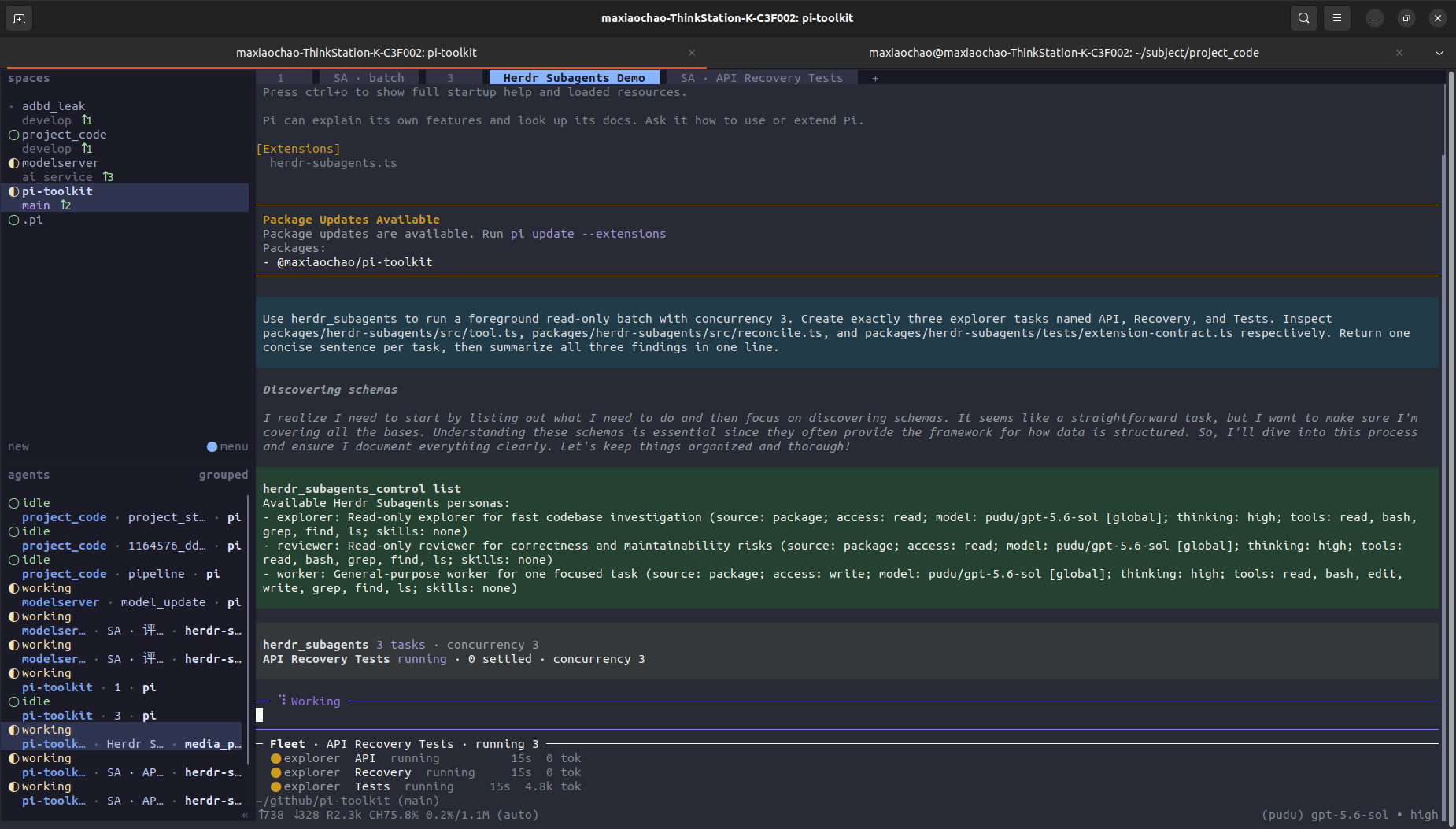
Demo
https://github.com/user-attachments/assets/8ddf3ae6-a11a-492b-9cae-d9496ba65b67
The reproducible source recording is retained as docs/demo.webm.
Requirements and install
Run Pi inside a Herdr workspace, then install the standalone package:
pi install npm:@maxiaochao/pi-herdr-subagentsUpdate it with pi update npm:@maxiaochao/pi-herdr-subagents. The full @maxiaochao/pi-toolkit package already bundles this extension, so install the toolkit or this standalone package, not both.
The tools and command are registered only when Pi is running inside Herdr with a workspace ID. If they are unavailable after entering Herdr, use /reload or restart Pi there.
Execution contract
herdr_subagents accepts an ordered, non-empty tasks array. Every task must explicitly set agent; there is no default Persona.
concurrency: 1runs tasks strictly in input order.concurrency: Nruns at most N read-only tasks at once.- A run containing a write-capable persona must use
concurrency: 1; unsafe parallel writes are rejected. - One task failing does not cancel its siblings.
- The tool returns only after every task is
completed,failed, orcancelled. - There is no background queue, blocked/respond flow, automatic resume, or early failure detach.
{
  "label": "review",
  "concurrency": 2,
  "tasks": [
    { "name": "api", "prompt": "Review the API boundary.", "agent": "reviewer" },
    { "name": "tests", "prompt": "Find missing test coverage.", "agent": "explorer" }
  ]
}
Each task starts a single-task interactive Pi process in its own Herdr pane. Herdr first confirms the interactive Pi is ready, then the prompt is delivered exactly once. Prompt acknowledgement never decides task completion. Panes remain ordinary Herdr panes: they can be focused and inspected while work is running or after it settles. An early-finishing child stays at the Pi UI while sibling tasks continue. After the whole run settles, cleanup closes an unfocused run tab immediately or waits for the user to leave a focused run tab.
Cleanup belongs to the Pi session that created the run. Starting a new Pi session never scans historical runs or closes their recorded Herdr tabs. If Pi terminates before shutdown cleanup runs, any surviving Subagent tab remains visible for explicit inspection or cleanup.
Result protocol
The child must call subagent_report once with a terminal status:
completed: the requested work finished.failed: it cannot be completed; includeerror.
The complete result is stored on disk. The parent receives only the compact summary and document paths.
The child UI renders only the report status and saved size instead of echoing the complete result argument. The parent-facing tool result includes one complete-result path per task; additional consulted-document metadata remains in the durable report.
An atomically renamed attempt report is the authoritative completion signal. Herdr states such as idle, blocked, and done are wake-up hints only. A prompt transport error or Pi retry cannot fail a task while its child process remains alive. If the process exits without a valid report, the task fails explicitly.
Duplicate identical reports are idempotent. A conflicting report for the same task attempt is rejected. Terminal task records are immutable.
State model
The same small state machine is used for every task; there are no separate foreground, background, blocked, resumed, or retry lifecycles.
New task records use:
queued -> running -> completed | failed | cancelledA run is running while any task is queued or running. Settled aggregate states are completed, failed, partial, or cancelled.
Older records containing starting or blocked remain readable for history and cleanup, but new runs never write those states.
Durable records
Records are stored under:
.pi/herdr-subagents/runs/<sortable-run-id>/
  run.json
  tasks/<order>-<task-id>/
    task.json
    session.jsonl
    system-prompt.md
    report.json
    reports/<attempt-id>.json
    results/<attempt-id>.md
The orchestrator is the only writer of run.json, task.json, and promoted report.json. The child only writes its attempt-scoped result and report.
Tools and UI
herdr_subagents
Starts one ordered batch and waits until every task reaches a terminal state. Its parameters are:
| Field | Required | Default | Purpose |
|---|---|---|---|
tasks |
Yes | — | Non-empty ordered task array. |
label |
No | "batch" |
Short Herdr run-tab label, at most 48 characters. |
concurrency |
No | defaultConcurrency |
Maximum number of simultaneously active read-only tasks. It is capped by maxConcurrency. |
tasks[].name |
Yes | — | Short pane/task name, at most 48 characters. |
tasks[].prompt |
Yes | — | Self-contained task instructions. |
tasks[].agent |
Yes | — | Effective Persona name; use control list to inspect available Personas. |
tasks[].model |
No | Persona/default model | Model override for this task. |
A batch containing a write-capable Persona must explicitly or effectively use concurrency: 1; an unsafe parallel request is rejected.
herdr_subagents_control
| Action | runId |
Purpose |
|---|---|---|
list |
Not accepted | List effective Personas, resolved options, and diagnostics. |
status |
Required | Show one run and its task states. |
history |
Not accepted | List durable project-local run history. |
cancel |
Required | Cancel an active run. |
cleanup |
Required | Remove one archived run. |
Settled tasks are immutable. Follow-up work starts a new task or run; there is no resume/respond lifecycle.
Slash command
/herdr-subagents supports:
| Command | Purpose |
|---|---|
active |
Show the current run. This is also the default with no argument. |
history |
Show project-local history. |
focus <task-number> |
Focus a running task pane. |
agents |
Show effective Persona source, access, model, thinking, tools, skills, and extensions. |
models |
List authenticated Pi models. |
settings |
Show effective settings, their sources, and configuration diagnostics. |
Configuration and Personas
Settings and Persona definitions are separate:
| Scope | Settings file | Persona directory |
|---|---|---|
| Project | <project>/.pi/herdr-subagents.json |
<project>/.pi/herdr-subagents/agents/*.md |
| Global | ~/.pi/agent/herdr-subagents.json |
~/.pi/agent/herdr-subagents/agents/*.md |
| Package | Built-in defaults | Installed package agents/*.md |
For JSON settings, project fields override global fields, which override built-in defaults. personas entries merge by Persona name and then by field; array values replace lower-precedence arrays rather than appending to them.
Persona Markdown uses whole-definition replacement instead of field merging. A same-name definition is selected in this order:
- project Persona
- global Persona
- package Persona
Complete settings reference
These are all supported top-level fields in herdr-subagents.json:
| Option | Accepted value | Built-in default | Purpose |
|---|---|---|---|
exposure |
"model-only" or "direct" |
Unset (inherit Pi; currently direct) |
Controls whether the two tools may be called only by the top-level model or also by nested tools such as Codemode. |
defaultConcurrency |
Positive integer | 1 |
Concurrency used when a call omits concurrency; capped to maxConcurrency. |
maxConcurrency |
Positive integer | 4 |
Hard ceiling for requested/default read-only concurrency. It does not make write-capable batches safe. |
stalledWarningSeconds |
Positive integer | 300 |
Emit a warning after a child runs this long. This is not a timeout and does not stop it. |
defaultModel |
Non-empty Pi model ID, normally provider/model |
Unset | Fallback child model. If unset, the parent model is inherited. |
defaultThinking |
Non-empty Pi thinking value | Unset | Fallback thinking level below Persona-specific settings. Typical Pi values are off, minimal, low, medium, high, xhigh, and max; model support varies. |
personas |
Object keyed by an existing Persona name | {} |
Per-Persona overrides. It cannot create a Persona without a matching Markdown definition. |
Each personas.<name> object supports:
| Option | Accepted value | Purpose |
|---|---|---|
model |
Non-empty Pi model ID | Override the model from Persona Markdown and defaultModel. |
thinking |
Non-empty Pi thinking value | Override Persona Markdown and defaultThinking. |
skills |
Array of non-empty strings | Replace the lower-precedence explicit skill list. Use [] to clear it. |
extensions |
Array of non-empty Pi source strings | Replace the lower-precedence extension-source list. Use [] to clear it. |
JSON overrides cannot change a Persona's name, description, access, tools, or system prompt; those belong in its Markdown definition.
Invalid known values are ignored and reported by /herdr-subagents settings or the control tool's list action. If defaultConcurrency exceeds maxConcurrency, the effective default is reduced to the maximum. Model IDs, thinking compatibility, skills, and extension sources are ultimately resolved by child Pi.
Exposure
Use the restrictive mode when only direct model calls should be allowed:
{
  "exposure": "model-only"
}model-only: the top-level model may call the tools, but Codemode scripts and other tools cannot invoke them as nested tools.direct: allow both top-level and nested calls explicitly.- omitted: do not set an exposure during registration; inherit Pi's default behavior.
exposure is read once when the extension registers. After changing it, use /reload or restart Pi. Other settings and Persona files are re-read at the start of each new tool call; they do not modify an already running task.
Complete global example
Save this as ~/.pi/agent/herdr-subagents.json. Model IDs, skills, and extension sources are illustrative and must exist in your Pi environment.
{
  "exposure": "model-only",
  "defaultConcurrency": 2,
  "maxConcurrency": 4,
  "stalledWarningSeconds": 300,
  "defaultModel": "anthropic/claude-sonnet-4-5",
  "defaultThinking": "medium",
  "personas": {
    "explorer": {
      "model": "anthropic/claude-haiku-4-5",
      "thinking": "low",
      "skills": ["code-search"],
      "extensions": ["~/.pi/agent/extensions/provider-routing.ts"]
    },
    "reviewer": {
      "thinking": "high",
      "skills": ["code-review"],
      "extensions": []
    }
  }
}
A project can override only what differs in .pi/herdr-subagents.json:
{
  "defaultConcurrency": 3,
  "stalledWarningSeconds": 600,
  "personas": {
    "explorer": {
      "model": "openai/gpt-5.2",
      "skills": []
    },
    "reviewer": {
      "extensions": ["npm:@example/pi-review-tools@1.0.0"]
    }
  }
}
Here the project keeps global maxConcurrency, defaultModel, and defaultThinking; replaces the explorer model and skill list; and replaces the reviewer extension list. It does not append arrays.
Built-in Personas
None of the bundled Personas pins a model, thinking level, skill, or optional extension. Those values come from configuration or parent-session inheritance.
| Persona | Access | Built-in tools | Intended use |
|---|---|---|---|
worker |
write |
read, bash, edit, write, grep, find, ls, codemode |
One focused implementation or other file-changing task. |
explorer |
read |
read, bash, grep, find, ls, codemode |
Fast codebase investigation without file changes. |
analyst |
read |
read, bash, grep, find, ls, codemode |
Neutral analysis where the task prompt supplies the role and evaluation method. |
reviewer |
read |
read, bash, grep, find, ls, codemode |
Correctness and maintainability review with actionable evidence. |
access is a scheduling declaration: any write Persona requires serial execution. It is not by itself a sandbox. For a custom read-only Persona, also omit write-capable tools and load only trusted extensions.
Custom Persona example
Save the following as .pi/herdr-subagents/agents/security-reviewer.md (or in the global Persona directory):
---
name: security-reviewer
description: Read-only reviewer for security risks
access: read
model: anthropic/claude-sonnet-4-5
thinking: high
tools: read, bash, grep, find, ls, codemode
skills: security-review, code-review
extensions: ~/.pi/agent/extensions/provider-routing.ts
---

Review the assigned scope without modifying files. Separate confirmed vulnerabilities from hypotheses and cite concrete evidence.
The Markdown body is the child system prompt. Frontmatter is intentionally a small single-line format, not full YAML:
| Field | Accepted value | Required/default | Purpose |
|---|---|---|---|
name |
Non-empty string | Required | Identifier used by tasks[].agent; unique within one directory. |
description |
Non-empty string | Required | Description shown by Persona listings. |
access |
read or write |
write |
Scheduling safety declaration. |
model |
Non-empty Pi model ID | Unset | Persona model default. |
thinking |
Non-empty Pi thinking value | Unset | Persona thinking default. |
tools |
Non-empty comma-separated list, optionally [bracketed] |
Pi child defaults | Built-in-tool allowlist. Supported names: read, bash, edit, write, grep, find, ls, powershell, codemode. subagent_report is always added. |
skills |
Comma-separated list, optionally [bracketed] |
None | Explicit child skills; normal automatic skill discovery is disabled. |
extensions |
One source or a comma-separated list; [] clears |
None | Additional Pi extension/package sources loaded into the child. |
Relative extension paths resolve from the project root. ~ resolves to the home directory. Pi-native local, npm:, git:, and builtin: sources are accepted. Children always load the required report extension and Codemode; configured sources are additional. Pi packages may provide resources beyond extensions, so load only trusted code and pin versions/refs when reproducibility matters.
Effective option precedence
The child model is selected in this order:
tasks[].model- project
personas.<name>.model - global
personas.<name>.model - effective Persona Markdown
model - effective
defaultModel(project, then global) - parent Pi model
Thinking is selected in this order:
- project
personas.<name>.thinking - global
personas.<name>.thinking - effective Persona Markdown
thinking - effective
defaultThinking(project, then global) - parent thinking when the child also inherits the parent model
There is no task-level thinking override. skills and extensions use project Persona JSON, then global Persona JSON, then effective Persona Markdown. Each winning list replaces the whole lower-precedence list.
Use /herdr-subagents agents, /herdr-subagents models, and /herdr-subagents settings to inspect the result before starting work.
Development and tests
See TESTING.md for deterministic tests, extension loading, packaging, and real Herdr smoke requirements. The real smoke preserves your configured analyst model, thinking level, and explicit extensions (including authentication providers) inside its isolated fixture; unrelated Persona settings remain isolated.