@mazurovn/mazzy-vpn-pi
Mazzy VPN extension for pi — connect to and manage Mazzy VPN from inside pi: auto-connect, live status widget, monitor + auto-reconnect, and LLM-callable tools to connect/switch/disconnect/recover/verify (bypass blocks). Drives the mazzy-vpn Go CLI.
Package details
Install @mazurovn/mazzy-vpn-pi from npm and Pi will load the resources declared by the package manifest.
$ pi install npm:@mazurovn/mazzy-vpn-pi- Package
@mazurovn/mazzy-vpn-pi- Version
0.1.3- Published
- Aug 20, 2026
- Downloads
- 650/mo · 15/wk
- Author
- mazurovn
- License
- PolyForm-Noncommercial-1.0.0
- Types
- extension
- Size
- 107.5 KB
- Dependencies
- 0 dependencies · 2 peers
Pi manifest JSON
{
  "extensions": [
    "./index.ts"
  ],
  "image": "https://raw.githubusercontent.com/mazurovn/mazzy-vpn/pi-ext-v0.1.3/pi-extension/assets/screenshot.png"
}Security note
Pi packages can execute code and influence agent behavior. Review the source before installing third-party packages.
README
Mazzy VPN — pi extension
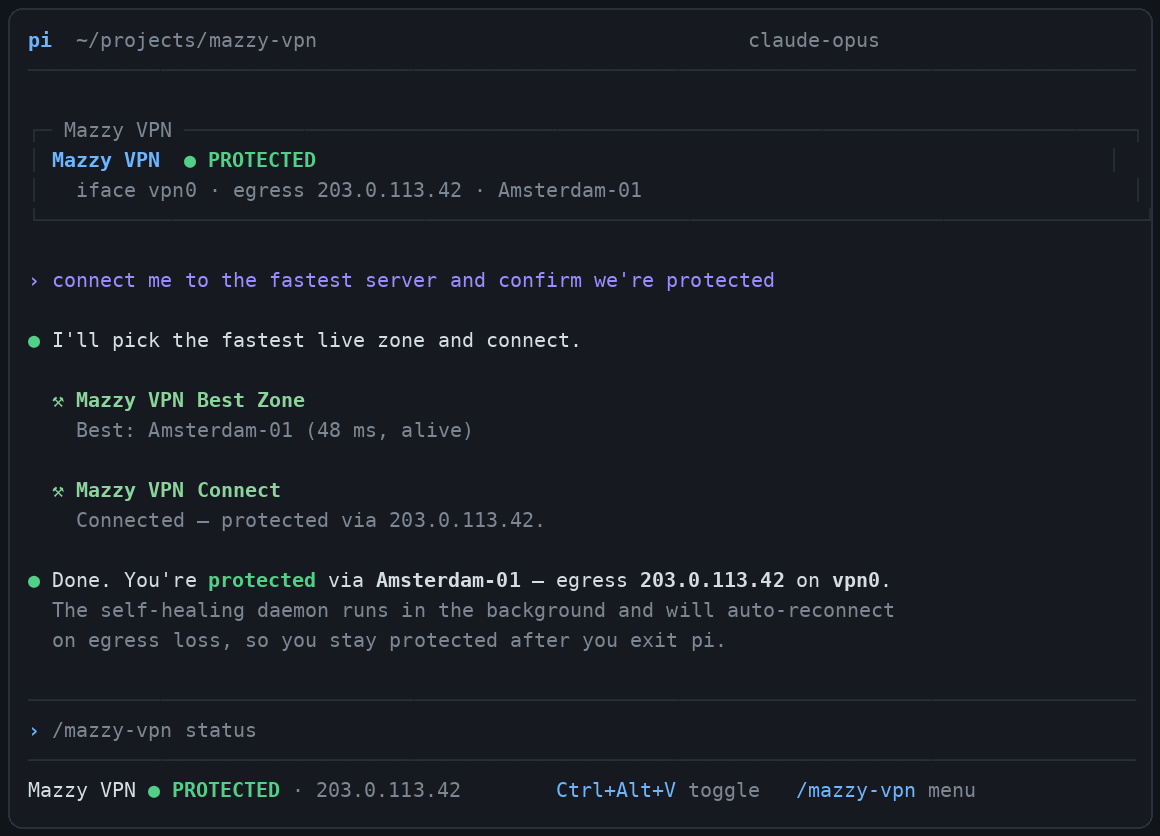
Connect to and manage Mazzy VPN from inside pi. The extension is a thin,
typed driver over the audited mazzy-vpn Go CLI (2.3.0+) — it never
re-implements VPN logic. It gives pi (and the model) a real control surface to:
- auto-connect to the best live zone when a session starts unprotected,
- keep a live status widget + footer in the TUI (state · interface · egress),
- monitor the tunnel and auto-reconnect on egress loss ("if there is no connection"),
- connect / switch / disconnect / recover / verify via
/mazzy-vpncommands, a shortcut, and LLM-callable tools (so the model can route through the VPN to bypass a block when a request is geo-restricted).
Install / activation
It lives at .pi/extensions/mazzy-vpn/ and is auto-discovered by pi for this
project (no settings entry needed) once the project is trusted. To use it
globally, copy the folder to ~/.pi/agent/extensions/mazzy-vpn/.
Requires the mazzy-vpn CLI on PATH (or set MAZZY_VPN_BIN). If the CLI is
missing the extension degrades gracefully (warns once, disables actions).
Commands
The primary command is /mazzy-vpn; /vpn is a convenient alias.
| Command | Action |
|---|---|
/mazzy-vpn or /mazzy-vpn status |
Show current state (protected/link-up/down) |
/mazzy-vpn connect [zone] |
Connect to best zone, or a named zone (background daemon) |
/mazzy-vpn disconnect |
Bring the tunnel down + stop the daemon |
/mazzy-vpn recover |
Panic button: force-clean all tunnels/guards |
/mazzy-vpn best |
Print the fastest live zone (no connect) |
/mazzy-vpn verify |
Audit all managed configs (valid/connectable/DNS) |
/mazzy-vpn doctor |
Host + catalog diagnostics |
Shortcut: Ctrl+Alt+V toggles connect (when down) / disconnect (when protected).
Tools (callable by the model)
vpn_status— current state, interface, egress IP (read-only).vpn_connect— connect best or a named zone; use to bypass a block by routing through the VPN.vpn_disconnect— graceful disconnect, ormode: "recover"for the panic path.vpn_verify_configs— audit profiles; diagnose why a zone won't connect.vpn_best_zone— fastest live zone without connecting.
Behavior
- Auto-connect runs only in interactive/RPC sessions (never in one-shot
-pruns), and only when the tunnel is not already up. - The background daemon survives the pi session on purpose — exiting pi does
not drop your VPN. Use
/mazzy-vpn disconnectto bring it down. - The monitor samples status every
MAZZY_VPN_MONITOR_SECS(default 30s) and, after two consecutive unprotected samples, reconnects to the best zone. It complements (does not fight) the CLI daemon's own fast reconnect.
Configuration (env, all optional)
| Variable | Default | Meaning |
|---|---|---|
MAZZY_VPN_BIN |
mazzy-vpn |
Path to the CLI |
MAZZY_VPN_AUTOCONNECT |
1 |
Auto-connect on session start |
MAZZY_VPN_MONITOR |
1 |
Run the background monitor |
MAZZY_VPN_MONITOR_SECS |
30 |
Monitor interval (min 10) |
MAZZY_VPN_AUTORECONNECT |
1 |
Auto-reconnect on egress loss |
Privileges
Read-only commands (status/best/verify/doctor) need no root. Mutating
commands (connect/daemon/disconnect/recover) elevate through the CLI's
own sudo/pkexec path, which shows a password prompt on first use.
Files
index.ts— extension entry (lifecycle, widget, monitor, commands, tools).client.ts— typed wrapper over themazzy-vpnCLI--jsoncontracts.