@melihmucuk/pi-crew
Non-blocking subagent orchestration for pi coding agent
Package details
Install @melihmucuk/pi-crew from npm and Pi will load the resources declared by the package manifest.
$ pi install npm:@melihmucuk/pi-crew- Package
@melihmucuk/pi-crew- Version
1.0.15- Published
- May 5, 2026
- Downloads
- 938/mo · 40/wk
- Author
- melihmucuk
- License
- MIT
- Types
- extension, skill, prompt
- Size
- 134.9 KB
- Dependencies
- 0 dependencies · 5 peers
Pi manifest JSON
{
  "extensions": [
    "./extension/index.ts"
  ],
  "skills": [
    "./skills"
  ],
  "prompts": [
    "./prompts"
  ],
  "video": "https://monkeys-team.ams3.cdn.digitaloceanspaces.com/pi-crew-demo.mp4"
}Security note
Pi packages can execute code and influence agent behavior. Review the source before installing third-party packages.
README
pi-crew
Non-blocking subagent orchestration for pi. Spawn isolated subagents that work in parallel while your current session stays interactive. Results are delivered back to the session that spawned them as steering messages when done.
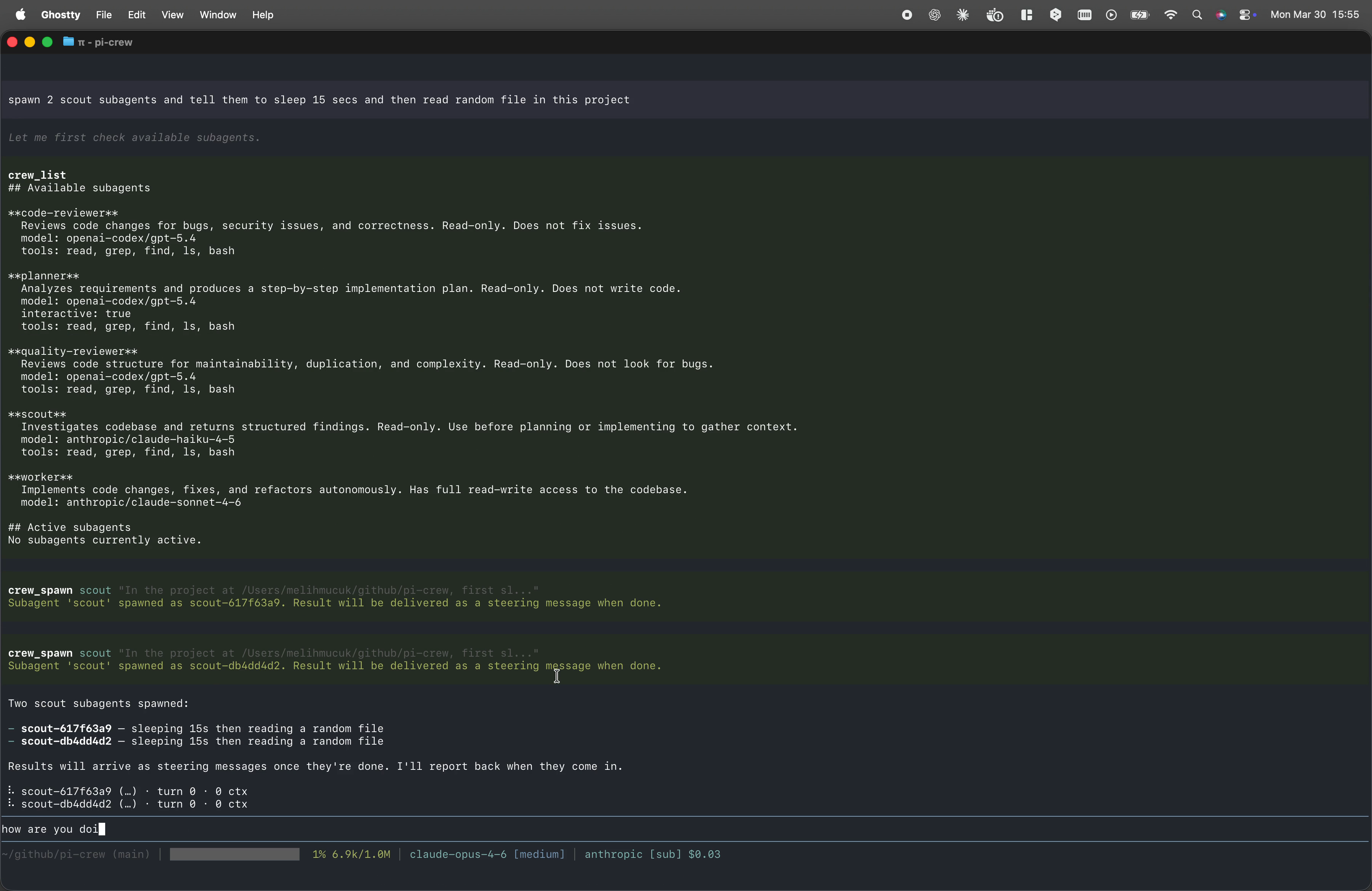
Demo - Watch the Video
Install
From npm:
pi install npm:@melihmucuk/pi-crew
From git:
pi install git:github.com/melihmucuk/pi-crew
This installs the extension and all bundled resources. Subagent definitions are automatically discovered and ready to use without any extra setup.
How It Works
Once installed, pi-crew exposes these capabilities in your pi session:
Tools
crew_list
Lists available subagent definitions and active subagents owned by the current session.
crew_spawn
Spawns a subagent in an isolated session. The subagent runs in the background with its own context window, tools, and skills. When it finishes, the result is delivered to the session that spawned it as a steering message that triggers a new turn. If that session is not active, the result is queued until you switch back to it.
"spawn scout and find all API endpoints and their authentication methods"
crew_abort
Aborts one, many, or all active subagents owned by the current session.
Supported modes:
- single:
subagent_id - multiple:
subagent_ids - all active in current session:
all: true
"abort scout-a1b2"
"abort scout-a1b2 and worker-c3d4"
"abort all active subagents"
Tool-triggered aborts are reported back as steering messages with the reason Aborted by tool request. Shutdown-triggered aborts use a distinct reason.
crew_respond
Sends a follow-up message to an interactive subagent owned by the current session that is waiting for a response. Interactive subagents stay alive after their initial response, allowing multi-turn conversations.
"respond to planner-a1b2 with: yes, use the existing auth middleware"
crew_done
Closes an interactive subagent session owned by the current session when you no longer need it. This disposes the session and frees memory.
"close planner-a1b2, the plan looks good"
Prompt Templates
/pi-crew-plan
Expands a bundled prompt template that orchestrates discovery and planning for implementation tasks. Use it to spawn scout subagents to investigate the codebase, then delegate to a planner subagent to produce a step-by-step implementation plan.
Note: This prompt requires the scout and planner subagent definitions. These are included as bundled subagents and work out of the box.
/pi-crew-review
Expands a bundled prompt template that orchestrates parallel code and quality reviews.
Use it to review recent commits, staged changes, unstaged changes, and untracked files with code-reviewer and quality-reviewer, then merge both results into one report.
Note: This prompt requires the code-reviewer and quality-reviewer subagent definitions. These are included as bundled subagents and work out of the box.
Skills
pi-crew
A bundled orchestration skill that provides best practices for delegating work to subagents, handling asynchronous results, and managing interactive subagent lifecycle. It loads automatically when you coordinate work with pi-crew tools.
Bundled Subagents
pi-crew ships with six subagent definitions that cover common workflows:
| Subagent | Purpose | Tools | Model |
|---|---|---|---|
| scout | Investigates codebase and returns structured findings. Read-only. Use before planning or implementing to gather context. | read, grep, find, ls, bash | anthropic/claude-haiku-4-5 |
| planner | Analyzes requirements and produces a step-by-step implementation plan. Read-only. Does not write code. Interactive. | read, grep, find, ls, bash | openai-codex/gpt-5.4 |
| oracle | Evaluates critical decisions, surfaces blind spots, and challenges assumptions. Read-only. Does not implement. Interactive. | read, grep, find, ls, bash | openai-codex/gpt-5.4 |
| code-reviewer | Reviews code changes for bugs, security issues, and correctness. Read-only. Does not fix issues. | read, grep, find, ls, bash | openai-codex/gpt-5.4 |
| quality-reviewer | Reviews code structure for maintainability, duplication, and complexity. Read-only. Does not look for bugs. | read, grep, find, ls, bash | openai-codex/gpt-5.4 |
| worker | Implements code changes, fixes, and refactors autonomously. Has full read-write access to the codebase. | all | anthropic/claude-sonnet-4-6 |
Read-only bundled subagents still keep bash for inspection workflows like git and ast-grep. This is an instruction-level contract, not a sandbox boundary.
Subagent Discovery
Subagent definitions are discovered from three locations, in priority order:
- Project:
<cwd>/.pi/agents/*.md - User global:
~/.pi/agent/agents/*.md - Bundled: shipped with this package
When multiple sources define a subagent with the same name, the higher-priority source wins. This lets you override any bundled subagent by placing a file with the same name in your project or user directory.
Custom Subagents
Create .md files in <cwd>/.pi/agents/ (project-level) or ~/.pi/agent/agents/ (global) with YAML frontmatter:
---
name: my-subagent
description: What this subagent does
model: anthropic/claude-haiku-4-5
thinking: medium
tools: read, grep, find, ls, bash
skills: skill-1, skill-2
---

Your system prompt goes here. This is the body of the markdown file.

The subagent will follow these instructions when executing tasks.
Frontmatter Fields
| Field | Required | Description |
|---|---|---|
name |
yes | Subagent identifier. No whitespace, use hyphens. |
description |
yes | Shown in crew_list output. |
model |
no | provider/model-id format (e.g., anthropic/claude-haiku-4-5). Falls back to session default. |
thinking |
no | Thinking level: off, minimal, low, medium, high, xhigh. |
tools |
no | Comma-separated list: read, bash, edit, write, grep, find, ls. Omit for all, use empty value for none. |
skills |
no | Comma-separated skill names (e.g., ast-grep). Omit for all, use empty value for none. |
compaction |
no | Enable context compaction. Defaults to true. |
interactive |
no | Keep session alive after response for multi-turn conversations. Defaults to false. |
Subagent Overrides via JSON
You can override selected frontmatter fields without editing the .md definition files.
Config locations:
- Global:
~/.pi/agent/pi-crew.json - Project:
<cwd>/.pi/pi-crew.json
Project config overrides global config. Only these fields are overridable:
modelthinkingtoolsskillscompactioninteractive
name and description cannot be overridden.
Example:
{
  "agents": {
    "scout": {
      "model": "anthropic/claude-haiku-4-5",
      "tools": ["read", "bash"],
      "interactive": false
    },
    "planner": {
      "thinking": "high"
    }
  }
}
Override values replace the matching frontmatter fields for the named subagent after discovery. Unknown subagent names and invalid override values are ignored with warnings in crew_list output.
Status Widget
When the current session owns active subagents, a live status widget appears in the TUI for that session, showing each subagent's ID, model, turn count, and context token usage.
On session replacement paths such as /new, /resume, /fork, and /reload, subagents keep running and reconnect to the owner session when it becomes active again. On real quit, pi-crew aborts running subagents during shutdown.
⠹ scout-a1b2 (claude-haiku-4-5) · turn 3 · 12.5k ctx
⠸ worker-c3d4 (claude-sonnet-4-6) · turn 7 · 45.2k ctx
⏳ planner-e5f6 (gpt-5.4) · turn 2 · 8.3k ctx
Interactive subagents waiting for a response show a ⏳ icon instead of a spinner.
Acknowledgments
Inspired by these projects:
License
MIT