@mickyyy68/pi-ask
Grouped single- and multi-select questions for Pi, with custom answers and stable values.
Package details
Install @mickyyy68/pi-ask from npm and Pi will load the resources declared by the package manifest.
$ pi install npm:@mickyyy68/pi-ask- Package
@mickyyy68/pi-ask- Version
0.1.1- Published
- Jul 13, 2026
- Downloads
- 216/mo · 216/wk
- Author
- mickyyy68
- License
- MIT
- Types
- extension
- Size
- 77.4 KB
- Dependencies
- 0 dependencies · 3 peers
Pi manifest JSON
{
  "extensions": [
    "./index.ts"
  ],
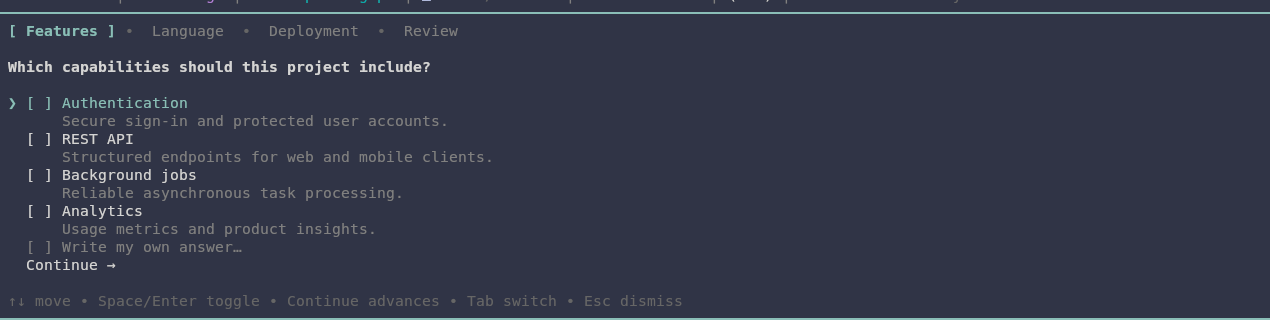
  "image": "https://raw.githubusercontent.com/mickyyy68/pi-ask/main/demo-image.png"
}
Security note
Pi packages can execute code and influence agent behavior. Review the source before installing third-party packages.
README
pi-ask
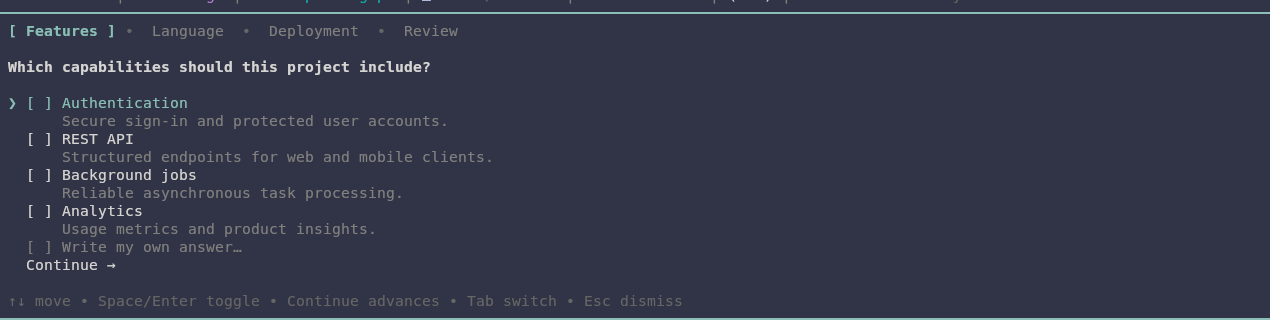
pi-ask adds an interactive ask_user tool to Pi. It lets the model group related clarification questions into one terminal questionnaire instead of guessing or interrupting the user with several plain-text prompts.
Features
- Ask 1–4 related questions in one dialog.
- Present 2–5 choices per question.
- Mix single-select and multi-select questions.
- Add a free-form custom answer to either selection mode.
- Edit an existing custom answer, or submit it blank to remove it.
- Return optional stable machine-readable values independently of display labels.
- Review all answers before submitting.
- Navigate with tabs, arrows, Enter, and Space.
- Render safely in narrow terminals with ANSI-aware wrapping.
- Run sequentially so multiple interactive tool calls cannot compete for focus.
┌ Scope ✓ ─ Features ─ Review ┐
│ Which features should ship? │
│ [x] Linting                 │
│ [ ] Formatting              │
│ [x] Tests                   │
│ [ ] Write my own answer…    │
│     Continue →              │
│                             │
│ ↑↓ move • Space/Enter toggle│
│ Tab switch • Esc dismiss    │
└─────────────────────────────┘
Installation
Install from npm:
pi install npm:@mickyyy68/pi-ask
Or install directly from GitHub:
pi install git:github.com/mickyyy68/pi-ask
Then restart Pi or run /reload in an existing interactive session.
From a local checkout:
pi install "$PWD"
Tool
The package registers one tool:
ask_user
Pi adds tool-specific guidance that encourages the model to group related questions, use multi-select only for non-exclusive choices, and provide stable values when labels are not reliable identifiers.
Minimal example
ask_user({
  questions: [
    {
      question: "Which database should the project use?",
      options: [
        {
          value: "postgres",
          label: "PostgreSQL",
          description: "Full relational database with production tooling."
        },
        {
          value: "sqlite",
          label: "SQLite",
          description: "Embedded database with minimal setup."
        }
      ]
    }
  ]
})
Grouped and multi-select example
ask_user({
  questions: [
    {
      id: "language",
      header: "Language",
      question: "Which language should the project use?",
      options: [
        { value: "typescript", label: "TypeScript" },
        { value: "python", label: "Python" }
      ]
    },
    {
      id: "features",
      header: "Features",
      question: "Which features should be included?",
      multiSelect: true,
      options: [
        { value: "auth", label: "Authentication" },
        { value: "api", label: "REST API" },
        { value: "jobs", label: "Background jobs" }
      ]
    }
  ]
})
Input schema
interface AskUserInput {
  questions: Array<{
    id?: string;
    header?: string;
    question: string;
    multiSelect?: boolean;
    options: Array<{
      value?: string;
      label: string;
      description?: string;
    }>;
  }>;
}
| Field | Behavior |
|---|---|
questions |
Between 1 and 4 questions. |
id |
Optional stable question identifier; defaults to q1, q2, and so on. |
header |
Optional tab label, maximum 16 characters; defaults to Q1, Q2, and so on. |
question |
Non-empty question text. |
multiSelect |
Defaults to false. |
options |
Between 2 and 5 choices. |
value |
Optional stable value; defaults to the trimmed label. |
label |
Non-empty display label, maximum 60 characters. |
description |
Optional text rendered below the option. |
Question IDs must be unique within an invocation. Option values must be unique within their question. Runtime control labels such as Write my own answer… and Continue → are reserved.
Stable values
Display labels are written for people and may change. Stable values are written for tools and workflows:
{ value: "postgres", label: "PostgreSQL" }
The result contains both values:
{
  "value": "postgres",
  "label": "PostgreSQL",
  "custom": false
}
When value is omitted, the normalized label is used for both fields.
Custom answers
Every question includes Write my own answer….
- On a single-select question, a custom answer becomes the only selection.
- On a multi-select question, it is added alongside predefined selections.
- Reopen the custom row to edit an existing answer.
- Clear the editor and press Enter to remove the existing custom answer.
- Press Escape while editing to discard uncommitted changes and keep the existing answer.
A custom selection uses the submitted text as both its value and label and sets custom: true.
Keyboard controls
| Key | Action |
|---|---|
↑ / ↓ |
Move through options or review actions. |
Enter |
Select a single choice, toggle a multi-select choice, open/save custom input, advance, or submit. |
Space |
Toggle a multi-select choice or open the custom row. |
Tab / → |
Move to the next question or Review tab. |
Shift+Tab / ← |
Move to the previous tab. |
Escape |
Leave custom editing or dismiss the questionnaire. |
Single-select answers advance automatically. Multi-select questions use a Continue → row. The Review tab refuses submission until every question has at least one selection.
Result contract
A successful result stores the same selection shape for single- and multi-select questions:
interface AskUserDetails {
  answers: Array<{
    questionId: string;
    question: string;
    selections: Array<{
      value: string;
      label: string;
      custom: boolean;
    }>;
  }>;
  cancelled: false;
}
Example:
{
  "answers": [
    {
      "questionId": "features",
      "question": "Which features should be included?",
      "selections": [
        { "value": "api", "label": "REST API", "custom": false },
        { "value": "Dark mode", "label": "Dark mode", "custom": true }
      ]
    }
  ],
  "cancelled": false
}
Dismissal discards unsubmitted choices:
{
  "answers": [],
  "cancelled": true
}
Validation and environment failures add an error field. Current codes are:
no_uiabortedno_questionstoo_many_questionstoo_few_optionstoo_many_optionsempty_questionempty_question_idempty_headerheader_too_longempty_option_labellabel_too_longempty_option_valueduplicate_question_idduplicate_option_valuereserved_label
pi-ask requires Pi's interactive TUI. In print, JSON, and RPC modes it returns no_ui and tells the model to ask in plain text. Pi may handle cancellation before dispatching the tool; aborts received while the questionnaire is open are returned as aborted with no partial answers.
Why sequential execution?
Pi can execute independent sibling tool calls concurrently. Interactive dialogs should not overlap or compete for keyboard focus, so ask_user declares:
executionMode: "sequential"
This does not affect normal parallel execution for other tools.
Development
Requirements:
- Node.js 22.19 or newer
- npm
npm install
npm run check
npm test
npm run pack:check
Run every validation step together:
npm run validate
See CONTRIBUTING.md for the source layout and contribution expectations.
Limitations
The initial release intentionally does not include preview panes, localization, per-option notes, or non-TUI questionnaire transport. It focuses on a compact, predictable grouped-question flow.