@mobrienv/pi-tidy-tools
Compact, reason-first tool output for pi with configurable layouts, live status, and diffs on demand.
Package details
Install @mobrienv/pi-tidy-tools from npm and Pi will load the resources declared by the package manifest.
$ pi install npm:@mobrienv/pi-tidy-tools- Package
@mobrienv/pi-tidy-tools- Version
0.4.1- Published
- Jul 19, 2026
- Downloads
- 1,151/mo · 1,151/wk
- Author
- mobrienv
- License
- MIT
- Types
- extension
- Size
- 3.3 MB
- Dependencies
- 1 dependency · 2 peers
Pi manifest JSON
{
  "extensions": [
    "./index.ts"
  ]
}
Security note
Pi packages can execute code and influence agent behavior. Review the source before installing third-party packages.
README
pi-tidy-tools

See what your Pi agent is doing at a glance. Restyles Pi's
built-in tools (read write edit bash grep find ls) into compact,
configurable blocks — a two-line default plus optional one-line reasoning and
result layouts — so the transcript reads like a narrative, not a wall of boxes.
Install
Install the published npm package with Pi:
pi install npm:@mobrienv/pi-tidy-tools
Restart Pi or run /reload in an existing session. To update or remove later:
pi update --extension npm:@mobrienv/pi-tidy-tools
pi remove npm:@mobrienv/pi-tidy-tools
Using the optional pi-fff integration? Run
/tidy pi-fff teardownbefore removing pi-tidy-tools or pi-fff — see Optional pi-fff execution.
Before and after
The same successful read, grep, and edit calls rendered by native Pi and
pi-tidy-tools:
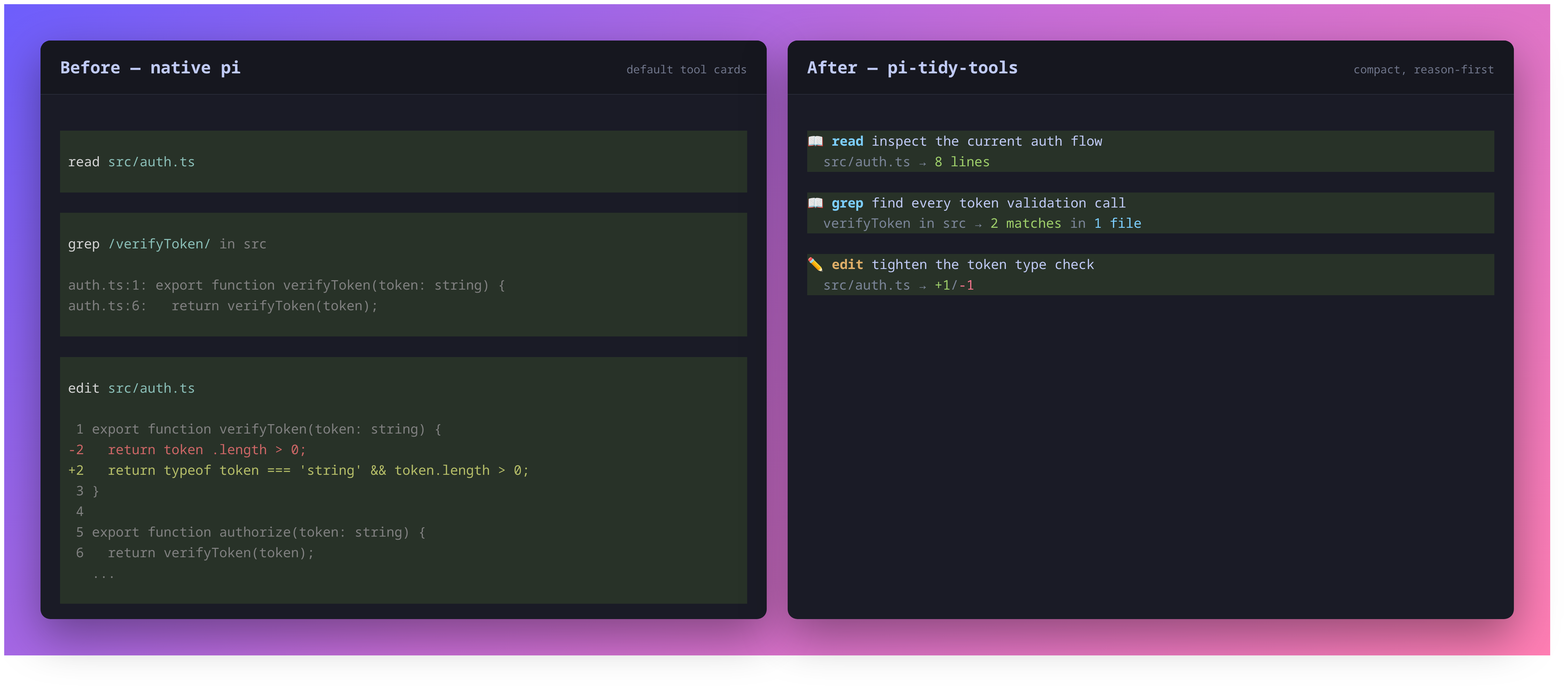
- Line 1 — tool icon/name and the model's goal/reasoning; running calls add a live dot.
- Line 2 — the concrete target (path/command/pattern) and a colored result summary.
By default, execution delegates to Pi's built-in tools unchanged; only the schema and rendering change. The optional pi-fff integration can substitute FFF search execution behind the same tidy presentation.
In action
Reasoning headline
In default and reasoning modes, each wrapped tool gains a required reasoning
parameter that the model fills with the goal behind the call (not a restatement
of the file or command, which is already shown). result mode leaves the native
tool schema unchanged and does not request reasoning.
Expand for detail (ctrl+o)
Collapsed blocks show the two-line summary. Expanding a tool (ctrl+o,
app.tools.expand) appends its full output:
- edit — the colored, line-numbered diff
- write — the written content with line numbers
- bash — the full (multi-line) command input, then its output
- read/grep/… — the raw result text
/diff — last-turn changes
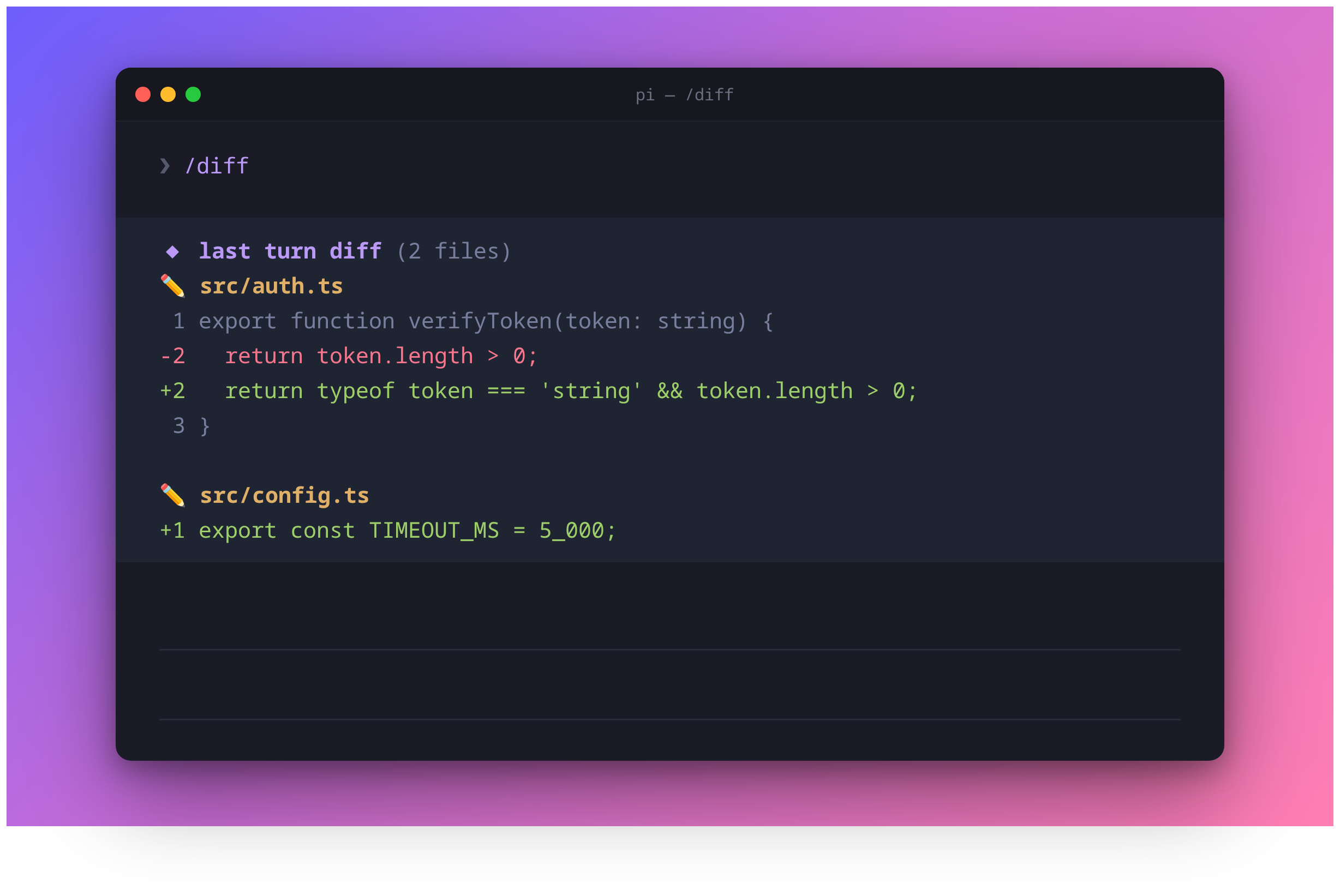
/diff (or ctrl+shift+o) recaps successful edit/write changes from the
immediately preceding turn as colored line-by-line diffs, including new files and
whole-file overwrites.
ctrl+shift+oalso maps to the built-inapp.tree.filter.cycleBackward; in the main transcript it triggers/diff. Rebind inkeybindings.jsonif you prefer.
Configure with /tidy
The extension is enabled by default. Use the management command to change or inspect its startup state:
/tidy on
/tidy off
/tidy toggle
/tidy status
/tidy mode default
/tidy mode reasoning
/tidy mode result
/tidy mode status
/tidy icons on
/tidy icons off
/tidy icons status
Layout modes:
default— reasoning headline, then target and result on line tworeasoning— one line with the reasoning and summarized resultresult— one line with the target and summarized result; no reasoning parameter is requested

A successful state, layout, or icon change is saved to
~/.pi/agent/pi-tidy-tools.json and reloads Pi's extensions immediately. While
disabled, /tidy remains available, but all seven tool overrides, reasoning
prompts, diff hooks, /diff, its shortcut, and custom rendering are absent.
Icon visibility is a top-level JSON boolean and defaults to true when missing,
malformed, unreadable, or not a boolean:
{
  "icons": false
}
/tidy icons off persistently removes only the decorative category icons 📖,
✏️, and ⚡ from tidy tool blocks, plus the decorative ◆ heading and file
category icons from /diff. It does not reserve an empty icon column. The
semantic running dot, hanging detail indent, and result arrow stay visible, as
do colors, names, summaries, expansion, and compact layouts. Settled success
and failure use Pi's native state backgrounds without redundant inline marks.
/tidy icons on|off reloads after a change; status is read-only and repeated
values do not write or reload.
For temporary or managed environments, PI_TIDY_TOOLS overrides only whole
extension enablement. It accepts on/off, true/false, yes/no, or
1/0. Unset the variable before using /tidy on|off|toggle; /tidy status
reports when the override is active. There is no environment override for icon
visibility, so /tidy icons on|off remains available while PI_TIDY_TOOLS
controls enablement. A missing, unreadable, or malformed enablement config
defaults to enabled.
Optional pi-fff execution
pi-fff is optional and remains a separately installed Pi package — it is not bundled by, or a peer dependency of, pi-tidy-tools. When set up, FFF's fast fuzzy search executes behind tidy's presentation. Two capability profiles are supported, both on Pi 0.80.6+ and with no upper version bound:
- Legacy (
pi-fff0.1.12+) — pi-fff ownsread/grepexecution; tidy owns their schema and rendering. - Scoped (
@ff-labs/pi-fff0.6.0+) — FFF executes tidy-presentedgrepandfind, native tidyreadis unchanged, and the rawffgrep/fffindnames stay hidden.
pi install npm:@ff-labs/pi-fff@0.9.6       # user scope
# or: pi install -l npm:@ff-labs/pi-fff@0.9.6  # project scope
# Legacy remains supported: pi install npm:pi-fff@0.1.12
Restart Pi, then explicitly let tidy manage pi-fff registration:
/tidy pi-fff setup
/tidy pi-fff status
/tidy pi-fff teardown
Setup previews every discovered user/project settings change and requires
confirmation; teardown restores the exact prior entries. /tidy pi-fff status
always reports a truthful ownership state.
Verified version tuples — and how newer releases are promoted from
forward-compatible/unverified — are tracked in the
verification policy.
Always run /tidy pi-fff teardown before removing pi-tidy-tools or pi-fff.
The full integration contract — settings and sidecar mechanics, every ownership state, the verification policy and release matrix, drift recovery, manual restoration, and editor caveats — lives in docs/pi-fff.md.
Styling
Mirrors a clean, theme-agnostic palette + icon mapping:
| Tools | Icon | Color |
|---|---|---|
read grep find ls |
📖 | cyan |
write edit |
✏️ | yellow |
bash |
⚡ | magenta |
- Paths collapse
$HOME→~ editshows+adds/-dels; textwriteshows line count;bashshows status + elapsed timegrepshowsN matches in M files;find/lsshow file or entry counts- Tool blocks start at the left edge without a decorative border or outer indent
- Every line is truncated to the live terminal width (ANSI-aware) so nothing wraps
- Pi's native pending/success/error background colors remain, without restoring its padding or extra spacing
Raw ANSI is intentional for the foreground palette; tool backgrounds follow the active Pi theme.
Scope
Only the seven built-in tools are restyled. MCP / third-party tools keep their default rendering — Pi does not expose a way to override a foreign tool's renderer without owning its execution.
Troubleshooting
| Symptom | Fix |
|---|---|
/tidy on|off|toggle appears to have no effect |
The PI_TIDY_TOOLS environment variable overrides the config file. Unset it first; /tidy status reports when the override is active. |
ctrl+shift+o cycles the tree filter instead of running /diff |
The shortcut doubles as Pi's built-in app.tree.filter.cycleBackward; only the main transcript triggers /diff. Rebind in keybindings.json if you prefer. |
/tidy pi-fff status reports recovery-pending |
An interrupted setup/teardown awaits Pi's reload. Run /reload; the next startup finalizes the transition at a safe boundary. |
Status reports unsafe partial registration; reload required |
Tool ownership is unknown after a replay failure. Run /reload before trusting any read/grep/find claim. |
| Autocomplete or a custom editor stopped working alongside legacy pi-fff | Legacy pi-fff 0.1.12 installs a custom autocomplete editor that is last-writer-wins with other custom editors. Disable one editor feature and /reload — see editor caveats. |
| Removed pi-fff or pi-tidy-tools without running teardown | Follow the manual restoration steps in docs/pi-fff.md. |
Local development
From the monorepo root, quick-test this workspace:
pi -e ./packages/pi-tidy-tools/index.ts
Or install the workspace through ~/.pi/agent/settings.json:
{
  "packages": ["/absolute/path/to/repo/packages/pi-tidy-tools"]
}
Develop
Run all workspaces from the repository root:
npm install
npm test
npm run check
Or target this package with --workspace @mobrienv/pi-tidy-tools.
Regenerating screenshots
docs/comparison.png, docs/demo.png, docs/diff.png, and docs/modes.png are
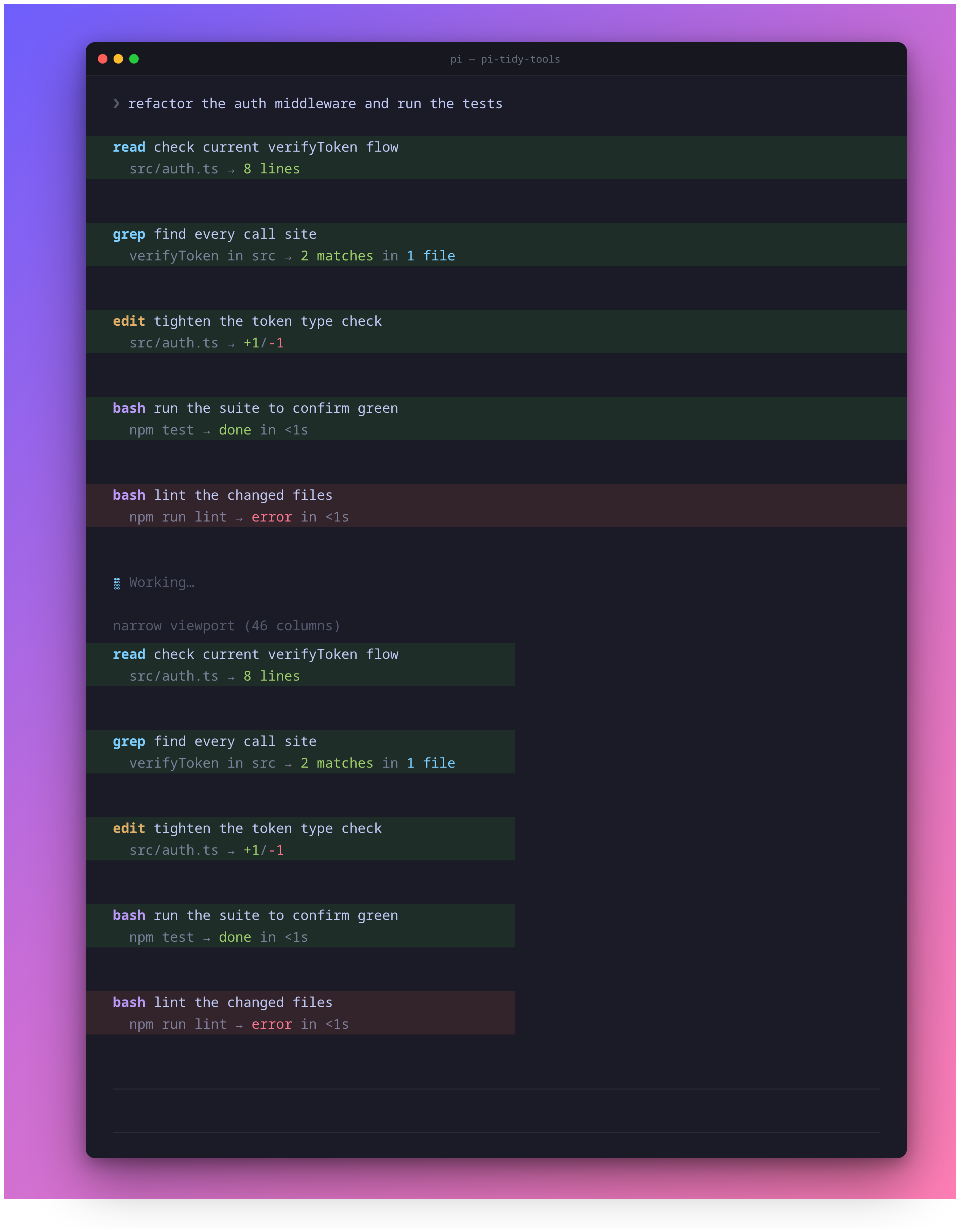
generated from real renderer output (no hand-typed ANSI). docs/demo.png
shows icons-off output at normal and narrow widths: the scripts run the
built-in tools, render them through the actual extension (or native Pi cards for
the comparison), and screenshot the result via headless Chrome.
bash packages/pi-tidy-tools/docs/comparison.sh # native vs tidy comparison
bash packages/pi-tidy-tools/docs/demo.sh       # full tidy transcript
bash packages/pi-tidy-tools/docs/diff.sh       # /diff last-turn recap
bash packages/pi-tidy-tools/docs/modes.sh      # layout-mode comparison
All four generators require Google Chrome/Chromium and ImageMagick.