@moguw/pi-stats-dashboard
Local usage and behavior dashboard for Pi agent sessions
Package details
Install @moguw/pi-stats-dashboard from npm and Pi will load the resources declared by the package manifest.
$ pi install npm:@moguw/pi-stats-dashboard- Package
@moguw/pi-stats-dashboard- Version
0.1.3- Published
- Oct 2, 2026
- Downloads
- 228/mo · 20/wk
- Author
- moguw
- License
- MIT
- Types
- extension
- Size
- 266.7 KB
- Dependencies
- 0 dependencies · 0 peers
Pi manifest JSON
{
  "image": "./artifacts/stats.png",
  "extensions": [
    "./extensions/stats.js"
  ]
}
Security note
Pi packages can execute code and influence agent behavior. Review the source before installing third-party packages.
README
pi-stats-dashboard
A local, privacy-first /stats dashboard for Pi. It reads Pi's persisted JSONL sessions and opens a browser dashboard with lifetime, today, 7-day, and 30-day usage.
GitHub repository · npm package
Vendored into Mieluoxxx/pi-ext from suryavamsi6/pi-stats-dashboard @
3ee97be— packagev0.1.3plus the unreleased dashboard change from that commit (Show token usage categories separately). OnlyREADME.md,LICENSE,artifacts/,extensions/,src/, andtest/from upstream are tracked here; the upstreamflake.nix/flake.lockNixOS packaging and GitHub Actions workflow are not.Local changes on top of upstream: responsive desktop layout fixes in
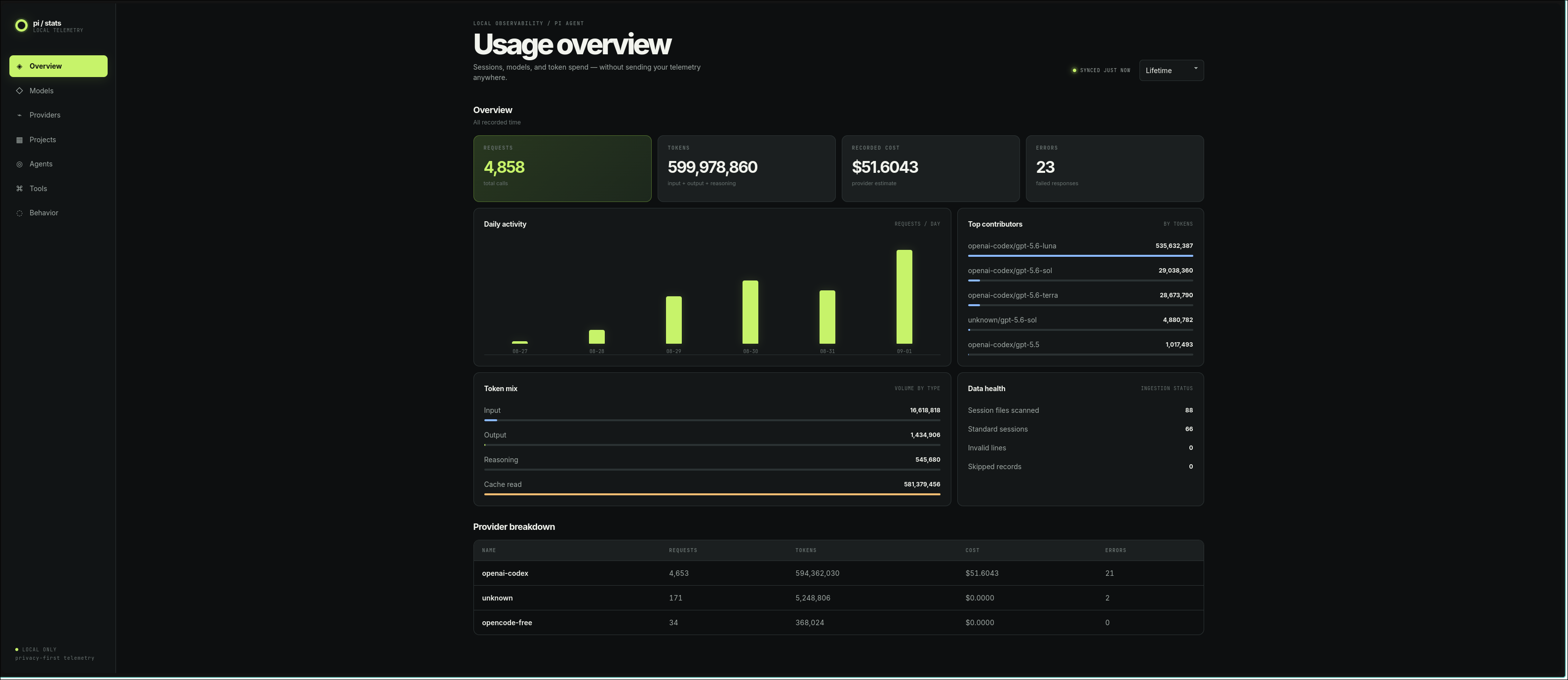
src/dashboard.htmlso panels, tables, and chart labels no longer overflow their container; count abbreviation (K/M/B) instead of raw numbers; the upstream mobile breakpoints (max-width: 850px/430px) removed; and the upstream "Data health" panel replaced by an error-type breakdown (src/aggregate.jserrorType()groups raw provider error messages into buckets — aborts, timeouts, HTTP status codes, context overflow, stream interruptions).src/server.jsre-readsdashboard.htmlon every page request and reloadssrc/aggregate.jswhen its file changes, so panel edits show up without restarting Pi.
Install
From the monorepo root:
pi -e ./extensions/pi-stats-dashboardOr install the published package:
pi install npm:@moguw/pi-stats-dashboardThen run Pi and use /stats.
Included metrics
- Input, output, reasoning, cache read/write, total tokens, recorded cost, requests, and errors
- Activity chart: hourly bars for Today, daily bars for 7-day, GitHub-style heatmap for 30 days (row) and Lifetime (week-columns calendar); breakdowns by model, provider, project, agent, and tool
- Local-only behavior counters for user messages: yelling, profanity, anguish, correction, repetition, and blame
- Error breakdown by type: aborts, timeouts, HTTP status codes, context overflow, stream interruptions
Costs are the values recorded by providers and may be zero or unavailable. They are estimates, not invoices. Pi does not persist reliable historical latency, TTFT, tokens/sec, or subscription-window data, so those are intentionally not fabricated.
The server binds to 127.0.0.1, uses a random URL token, and returns aggregate data only. Prompt and response text is never retained or returned; behavior analysis happens in memory.
Development
pi -e .
pnpm test
pnpm run check
pnpm pack --dry-run
This package intentionally uses Node built-ins and no runtime dependencies. The generated tarball is publish-ready; npm publication and repository creation are not automated.