@monotykamary/pi-queue-steer
Visible steering and follow-up queues with inline editing for Pi.
Package details
Install @monotykamary/pi-queue-steer from npm and Pi will load the resources declared by the package manifest.
$ pi install npm:@monotykamary/pi-queue-steer- Package
@monotykamary/pi-queue-steer- Version
0.3.1- Published
- Aug 24, 2026
- Downloads
- 361/mo · 6/wk
- Author
- monotykamary
- License
- MIT
- Types
- extension
- Size
- 1 MB
- Dependencies
- 0 dependencies · 3 peers
Pi manifest JSON
{
  "extensions": [
    "index.ts"
  ]
}
Security note
Pi packages can execute code and influence agent behavior. Review the source before installing third-party packages.
README
pi-queue-steer


A visible steering and follow-up timeline for Pi.
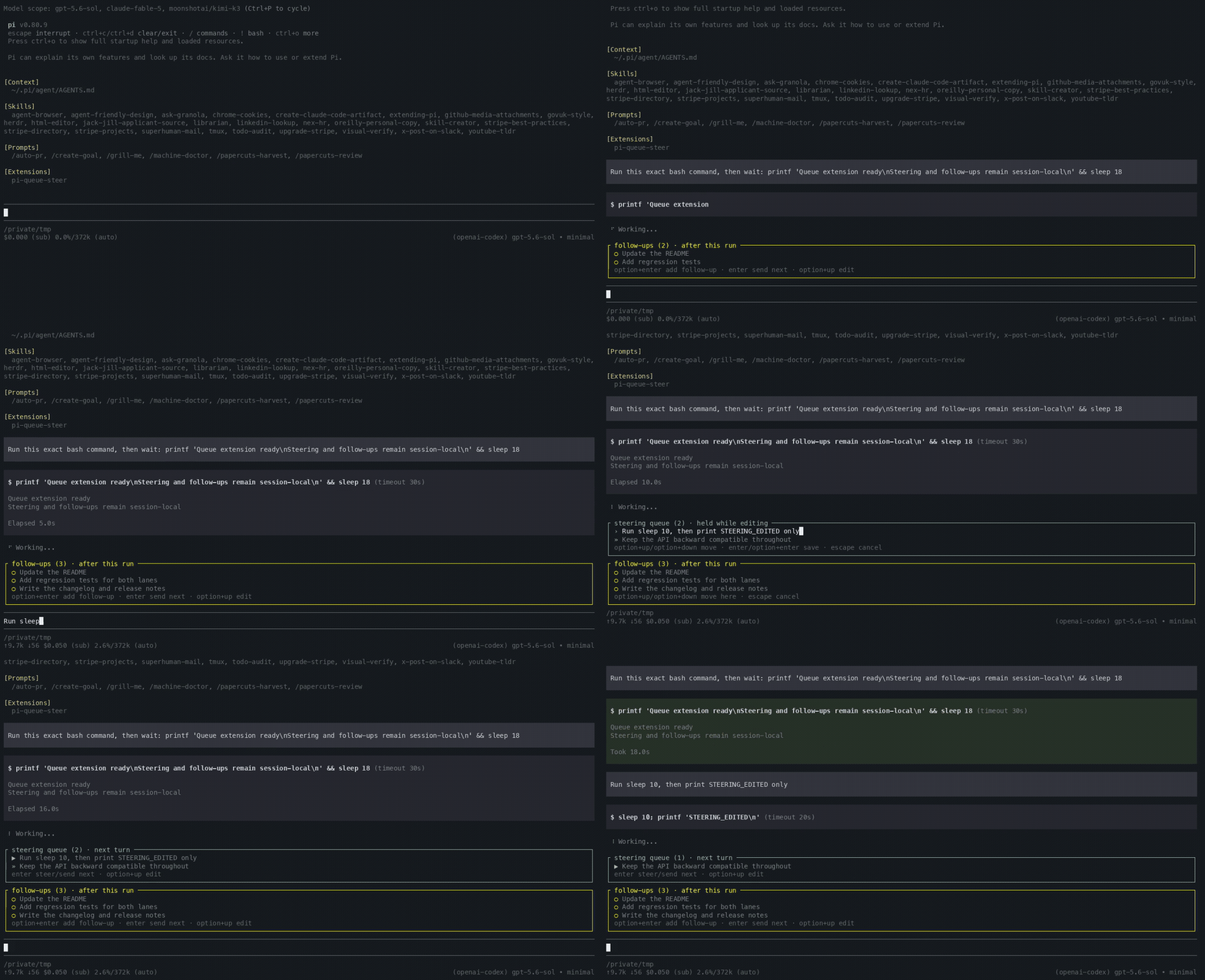
Queue instructions while the agent works. Steering stays in a blue next-turn box. Follow-ups stay in a yellow after-this-run box beneath it. Both lanes remain independent first-in, first-out queues and keep Pi’s delivery timing.
Move into any row to edit it. The selected row becomes the live Pi editor, with its cursor, wrapping, paste handling, autocomplete and custom-editor behaviour intact.
Demo
Install
Install the latest version from GitHub:
pi install git:github.com/monotykamary/pi-queue-steer
Pin the current release:
pi install git:github.com/monotykamary/pi-queue-steer@v0.3.0
Then start a new Pi session or run /reload.
Try a local checkout for one session:
pi -e ./index.ts
Controls
The extension follows your configured Pi action bindings. These are the default keys on macOS terminals:
| Context | Key | Action |
|---|---|---|
| Agent working | Enter |
Add visible steering for Pi’s next safe turn boundary |
| Agent working | Option+Enter |
Add a visible follow-up for after the run |
| Queue visible | Option+Up |
Select the most recently queued row |
| Editing a row | Option+Up |
Keep the current draft and move to the previous visual row |
| Editing a row | Option+Down |
Keep the current draft and move to the next visual row |
| Editing a row | Type normally | Edit directly inside the selected row |
| Editing a row | Option+X |
Mark the selected row for removal; save deletes it, a second press restores it |
| Editing a row | Option+T |
Move the selected row to the other lane when saved |
| Editing a row | Option+Shift+Up / Option+Shift+Down |
Reorder the selected row within its lane; positions apply immediately and roll back on Escape |
| Editing a row | Enter or Option+Enter |
Save all row edits without changing their lanes |
| Editing a row | Escape |
Cancel the session and roll back all unsaved row edits |
| Empty composer, follow-up queued | Enter |
Promote the oldest follow-up to steering now |
| Queue paused after an abort | Enter |
Resume from the next steering row, or the next follow-up |
| Queue restored after resume | Enter |
Send the next queued row; Option+Up edits it first |
| Agent stopped | Option+Enter |
Queue the message (or a skill/template command) visibly, paused; Enter keeps Pi's immediate send |
| Agent working, queue visible | Escape |
Abort the run and pause both visible lanes |
Option+Down, Option+X, Option+T and Option+Shift+Up/Down are the only new fixed shortcuts. The other controls use Pi’s configured action bindings. Terminals outside macOS may label Option as Alt.
Delivery semantics
The extension keeps Pi’s 2 delivery classes:
- steering reaches the current run at Pi’s next safe turn boundary
- follow-ups wait until the run finishes
- the blue steering box remains above the yellow follow-up box
- each lane keeps its own first-in, first-out order
- reordered rows keep their stable IDs, text drafts and attachments
- reordering waits while a lane toggle is pending; the lane move lands first on save
- Pi’s
one-at-a-timeandallsettings apply independently at active-run delivery boundaries
The extension hands messages back to Pi’s native queues only when their delivery boundary arrives. They remain visible and editable before that point. Pi records delivered rows as normal user messages. Queue ownership is TUI-only; RPC, JSON and print-mode input pass through unchanged.
Queueing while stopped
With the agent stopped, Enter keeps Pi's normal immediate send. Option+Enter instead places the submission into the yellow follow-up box, paused — including skill and prompt-template invocations such as /bro simplify this, which stay short and editable, then autoexpand when the row sends. Press Enter on the empty composer to send the next queued row, or Option+Up to edit it first.
Pi's built-ins still run immediately — a stopped /compact or /reload executes at once (see command rows) — and extension commands, unknown slash input and ! bash pass straight through.
Prompt templates and Agent Skills
Queued /do-less this code, /skill:bro and /bro rows stay short and editable, then expand when delivered — while the agent works they queue through steering or follow-up input, and while stopped Option+Enter parks them paused like any message. /bro is shorthand for /skill:bro unless a built-in, prompt or extension already uses that name. Template arguments and images are preserved; unknown slash input remains ordinary text.
Pi cannot invoke arbitrary commands through its public extension API. /compact and /reload are the supported built-ins. A queued extension command pauses delivery until you edit or remove it.
Command rows
Text-only rows whose text is exactly /compact, /compact <instructions> or /reload are command rows. A row with image attachments remains a normal message even if its text matches a command, so attachments are never discarded. Command rows execute the Pi command instead of becoming an LLM message:
Option+Enterwhile the agent works queues the command in follow-up order- a command row executes only once the agent is idle; rows behind it wait — so
/compactfollowed bycontinuecompacts first and deliverscontinueafter compaction completes /reloadruns Pi’s built-in reload; committed rows queued behind it retain their IDs, lanes, attachments and pause state across the runtime swap- idle
/compactuses Pi’s public compaction API so queued rows resume when compaction finishes; a start failure restores and pauses the command row /reloadsubmitted while the agent works or tracked compaction runs stays queued instead of showing Pi’s built-in wait warningEnteron/compactwhile the agent works uses Pi’s public compaction API and holds visible rows until compaction settles- ordinary messages submitted during compaction remain in Pi’s native queue and can run before extension-owned command rows after compaction finishes
Option+Enteron a command while the agent is idle executes it immediately instead of sending the text to the model- command rows show a
⚙marker and pause, resume and edit like any other row; editing a row into or out of command form just works
Draining the queue
/queue-drain empties both lanes into the run as a single combined message. Row texts join in timeline order — steering rows first, then follow-ups — expanding prompt templates and skills as they go, with every row's image attachments appended in the same order.
- during a run, the combined message reaches Pi as one steering message
- while stopped, the combined message starts a new run directly
- a mid-turn drain lands inside the in-flight call's context when the turn has not responded yet, or as the next steering turn once it has — either way the transcript records the combined message exactly once
- command rows are not messages:
/compactand/reloadrows stay queued and still execute once the agent is idle - an active row-editing session refuses the drain, so rows are never pulled away mid-draft
- a synchronous hand-off failure restores every row, in order, and pauses the queue
Editing semantics
Option+Upstarts at the row you queued most recentlyOption+UpandOption+Downthen move through the visible timeline- saving never changes a row’s lane implicitly;
Option+Tre-lanes the selected row explicitly, and it joins the tail of its new lane on save - a re-laned row previews inside its destination box before the save commits it
Option+Xmarks the selected row for removal; save deletes it, andEscapeor a secondOption+Xrestores it- a selected row becomes the real editor without a nested composer frame
- one editing session can hold drafts for several rows
Escaperestores every row from the session snapshot, including removal marks and lane toggles- saving an empty text-only row removes it
- image-only rows survive text clearing;
Option+Xremoves them - an unrelated composer draft is stashed and restored when editing ends
A touched head row is pinned until you save or cancel. In one-at-a-time mode, later rows do not block the head. In all mode, editing any row holds that whole lane at active-run delivery boundaries.
Abort and recovery
Aborting a run pauses both visible lanes. This prevents a follow-up from starting immediately after the abort.
Press Enter on the empty composer to resume; the same keypress sends rows queued while stopped. A synchronous handoff or preflight failure returns the affected batch to the front of its lane.
Committed rows also survive quitting and resuming Pi. On shutdown the extension records the queue in the session file as an invisible custom entry that stays out of the transcript and out of the model context. Reopening that session restores the rows paused: nothing sends until you press Enter on the empty composer. A /reload runtime swap still carries committed rows and pause state through a short in-process handoff. Edit drafts stay session-local and never persist; /new starts clean and forks do not inherit rows.
Public API limits
Pi’s public sendUserMessage API is fire-and-forget. The extension restores synchronous dispatch failures and preflight/expansion failures without reordering, but Pi does not expose later asynchronous input rejection to extensions. Inferring rejection from queue timing could duplicate a delayed successful handoff, so the extension does not do that.
Pi also exposes queued /reload only through the TUI editor’s void submit callback. The extension prevents known busy and compaction conflicts and restores trailing rows on a successful runtime swap, but Pi cannot acknowledge or reject that submit back to the extension.
If an all-mode lane stays pinned until the agent settles, saving from idle starts the new run with the lane head, then delivers the remaining rows in FIFO order at the next native boundary. The public API has no atomic idle-to-native-queue batch operation, so this restart cannot be one native batch. Draining sidesteps that limit by composing its combined message client-side, so one send carries every row.
Resume persistence
Queuing a row does not send it. When Pi shuts down cleanly — /quit, Ctrl+C, Ctrl+D, or a session switch — the extension records the committed queue as a custom session entry (pi-queue-steer:queue), invisible in the transcript and excluded from the model context. When the same session is reopened (pi -c, pi -r, pi --session, /resume), the rows come back in FIFO order with their IDs, lanes, image attachments and command rows intact — and the queue is parked paused. Press Enter on the empty composer to send the next row, or Option+Up to edit it first.
Rows belong to the session they were queued in. /new and /fork start with an empty queue. Older snapshots superseded by later ones stay in the session file but are never restored, and a session can only be resumed at all if Pi wrote it: sessions without an assistant response are not persisted by Pi, and a hard kill skips the shutdown hook.
Editor composition
pi-queue-steer wraps the active Pi editor. It does not replace Pi’s input model.
For display, it extracts the live editor’s text and cursor from the editor frame. It then places that content inside the selected queue row. Autocomplete remains below the edited text.
The extension composes with custom editors including raw-paste and pi-session-hud.
Development
npm install
npm run ci
./test/tui-evidence.sh /tmp/pi-queue-tui-evidence
pi -e ./index.ts
The automated suite covers delivery, editing, command rows, resource expansion, recovery, images, editor composition, repeated reloads, real retry ordering, real manual compaction success/failure and real automatic overflow compaction. The tmux harness exercises the same paths through Pi's real TUI, including actual runtime reloads and native post-compaction input.
The Pi package ranges are intentionally unpinned. The full suite and real-TUI harness are verified against the current resolved Pi release; see the validation record for exact commands and evidence.
Security
Pi extensions run with the same system permissions as Pi. Review extension source before installing a third-party package.
Licence
MIT. See LICENSE.
This project draws on Cursor’s queue interaction. It is not affiliated with Cursor or Anysphere.