@mrclrchtr/supi-ask-user
SuPi ask-user extension — rich questionnaire UI for structured agent-user decisions
Package details
Install @mrclrchtr/supi-ask-user from npm and Pi will load the resources declared by the package manifest.
$ pi install npm:@mrclrchtr/supi-ask-user- Package
@mrclrchtr/supi-ask-user- Version
2.5.0- Published
- Jul 19, 2026
- Downloads
- 3,756/mo · 534/wk
- Author
- mrclrchtr
- License
- MIT
- Types
- extension
- Size
- 227.6 KB
- Dependencies
- 1 dependency · 3 peers
Pi manifest JSON
{
  "extensions": [
    "./src/extension.ts"
  ],
  "image": "https://raw.githubusercontent.com/mrclrchtr/supi/main/packages/supi-ask-user/assets/ask-user-choice-details.png"
}
Security note
Pi packages can execute code and influence agent behavior. Review the source before installing third-party packages.
README
@mrclrchtr/supi-ask-user
SuPi Ask-User brings structured decision forms to your pi sessions. When the agent needs your input, you get a clear, keyboard-driven form instead of a chat message.
Install
pi install npm:@mrclrchtr/supi-ask-user
For local development:
pi install ./packages/supi-ask-user
What to expect
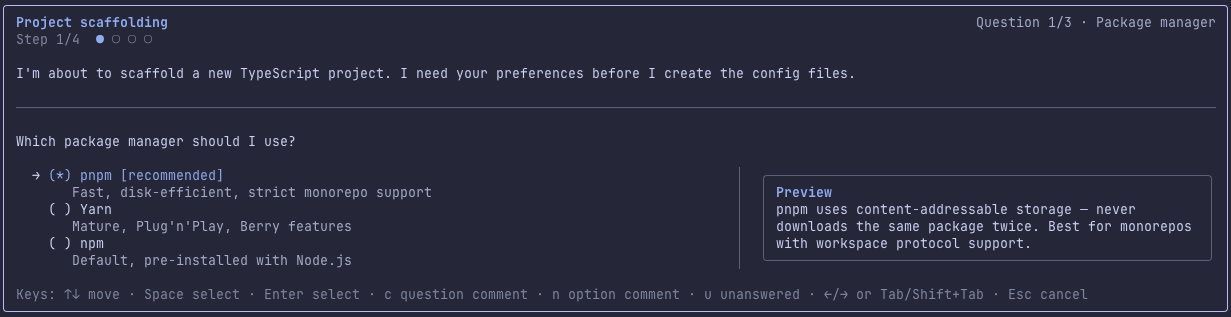
During a session, the agent may pause and open a small form when it needs an explicit decision from you. The form appears directly in the TUI and blocks the agent until you respond.
Each form can contain up to ten questions. A question is either a choice (pick one or more from a list) or a text (type a short answer). The agent can suggest a recommended answer, which is preselected or prefilled for you.
All questions are expected to be answered before the form can be submitted. If you leave any question unanswered, the agent receives a "needs discussion" outcome so it can follow up.
You can also add comments to individual questions, options, or the whole form if you want to explain your thinking.
If you have configured a custom Pi editor, such as a Vim or Emacs editor, Ask User creates one editor instance per form and reuses it for text answers and all comment fields. If the custom editor cannot be initialized or does not satisfy Pi's editor contract, Ask User warns and uses the default editor for that form. The decision form keeps ownership of its navigation shortcuts; main-prompt actions such as model switching are not reproduced inside the form.
Agent-facing behavior
ask_user is an interactive TUI-only handoff. The agent should use one form for one focused decision, combine related questions instead of opening multiple forms, and wait for the result before doing work that depends on your answer. Only one form can be active at a time.
The model-visible result summary is bounded to Pi's default tool-output limits: 2,000 lines or 50KB, whichever is hit first. If a very large response is truncated, the agent is told to ask a focused follow-up for any omitted text it still needs.
Preview
Keyboard reference
Choice questions
| Key | Action |
|---|---|
↑ ↓ |
Move between options |
Space |
Select / toggle an option |
Enter |
Confirm and advance |
Tab / → |
Next question (last question goes to review) |
Shift+Tab / ← |
Previous question |
n |
Comment on the focused option |
c |
Comment on the current question |
u |
Mark the current question unanswered |
Esc |
Cancel the whole form |
Text questions
| Key | Action |
|---|---|
Enter |
Submit text and advance |
Tab |
Next question |
Alt+C |
Comment on the current question |
Alt+U |
Mark the current question unanswered |
Esc |
Cancel the whole form |
Review screen
| Key | Action |
|---|---|
↑ ↓ |
Move between questions and Submit |
Enter |
Open a question for editing, or submit the form |
← / Shift+Tab |
Return to the last question |
c |
Edit the form-level comment |
Esc |
Cancel the whole form |
Comment editors
| Key | Action |
|---|---|
Enter |
Save comment and return |
Esc |
Discard comment edits and return |
With a modal custom editor, Esc is offered to the editor first so it can leave insert mode. When the editor delegates the interrupt, Ask User performs the cancel or discard action shown above.
The recommended option is labeled [recommended]. On wide terminals, option details render side-by-side with the list; on narrow terminals they stack below.