@mrclrchtr/supi-code-intelligence
LSP and AST navigation, search, diagnostics, and refactoring
Package details
Install @mrclrchtr/supi-code-intelligence from npm and Pi will load the resources declared by the package manifest.
$ pi install npm:@mrclrchtr/supi-code-intelligence- Package
@mrclrchtr/supi-code-intelligence- Version
10.0.0- Published
- Oct 19, 2026
- Downloads
- 3,064/mo · 476/wk
- Author
- mrclrchtr
- License
- MIT
- Types
- extension
- Size
- 56.2 MB
- Dependencies
- 7 dependencies · 4 peers
Pi manifest JSON
{
  "image": "https://raw.githubusercontent.com/mrclrchtr/supi/main/packages/supi-code-intelligence/assets/social-preview.png",
  "extensions": [
    "./src/extension.ts"
  ]
}
Security note
Pi packages can execute code and influence agent behavior. Review the source before installing third-party packages.
README
@mrclrchtr/supi-code-intelligence


A Pi coding agent extension to navigate symbols, search code structure, check diagnostics, and preview and apply semantic refactors.
Install
pi install npm:@mrclrchtr/supi-code-intelligenceAdd -l for a project-local install. To try the package for one run:
pi -e npm:@mrclrchtr/supi-code-intelligenceFor local development, run pi install ./packages/supi-code-intelligence from the SuPi repository root. Run /reload after changes.
This package is included in the SuPi release installer. SuPi remains pre-release. The package bundles its LSP and Tree-sitter runtime dependencies, but not language-server binaries.
Under Bun, including compiled applications such as Pi-Bolt, structural analysis also requires a Node.js executable named node on PATH. The parser runs in a protected Node child process, not in Bun. If Node.js is unavailable, structural analysis reports an installation error; LSP startup remains separate.
What it adds
- Language Server Protocol (LSP) tools for types, definitions, references, implementations, diagnostics, workspace symbols, and semantic refactoring.
- Tree-sitter tools for syntax, declarations, structural search, and calls as written in source code. These calls are not a semantic call graph.
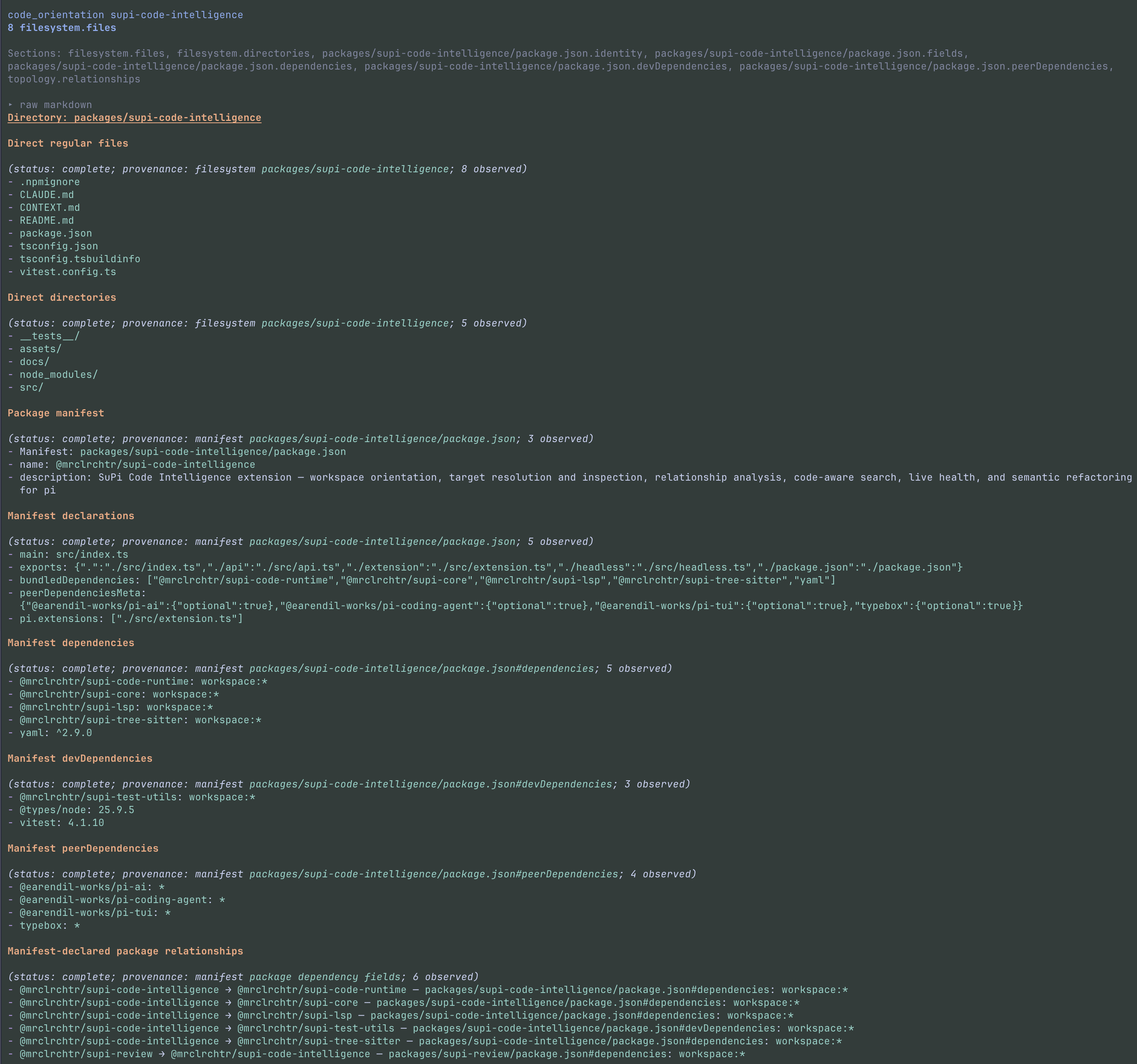
- Workspace orientation from included files and explicit project declarations. It works without package metadata. Directory orientation can also show configured instruction files and Mermaid diagrams of declared relationships.
- Visible evidence limits that distinguish no matches from incomplete or unavailable analysis. Search modes do not silently switch to each other or to text search.
- An optional first-turn overview with observed names, paths, file-extension counts, and project declarations. It is enabled by default. Repository descriptions retain their source fields and are untrusted evidence, not instructions.
The overview is a hidden Pi message, not a live architecture graph. It is not repeated when the active session branch already contains it. It works in source-only projects. Names and paths have priority over descriptions. Omitted collected facts remain in a temporary captured-result file.
Usage
Ask Pi normal coding questions. For example:
- “Map this repository and find the authentication package.”
- “Find references and implementations of
PaymentProvider.” - “Show the calls written inside
executeAskUser.” - “Find interface declarations under
packages/api.” - “Refresh the language-server diagnostics for this file.”
- “Preview a rename from
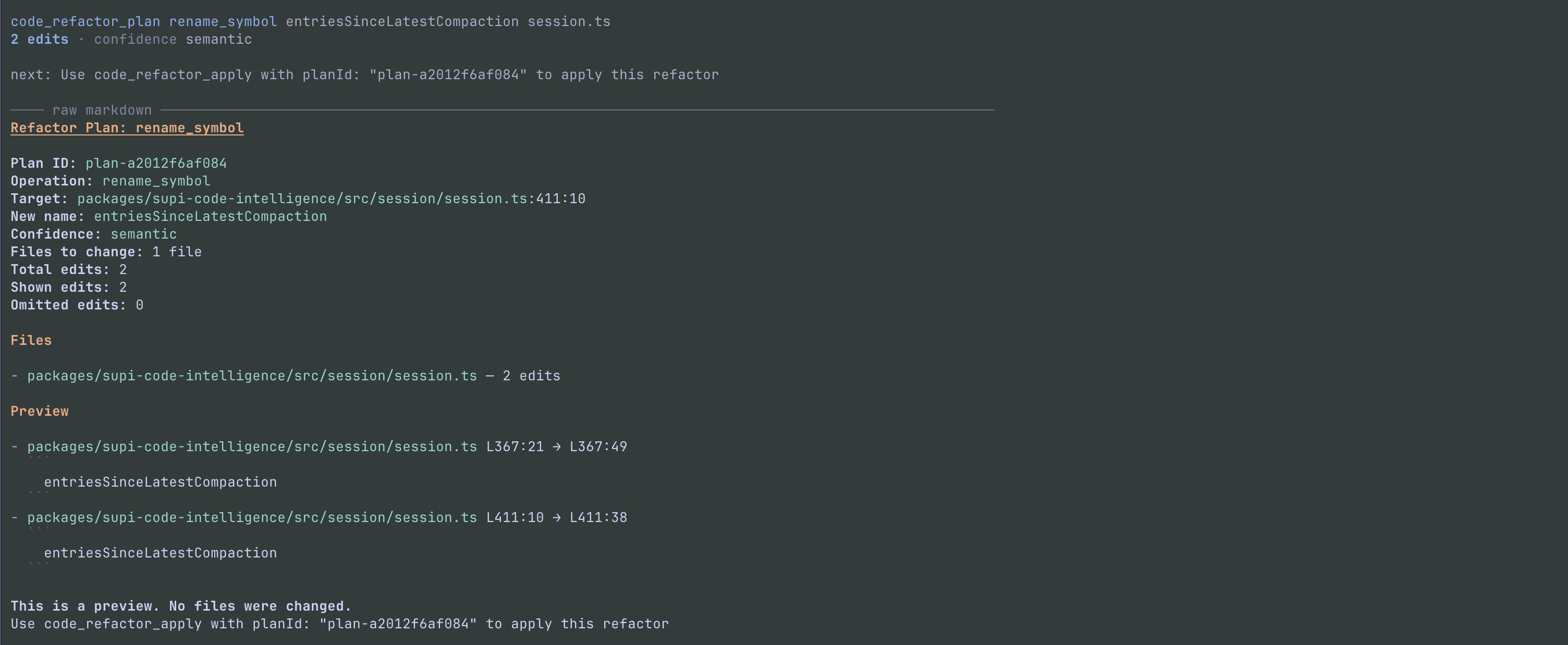
oldNametonewName. Do not apply it yet.”
Agent tools
The full extension registers all eight tools at startup; it does not load them on demand.
| Tool | Purpose |
|---|---|
code_orientation |
Show workspace facts, or focus on a path, module, or symbol target |
code_resolve |
Resolve a real symbol anchor or semantic query to target handles, or list a file's declarations |
code_inspect |
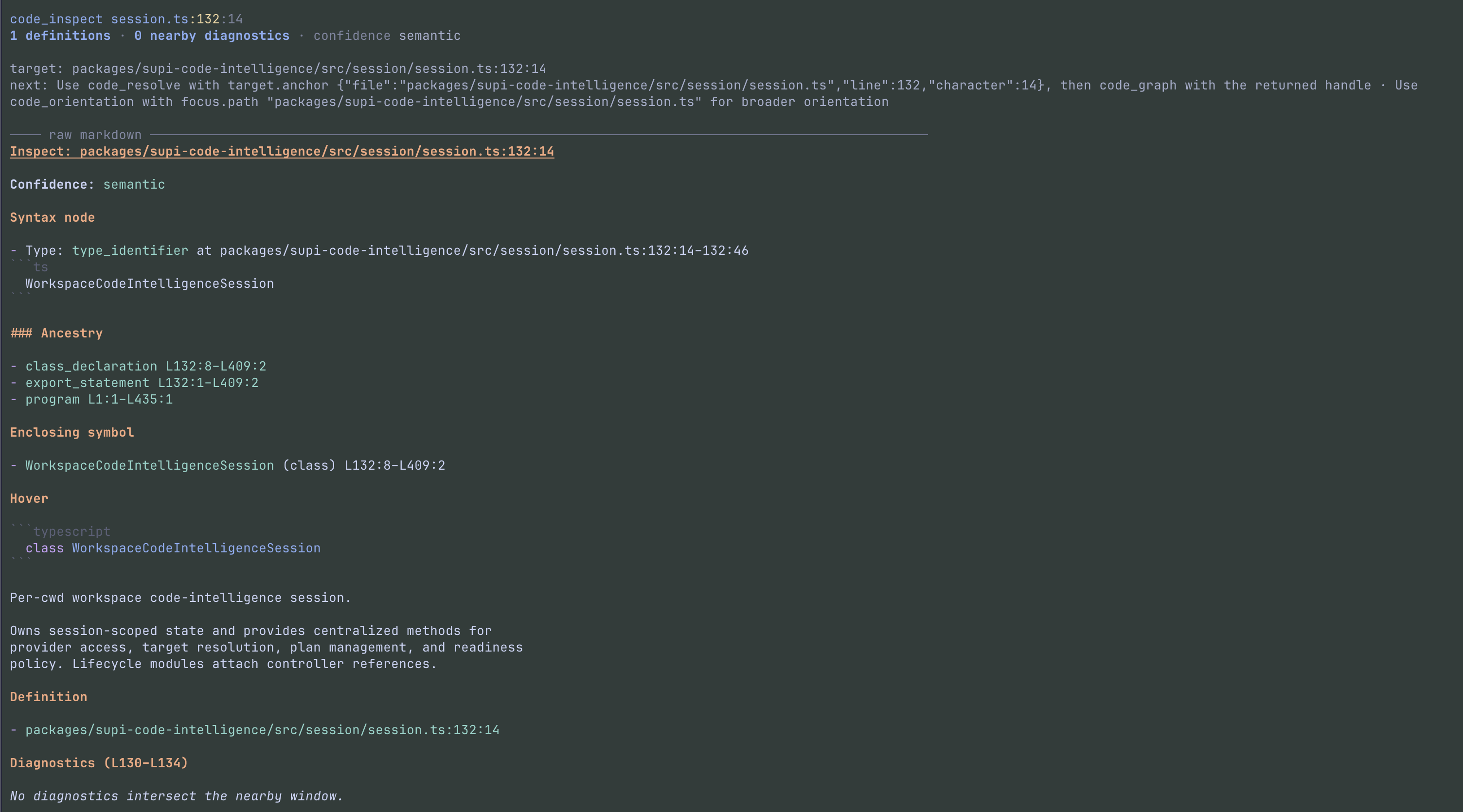
Inspect syntax, the enclosing declaration, hover information, definitions, and nearby diagnostics at one point |
code_graph |
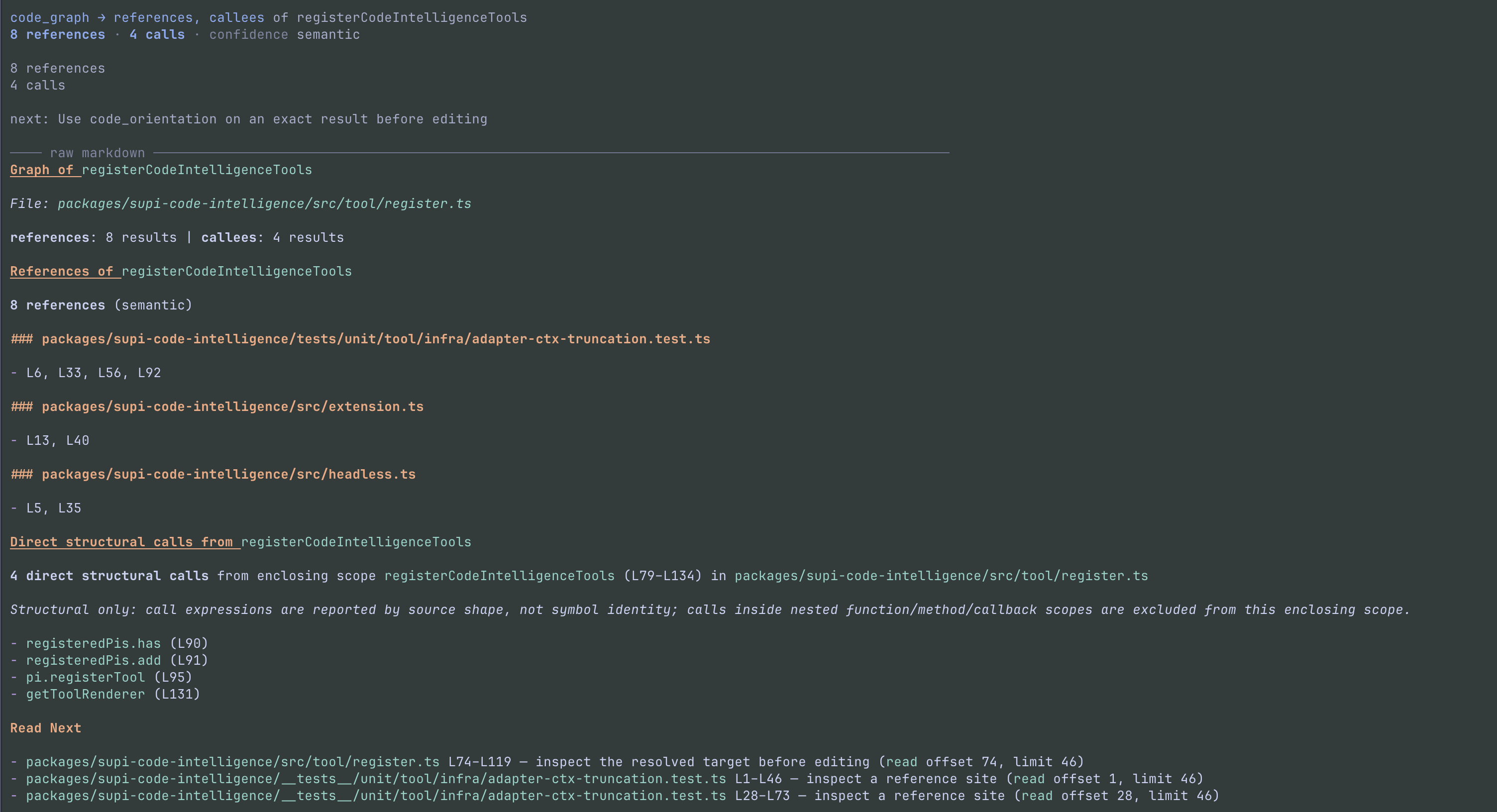
Find semantic references and implementations, or structural calls from the enclosing scope |
code_find |
Search with an explicit ast or semantic mode |
code_health |
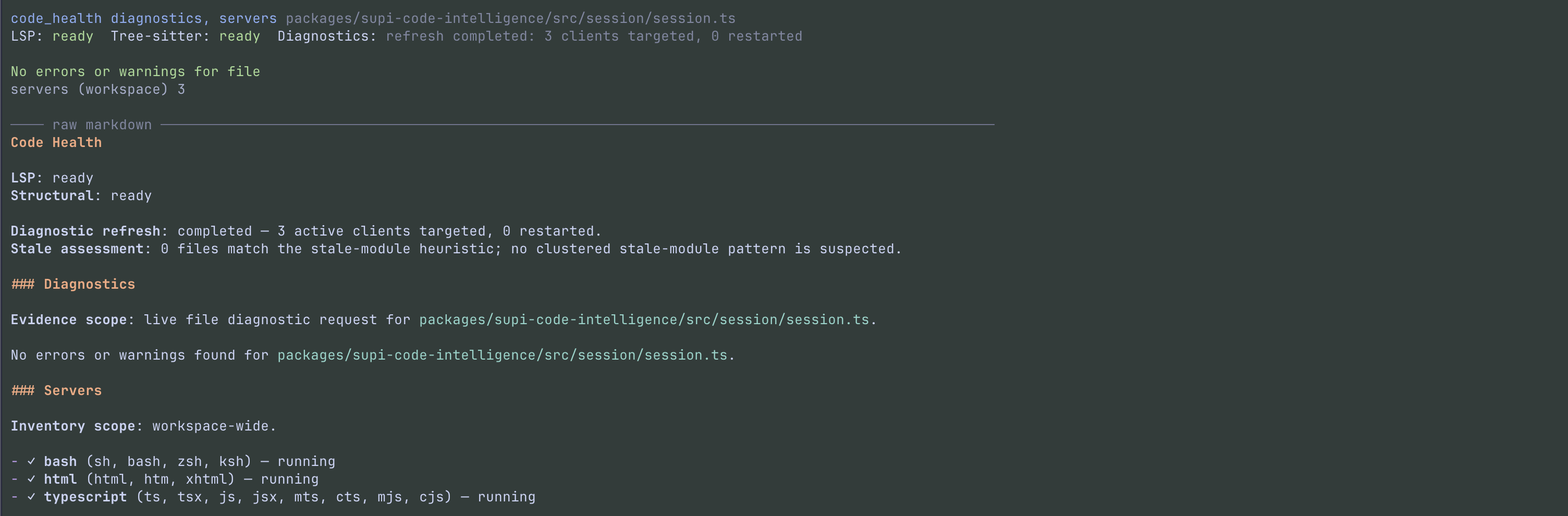
Report diagnostic observations and language-server health |
code_refactor_plan |
Store a semantic refactor preview without changing files |
code_refactor_apply |
Apply a fresh stored plan after file and edit checks |
Use Pi's grep for literal or regular-expression search. Source points use 1-based lines and 1-based UTF-16 columns. A target or focus selector must contain exactly one choice.
Example tool calls:
code_orientation({ focus: { path: "packages/api" } })
code_find({ query: "PaymentProvider", mode: "semantic", scope: ["packages/api"] })
code_health({ scope: "packages/api/src/index.ts", refresh: true })
Important tool rules:
- Resolve: new target handles require semantic readiness. A comment or whitespace point is not a symbol; use
code_inspectthere. Handles are session-local and become stale when file contents change. Resolve the symbol again rather than reuse a stale handle. Symbol queries put case-sensitive exact-name matches first, before the display cap. Provider order stays unchanged within exact-name and other matches. An incomplete provider result never selects a target automatically. - Graph: relations are
references(default),callees, andimplements. Use["all"]for all three. Callee depth isdirectby default;deepincludes nested scopes, not transitive calls. Callees match source shape, not symbol identity. Counts include each distinct call site; repeated expressions share one agent-output row with all shown line/column coordinates. Each relation reports its counts and limits once. Provider-limited results have unknown totals; invalid locations are disclosed separately. Callee previews shorten receiver argument lists from syntax without changing grouping by the full expression. Matching previews get local expression numbers so distinct source expressions remain clear. Unavailable references retain the provider reason, including an exhausted enrollment retry. Unavailable callees retain the provider reason and a source-inspection next step. Ambiguous targets ask for candidate selection, not input correction. Candidate limits retain exact totals, or unknown totals when the provider returns partial data. Agent output and both transcript views disclose omissions. Only shown candidates receive target handles. The human transcript shows the resolved target and per-relation evidence types and status. The expanded view groups up to 20 sites per relation by file, without a duplicate Markdown body. If this display limit hides returned sites, the transcript links to a temporary file with all returned evidence. This file does not include evidence beyondmaxResults, and its path does not add text to an otherwise complete agent result. Merged read ranges use neutral guidance. - Find: AST mode requires
kind:definition,import,export,call,type,interface,class,method, orenum. Semantic mode does not acceptkind. A suppliedscopeis a non-empty array. - Health:
includeacceptsdiagnosticsandservers(both by default);levelissummary(default) ordetailed. Server inventory and route counts remain workspace-wide, even with a diagnostic scope. A diagnostic snapshot does not prove that the whole workspace is clean. Tsconfig and jsconfig coverage applies only to TypeScript and JavaScript-family files; other-language files have noTsconfiglabel.
code_health({ refresh: true }) retries failed startup and exhausted process-crash routes in scope, with at most one attempt per route per call. It collects fresh diagnostic evidence and reports recovery separately from diagnostic confirmation. A broad maintenance attempt can include active tracked files outside a requested directory, but the diagnostic result keeps the requested directory and tracked-file boundary. The report labels maintenance evidence separately from result coverage. A later refresh can retry a failed route. Reports show up to 16 route entries per recovery list and disclose omitted entries. Use an exact file scope when a route reports use-exact-file.
Workspace and directory observations
Automatic collection stays within the session working directory. Ancestor Git roots and workspace manifests do not expand that boundary. An explicit directory focus can select a different root. Each tool call makes a new observation; its output does not depend on an earlier overview.
- Git inventories contain tracked and non-ignored untracked files. Tracked files remain eligible when ignore rules match them. Configured exclusions still apply.
- Without Git, collection uses accessible files and configured exclusions. Directory names do not determine project roles or generated-file status.
- Symbolic links are recorded, not followed. An explicit ignored or excluded directory can be observed separately. This does not change automatic inclusion elsewhere.
- Metadata readers cover Node
package.jsonand workspace declarations, Python[project]inpyproject.toml, RustCargo.toml, and Gogo.mod/go.work. They do not run build tools or project code. - Unsupported, dynamic, inherited, malformed, and unresolved declarations are disclosed. Go replacement directives and unsupported quoted-string escapes are not interpreted. Native project kinds remain separate; nearby Python or Rust projects do not become Node workspace members.
- Directory diagrams retain separate dependency categories and declared values. Unique declared-name matches do not prove installed dependency resolution or runtime architecture.
- The inventory retains at most 10,000 entries. An explicit in-root directory is collected before unrelated paths use that budget. External directory focus uses its own observation. Metadata files have a 1 MiB read limit. The first-turn collector has a 10-second deadline; tool calls use their request control. Results disclose incomplete collection.
Estimated tokens are ceil(characters / 4). The overview warns above 1,000 and has a 2,000-token hard cap. Workspace and directory navigation warn above 2,000 and have a 4,000-token hard cap. Warnings go to UI and debug only. maxResults can reduce a list, but cannot bypass the total cap.
Captured-result files contain the complete collected observation, not just the selected rows. Reading them does not refresh facts or establish that every possible fact was collected. Instruction snippets have a separate budget and still respect Pi's final output safety limit. Unread instruction text is identified and is not recorded as supplied. File- and symbol-focused navigation retain their existing output.
Transcript failures
All Code Intelligence tools show PI execution failures with the tool name and the available reason. Structured failure text takes priority; a failure without details uses PI's plain error text. The transcript removes terminal controls and keeps up to 4096 characters. Collapsed output keeps two wrapped rows; expanded output keeps 20. A notice discloses further display limits. These limits do not change agent output or saved results.
Candidate selection for Graph, Resolve, and Orientation uses one structured transcript view. The collapsed view shows Choose a target and one count summary. Incomplete symbol-query results retain the provider reason and distinguish collected candidates from display omissions in agent output and both transcript views. The transcript removes terminal controls from this disclosure and limits it to 4096 source characters and 3 collapsed or 10 expanded body rows, plus a notice when text is hidden. These display limits do not change agent output or saved details. The expanded view shows one candidate section and selection guidance; it does not repeat raw Markdown when candidate rows are available. Older results use structured evidence when available. When candidate rows are unavailable, or structured reason or guidance is missing, the renderer uses a bounded raw detail view with up to 4096 source characters and 40 wrapped body rows. It shows a truncation notice and keeps any existing full-output link.
Refactor checks
The planner accepts one target handle or anchor and one operation: rename_symbol, extract_function, extract_variable, update_imports, or delete_dead_code. Availability depends on the language server. Unsupported operations do not fall back to text edits.
Plans are held in memory for the current session. Apply accepts only the returned planId; it does not create or regenerate a plan. It checks SHA-256 file fingerprints, provider-authorized roots, document versions when available, edit ranges, and overlaps before writing. Changed files require a new plan. A successful apply removes the plan.
Refactors can change several files. If a later write fails, the tool attempts to restore earlier files and reports restoration failures. It does not create a Git commit. The plan/apply split is not a user confirmation dialog: the agent can call apply. Review the diff and run tests.
Language support
Install the required language servers yourself. The extension detects project languages and starts available configured commands on PATH in trusted projects. It does not download or install servers. Individual semantic features depend on server support and readiness.
Tree-sitter grammars are bundled and parse locally. Grammar selection uses the file extension, not a shebang.
| Language | Default LSP binary | Tree-sitter file extensions |
|---|---|---|
| TypeScript / JavaScript | typescript-language-server |
.ts, .mts, .cts, .tsx, .js, .jsx, .mjs, .cjs |
| Python | pyright-langserver |
.py, .pyi |
| Rust | rust-analyzer |
.rs |
| Go | gopls |
.go |
| C / C++ | clangd |
.c, .h, .cpp, .hpp, .cc, .cxx, .hxx, .c++, .h++ |
| Bash | bash-language-server |
.sh, .bash, .zsh, .ksh (Bash grammar) |
| HTML | vscode-html-language-server |
.html, .htm, .xhtml |
| SQL | sql-language-server |
.sql |
| Ruby | ruby-lsp |
.rb, .gemspec |
| Java | jdtls |
.java |
| Kotlin | kotlin-lsp |
.kt, .kts |
| R | R with the languageserver package |
.r |
| LaTeX / BibTeX | texlab |
.tex, .sty, .cls |
Texlab routes .tex and .bib files. The bundled Tree-sitter grammar parses .tex, .sty, and .cls, but it does not parse .bib. LaTeX AST search supports outlines and imports for packages, classes, source files, and bibliographies. It does not support export searches, callee queries, or call-site analysis. AST import searches also support JavaScript, TypeScript, and TSX. Export searches support only those languages. Other AST operations depend on each grammar's extractors. Structural queries work without an LSP server. Semantic targets and related operations need a running server.
Search and output limits
- An AST search has a 5,000 eligible-file limit and a 10-second deadline shared by file enumeration and analysis. These are not tool-call settings.
- Below directory roots, AST search excludes hidden entries, dependency/build/cache directories, symlinks, non-regular files, configured
code-intelligence.excludepaths, and files unsupported by the requested operation. It does not read.gitignore. Explicit roots are resolved and honored, including excluded paths and symlink roots. See the scan policy for the exact directory list. - An exact file that does not support the requested AST operation is invalid. Results disclose policy exclusions, interrupted scans, provider limits, and omitted matches. No matches do not mean that unsupported files were searched.
- Tool text is truncated at Pi's default 2,000 lines or 50 KB. When this occurs, the full text is written to a temporary file and its path is returned. Result-list limits still apply to that full text.
Status and settings
In interactive Pi, open the status overlay:
/supi-ci-statusIt shows server routes and roots, missing or running servers, diagnostics, and capability warnings. The terminal must be at least 60 columns wide. Use Up/Down to select a diagnostic file, Enter or Space to expand it, r to reload the displayed snapshot, a to collapse it, and Escape to close. The extension also adds LSP status to the footer. Use code_health for health reports outside the interactive terminal.
The package registers Code Intelligence and LSP settings. If @mrclrchtr/supi-settings is installed, use /supi-settings to edit them. A standalone Code Intelligence install does not include that settings UI.
Configuration files:
- Global:
~/.pi/agent/supi/config.json - Project:
.pi/supi/config.json
Project values override global values, which override defaults. Project configuration and instruction discovery require project trust. For an untrusted project, the overview setting uses global values and defaults only; no LSP controller is started for that session.
| Setting | Default | Effect |
|---|---|---|
code-intelligence.overviewEnabled |
true |
Add the hidden overview; the choice is fixed for the session |
code-intelligence.instructionFileNames |
["CLAUDE.md", "AGENTS.md"] |
Ordered plain filenames for directory instruction discovery |
code-intelligence.exclude |
[] |
Gitignore-style patterns for automatic workspace navigation, LSP work, and broad AST searches; not an access control |
lsp.servers.<language>.enabled |
Enabled unless false |
Disable a language server |
Example .pi/supi/config.json:
{
  "code-intelligence": {
    "overviewEnabled": false,
    "instructionFileNames": ["AGENTS.md", "CLAUDE.md"],
    "exclude": ["generated/**"]
  },
  "lsp": {
    "servers": {
      "python": { "enabled": false }
    }
  }
}
Use typescript, python, rust, go, c, ruby, java, kotlin, bash, html, sql, r, or latex for built-in server keys (cpp aliases c). Server command and routing overrides are defined in the LSP configuration reference. .pi-lsp.json is not read. Only the boolean true enables the overview; non-boolean values do not enable it. The shared exclusion list uses gitignore syntax and project-over-global replacement. An explicit project [] clears configured patterns. /supi-settings shows the config path and says to reload or restart Pi after saving. LSP and AST work use saved exclusions after reload or restart. New workspace observations read the current exclusions. Exact file and explicitly selected directory requests remain available. An old lsp.exclude value reports a migration error and is not used.
Directory orientation checks the path from the workspace root to the focused directory. It selects the first valid configured instruction file per directory, skips files already loaded by Pi or shown on the active branch, and shows at most 200 lines per file. Resolved instruction paths must stay inside the workspace. These snippets are tool output, not additions to Pi's system prompt.
Privacy and security
Pi extensions run with your system permissions; this package is not a sandbox. Language servers run as local processes and receive source files. Review server commands and project configuration before trusting a project. code-intelligence.exclude and AST scan exclusions are not access controls.
Tool results and the hidden overview enter Pi's model context and can be saved in session history. They can contain source text, paths, manifest data, diagnostics, and instruction-file contents. Truncated tool results, orientation captures, and graph display overflow also leave collected text in local temporary files. These files are not durable session storage and can be removed by system cleanup. “Hidden” means not displayed in the transcript, not hidden from the model.
Public entrypoints
| Export | Surface |
|---|---|
@mrclrchtr/supi-code-intelligence/api |
Type-only provider contracts, architecture models, targets, health observations, and tool results; no runtime functions |
@mrclrchtr/supi-code-intelligence/extension |
Default full Pi extension factory |
@mrclrchtr/supi-code-intelligence/headless |
Default inspection-only extension factory and HEADLESS_INSPECTION_TOOL_NAMES |
@mrclrchtr/supi-code-intelligence/package.json |
Package manifest |
The package-root export also re-exports types; prefer /api. See the type exports for the complete list.
The headless factory registers only code_resolve, code_inspect, code_orientation, code_graph, code_find, and code_health for managed child sessions. It adds no refactor tools, settings, commands, UI, or overview. It is a tool profile, not a filesystem sandbox.
See it in action
Select any screenshot to open it at full resolution.
Understand the workspace
Inspect an exact symbol
Follow references and calls
Check live health
Preview a refactor