@myka2003/pi-dpi
dπ — 拆解 π:pi 的解耦 agent 仓库引擎
Package details
Install @myka2003/pi-dpi from npm and Pi will load the resources declared by the package manifest.
$ pi install npm:@myka2003/pi-dpi- Package
@myka2003/pi-dpi- Version
0.8.35- Published
- Aug 4, 2026
- Downloads
- 5,096/mo · 5,096/wk
- Author
- myka2003
- License
- MIT
- Types
- extension
- Size
- 224.8 KB
- Dependencies
- 0 dependencies · 3 peers
Pi manifest JSON
{
  "extensions": [
    "extensions"
  ]
}
Security note
Pi packages can execute code and influence agent behavior. Review the source before installing third-party packages.
README
pi-dpi — dπ: Decouple & Distribute π
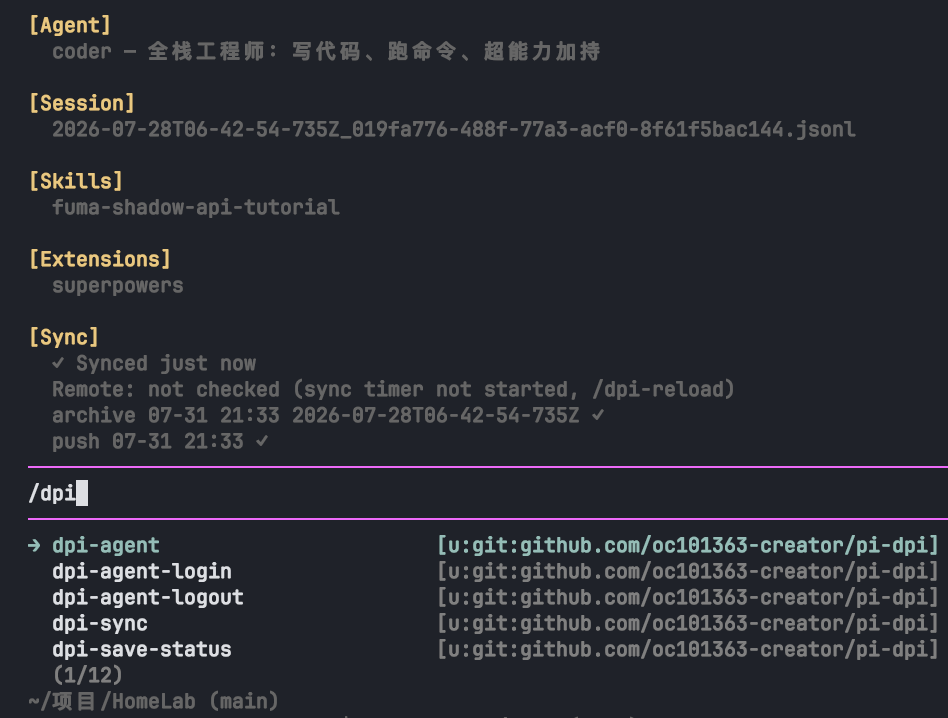
dπ = 拆解 π = decouple & distribute. pi-dpi is an extension plugin for the pi coding agent (pure engine, no agent content): it splits the "agent world" — personas, skills, prompts, session archives — out of the pi package into an independent content repository (your own git repo). pi-dpi only binds, loads, and syncs it. Engine and content are decoupled: engine upgrades don't touch content, content iteration doesn't touch the engine, and the same content repo can be distributed across machines and team members.
中文: README.zh.md | English: this file
Install
Recommended — install from npm (versioned releases, cached installs):
pi install npm:@myka2003/pi-dpi
Alternative — latest from GitHub (unversioned, always current):
pi install git:github.com/oc101363-creator/pi-dpi
Getting Started: /dpi-agent-login
After installing, run in pi:
/dpi-agent-login
Full flow:
- Repo address: pass
/dpi-agent-login <address>or answer interactively. The address format determines the remote type automatically (see "Remote Type Matrix" below): GitHub forms (user/repo,github.com/user/repo,https://…) normalize tohttps://github.com/user/repo.git;git@…/ssh://…use SSH;https://<self-hosted>/…uses generic HTTPS; local paths/file://use the local protocol. - Proxy selection (GitHub / generic HTTPS only): no proxy /
127.0.0.1:7890/ custom. - Auth: GitHub uses device flow — the terminal shows a
user_codeand verification URL; open https://github.com/login/device and enter the code. Generic HTTPS prompts for username + token. SSH and local repos need no credentials. - Clone: the content repo is cloned to
~/.pi/agent/dpi/repo(token never lands in the remote URL; a one-shot credential helper is used). Clones are validated foragents/*/SYSTEM.md— a non-dpi repo errors loudly and writes no config. - Declarative registration: the local path is written into
settings.jsonpackages— the content repo itself is a standard pi package (prompts/themes loaded natively). - Skills by declaration: the engine reads the current agent's
agent.jsononresources_discoverand returns only declared skills (from the repo-rootskills/registry) — undeclared skills never enter a session. This is dpi's skill isolation. - Instant effect: auto
/reload— agent card, skills, prompts available immediately.
No repo yet? /dpi-agent-login (no argument) guides you: it offers to
initialize a local content repo for you (zero-config, single machine) or shows the
forkable starter template (https://github.com/oc101363-creator/pi-dpi/tree/main/templates/content-repo)
for multi-machine sync later.
Remote Type Matrix
| Address form | Type | Auth |
|---|---|---|
user/repo, github.com/user/repo, https://github.com/user/repo(.git) |
GitHub | OAuth device flow, token stored locally (0600) |
git@host:path, user@host:path, ssh://… (incl. git@github.com:…) |
SSH | Zero credential, local ssh key |
https://<non-GitHub>/…, http://… |
Generic HTTPS | Interactive username + token (two-line token file) |
/abs/path, ~/path, file://… |
Local | Zero credential, local git protocol |
Examples:
/dpi-agent-login git@git.example.com:user/agents.git        # SSH remote
/dpi-agent-login https://gitea.example.com/user/agents.git  # generic HTTPS
/dpi-agent-login ~/srv/agents.git                           # local repo (bootstraps if empty)
Commands
| Command | Purpose |
|---|---|
/dpi-agent-login [repo] |
Bind / rebind the content repo |
/dpi-agent-logout |
Clear the local token (repo and config kept) |
/dpi-agent [name] |
View / switch current agent |
/dpi-skills |
Manage current agent's skill set (toggle/delete registry skills) |
/dpi-extensions |
Manage current agent's extensions (toggle/delete registry extensions) |
/dpi-sync |
Manual sync: pull --rebase → sweep commit → push (reloads on declaration change) |
/dpi-record on|off|status |
Session archive toggle |
/dpi-save [name] |
Save the current session now; with a name = named savepoint |
/dpi-sessions |
Browse archived sessions (vim nav: j/k, gg/G, / filter), restore/rename/delete |
/dpi-session-repair |
Clean bad messages in the current session file (takes effect on re-entry) |
/dpi-save-status |
Show save status: last archive/push, unpushed commits |
Auto-sync: a 3s remote watch fetches GitHub and pulls declaration changes; a 15-minute
session archiver writes the current session to the git object store (plus manual /dpi-save)
and pushes with credentials. Restore sanitizes session structures generically (orphan or
consecutive tool results from compaction, trailing metadata) so any archived session loads
correctly — no per-session fixes. Save status lives in the footer (sync: ✓) and
/dpi-save-status.
Session self-healing: gateway 400/429 failures or user aborts can write empty assistant
messages into the session file, killing the session. The engine cleans them on exit and on
session switch; /dpi-session-repair fixes manually.
Content Repository Structure
A content repo is an ordinary git repo (keep it Private — session archives live in it):
<content-repo>/
├── agents/                 # Multi-agent worlds: one directory per persona
│   └── <name>/
│       ├── SYSTEM.md       # Persona (injected into system prompt every turn)
│       ├── agent.json      # Capability declaration: { description, skills, extensions }
│       └── prompts/        # Agent prompt templates (xxx.md → /xxx)
├── skills/                 # Skill registry: flat <name>/SKILL.md entries
├── extensions/             # Extension registry: flat <name>.ts or <name>/index.ts dirs
├── machines/               # Per-machine overrides: <hostname>.json (proxy, recordSessions sync across machines)
├── sessions/<agent>/       # Session archives by agent (_legacy/ holds old flat archives)
├── docs/plans|specs/       # Workflow docs: spec (design) then plan (execution)
└── themes/                 # Optional pi themes
New agent = add agents/<name>/{SYSTEM.md, agent.json} + declare skills/extensions in
agent.json — no engine changes. New skill = add skills/<name>/SKILL.md, then enable via
/dpi-skills (writes back to agent.json). Same for extensions: add
extensions/<name>.ts (or a directory with index.ts), enable via /dpi-extensions.
Extension = self-contained unit
An extension can bundle its own skills at extensions/<name>/skills/ — declaring the
extension makes its skills available automatically (no registry copying). Vendor community
packages by copying the package into extensions/<name>/ and merging its dependencies
into the content repo's package.json (auto npm install on first load). Deleting an
extension cascades to its same-name bundled skill.
per-agent extensions
The content repo's extensions/ is a flat registry; the engine rewrites the content
package's extensions filter in settings.json to the current agent's declared whitelist.
Filtering happens before jiti import — undeclared extension files never execute (real
isolation); switching agents triggers a full reload.
superpowers support
superpowers ships as an ordinary extension in the
content registry, loaded per agent via agent.json declaration + settings whitelist.
Machine-level config (machines/)
The engine overlays machines/<hostname>.json (normalized lowercase [a-z0-9-]) on top of
the global config. Whitelisted fields: proxy, recordSessions — machine-specific settings
travel with the repo, new machines get them automatically.
⚠️ Privacy
- The content repo must stay Private. Session archives live in the repo — public repo means public chat history.
- The token is stored only at
~/.pi/agent/dpi/token(0600), never in remote URLs or config.
Development
npm run typecheck/npm run test— must be green before committing- See CONTRIBUTING.md for contribution guidelines