@nguyenquangthai/pi-ask
Keyboard-first structured questions with review for Pi Coding Agent.
Package details
Install @nguyenquangthai/pi-ask from npm and Pi will load the resources declared by the package manifest.
$ pi install npm:@nguyenquangthai/pi-ask- Package
@nguyenquangthai/pi-ask- Version
0.2.0- Published
- Sep 12, 2026
- Downloads
- 476/mo · 34/wk
- Author
- nguyenquangthai
- License
- MIT
- Types
- extension
- Size
- 168.7 KB
- Dependencies
- 0 dependencies · 3 peers
Pi manifest JSON
{
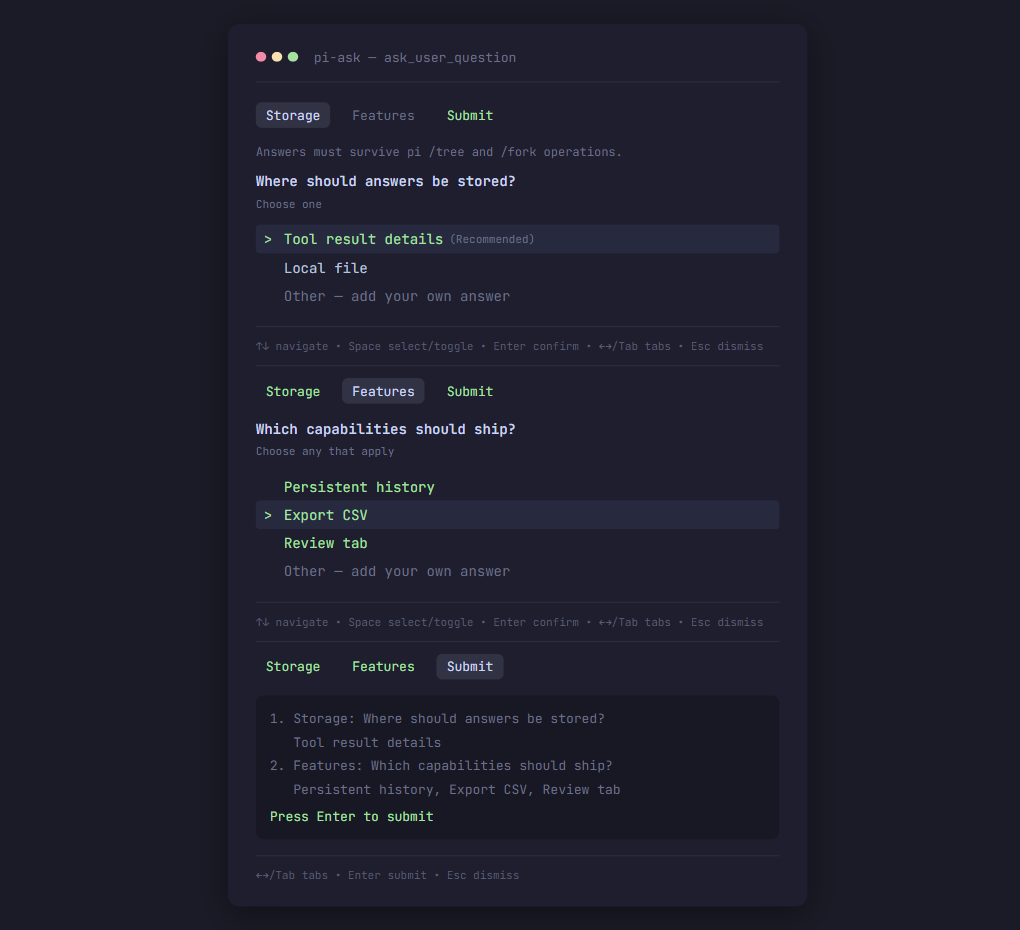
  "image": "https://raw.githubusercontent.com/QuangThai/pi-ask/main/assets/pi-ask-preview.png",
  "extensions": [
    "./src/index.ts"
  ]
}
Security note
Pi packages can execute code and influence agent behavior. Review the source before installing third-party packages.
README
pi-ask
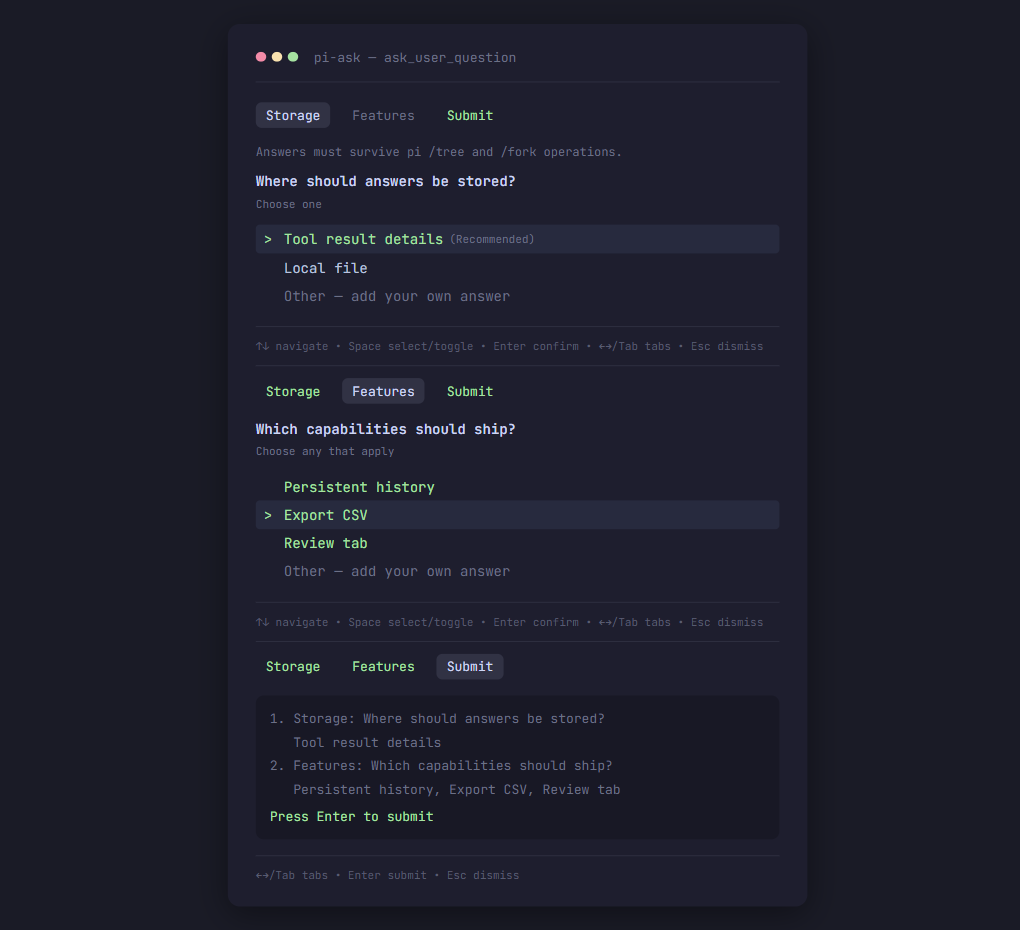
Interactive keyboard-first questionnaire for Pi Coding Agent. Presents the user 1–4 structured questions with options, custom answers, and a review tab before final submission.
Inspired by the AskUserQuestion tool from Claude Code / OpenCode / Codex CLI.
Install
# Install from npm (recommended)
pi install npm:@nguyenquangthai/pi-ask

# Or pin a Git commit/tag
pi install git:github.com/QuangThai/pi-ask@v0.2.0

# Local development
pi install ./
Prerequisites: Pi >=0.80.7 and Node.js >=22.19.0 (the extension runs
inside Pi's runtime, which requires that version).
What it looks like
The tool (ask_user_question) makes the LLM pause and show a keyboard-driven dialog:
- Questions tab — each question has a header, optional context, and 2–4 options
- Recommended — options marked
recommended: trueare moved to the top and show a(Recommended)hint; they are never pre-selected - Other — pick "Other — add your own answer" to enter free text via the inline editor;
Entersaves and continues - Skip — optional questions (
required: false) get their own "Skip this question" row, soEnteron an option always selects it - Multi-select —
Spaceto toggle,Enterto confirm - Pick & continue — choosing a single-choice option (
Space/Enter) saves and moves to the next tab automatically - Review tab — see all answers before submitting; navigate back to any tab to edit
- Keyboard navigation —
↑↓move,Space/Enterchoose & continue,←→/Tabswitch tabs,Escdismiss. Selection and confirm keys follow yourkeybindings.json(tui.select.*), and the on-screen hints show whatever you configured
Tool call (transcript)
ask_user_question 2 questions (Storage, UI)
  ↓
Storage: Tool details
UI: Review tab, Custom answer
Usage for the LLM
When facing ambiguity, the model calls ask_user_question. Example:
{
  "questions": [
    {
      "id": "persistence",
      "header": "Persist",
      "question": "How should session state be persisted?",
      "context": "Answers must survive pi /tree and /fork operations.",
      "multiSelect": false,
      "required": false,
      "options": [
        { "value": "details", "label": "Tool result details", "recommended": true },
        { "value": "file",    "label": "File" },
        { "value": "env",     "label": "Environment variable" }
      ]
    }
  ]
}
Conditional follow-up example
Use showWhen to ask a follow-up only when it is relevant:
{
  "questions": [
    {
      "id": "stack",
      "header": "Stack",
      "question": "What are you building?",
      "context": "Selecting Backend reveals a database question.",
      "multiSelect": false,
      "options": [
        { "value": "frontend", "label": "Frontend UI" },
        { "value": "backend", "label": "Backend API", "recommended": true }
      ]
    },
    {
      "id": "db",
      "header": "DB",
      "question": "Which database?",
      "multiSelect": false,
      "showWhen": { "questionId": "stack", "equals": "backend" },
      "options": [
        { "value": "postgres", "label": "PostgreSQL" },
        { "value": "sqlite", "label": "SQLite" }
      ]
    }
  ]
}
| User picks… | Behavior |
|---|---|
| Frontend UI | DB tab hidden — submit only shows { stack: frontend } |
| Backend API | DB tab appears — user picks a database; submit shows { stack: backend, db: postgres } |
| Backend → picks Postgres → reopens and switches to Frontend | DB answer cleared and removed from the result; hidden required children never block submit |
When to use: Prefer
showWhenover separateask_user_questioncalls. One dialog with a conditional chain is faster and less disruptive than asking multiple times.
Rules:
idmust be unique per question;valuemust be unique per optionvalue,label,id, andheaderare required in the public schema, but the tool registers aprepareArguments()hook that derives anything the model omits before Pi's validation runs — so LLM calls never hit a hard framework validation error. Missingvalue→ slug of the label (e.g.Chọn mẫu tối giản→chon-mau-toi-gian), missingid→question-N, missingquestion→ the header, missingheader→ the question text (truncated)- Providing
value/labelexplicitly is preferred:valueis the stable key returned to you,labelis the text shown to the user - A single question/option object is auto-wrapped into an array;
null/non-object entries are dropped; string booleans ("false","no","yes", …) are normalized requireddefaults totrue; setrequired: falseto add a "Skip this question" row the user can choose deliberatelyshowWhen: { questionId, equals }shows a follow-up only after the parent is confirmed with that optionvalue(one level deep; Other text never matches)- Use
recommended: trueon the best option (moved to the top with a hint; user must select it explicitly) - Do not include a custom "Other" option — it is automatic
header≤ 12 terminal columns (longer headers are truncated on a grapheme boundary, never rejected — CJK and emoji count as two columns)question,contextand optiondescriptionmay contain line breaks and are wrapped;header,label,valueandidare collapsed onto one line- Escape sequences and control characters are stripped from every string before validation, so styled or multi-line model output never fails the call
- More than four options are trimmed to the first four (recommended first) instead of failing; duplicate ids or option values get a
-2suffix - Free-text Other answers are capped at 4,000 characters; terminal control characters are removed
Key bindings
| Key | Context | Action |
|---|---|---|
↑ ↓ |
Options list | Move cursor |
Space / Enter |
Single-select option | Select and continue to next tab |
Space / Enter |
"Skip this question" (optional questions only) | Clear any pick and confirm the question as skipped |
Space |
Multi-select option | Toggle option (stay on tab) |
Enter |
Selected multi-select options | Confirm question |
Enter / Space |
"Other — add your own answer" | Open inline editor |
Enter |
Inline editor (with text) | Save, confirm, and continue |
Esc |
Inline editor | Cancel |
← → / Tab |
Multi-question tabs | Switch tabs |
Enter |
Review tab | Submit all |
Esc |
Anywhere | Cancel / dismiss |
Enter and Esc above are the defaults for tui.select.confirm and
tui.select.cancel. If you rebind them in ~/.pi/agent/keybindings.json, the
questionnaire follows your binding and the hint line shows it.
Submission guarantees
- An unanswered required question can be visited in Review but cannot be submitted;
Enteris a no-op until every visible question is confirmed. - An optional question is skipped only from its own "Skip this question" row; it is then omitted from the submitted
answersarray.Enteron an option always selects that option, so a highlighted answer is never silently discarded. - A required multi-select question with no checked option and no Other text cannot be confirmed.
- Saving an Other answer (
Enterin the inline editor) confirms the question and continues immediately; the answer is shown in the Review tab and when navigating back. - Saving blank Other text clears it. If that leaves no answer, the question becomes unconfirmed and blocks Submit.
- Editing a selected answer or Other text unconfirms that question until the user confirms it again.
- A
showWhenfollow-up is hidden until its parent is confirmed with the matching optionvalue; hidden questions are omitted from tabs, Review, andanswers. - Editing or unconfirming a parent clears and hides dependent children; a hidden required child does not block submit.
- Multi-select answers are serialized in the original option order, regardless of the order in which options were toggled.
- A submitted answer may carry
selectedValuesandcustomTexttogether; the LLM transcript preserves both. - Terminal exit/abort, user dismissal, invalid input, and unavailable UI have distinct result statuses:
aborted,dismissed,invalid, andunavailable.
What the model reads back
The text returned to the model is keyed by your id and leads with the option
value you supplied, with the label in quotes when it adds anything:
persistence: details ("Tool result details")
ui: review ("Review tab"), custom ("Custom answer"); (wrote) plus a sidecar file
The transcript the user sees is the mirror image — the question header and
the human labels, one line per answer. Press the tool-expand key (Ctrl+O by
default, app.tools.expand) to see the stable values and the full text of a
long free-text answer.
Architecture
src/
├── index.ts       # Tool registration, mode handling, renderCall/renderResult
├── schema.ts      # TypeBox schemas, normalization (repair), validation
├── state.ts       # Reducer: navigation, selection, confirm, skip, toResult
├── component.ts   # QuestionnaireComponent (pi-tui only at runtime)
├── keys.ts        # Keybinding lookup and hint labels
├── result.ts      # Answer summary for the model
└── text.ts        # One sanitizer for every untrusted string
tests/
├── state.test.ts        # reducer and result-contract tests
├── component.test.ts    # keyboard and rendering tests
├── tool.test.ts         # runtime validation and lifecycle tests
├── regressions.test.ts  # behaviours that were wrong once
├── text.test.ts         # escape-sequence and control-character handling
└── e2e/
    ├── ask.e2e.test.ts  # full tool call on a real TUI + Pi's own validator
    └── cli.e2e.test.ts  # a real `pi` process against a mock model server
Key design decisions:
- Built-in "Other" row — Pi's LLM should not add its own "Other" option; the component adds "Other — add your own answer" automatically. For multi-select questions, the custom text supplements selected options.
- Result by question ID, not text — answers map via stable
questionId/value, avoiding duplicate-text collisions. - State in tool result
details— answers persist in the Pi session JSONL via built-intoolResult.details. Branch tracking is automatic:/treeor/forkuses the correct branch's answers. NoappendEntry, no external state. - Non-TUI = disabled — outside
ctx.mode === "tui"the tool removes itself onsession_start, so it never reaches the model's tool list in print, JSON or RPC mode; a direct call still returnsstatus: "unavailable". - Keyboard-first WCAG — all actions work with
↑↓ Enter Space Esc ←→; no mouse dependency; color is never the sole indicator. - No dead rendering —
render()caches by width and invalidates on state/theme change. - TUI-only custom component —
ctx.ui.custom()opens only inctx.mode === "tui"; RPC, JSON, and print modes return an explicitunavailableresult. - Terminal and IME safety — rendered lines are clamped to the supplied display width; the questionnaire forwards focus to its inline
Editorfor IME-aware terminals.
Reliability
npm run check covers reducer invariants, keyboard flows, review navigation,
Other editing, narrow terminal widths, runtime validation, non-TUI fallback,
and aborts before and after opening the dialog.
npm run check:all adds two end-to-end layers that use the real thing rather
than a stand-in:
- Real TUI (
tests/e2e/ask.e2e.test.ts) — a whole tool call runs against an actualTUIinstance, the theme Pi ships, a realKeybindingsManagerand real terminal byte sequences, with arguments validated by Pi's ownvalidateToolArguments. The renderer throws if any line exceeds the terminal width, so the dialog is exercised at 20, 24, 40, 80 and 120 columns. - Real CLI (
tests/e2e/cli.e2e.test.ts) — a childpiprocess loads the extension from source and runs a scripted tool call against a local OpenAI-compatible mock server, asserting on the tool list Pi actually sends and on the tool result that comes back.
The package tarball includes only runtime source and release metadata.
GitHub Actions runs the check and both end-to-end layers, a production dependency audit, a coverage run, a package dry-run, and a clean tarball-install smoke test on Node 22 and 24.
Implementation choices are verified against:
- Pi extension API and lifecycle: https://github.com/earendil-works/pi/blob/main/packages/coding-agent/docs/extensions.md
- Pi custom-component, focus, keyboard, and width contract: https://github.com/earendil-works/pi/blob/main/packages/coding-agent/docs/tui.md
- Reference questionnaire test coverage: https://github.com/ghoseb/pi-askuserquestion
- Alternative
askcontract (free text, review disposition, dismissal): https://github.com/IgorWarzocha/howaboua-pi-stuff/tree/main/packages/pi-ask
Pi package gallery
pi.dev/packages indexes npm packages tagged with the
pi-package keyword; it does not accept a separate package upload. This package
carries that keyword and hosts its preview asset at a stable GitHub URL through
pi.image in package.json, and it is published to npm as
@nguyenquangthai/pi-ask.
Development
npm install
npm test                 # unit and integration tests
npm run e2e              # end-to-end through the real pi CLI
npm run check            # typecheck + lint + tests
npm run check:all        # the above plus the CLI end-to-end suite
npm run test:coverage    # coverage with thresholds
npm run pack:dry         # verify package contents
See CONTRIBUTING.md for how the test layers fit together.
Test interactively:
pi -e ./src/index.ts --model sonnet
Support and security
- Report bugs or request features through GitHub Issues.
- See SECURITY.md for responsible vulnerability reporting.
License
MIT © 2026 QuangThai