@nguyenquangthai/pi-omp-theme
An OMP-inspired visual theme and TUI presentation extension for Pi.
Package details
Install @nguyenquangthai/pi-omp-theme from npm and Pi will load the resources declared by the package manifest.
$ pi install npm:@nguyenquangthai/pi-omp-theme- Package
@nguyenquangthai/pi-omp-theme- Version
1.0.26- Published
- Oct 12, 2026
- Downloads
- 2,421/mo · 484/wk
- Author
- nguyenquangthai
- License
- MIT
- Types
- extension, theme
- Size
- 638.6 KB
- Dependencies
- 0 dependencies · 2 peers
Pi manifest JSON
{
  "image": "https://raw.githubusercontent.com/QuangThai/pi-omp-theme/main/media/gallery-preview.png?v=gallery-5",
  "themes": [
    "./themes"
  ],
  "extensions": [
    "./dist/extensions/pi-omp-theme.ts"
  ]
}Security note
Pi packages can execute code and influence agent behavior. Review the source before installing third-party packages.
README
@nguyenquangthai/pi-omp-theme


An OMP-inspired visual theme and TUI presentation extension for Pi. It combines Titanium dark/light themes with a coordinated startup view, status line, editor, messages, and tool rendering.
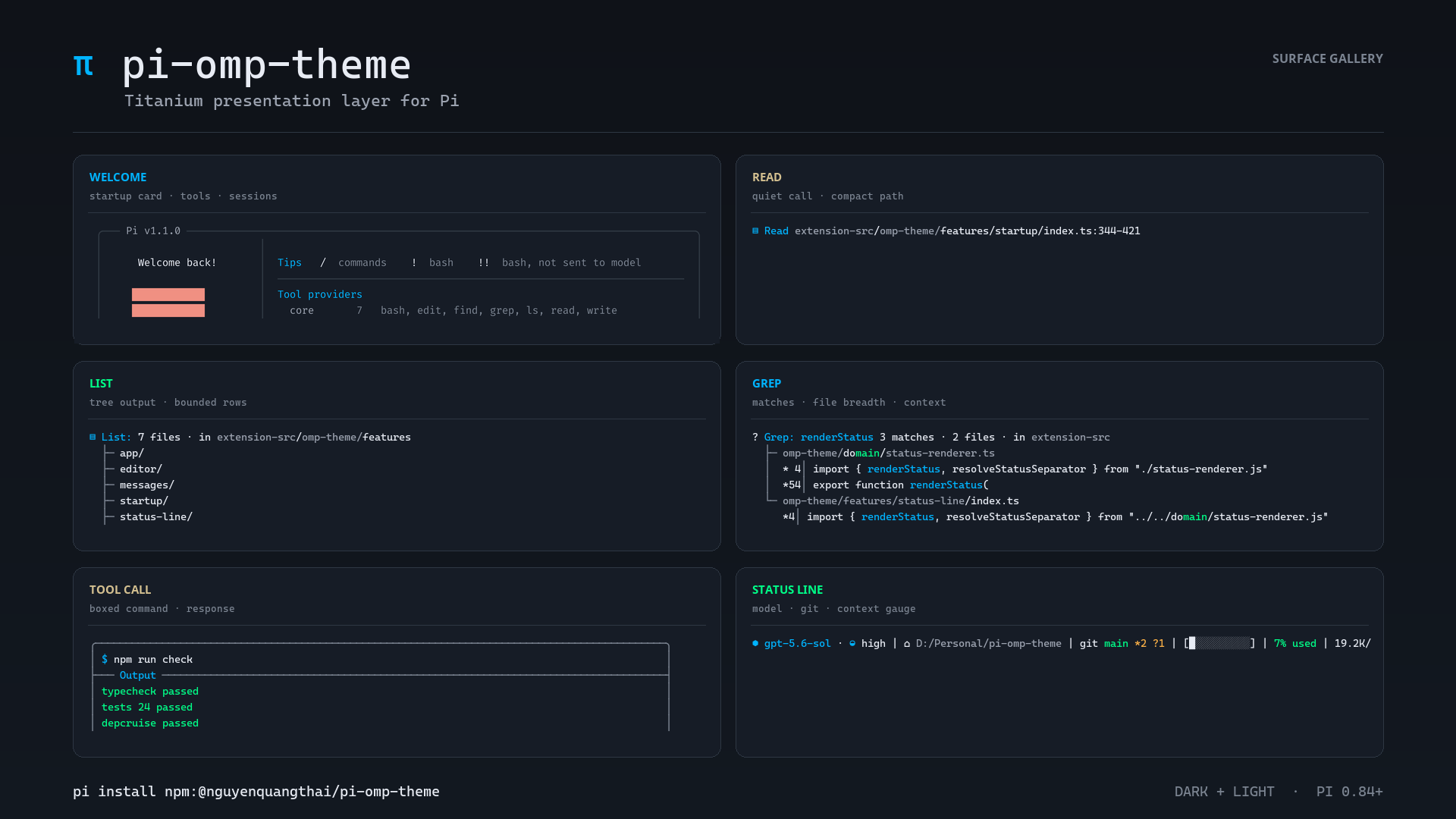
Surface gallery
The gallery is more than a logo preview: it shows the surfaces people see in a real Pi session. These representative Pi 0.84.2 captures use the Titanium dark theme, Unicode glyphs, a 120-column terminal, and sample local project data. Click any thumbnail for the full-size image.
| Surface | What it demonstrates | Full-size preview |
|---|---|---|
| Welcome | Startup resources, tool providers, and recent sessions | open welcome.png |
| Read | Quiet, single-line file reads with a readable path | open read.png |
| List | Bounded directory output rendered as a tree | open list.png |
| Grep | Match counts, file grouping, context, and truncation | open grep.png |
| Tool call | Boxed command, response, exit status, and elapsed time | open tool-call.png |
| Status line | Model, effort, path, Git state, and context usage | open status-line.png |
Install it in Pi with one command:
pi install npm:@nguyenquangthai/pi-omp-themeFeatures
- Claude-style and OMP-style editor/status compositions.
- Responsive status segments for model, effort, path, Git, context, usage, cost, time, and session state.
- Compact startup header or optional welcome card.
- Boxed tool rendering, quiet-call batching, adaptive diffs, elapsed time, and completed-turn summaries.
- Optional Claude Code transcript (
claude-codepreset):● Tool(args)calls with a⎿result gutter, marked answers, one-line thinking, edit sentences, an interrupt prompt, and a working row with run time and tokens. - Optional message/tool compatibility patches with per-surface identity checks and native fallback.
- Titanium dark/light themes, Nerd Font/Unicode/ASCII modes, shimmer, syntax-highlight caching, and session accents.
Requirements
- Node.js 22.19 or newer.
- Pi 0.83.x or newer. Compatibility patches are probed against the live Pi runtime per surface; Pi version numbers are diagnostic only, so unrelated releases keep the themed TUI when the patched method contracts remain unchanged. Unrecognized contracts fall back to Pi's native rendering.
Install
Use Pi's package manager so the extension and themes are registered correctly:
pi install npm:@nguyenquangthai/pi-omp-themeRunning npm install alone downloads the package but does not register it with Pi.
Verify installation
pi list
pi -p "/pi-omp-theme doctor"
pi list should include npm:@nguyenquangthai/pi-omp-theme. The doctor summary reports the active preset, Pi compatibility identity, surface fallbacks, and host binding; Host binding should read bound. Use /pi-omp-theme doctor json when you need the complete field-level payload.
Install from a local checkout
npm ci && npm run build
pi install /path/to/pi-omp-theme
The compiled entry is dist/extensions/pi-omp-theme.ts on purpose. Pi loads extensions through jiti, which applies the host aliases (@earendil-works/* → the running Pi's own modules) while loading the .ts entry. A .js entry next to a checkout's node_modules/@earendil-works/pi-coding-agent can bind the extension to a second copy of Pi and make message/tool decoration silently miss the TUI. Pi 0.84.3+ runs its Node CLI/RPC entrypoints from a bundled runtime and exposes those host modules virtually; the package detects that loader path instead of comparing it with the modular package entry. If the doctor ever reports hostBinding.status: "foreign", the extension was loaded outside Pi's loader; reinstall with pi install npm:@nguyenquangthai/pi-omp-theme or rebuild the checkout.
The first launch after a rebuild transpiles the bundle once (a few seconds); jiti caches the result for later launches.
Update
pi update npm:@nguyenquangthai/pi-omp-theme
# Or update every installed Pi package:
pi update --extensions
Version-pinned installs such as npm:@nguyenquangthai/pi-omp-theme@1.0.3 remain pinned until explicitly changed.
Uninstall
pi remove npm:@nguyenquangthai/pi-omp-themeDefaults
The shipped configuration uses the claude preset with a dock editor, a status row below the editor, compact startup presentation, boxed tools, completed-turn summaries, and the titanium theme. Core compatibility patches remain disabled unless explicitly enabled.
Presets
claude, claude-code, omp, default, minimal, compact, full, ascii, and native.
Claude Code transcript
The claude-code preset keeps the claude composer and status row and renders the transcript the way Claude Code does:
● The expiry check compared with < instead of <=.

● Thought for 6.2s · Ctrl+T to show

● Bash(npm test -- auth)
  ⎿  … +18 earlier lines · Ctrl+O to expand
     ✕ rejects expired tokens (12 ms)
     ✘ Exit 1 · 2.2s · ~41 words

● Edit(src/auth.ts)
  ⎿  Updated src/auth.ts with 1 addition and 1 removal
     +1 −1 · 0.2s
     -  42  if (exp < now) return true;
     +  42  if (exp <= now) return true;

● Read 1 file, ran 2 shell commands · 6.7s · Ctrl+O to expand

⣾ Working... (14s · ↓ 1.2k tokens · Escape to interrupt)
{
"piOmpTheme": {
"preset": "claude-code"
}
}Each part is an ordinary option, so it can also be enabled on its own:
| Option | Effect |
|---|---|
tools.chrome: "inline" |
Tool calls render as ● Name(args) with a ⎿ result gutter instead of a frame. The marker colour shows the status (running, done, failed); todo lists render as a checklist. |
messages.assistantMarker: true |
Each assistant answer starts with ●, its lines hanging under it. Your messages start with the prompt's ❯ (or your theme.glyphs.prompt): their band starts under the ●, covers only the text rows, and their text lines up with the answers. Replaces the messages.assistantPrefix gutter. |
messages.thinkingSummary: true |
Hidden thinking reads ● Thinking… while it streams and ● Thought for 6s afterwards; click it or press the thinking toggle to show it. Restored sessions show ● Thought. |
theme.workingElapsed: true |
The working row shows the run time: Working... (14s · Escape to interrupt). |
theme.workingTokens: true |
The working row shows the run's output tokens: (14s · ↓ 1.2k tokens · Escape to interrupt). Streamed text counts at about four characters a token until each message reports its real usage. |
tools.editSummary: true |
File changes read like Claude Code's: an inline edit opens with Updated src/auth.ts with 1 addition and 1 removal above the +1 −1 · 0.2s row and the diff, and a write reads Wrote 3 lines to notes/todo.txt · 0.2s. On a row too narrow for it, the sentence shortens to Updated src/auth.ts and the write drops its path, so nothing shown before is cut. |
messages.interruptHint: true |
An interrupted turn keeps Pi's notice and adds · What should the agent do instead?: Operation aborted · … when Esc stops an answer, Error: This operation was aborted · … when it stops a tool run. Esc while a tool call's arguments are still streaming shows on that tool block, unchanged. |
The preset also lowers tools.maxCollapsedLines to 4. Glyphs follow the Nerd Font/Unicode/ASCII mode and can be overridden through theme.glyphs (toolMarker, resultGutter, todoDone, todoOpen, thinkingMarker); ASCII mode uses *, |, [x], [ ], and ~. Message blocks (compaction, skills, branches) and user !commands follow the same ●/⎿ form, todo lists render as checklists and stay visible after a turn collapses, and the git/gh cards and git diff/gh run views hang under the gutter without frames. grep, rg, ls, and find run through bash read like the Grep, List, and Find tools (● Grep(row in src)).
Hiding extension widgets
widgets.hide keeps chosen extension widgets off screen. The extension keeps running; only its widget is not drawn. For example, the transcript already shows pi-todo's checklist, so its pinned Updated Plan box above the editor can go:
{
  "piOmpTheme": {
    "widgets": { "hide": ["pi-todo"] },
    "compatibility": { "allowCorePatches": true }
  }
}
The value is a list of widget keys (pi-todo uses pi-todo); other widgets are untouched, and the list is empty by default. It is a core patch, so it needs compatibility.allowCorePatches, and /pi-omp-theme doctor reports it as Widgets. /todos still shows the list. Changes to the list take effect on /reload or when Pi restarts.
Configuration
Use the piOmpTheme key in Pi's global or trusted project settings.json:
{
  "piOmpTheme": {
    "preset": "claude", // claude-code | omp
    "theme": {
      "autoApply": "titanium"
    },
    "compatibility": {
      "allowCorePatches": false
    }
  }
}
Presets coordinate status placement, editor style/frame, separator, and status layout. Keep those fields omitted when you want the preset's complete composition; for example, changing only preset to "omp" selects the rounded border layout. Explicit values still win, but /pi-omp-theme doctor warns when they contradict coordinated preset fields and produce a hybrid UI.
Precedence:
defaults < global settings < trusted project settings < environment < session overrideInvalid values fall back safely and appear in /pi-omp-theme doctor.
Read-only tool activation
By default, the theme leaves Pi's active tool set unchanged. This prevents it from
re-enabling tools intentionally disabled by extensions such as pi-hashline-edit-pro.
Package order is not a workaround you need with this default.
To explicitly add registered grep, find, and ls tools at session start:
{
  "piOmpTheme": {
    "readonlyTools": true
  }
}
Set readonlyTools to false (the default) to leave tool selection alone. Global
and trusted-project settings follow the normal configuration precedence. A disabled
extension (enabled: false or PI_OMP_THEME_DISABLED=1) never activates tools.
For one invocation, override the setting with an explicit CLI value:
pi --pi-omp-theme-readonly-tools=true
pi --pi-omp-theme-readonly-tools=false
The space-separated forms (--pi-omp-theme-readonly-tools true / false) also work.
Migration from 1.0.14: the flag now requires a value; the former bare boolean
flag is no longer supported. A value-taking flag avoids Pi 0.99.1 interpreting
=false as boolean true. Invalid values disable activation and emit a warning.
Activation is checked at session start, including a new session or Pi's /reload.
Editing settings or running /pi-omp-theme reload does not change active tools
mid-session. Opting out never removes tools already enabled by you or another
extension. Explicit opt-in can still re-enable a tool another extension disabled;
leave it off when using replacement tools. Pi's --exclude-tools grep is also
available when you need to keep native grep inactive while allowing find and ls.
Environment variables
| Variable | Purpose |
|---|---|
PI_OMP_THEME_DISABLED=1 |
Disable the extension. |
PI_OMP_THEME_NERD_FONTS=1|0 |
Force Nerd Font or non-Nerd glyphs. |
PI_OMP_THEME_EDITOR=native|compact|boxed|dock |
Override editor style. |
PI_OMP_THEME_STATUS=above|below|off |
Override status placement/state. |
PI_OMP_THEME_THEME=<name|off> |
Select or disable automatic theme application. |
PI_OMP_THEME_OSC11=1|0 |
Override terminal background synchronization. |
PI_OMP_THEME_DEBUG=1 |
Enable bounded diagnostics. |
CLI flags
--pi-omp-theme-core-patches
--pi-omp-theme-message-assistant
--pi-omp-theme-message-special-blocks
--pi-omp-theme-tools
--pi-omp-theme-readonly-tools <true|false>
--pi-omp-theme-ascii
Commands
| Command | Purpose |
|---|---|
/pi-omp-theme |
Show active preset and surface state. |
/pi-omp-theme on|off |
Toggle the extension for the current session. |
/pi-omp-theme preset <name> |
Apply a preset. |
/pi-omp-theme placement above|below|border |
Change status placement. |
/pi-omp-theme editor <style> [frame] |
Change editor presentation. |
/pi-omp-theme startup off|compact|overlay |
Change startup presentation. |
/pi-omp-theme surface <name> on|off |
Toggle a surface. |
/pi-omp-theme set <path> <JSON> |
Set a validated configuration leaf. |
/pi-omp-theme persist global|project set <path> <JSON> |
Persist a validated setting. |
/pi-omp-theme reload |
Reload configuration and affected surfaces. |
/pi-omp-theme doctor |
Show a compact, human-readable health report. |
/pi-omp-theme doctor json |
Show the complete machine-readable diagnostic payload. |
Privacy and security
Pi extensions execute with the user's system permissions. Review the source before installation.
The extension does not implement telemetry. The optional welcome presentation reads bounded local Pi metadata; its recent-session list can derive a short display title from the opening request in local session files. That data is rendered locally and is not transmitted by this package.
Development
npm ci
npm run typecheck
npm run depcruise
npm run build
npm run package:smoke
npm run check
npm run check is also enforced by the npm prepack hook.
Releases are published manually to avoid CI billing. The complete maintainer checklist is documented in the release guide.
License
MIT. Required notices from incorporated MIT-licensed sources are retained.