@nguyenquangthai/pi-todo
OpenCode-like session todo checklist for the pi coding agent — todo_write/todo_update/todo_read with a live TUI overlay
Package details
Install @nguyenquangthai/pi-todo from npm and Pi will load the resources declared by the package manifest.
$ pi install npm:@nguyenquangthai/pi-todo- Package
@nguyenquangthai/pi-todo- Version
0.7.0- Published
- Sep 12, 2026
- Downloads
- 496/mo · 56/wk
- Author
- nguyenquangthai
- License
- MIT
- Types
- extension
- Size
- 123.1 KB
- Dependencies
- 0 dependencies · 4 peers
Pi manifest JSON
{
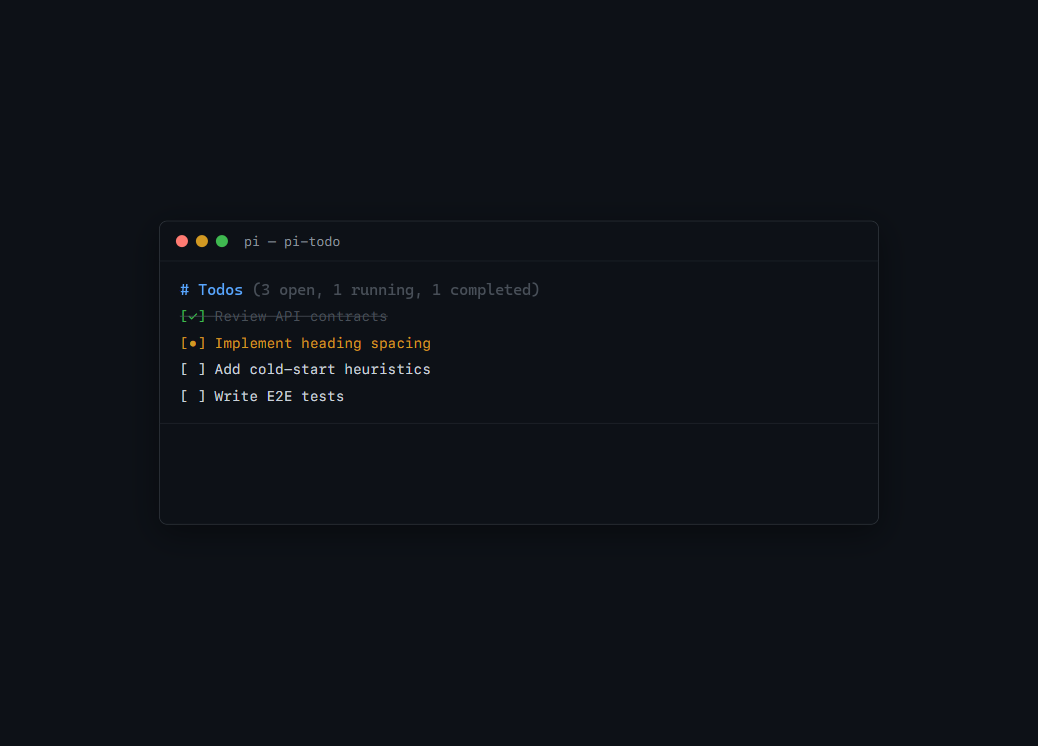
  "image": "https://raw.githubusercontent.com/QuangThai/pi-todo/main/media/screenshot.png",
  "extensions": [
    "./src/index.ts"
  ]
}
Security note
Pi packages can execute code and influence agent behavior. Review the source before installing third-party packages.
README
pi-todo


OpenCode-style session todo checklist for the pi coding agent.
Adds todo_write / todo_update / todo_read, the /todos and /todo-diagnose commands, a live Updated Plan overlay above the editor ([ ] / [•] / [✓] / [×]), and branch-replay persistence that survives /reload, tree navigation, and compaction.
Requires Node >= 22.19 (the same floor as pi itself).
Install
pi install npm:@nguyenquangthai/pi-todoOr from source:
git clone https://github.com/QuangThai/pi-todo.git
cd pi-todo
pi install .
Then restart pi or run /reload.
Tools
todo_write
Full-replace the session todo list. Each call must pass the complete list.
{
  "todos": [
    { "content": "Wire overlay", "status": "completed", "priority": "high" },
    { "content": "Add tests", "status": "in_progress", "priority": "high" },
    { "content": "Write README", "status": "pending" }
  ]
}
Rules enforced by the tool:
- Exactly one
in_progressallowed (hard reject if more) contentrequired (non-empty after sanitize); max 500 chars, clamped without splitting a surrogate pairstatusrequired:pending|in_progress|completed|cancelledpriorityoptional:high|medium|low, defaulting tomedium- ID rule: omit
idfor a new item; the system assigns a short sequential ID (t1,t2, …). Only include an ID returned bytodo_reador a previous result when retaining an existing item. Never invent an ID. Replacing the list does not inherently reset IDs: matching existing items can retain them. - Stale-ID recovery: an unknown ID is treated as a new item rather than rejecting the whole replacement.
todo_updatestays strict, because it is an identity-based patch. - For changed, repeated, or long/truncated content, include the exact existing ID rather than relying on automatic content matching.
- A mutation can contain at most 200 todos/updates
- Array order is the workflow timeline. Keep existing positions when statuses change; only add or reorder items intentionally.
- Tool text echo caps at 40 lines (
… and N morein the text body; the full list still reaches the UI throughdetails)
Lenient input. Before validation, arguments pass through a coercion layer, so the common near-misses cost a coercion instead of a wasted turn: status: "done" / "in-progress" / "wip", priority: "P1" / "urgent", text / task / title in place of content, a single object where a list belongs, or the whole argument object handed over as a JSON string. Anything genuinely ambiguous is passed through untouched so validation can report it properly.
todo_update
Patch existing todos by short stable ID (t1, t2, …) without replacing the list or changing its order. id is required and must match a current todo exactly. This tool never deletes items.
If an older session returns a todo without id, it cannot be patched. Rewrite it with todo_write, omitting id, to assign one.
{
  "updates": [{ "id": "t1", "status": "completed" }]
}
todo_read
Returns the current list as a single compact checklist with stable IDs and priorities — one representation, not a checklist plus a duplicate JSON dump. Output is bounded so a maximum-size list cannot overrun pi's tool-output limit. Prefer the overlay for at-a-glance status; use this when you need exact IDs.
Commands
| Command | What it does |
|---|---|
/todos |
Show the whole list, including finished items the overlay hides |
/todos reset |
Discard every todo in this session (asks first) |
/todos reminders on|off |
Turn the nudges below on or off for this session |
/todo-diagnose |
Compare the live snapshot against the durable session replay; reports consistent, mismatch, or repair_needed. Read-only. |
Diagnostics are a command rather than a tool on purpose: the model never needs them, and a tool would spend description and schema tokens on every request to offer it that.
Overlay
Shown above the editor while any open todo remains (pending / in_progress), and hidden as soon as the list is empty or every item is completed / cancelled.
Updated Plan
└ [✓] Wire overlay
  [•] Add tests
[ ] Write README- The heading is
Updated Plan, directly above the first row — no counts, no blank line between them. - Items stay in the array's workflow order; status changes only the marker and colour. Finished items are dimmed and struck through.
- The overlay fits within 10 lines, matching pi's own per-widget budget. When space runs out it shows the earliest items plus
+N more, and if the active item falls outside that prefix it is repeated asActive: [•] …rather than moved ahead of earlier work. - In hosts that cannot run a TUI component (RPC front ends), the same layout is sent as plain lines, because pi's RPC transport drops component factories.
- The footer carries a compact
todos done/totalstatus while work is open. - A successful mutation renders
✓ Saved · N open / M total, which means the durable checkpoint was accepted before the in-memory snapshot was updated.
What this extension adds to your context
Worth knowing, since it costs tokens on every request:
- Always on (~580 tokens of prose, plus the three JSON schemas): the tool descriptions, one-line snippets in
Available tools, three guideline bullets inGuidelines, and the schema field descriptions. Down from ~1.75k before 0.7.0. - Situational (0 tokens most turns): a transient
<system-reminder>appended as the last message for a single LLM call — either a cold-start nudge when a multi-step request arrives with an empty list, or an idle reminder when open work has gone untouched for ~4 turns. It is never persisted to the session.
The system prompt itself is never modified per turn. pi renders tools → system → messages and the provider caches that prefix, so a system prompt that changes shape between user turns invalidates the whole cached conversation. Everything situational is therefore a tail message instead.
To turn the nudges off, run /todos reminders off, or start pi with --no-todo-nudges.
Development
git clone https://github.com/QuangThai/pi-todo.git
cd pi-todo
npm install
npm run check          # lint + typecheck + tests
npm run test:coverage
pi -e ./src/index.ts
tests/e2e-real-pi.test.ts runs the extension against the real pi runtime — real extension loader, tool registry, agent loop, session replay, and ctx.ui — with only the model stubbed through the documented pi.registerProvider({ streamSimple }) API. Behaviour changes should be proven there, not only against a hand-written fake.
License
MIT © QuangThai
See CHANGELOG.md for release history.