@nilskluewer/pi-gcp-agent-platform
Use Claude and Gemini models on Google Cloud Vertex AI / Gemini Enterprise Agent Platform from pi.
Package details
Install @nilskluewer/pi-gcp-agent-platform from npm and Pi will load the resources declared by the package manifest.
$ pi install npm:@nilskluewer/pi-gcp-agent-platform- Package
@nilskluewer/pi-gcp-agent-platform- Version
0.4.0- Published
- Oct 29, 2026
- Downloads
- 1,350/mo · 1,107/wk
- Author
- nilskluewer
- License
- MIT
- Types
- extension
- Size
- 117.7 KB
- Dependencies
- 1 dependency · 2 peers
Pi manifest JSON
{
  "extensions": [
    "./extensions/gcp-agent-platform/index.ts"
  ]
}
Security note
Pi packages can execute code and influence agent behavior. Review the source before installing third-party packages.
README
@nilskluewer/pi-gcp-agent-platform
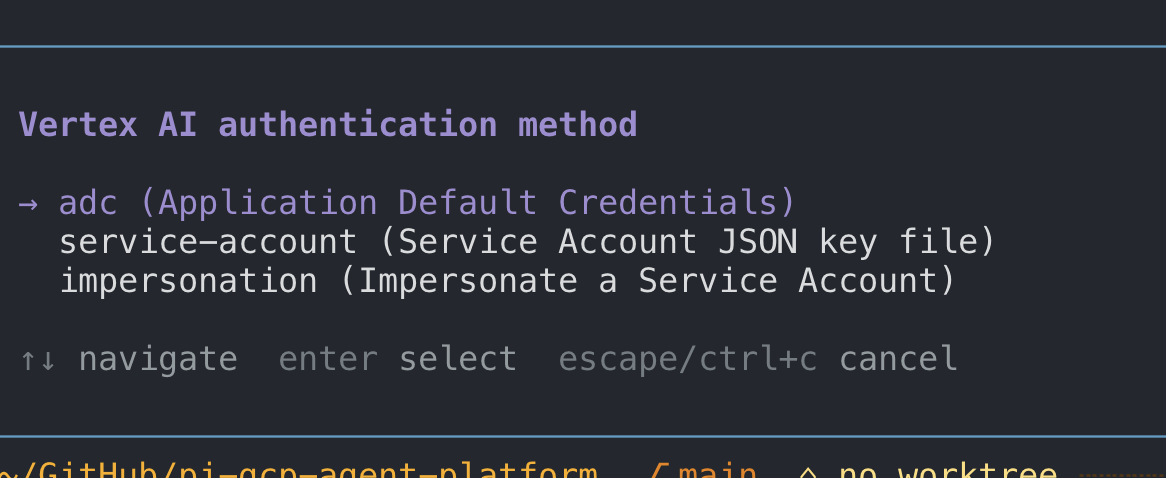
Three authentication methods for Claude and Gemini on Vertex AI:
- ADC — sign in with your Google user account.
- Service Account JSON key — select your key file.
- Service Account impersonation — select a target Service Account and source credentials.
Run /setup-gemini-vertexai to choose a method. If the selected credentials fail, requests stop instead of falling back to another authentication method.
New in 0.4.0: authentication-first setup, Enter to keep the current project and location, and cache settings through /vertex-cache. See patch notes.
Overview
Use Claude and Gemini models through Google Cloud Vertex AI / Gemini Enterprise Agent Platform in pi.
This package contains Vertex model adapters:
anthropic-vertexuses Anthropic'sAnthropicVertexclient for Claude.google-vertexuses pi's native Google Vertex provider for Gemini.google-vertex-imagesuses Vertex AI for Gemini image generation.
All providers share the same Google Cloud project, location, credentials, and prompt-caching configuration.
Getting Started
pi install npm:@nilskluewer/pi-gcp-agent-platform
pi
/setup-gemini-vertexai
/model google-vertex/gemini-3.5-flash-lite
Select Claude in the same session:
/model anthropic-vertex/claude-opus-5-5The legacy /setup-vertexai command remains available as an alias.
Structure
.
├── extensions/
│   └── gcp-agent-platform/
│       ├── index.ts       # shared setup, auth, caching, and provider registration
│       ├── anthropic.ts   # AnthropicVertex adapter for Claude
│       └── images.ts      # Vertex AI adapter for Gemini image generation
├── scripts/
│   └── smoke.mjs          # package smoke test
├── LICENSE
├── README.md
└── package.json
Setup and Authentication
Requirements
- A Google Cloud project with the Vertex AI API enabled.
- Claude and/or Gemini models enabled in Vertex AI / Gemini Enterprise Agent Platform.
gcloudinstalled when you use Application Default Credentials (adc).
Run /setup-gemini-vertexai
Run the setup command in pi:
/setup-gemini-vertexai <google-cloud-project> [location]Examples:
/setup-gemini-vertexai my-project-id eu
/setup-gemini-vertexai my-project-id global
Run /setup-gemini-vertexai without arguments to open the interactive wizard. It asks for the authentication method first, then the project ID and location, followed by credential details and prompt-caching TTLs. Press Enter at the project or location prompt to keep the current value. Press Escape at these initial prompts to cancel without saving.
The wizard saves the configuration to:
~/.pi/agent/gcp-agent-platform.jsonAuthentication Options
/setup-gemini-vertexai supports three authentication modes:
- Application Default Credentials (
adc) Uses standard Google Application Default Credentials fromgcloud:gcloud auth application-default login - Service Account JSON Key (
service-account) Provide the path to a service account JSON key file (for example,~/.config/gcp-agent/key.json). The extension setsGOOGLE_APPLICATION_CREDENTIALSautomatically. - Service Account Impersonation (
impersonation) Provide a target service account email (for example,sa@project.iam.gserviceaccount.com) and an optional source key file (or use your default ADC as the source). The extension generates~/.pi/agent/gcp-agent-platform-impersonated-adc.json(type: "impersonated_service_account") and pointsGOOGLE_APPLICATION_CREDENTIALSto it so Gemini, Claude, and Image generation use the impersonated credentials automatically.
Environment Variables
Project and location environment variables override the saved setup at startup. An explicitly saved authentication method takes precedence over ambient credentials. The credential and cache variables below provide defaults when the corresponding saved settings are absent:
| Name | Description | Default |
|---|---|---|
GOOGLE_CLOUD_PROJECT |
Google Cloud project ID. | Saved setup value |
ANTHROPIC_VERTEX_PROJECT_ID |
Claude-compatible project ID fallback. | Optional |
GCLOUD_PROJECT |
Google Cloud project ID fallback. | Optional |
GOOGLE_CLOUD_LOCATION |
Vertex region or multi-region. | Saved setup value or eu |
CLOUD_ML_REGION |
Region fallback. | Optional |
VERTEX_REGION |
Additional region fallback. | Optional |
GOOGLE_APPLICATION_CREDENTIALS |
Path to service account JSON key or generated impersonated ADC file. | Saved key path or generated impersonation file |
VERTEX_IMPERSONATE_SERVICE_ACCOUNT |
Target email fallback when impersonation mode is explicitly configured. Does not select impersonation mode by itself. | Saved impersonateServiceAccount |
PI_CACHE_RETENTION |
Anthropic prompt-cache retention (short or long). |
Saved anthropicCacheTtl (5m) |
The package reads the former Anthropic Vertex setup file (~/.pi/agent/anthropic-vertex-enterprise-agent-platform.json) as a migration fallback, and writes new configuration to ~/.pi/agent/gcp-agent-platform.json.
Prompt & Context Caching TTLs
You can configure caching during /setup-gemini-vertexai or at any time with /vertex-cache.
Anthropic Claude 5.5 Models (claude-haiku-5-5, claude-sonnet-5-5, claude-opus-5-5)
Claude models on Vertex AI use explicit cache_control breakpoints together with pi's background CacheWarmer.
Configurable TTL tiers:
5m(short, default): 300s TTL, 1.25x cache write cost, 90-95% cache read discount ($0.01 / $0.10 / $0.20 per 1M tokens).1h(long): 3600s TTL (ttl: "1h"), 2.0x cache write cost, 90-95% cache read discount.off: Disables prompt caching.
Gemini Models (gemini-3.5-flash-lite, gemini-3.8-flash, gemini-4-argon)
Gemini models on Vertex AI use Implicit Context Caching:
- $0 cache write cost.
- 90% cache read discount on
gemini-3.5-flash-lite($0.03 per 1M tokens) andgemini-3.8-flash($0.075 per 1M tokens). - 95% cache read discount on
gemini-4-argon($0.10 per 1M tokens). - The extension configures the
promptCacheTTL in seconds (default300seconds / 5m, custom seconds, oroff) ongemini-3.5-flash-lite,gemini-3.8-flash, andgemini-4-argonso pi'sCacheWarmerkeeps the implicit prefix cache warm.
/vertex-cache Command Usage
/vertex-cache
/vertex-cache status
/vertex-cache anthropic 1h
/vertex-cache gemini 300
Example ~/.pi/agent/gcp-agent-platform.json
{
  "project": "my-gcp-project",
  "location": "eu",
  "authMode": "impersonation",
  "serviceAccountKeyPath": "~/.config/gcp-agent/source-key.json",
  "impersonateServiceAccount": "vertex-agent@my-gcp-project.iam.gserviceaccount.com",
  "anthropicCacheTtl": "1h",
  "geminiCacheTtlSeconds": 300
}
Endpoints and Model Availability
| Location | Endpoint |
|---|---|
global |
https://aiplatform.googleapis.com |
eu |
https://aiplatform.eu.rep.googleapis.com |
us |
https://aiplatform.us.rep.googleapis.com |
| other regions | https://<region>-aiplatform.googleapis.com |
Model availability depends on the selected location and the Google Cloud project. For example, some Gemini models available on global are not available in eu.
Models
Use any Claude model exposed by pi's Anthropic catalog and available in the project:
/model anthropic-vertex/claude-opus-5-5
/model anthropic-vertex/claude-sonnet-5-5
/model anthropic-vertex/claude-haiku-5-5
Use any Gemini model exposed by pi's Google Vertex catalog and available in the project:
/model google-vertex/gemini-3.5-flash-lite
/model google-vertex/gemini-3.8-flash
/model google-vertex/gemini-4-argon
Image Model
google-vertex-images/gemini-3.1-flash-image (Nano Banana 2) is registered as a pi image model. Image models are not in /model; scripts reach them through the codemode tool (defaultTools: ["+codemode"]). eu and global serve it; usage counts toward session cost.
Codemode passes no options, so put settings in the prompt: @aspect=16:9 @size=2K (sizes 512, 1K, 2K, 4K). Images are not saved; the script must write them to disk.
const m = await models.getModelOfType("image", "google-vertex-images", "gemini-3.1-flash-image");
const r = await models.generateImages(m, { input: [{ type: "text", text: "@aspect=16:9 A red fox" }] });
for (const b of r.output) if (b.type === "image") image(b);
Vertex AI does not support Anthropic's server-side fallbacks request parameter. The Claude adapter removes that Anthropic-only model metadata before sending requests.
Run Without Installing
pi -e npm:@nilskluewer/pi-gcp-agent-platformMigration from the Standalone Packages
Use this package as the single canonical Vertex package. The former standalone Anthropic package is no longer needed in pi settings.
pi remove /path/to/pi-anthropic-vertex-enterprise-agent-platform
pi install npm:@nilskluewer/pi-gcp-agent-platform
pi-vertex-gemini-search is a separate optional web-search extension and is not part of this model package.
Patch notes
See PATCH_NOTES.md for release changes.
License
MIT