@nogardxu/pi-open-tui
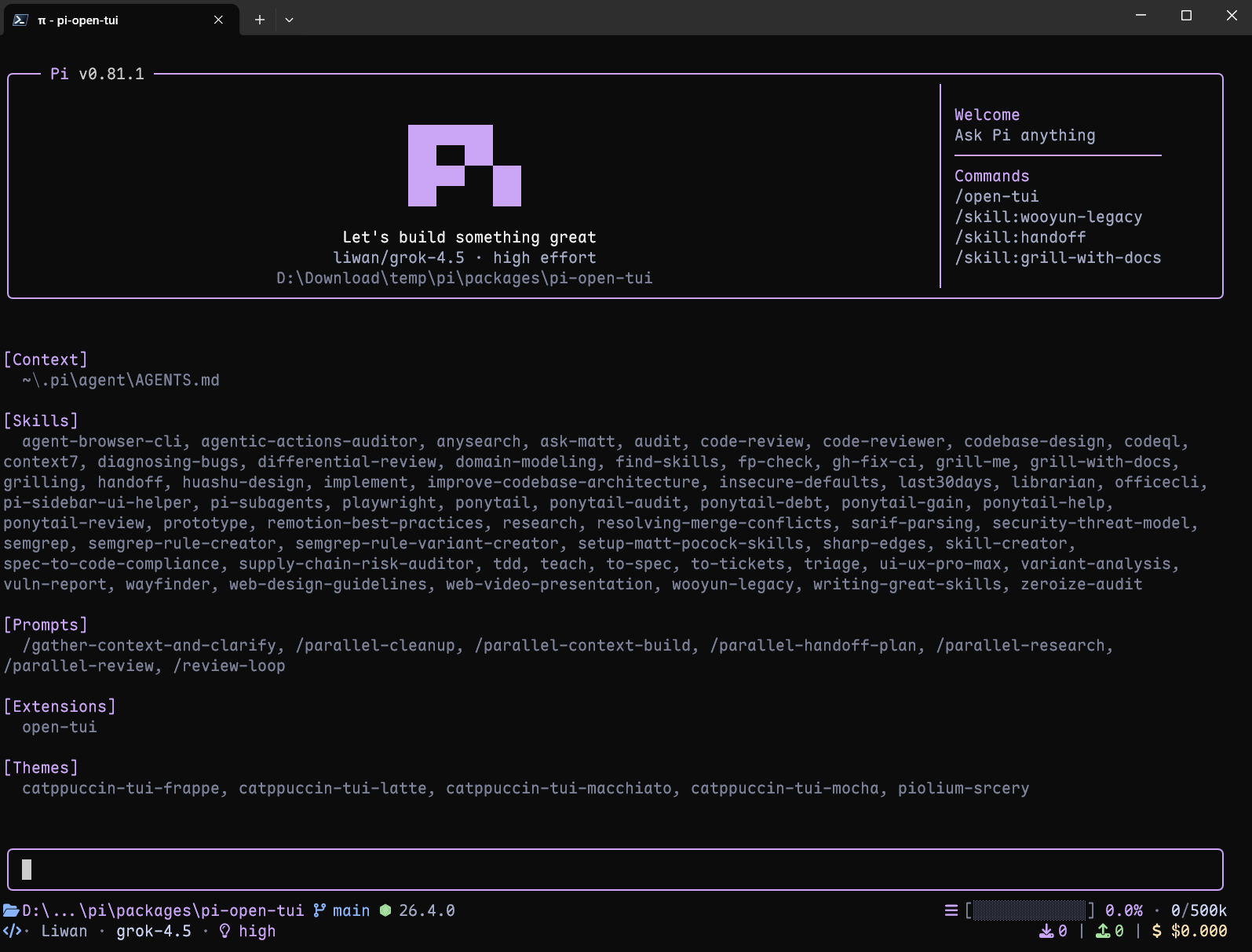
A polished TUI extension for the Pi coding agent with an animated logo header, Starship-style footer, rounded editor, model metadata, and prompt-box user messages.
Package details
Install @nogardxu/pi-open-tui from npm and Pi will load the resources declared by the package manifest.
$ pi install npm:@nogardxu/pi-open-tui- Package
@nogardxu/pi-open-tui- Version
0.2.0- Published
- Aug 8, 2026
- Downloads
- 154/mo · 154/wk
- Author
- nogardxu
- License
- MIT
- Types
- extension
- Size
- 290.1 KB
- Dependencies
- 0 dependencies · 3 peers
Pi manifest JSON
{
  "extensions": [
    "./extensions/open-tui/index.ts"
  ],
  "image": "https://raw.githubusercontent.com/nogardxu/pi-open-tui/main/assets/preview_dashboard_1.png"
}Security note
Pi packages can execute code and influence agent behavior. Review the source before installing third-party packages.
README
pi-open-tui
A polished TUI extension for the Pi coding agent. Combines the best of pi-haiku, pi-claude-code-tui, and pi-zentui into one cohesive package.
What's in it
- Animated Pi logo header — 16-frame color-changing logo animation + "Let's build something great" tagline
- Single-line Starship-style footer — left-aligned cwd, model, thinking level, git branch/status, and runtime; right-aligned context percentage/window, token counts, cache rate, cost, and clock
- Rounded editor — accent rail + borderMuted rounded corners, clean visual frame
- 60+ runtime detection — Node, Rust, Go, Python, Ruby, Java, Swift, Kotlin, C/C++, Deno, Bun, and many more
- Git status — branch, ahead/behind, modified/untracked/staged/stashed, detached HEAD commit hash + tag
- Live clock — current local time in the footer, refreshed once per second
- Turn telemetry — timestamp, token counts, cache rate, actual cost, duration, generation speed, and TTFT after each complete agent run
- Zero prototype patches — uses public Pi APIs (setHeader/setFooter/setEditorComponent), safe across Pi updates
- Interactive settings UI —
/open-tuiopens a tabbed settings dialog (General / Footer / Telemetry) - Popup session selector —
/resume-popupsearches, sorts, renames, deletes, and switches sessions without leaving the TUI - Tool call cards — readable, state-aware cards for read, write, edit, find, grep, ls, and bash tool calls
Install
pi install npm:@nogardxu/pi-open-tui
Or try it for one run:
pi -e npm:@nogardxu/pi-open-tui
Commands
/open-tui— open the tabbed settings dialog (General / Footer / Telemetry)/resume-popup— search and switch sessions in an overlaid selector
Configuration
Run /open-tui to open the interactive settings UI. Configuration is stored at ~/.pi/agent/open-tui.json:
{
  "enabled": true,
  "icons": {
    "mode": "auto"
  },
  "footer": {
    "separator": "dot"
  },
  "git": {
    "statusRefreshIntervalMs": 30000
  },
  "footerSegments": {
    "cwd": true,
    "model": true,
    "thinking": true,
    "gitBranch": true,
    "gitStatus": true,
    "gitCommit": false,
    "runtime": true,
    "context": true,
    "tokens": true,
    "cost": true,
    "extensionStatuses": true,
    "clock": true
  },
  "telemetry": {
    "enabled": true,
    "perTurn": true,
    "timestamp": true,
    "inputTokens": true,
    "outputTokens": true,
    "cacheRate": true,
    "tps": true,
    "ttft": true,
    "duration": true,
    "cost": true
  }
}
icons.mode:auto(detect Nerd Font),nerd(force Nerd Font glyphs), orascii(plain fallbacks)footer.separator:dot,pipe,slash, orarrow; controls separators between segments on each side of the single-line footergit.statusRefreshIntervalMs: Git status polling interval in milliseconds; defaults to30000(30 seconds)footerSegments.gitCommit: shows short hash + tag on detached HEAD (off by default)footerSegments.extensionStatuses: shows statuses published by extensions through Pi'ssetStatus()API inline on the left side (on by default); turn it off to hide themtelemetry.perTurn: shows telemetry after each completed LLM turn (on by default); turn it off to keep only the settled aggregate notification
Turn telemetry
When telemetry.perTurn is enabled, open-tui shows a transient notification after each completed LLM turn. When the complete agent run settles, it also shows one aggregated notification across all tool-call turns. The settled aggregate is shown even when per-turn notifications are disabled:
14:32:07 ↑ 567 ↓ 1.2K 82.5% 0.012 29.7s 42.5 Tok/s 1.2s
The notifications use the footer's icon mode. Turn telemetry uses the dim theme color; the settled aggregate uses the slightly brighter muted gray so the two levels are easy to distinguish. Segments are separated by two spaces. Configure its master switch, timestamp, input/output token, cache rate, TPS, TTFT, duration, and cost segments from the Telemetry tab in /open-tui.
TPS is the complete generation throughput for the agent run: all provider-reported assistant output tokens divided by the summed generation time of every LLM turn, measured from turn_start through the assistant message_end. This includes time-to-first-token, hidden reasoning, buffering, and stalls so the token count and timing cover the same interval. Tool execution between turns is excluded. A run with no output tokens or no measurable generation time is shown as —. The cost segment uses the actual accumulated usage.cost.total; it is not a per-million-token rate.
Local development
pi -e .
License
MIT
Acknowledgements
This project builds on the work of several Pi community packages:
- pi-haiku — the 2-line footer structure (location+model · timer+context) and working-timer pattern
- pi-claude-code-tui — the 16-frame animated Pi logo and rounded editor border technique
- pi-zentui — the Starship-style footer segments (git status icons, runtime detection, context gauge), generation-based session lifecycle, and interactive settings UI pattern
- pi-tps — the turn timing, stall detection, and conservative TPS measurement approach
The animated logo frames are derived from pi-claude-code-tui, which in turn derive from Pi's official install script (pi.dev/install.sh). The runtime detection list and git porcelain parsing borrow structure from pi-zentui.
Special thanks to the LINUX DO community for their support.