@nukcole-xinluo9510/pi-fun-working
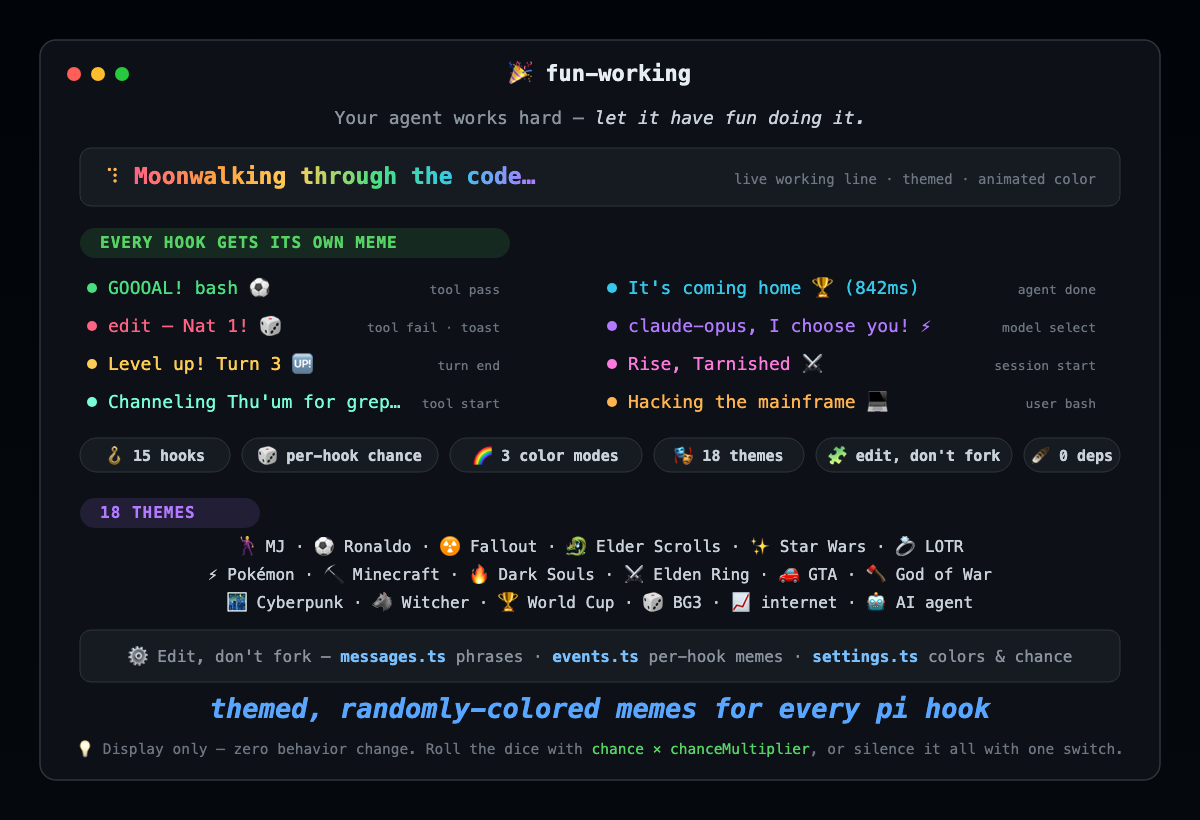
Pi extension — turn the boring "Working..." line into themed, randomly-colored memes for every hook
Package details
Install @nukcole-xinluo9510/pi-fun-working from npm and Pi will load the resources declared by the package manifest.
$ pi install npm:@nukcole-xinluo9510/pi-fun-working- Package
@nukcole-xinluo9510/pi-fun-working- Version
0.1.0- Published
- Jun 25, 2026
- Downloads
- 118/mo · 10/wk
- Author
- nukcole
- License
- MIT
- Types
- extension
- Size
- 195.8 KB
- Dependencies
- 0 dependencies · 1 peer
Pi manifest JSON
{
  "extensions": [
    "./extensions/fun-working/index.ts"
  ],
  "image": "https://raw.githubusercontent.com/luoxin9510/pi-packages/main/packages/pi-fun-working/assets/banner.png"
}
Security note
Pi packages can execute code and influence agent behavior. Review the source before installing third-party packages.
README
🎉 Fun Working
Your agent works hard — let it have fun doing it. This pi extension retires the
boring gray Working... line and replaces it with themed, randomly-colored memes —
across every hook, from kickoff to the final whistle.
tool passes? GOOOAL! ⚽ tool fails? You died — Maidenless ⚔️ Agent finishes?
It's coming home 🏆
Why it exists
The default loader says Working... and nothing else. It's correct. It's also asleep.
Fun Working treats the status line as a tiny stage. It hooks 15 of pi's lifecycle events and, on each one, rolls the dice to maybe show a themed one-liner — a goal celebration when a tool passes, a red card when it fails, a level-up at the end of a turn. The text flows through a random color palette, and a custom spinner ticks alongside.
It's pure vibe, zero behavior change: it only ever calls setWorkingMessage,
setWorkingIndicator, setStatus, and notify. Your agent runs exactly the same — it
just looks alive.
Highlights
- 🪝 Every hook covered —
agent_*,turn_*,tool_execution_*,message_*,model_select,thinking_level_select,session_*,user_bash,input. Pass/fail is read straight fromtool_execution_end.isError. - 🎲 Random by design — each hook has its own
chanceso even with everything on it stays playful, not spammy. A global multiplier dials the whole thing up or down. - 🌈 Colors that move —
solid, flowingrainbow, orrandom(a fresh palette color every time the phrase switches). Status memes get random colors too. - 🎭 17+ themes out of the box — Michael Jackson, Ronaldo (SIUUU), Fallout, Elder Scrolls, Star Wars, LOTR, Pokémon, Minecraft, Dark Souls, Elden Ring, GTA, God of War, Cyberpunk 2077, The Witcher, World Cup ⚽🏆, plus internet + AI-agent memes.
- 🧩 Edit, don't fork — three plain data files. Add a meme, flip a switch, change a color — no logic to touch.
- 🪶 Zero deps, zero behavior change — display only. Nothing is intercepted or blocked.
Install
# From npm
pi install npm:@nukcole-xinluo9510/pi-fun-working

# Or from a local checkout during development
pi add /path/to/pi-fun-working
Restart pi, send a message, watch it cook. 🧑🍳
What you'll see
| Moment | Hook | Example |
|---|---|---|
| Tool succeeds | tool_execution_end (ok) |
GOOOAL! bash ⚽ · Fus Ro Dah! read done 🐉 |
| Tool fails | tool_execution_end (error) |
edit took an arrow to the knee 🏹 · Red card 🟥 |
| Turn ends | turn_end |
Level up! Turn 3 🆙 · Combo x3 🔥 |
| Agent done | agent_end |
It's coming home 🏆 (842ms) · SIUUU — champions ⚽ |
| Model switch | model_select |
claude-opus, I choose you! ⚡ |
| Session opens | session_start |
Rise, Tarnished ⚔️ · Welcome to Night City 🌃 |
Frequent hooks (message_*, input) ship with a low chance so they stay tasteful.
Configure
Everything lives in three data files under extensions/fun-working/:
| File | What's inside |
|---|---|
messages.ts |
The phrases that cycle in the live working line. Add or remove freely. |
events.ts |
One entry per hook: its meme pool, chance, channel (notify / status), color, etc. |
settings.ts |
Global knobs — colorMode, palette, spinner frames/colors, speeds, and the master event switch + chanceMultiplier. |
A few common tweaks:
// settings.ts — pick how text is colored
colorMode: "random",   // "solid" | "rainbow" | "random"

// settings.ts — turn the whole event system up, down, or off
events: { enabled: true, chanceMultiplier: 1, colorizeStatus: true },

// events.ts — make goals fire almost every time
toolPass: { enabled: true, chance: 0.95, /* ... */ },
How chance works
Each event message fires with probability chance × chanceMultiplier (clamped to
0..1). So:
chanceMultiplier: 0→ silence everything without deleting a thing.chanceMultiplier: 2→ everything roughly twice as likely (capped at 100%).- Per-event
chancelets you keep failures loud (1.0) and chatter quiet (0.12).
How it works
On load the extension subscribes to pi's lifecycle hooks. For display events it calls a
single emit(key, ctx, vars):
- Bail if the global switch is off or the event is disabled.
- Roll
Math.random()againsteffectiveChance(chance, multiplier). - Pick a random line from that event's pool and fill
{tool}/{turn}/{ms}/{model}/{level}placeholders. - Send it to its channel — a toast (
notify) or the footer (setStatus, auto-cleared), optionally wrapped in a random palette color.
The live working line is driven separately by agent_start / agent_end, cycling
messages.ts on a timer with the configured color mode and spinner.
Requirements
- pi 0.79+
Development
npm run check   # tsc --noEmit
npm test        # node --test (fillTemplate, effectiveChance, hslToRgb)
License
MIT