@oddsjam/pi-sandbox
OS-level sandbox for pi using @anthropic-ai/sandbox-runtime, with an in-pi configure wizard, shift+tab toggle, and longest-prefix project configs.
Package details
Install @oddsjam/pi-sandbox from npm and Pi will load the resources declared by the package manifest.
$ pi install npm:@oddsjam/pi-sandbox- Package
@oddsjam/pi-sandbox- Version
0.1.2- Published
- May 12, 2026
- Downloads
- 86/mo · 25/wk
- Author
- zackify
- License
- MIT
- Types
- extension
- Size
- 197.8 KB
- Dependencies
- 1 dependency · 2 peers
Pi manifest JSON
{
  "extensions": [
    "./index.ts"
  ],
  "image": "./screenshots/sandbox-configure.png"
}
Security note
Pi packages can execute code and influence agent behavior. Review the source before installing third-party packages.
README
@oddsjam/pi-sandbox
A fully-configurable OS-level sandbox for pi, powered by @anthropic-ai/sandbox-runtime. Wraps every bash, read, write, and edit tool call with a permission gate so the agent can only touch what you've allowed.
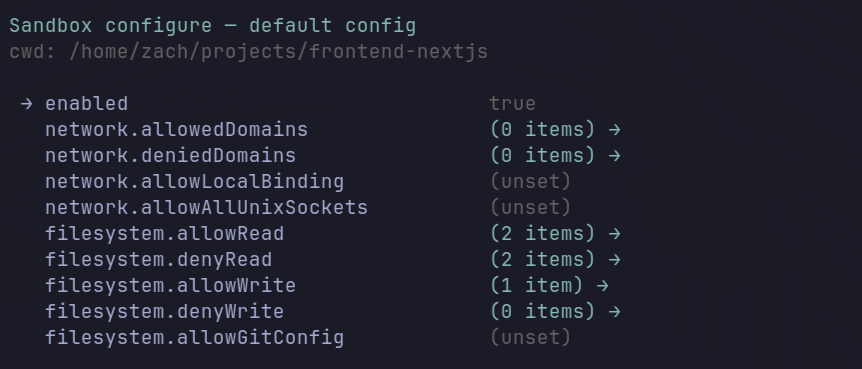
What you get
- Sane defaults. Out of the box the cwd is the agent's world: it can read and write anywhere under the directory where you launched pi, and nothing else. System paths (
/usr,/lib,/etc) remain readable so common tooling works. Everything outside the cwd — your home directory, other projects, secret files — is blocked at both the OS level (for bash subprocesses) and the tool level (for the agent'sread/write/edit). - Where you start pi defines the sandbox. Launch from
~and the agent can edit your.dotfilesfreely. Launch from~/projects/fooand the same agent is cleanly confined to that project — no config changes needed, justcdinto the right place first. - All configuration happens inside pi. Run
/sandboxto see the current effective config, toggle the sandbox on/off with one Enter press, or drop into a TUI wizard that edits allow/deny rules per-project or globally. No editing JSON by hand, no restarting pi. - Built on Anthropic's upstream sandbox. Linux uses bubblewrap + seccomp; macOS uses sandbox-exec. The enforcement layer is exactly what Anthropic uses internally — we only add the pi integration, the in-TUI wizard, and a few quality-of-life fixes around teardown and defaults.
- Pi's own files are protected for you.
~/.pi/agent/auth.jsonand~/.pi/agent/mcp-oauth/are denied by default even though~/.piitself is allowed (so skills, themes, and other extensions still work). The agent can use pi's tools but can't exfiltrate your tokens.
Run /sandbox at any time to inspect what's allowed, what's denied, and tweak it. Everything's a few keystrokes away — you never have to leave pi to lock down or open up access.
How it works
Two layers of enforcement
pi runs unsandboxed (the agent process needs ~/.pi/... access for sessions, config, etc.). Each tool gets gated in its own way:
- Bash subprocess — every
bashtool call is wrapped viaSandboxManager.wrapWithSandbox(...)from the upstream runtime. The wrapper produces abwrap [args] -- bash -c "socat ... apply-seccomp bash -c <user_cmd>"invocation that:- sets up a Linux user/mount/PID namespace (
bubblewrap) - bind-mounts
/read-only into the namespace, masksdenyReadpaths withtmpfs//dev/null, re-bindsallowReadpaths back on top - runs
apply-seccompto install a syscall filter that blocks Unix-socket connections to anything that isn't an allowed proxy - tunnels all network through an in-process HTTP/SOCKS proxy that calls back into our
SandboxAskCallbackfor domain checks - on macOS the same surface is implemented via
sandbox-execinstead of bubblewrap+seccomp.
- sets up a Linux user/mount/PID namespace (
- Read / write / edit tools — these run in the pi (Node.js) process, not a subprocess, so the OS-level sandbox can't see them. We hook
pi.on("tool_call", ...)and apply the same policy in JS:readalways prompts unless the path matchesallowReadwriteandeditprompt unless the path matchesallowWrite;denyWriteis a hard-block, never prompted- the prompt's choices write back into the config (and reinitialize the bash-side sandbox so the next subprocess sees the new rules)
Config storage
Everything lives in ~/.pi/agent/sandbox/:
~/.pi/agent/sandbox/
├── default.json    # Fallback SandboxRuntimeConfig + `enabled` flag
└── projects.json   # { "<abs-project-path>": SandboxRuntimeConfig, ... }
- Project lookup uses longest-prefix match on the canonicalized cwd (symlinks resolved).
projects.json["/work/foo"]covers/work/foo,/work/foo/sub,/work/foo/sub/deeper, etc. - No merging. If the project entry exists, it's used in full. Otherwise
default.jsonis the fallback. A project entry has the same shape asdefault.json. - Schema-validated on every save via
SandboxRuntimeConfigSchemafrom@anthropic-ai/sandbox-runtime. Invalid configs surface inline rather than corrupting the file.
The stored shape is exactly SandboxRuntimeConfig from the upstream library, plus a single extension-local enabled boolean. Anything documented in the upstream README works here (parent proxies, MITM, allowMachLookup, ripgrep overrides, etc.).
Default policy
Workspace-only, matching the pattern in the @anthropic-ai/sandbox-runtime docs:
{
  "enabled": true,
  "network": { "allowedDomains": [], "deniedDomains": [] },
  "filesystem": {
    "denyRead":  ["/Users", "/home"],
    "allowRead": [".", "~/.pi"],
    "allowWrite": ["."],
    "denyWrite": []
  }
}
denyRead: ["/Users", "/home"]— cross-platform (/Userson macOS,/homeon Linux; the path that doesn't exist on your OS is a harmless no-op).allowRead: [".", "~/.pi"]—.re-allows the workspace;~/.piis required because theapply-seccompbinary that runs inside bubblewrap lives at~/.pi/agent/extensions/zackify-pi-sandbox/node_modules/@anthropic-ai/sandbox-runtime/vendor/seccomp/<arch>/apply-seccomp. Without this re-allow, the sandbox itself can't start ("apply-seccomp: No such file or directory").allowWrite: ["."]— writes restricted to the workspace.allowedDomains: []— every domain prompts on first access.
Permission prompt
Triggered for: network domain not in allowedDomains, read path not in allowRead, write/edit path not in allowWrite. denyWrite hard-blocks with no prompt.
The option set is context-aware based on whether your cwd matches an entry in projects.json:
Exact match (cwd === some project key):
  [esc]  Abort
  [s]    Allow for this session only
  [P]    Allow for this project       → projects.json["/work/foo"]
  [A]    Allow for all projects       → default.json

Parent match (cwd is inside an existing project key):
  [esc]  Abort
  [s]    Allow for this session only
  [P]    Allow for this project (parent: /work/foo)
  [N]    Allow for this project (new config: /work/foo/sub)  ← copies parent entry under the cwd key, then adds the new item
  [A]    Allow for all projects

No match (no project key covers cwd):
  [esc]  Abort
  [s]    Allow for this session only
  [P]    Allow for this project       → seeds new entry from default.json
  [A]    Allow for all projects
Lowercase letter → requires Enter to confirm. Uppercase letter → commits immediately. [s] (session) and [esc] (abort) don't require confirm in either case. Session allowances live in JS memory only — they're never written to disk and the agent has no way to inspect them.
/sandbox — inspect, toggle, configure
One command does all three. Run /sandbox and you see:
- Current effective config summary at the top — scope (project key or default), allowed domains, read/write paths, deny lists, in-memory session allowances.
Disable sandbox(orEnable sandboxwhen off) as the first selectable option. Hitting Enter immediately at the menu toggles. No editor opens.- Scope options below the toggle: edit project config, create new project config (when in a subfolder of an existing key), edit default config.
This replaces what used to be three separate things — a /sandbox-disable slash command, a /sandbox-configure slash command, and a shift+tab shortcut that fought for the app.thinking.cycle binding. Now it's just /sandbox → Enter to flip off, or /sandbox → ↓ → Enter to edit.
You can also disable via the config by setting enabled: false in default.json or your project entry (via /sandbox → ↓ to a scope → Enter → toggle the enabled field → s to save). That persists across sessions, unlike the lead-action toggle which is session-only.
Field editor controls:
↑↓navigateentertoggle a bool / open a list / edit a scalarssave (validates againstSandboxRuntimeConfigSchema; surfaces errors inline rather than writing invalid JSON)?show advanced fields (enableWeakerNestedSandbox,allowPty,mandatoryDenySearchDepth, …)esc/qquit
List editor controls: ↑↓ navigate, a add (input prompt), d delete, esc/b back.
Save validates the draft against SandboxRuntimeConfigSchema and surfaces validation errors inline rather than writing invalid JSON. The sandbox is reinitialized after each save so changes take effect immediately.
Status line
The footer shows one of two states:
- Enabled (accent colour):
🔒 Sandbox: 3 domains, 2 write paths - Disabled (
disabledin red):Sandbox: disabled
Toggling via /sandbox updates this immediately. Toggling off runs the full disable path (see below); toggling on calls SandboxManager.initialize and re-attaches process-level teardown handlers.
Disable cleanliness (the bug fix)
pi-sandbox has a few small leaks around /sandbox-disable:
SandboxManager.reset()was fire-and-forget from the command handler — could return before teardown actually completed.- In-memory session allowances weren't cleared, so re-enabling in the same process started with stale state.
- The
NODE_USE_ENV_PROXY=1env mutation wasn't reverted. - The post-bash "Operation not permitted" scanner could still fire on output containing that substring even after disable, triggering spurious write prompts (this is the source of the "writes to
~/.bashrcstill blocked after disable" symptom).
This extension's performDisable (in src/disable.ts) does all of:
await SandboxManager.reset()(awaited, error captured into result).- Drain
sessionAllowedDomains,sessionAllowedReadPaths,sessionAllowedWritePathsin place. - Flip both
enabledandinitializedflags to false (the post-bash scanner checks both, so this fully bypasses it). - Restore env vars via an
EnvTrackerthat recorded the originals when they were first set. - Detach the
SIGINT/SIGTERM/SIGHUP/beforeExithandlers we attached at init time.
Each of those steps has its own unit test.
Teardown on hard kills
session_shutdown covers graceful pi exits but doesn't fire on SIGINT/SIGTERM/SIGHUP. src/teardown.ts attaches process-level handlers that:
- On signal: detach our own handlers (so re-raising doesn't loop), run
SandboxManager.reset(), then re-raise the same signal so pi's own handler still runs. - On
beforeExit: best-effort reset.
All idempotent — multiple signals during shutdown still produce exactly one teardown.
File layout
zackify-pi-sandbox/                  # folder on disk (kept unchanged for sync stability)
├── package.json                  "@oddsjam/pi-sandbox", trustedDependencies: ["@anthropic-ai/sandbox-runtime"]
├── tsconfig.json                 strict, allowImportingTsExtensions, noUncheckedIndexedAccess
├── README.md                     this file
├── index.ts                      extension entry: hooks, commands, lifecycle, shift+tab shortcut
├── src/
│   ├── paths.ts                  expandPath / canonicalizePath / matchesPattern / longestPrefixMatch
│   ├── domains.ts                URL extraction + wildcard domain matching
│   ├── output.ts                 extractBlockedWritePath (parses bash "Operation not permitted")
│   ├── config.ts                 default.json + projects.json IO, longest-prefix lookup,
│   │                             append* mutators, seedNewProjectEntry, validateConfig
│   ├── prompt.ts                 pure state machine for the permission prompt (context-aware)
│   ├── prompt-ui.ts              TUI adapter using ctx.ui.custom
│   ├── wizard.ts                 pure field/scope state for /sandbox-configure
│   ├── wizard-ui.ts              TUI adapter for the wizard
│   ├── bash-ops.ts               sandbox-wrapped child_process.spawn
│   ├── status.ts                 "🔒 Sandbox: …" / "Sandbox: disabled" renderers
│   ├── summary.ts                /sandbox summary-line builder (rendered above the scope picker)
│   ├── env.ts                    EnvTracker for safely mutating + restoring process.env
│   ├── disable.ts                performDisable orchestration (testable)
│   └── teardown.ts               attachTeardown for SIGINT/SIGTERM/SIGHUP/beforeExit
└── test/                         12 files, 143 bun:test tests, hermetic tmpdir HOME
Commands and keybindings
| Trigger | Effect |
|---|---|
/sandbox |
All-in-one. Shows effective config summary, lets you toggle on/off (first option — Enter to fire), and lets you edit the default or project configs. |
--no-sandbox CLI flag |
Start the session with the sandbox disabled |
There is no keyboard shortcut for toggling. The single /sandbox Enter path is fast enough and avoids fighting with pi's built-in app.thinking.cycle (shift+tab) keybinding. To make the sandbox stay off across sessions, edit enabled: false in the relevant config via the same /sandbox wizard.
Install
Auto-discovered when placed at ~/.pi/agent/extensions/zackify-pi-sandbox/ (the folder name on disk is unchanged; the npm-style name in package.json is @oddsjam/pi-sandbox). Sync ~/.pi/ to other machines and pi picks it up there too.
cd ~/.pi/agent/extensions/zackify-pi-sandbox
bun install
@anthropic-ai/sandbox-runtime is listed in trustedDependencies so bun doesn't block its install lifecycle.
Prerequisites
- Linux:
bwrap(bubblewrap),socat,ripgrep(rg) — pi's bash launch PATH must include these. - macOS:
sandbox-exec(ships with macOS),ripgrep(rg).
If apply-seccomp: No such file or directory appears, your ~/.pi/agent/sandbox/default.json is missing ~/.pi in allowRead. Add it via /sandbox-configure and save — ~/.pi must be visible inside the sandbox because the seccomp binary lives there.
Tests
bun test         # 143 tests across 12 files
bun run typecheck
Pure modules are unit-tested directly with synthetic state machines and a tmpdir HOME. TUI adapters and SandboxManager integration aren't exercised in bun test because they're stateful and platform-bound — verify those by running pi.
What's different from pi-sandbox
Heavily inspired by pi-sandbox by Chris Arderne (which is itself derived from Mario Zechner's example extension in badlogic/pi-mono). This extension keeps the core idea — wrap pi's bash/read/write/edit tools with a permission gate backed by an OS-level sandbox — and changes a few things:
| Feature | pi-sandbox | @oddsjam/pi-sandbox |
|---|---|---|
| Sandbox runtime | @carderne/sandbox-runtime (fork) |
@anthropic-ai/sandbox-runtime (upstream, directly) |
| Config storage | .pi/sandbox.json (per project) + ~/.pi/agent/sandbox.json (global) |
~/.pi/agent/sandbox/default.json + ~/.pi/agent/sandbox/projects.json (single user-level dir, no per-project files) |
| Config matching | Merged global + project | Longest-prefix match, no merging — most specific wins |
| Configure in pi | None — edit JSON by hand | /sandbox TUI wizard with current-config summary, scope picker, and per-field editor |
| Toggle | /sandbox-enable, /sandbox-disable slash commands |
First option in /sandbox is "Disable sandbox" / "Enable sandbox" — run /sandbox, hit Enter, done. No shortcut to remember, no built-in keybinding to free up. The footer shows Sandbox: disabled in red when off. |
| Permission prompt | 4 options: abort / session / project / global | 5 options when in a subfolder of an existing project key: adds "Allow for this project (new config)" which copies the parent entry under the cwd key |
| Disable cleanliness | Async reset fire-and-forget; session lists keep state across re-enable; env mutations not restored | Awaits SandboxManager.reset(); drains session lists; restores env vars; detaches signal handlers — closes a class of stale-state bugs (e.g. writes to ~/.bashrc still being blocked after disable) |
| Process-level teardown | session_shutdown only |
Also SIGINT/SIGTERM/SIGHUP/beforeExit — OS-level sandbox is reset on hard kills too |
| URL regex | Required two-dot domains (missed x.com-style hosts) |
Fixed: https?://[^\s/?#:]+ |
| Tests | None published | 143 bun:test tests across 12 files, hermetic via tmpdir HOME |
Default rules in detail
A few choices that make the defaults smoother than pi-sandbox's:
~/.piis inallowRead. pi-sandbox starts withdenyRead: ["/Users", "/home"]andallowRead: [".", "~/.config", "~/.local", "Library"]. On Linux that blocks reads of pi's own config tree, so skills, themes, prompt templates, and other extensions that live under~/.pi/agent/...are invisible to the sandboxed bash. We re-allow~/.piby default, so pi can pull in its own resources cleanly while everything else under/home//Usersstays blocked.Pi's auth files are re-denied on top of that.
~/.pi/agent/auth.jsonand~/.pi/agent/mcp-oauth/are indenyReadanddenyWriteeven though their parent~/.piis allowed. sandbox-runtime gives file-leveldenyReadprecedence over a directory-levelallowReadancestor, so the agent can read its own extensions and skills but cannot exfiltrate the token store viacat ~/.pi/agent/auth.json.Workspace-only by default.
allowRead: ["."]andallowWrite: ["."]mean every read and every write inside the cwd is silently allowed, but anything outside it prompts. System paths (/usr,/lib,/etc, …) remain readable for tooling.Where you launch pi matters. Because
.is resolved against pi's current working directory at start, the same install gives you two clean modes:cd ~ && pi— the cwd is~, so~/.bashrcis insideallowRead/allowWrite. Tools can edit your shell init files freely.cd ~/projects/foo && pi— the cwd is the project, so~/.bashrcis outsideallowRead/allowWrite. Tools get prompted (or blocked) if they try to touch it. The agent is cleanly confined to the project tree.
No per-session config flips needed — just
cdto the right scope before launching.
Acknowledgements
pi-sandboxby Chris Arderne — the design this extension is built on. Most of the policy semantics (read-prompts-everything, denyWrite-overrides-allowWrite, the 4-way prompt) come from there.badlogic/pi-monoby Mario Zechner — the original example extension that pi-sandbox forked from. Used under the MIT License.@anthropic-ai/sandbox-runtime— the upstream OS-level sandbox library. Used directly here without forking.