@oldsuns/pi-sidebar
Session sidebar for Pi's fullscreen TUI: context, usage, activity, git and tools beside the conversation
Package details
Install @oldsuns/pi-sidebar from npm and Pi will load the resources declared by the package manifest.
$ pi install npm:@oldsuns/pi-sidebar- Package
@oldsuns/pi-sidebar- Version
1.0.3- Published
- Nov 5, 2026
- Downloads
- 745/mo · 721/wk
- Author
- oldsuns
- License
- MIT
- Types
- extension
- Size
- 180.7 KB
- Dependencies
- 0 dependencies · 2 peers
Pi manifest JSON
{
  "extensions": [
    "./src/index.ts"
  ]
}
Security note
Pi packages can execute code and influence agent behavior. Review the source before installing third-party packages.
README
pi-sidebar
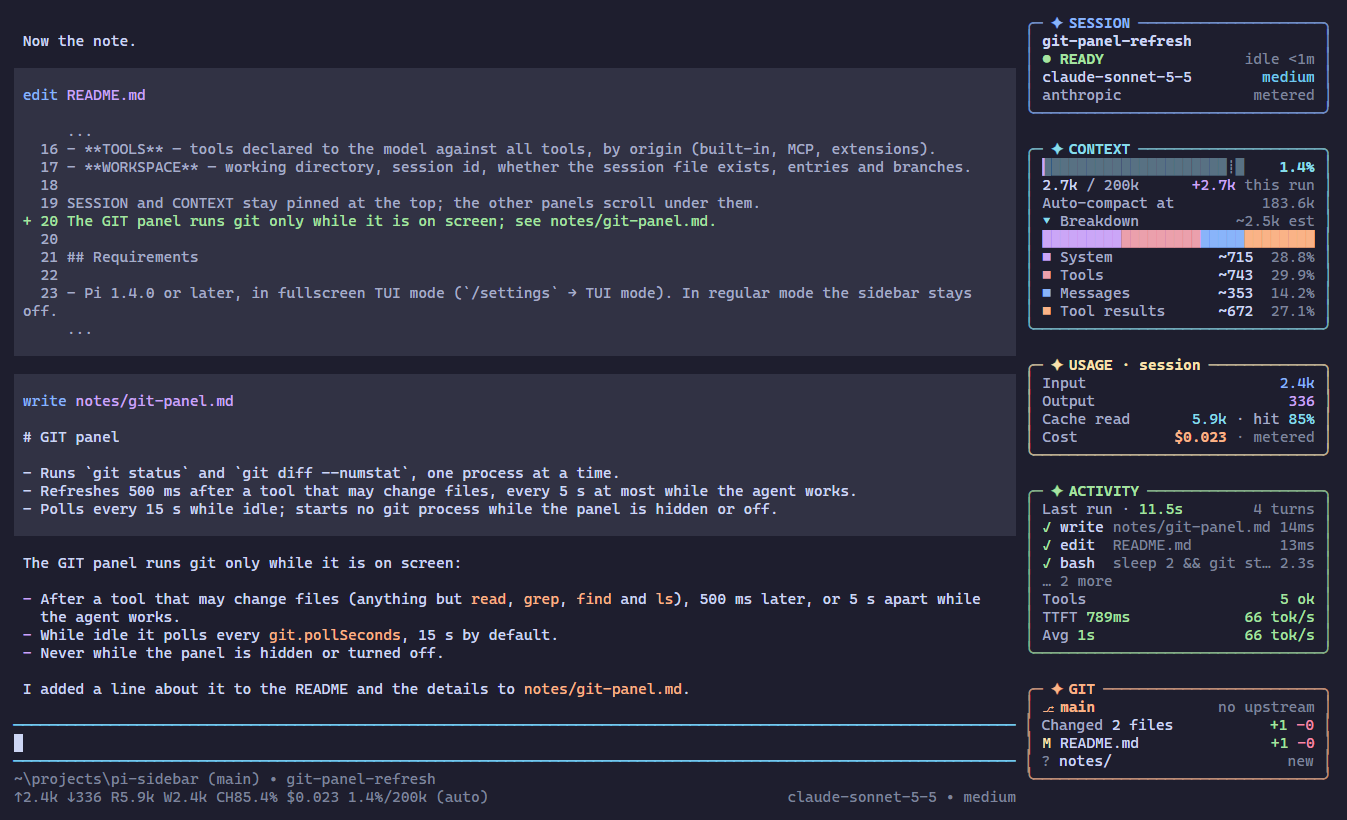
A sidebar for Pi's fullscreen TUI. It sits to the right of the conversation and shows the session at a glance: what fills the context, what it has cost, what the agent is doing, and where the repository stands. Pi's main window keeps its behaviour; it only gets narrower.
What it shows
Seven panels, each with its own colour:
- SESSION — name, status (ready, working with run clock and turn, compacting, error), model, thinking level, provider, billing (subscription or metered).
- CONTEXT — usage bar, tokens / window, growth during the current run, the auto-compact threshold while compaction is on, and a breakdown of the context by part: system prompt, tool declarations, messages, tool results, summaries, other, images.
- USAGE — input, output, cache reads and hit rate, cost for the whole session; the same totals as Pi's footer.
- ACTIVITY — running and recent tools with arguments and times, the run's tools by outcome, last run length and turns, time to first token and output speed (a live
~estimate while a reply streams) with the run's average, queued messages. - GIT — branch, upstream, ahead/behind, changed files with added and removed lines.
- TOOLS — tools declared to the model against all tools, by origin (built-in, MCP, extensions).
- WORKSPACE — working directory, session id, whether the session file exists, entries and branches.
SESSION and CONTEXT stay pinned at the top; the other panels scroll under them.
Requirements
- Pi 1.4.0 or later, in fullscreen TUI mode (
/settings→ TUI mode). In regular mode the sidebar stays off. - A terminal at least 92 columns wide. The sidebar takes 36 columns while the conversation keeps 110 or more (
minMainWidth+ 46; a terminal about 150 wide), else 28 while it keeps 64 or more, else it hides until the terminal is wider again.
Install
pi install npm:@oldsuns/pi-sidebarUse
Everything is a /sidebar command. Each one applies at once and is saved in ~/.pi/agent/pi-sidebar.json.
| Command | Effect |
|---|---|
/sidebar · on · off · toggle |
Show or remove the sidebar; off gives Pi its layout back |
/sidebar status |
Mount state, width decision, git, errors |
/sidebar width auto|28|36 |
Pick the width automatically, or keep one |
/sidebar min-main <48-160> |
Narrowest conversation the sidebar may leave (default 64) |
/sidebar panel <usage|activity|git|tools|workspace> on|off |
Show or hide a lower panel |
/sidebar fold|unfold <panel|all> |
Fold a panel to its title line |
/sidebar breakdown on|off |
The context breakdown under the CONTEXT bar |
/sidebar git on|off · git files <0-10> |
The GIT panel; files are listed at width 36 |
/sidebar colors theme|vivid|mono |
Colours from the theme, fixed vivid colours, or none (NO_COLOR forces mono). Where a theme's colours are too alike to tell the panels apart, as in Pi's built-in themes, theme keeps seven distinct hues at the theme's lightness |
/sidebar icons unicode|ascii |
Plain ASCII for terminals that draw some symbols double-width |
/sidebar reset |
Back to the defaults |
With the mouse:
- Click a panel title to fold or unfold the panel.
- Click
▸ Breakdown,… N moreor▸ namesto open a list; click the same row or▴ fewerto close it. - The wheel scrolls the lower panels. Nowhere over the sidebar does it move the conversation.
The sidebar never takes keyboard focus, and selecting text elsewhere works as before.
Settings
~/.pi/agent/pi-sidebar.json holds only what differs from these defaults (PI_SIDEBAR_CONFIG points elsewhere):
{
  "enabled": true,
  "width": "auto",              // "auto" | 28 | 36
  "minMainWidth": 64,
  "panels": { "usage": true, "activity": true, "git": true, "tools": true, "workspace": true },
  "folded": [],                 // panel names, e.g. ["git"]
  "contextBreakdown": true,
  "git": { "maxFiles": 3, "pollSeconds": 15 },   // pollSeconds 0: no polling
  "colors": "theme",            // "theme" | "vivid" | "mono"
  "icons": "unicode",           // "unicode" | "ascii"
  "contextWarnPercent": 70,
  "contextDangerPercent": 85,
  "recentTools": 3,
  "renderThrottleMs": 200
}
How it works
Pi has no sidebar API, but in fullscreen mode it draws a layout tree. The extension takes that tree unchanged into the left cell of a horizontal stack, puts the sidebar in the right cell, and hands the result back as the layout root. That needs one read of a private field (layoutRoot); everything else uses pi-tui's public API. If a Pi update changes the field, the sidebar turns itself off, says so once, and leaves the main window as it is.
It does not replace or decorate the editor, footer or header, opens no overlays or dialogs, registers no shortcuts or input listeners, and never writes to the session; npm run rules checks the source for those calls.
The context breakdown counts each message with Pi's own estimateTokens, so it follows the rule Pi uses for its context. It is an estimate and marked as one; the bar and the token count beside it are Pi's real figures.
A multi-column layout costs pi-tui some work per frame: it merges every box narrower than the terminal into its row. Each sidebar row is drawn by a single box to keep that cost low (about 5 ms per frame at 181×56 on a laptop; npm run bench). With the sidebar hidden, Pi's layout is drawn exactly as before.
Git
The GIT panel runs only git status --porcelain=v2 and git diff --numstat, one process at a time, with a timeout, while the panel is on screen. Optional locks, the fsmonitor hook, external diff programs and textconv stay off. Clean and smudge filters a repository configures (such as git-lfs) can still run during git status, as with shell prompts that show git state; /sidebar git off stops all git processes.
Development
npm run check       # rules, type check, tests, package and docs checks
npm test
npm run typecheck   # uses tsc next to Pi's packages or on PATH
npm run preview -- ansi    # the real renderer with sample data, in colour
npm run screenshots        # every image in docs/design/preview, from real Pi sessions (needs Chrome or Edge, and git)
npm run bench              # timings of rendering, usage scans and the breakdown
Tests and type checks use the packages of the installed Pi (~/.pi/agent/install/releases/<version>/node_modules), or the directory in PI_NODE_MODULES. CI installs Pi from npm and runs on Linux, Windows and macOS. The design is in docs/design/pi-sidebar-design.md.