@oresk/tidy-bash
Tidy bash output for pi — splits multi-command chains (&&, ;, ||, |) into readable lines with clean status summaries
Package details
Install @oresk/tidy-bash from npm and Pi will load the resources declared by the package manifest.
$ pi install npm:@oresk/tidy-bash- Package
@oresk/tidy-bash- Version
0.1.1- Published
- Jun 24, 2026
- Downloads
- 337/mo · 19/wk
- Author
- oresk
- License
- MIT
- Types
- extension
- Size
- 10 KB
- Dependencies
- 0 dependencies · 2 peers
Pi manifest JSON
{
  "extensions": [
    "./src/tidy-bash.ts"
  ],
  "image": "https://raw.githubusercontent.com/oresk/tidy-bash/main/screenshot.png"
}
Security note
Pi packages can execute code and influence agent behavior. Review the source before installing third-party packages.
README
tidy-bash
Tidy bash output for pi — splits multi-command chains into readable lines with clean status summaries.
What it does
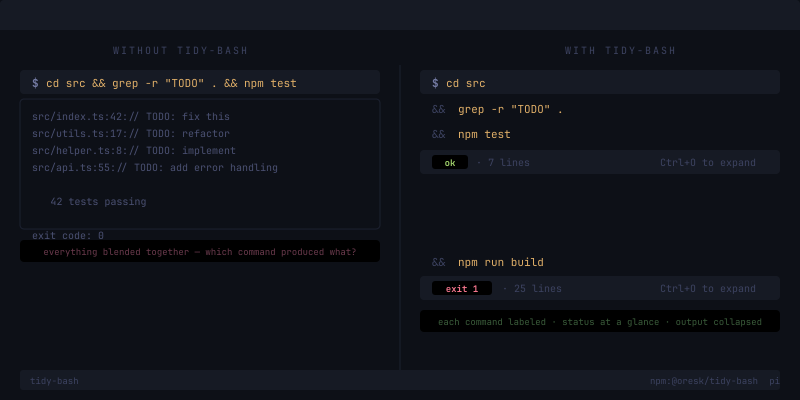
Before (default pi) — bash output is one blob:
$ cd src && grep -r "TODO" . && npm test
  ... all output mixed together ...
  exit code: 0
After (with tidy-bash) — each command gets its own line, result is a scannable summary:
$ cd src
  && grep -r "TODO" .
  && npm test

  ok · 42 lines           ← collapsed by default (Ctrl+O to expand)
When a command fails:
$ npm install
  && npm run build

  exit 1 · 25 lines       ← red, stands out immediately
Features
- Command-chain splitting —
&&,;,||,|separated commands each get their own labeled line - Quote-aware — strings like
echo "foo && bar"stay intact, no false splits - Clean status line —
ok(green) orexit N(red) + line count at a glance - Collapsible output — press
Ctrl+Oto expand and see full output - Zero behavior change — delegates to the built-in bash tool, same execution for the model
- ~80 lines, zero dependencies — just imports from pi's bundled packages
Install
pi install npm:@oresk/tidy-bash
Or load locally:
pi -e ./src/tidy-bash.ts
Requires
- pi >= 0.79.0
License
MIT