@pabloquero/pi-file-peek
Pi extension for connecting sessions and previewing files across sessions.
Package details
Install @pabloquero/pi-file-peek from npm and Pi will load the resources declared by the package manifest.
$ pi install npm:@pabloquero/pi-file-peek- Package
@pabloquero/pi-file-peek- Version
0.1.1- Published
- Jun 1, 2026
- Downloads
- not available
- Author
- pabloquero
- License
- MIT
- Types
- extension
- Size
- 106.7 KB
- Dependencies
- 0 dependencies · 2 peers
Pi manifest JSON
{
  "extensions": [
    "./pi-file-peek.ts"
  ]
}Security note
Pi packages can execute code and influence agent behavior. Review the source before installing third-party packages.
README

pi-file-peek is a small Pi extension for looking at files inside the terminal.
It can open files from the last assistant response, from tracked session history, or from a direct path. It can also send those previews between two Pi sessions.
Install
From npm:
pi install npm:@pabloquero/pi-file-peek
From GitHub:
pi install git:git@github.com:Pabloquero/pi-file-peek.git
For local development:
pi install /absolute/path/to/pi-file-peek
Then reload existing sessions:
/reload
Quick start
View files from the last assistant response:
/peek file
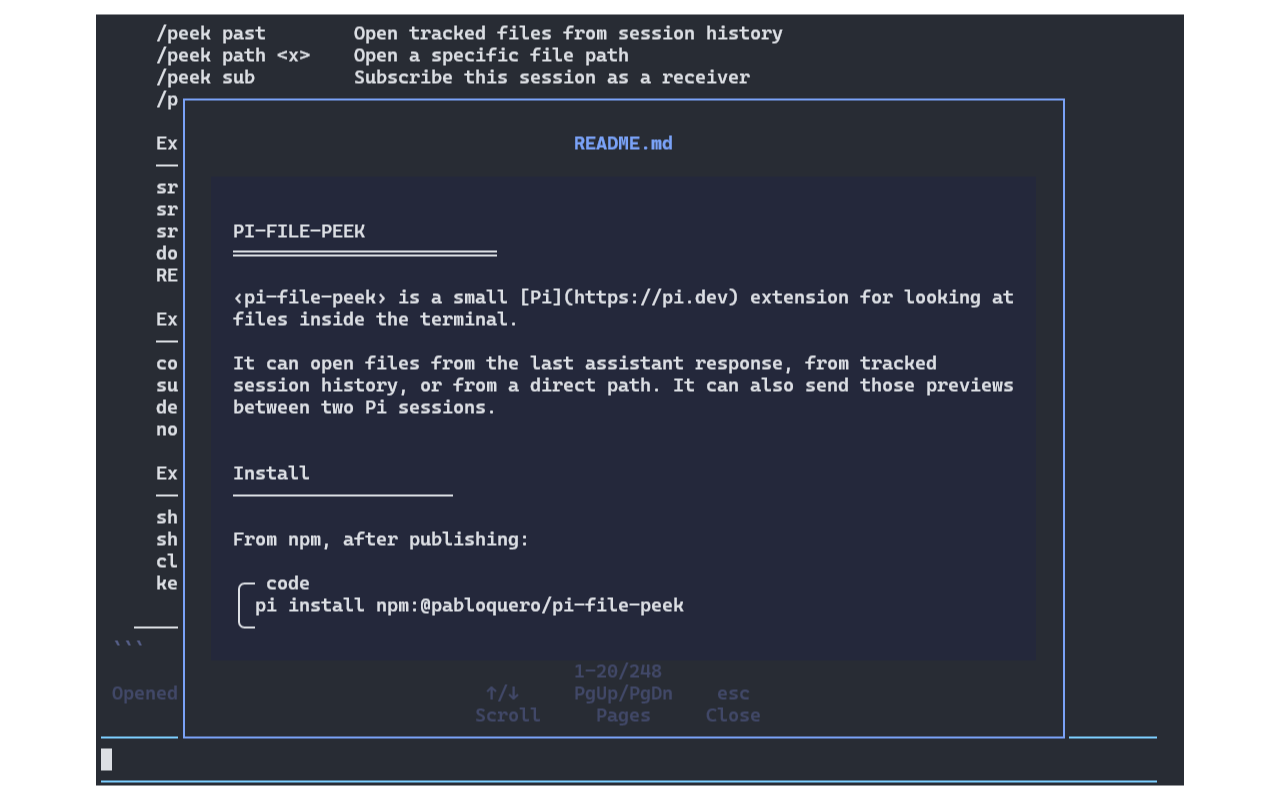
View tracked files from session history:
/peek past
Open a direct path:
/peek path src/runtime.ts
Two-session example
In the receiving session:
/peek sub
In the sending session:
/peek con
/peek file
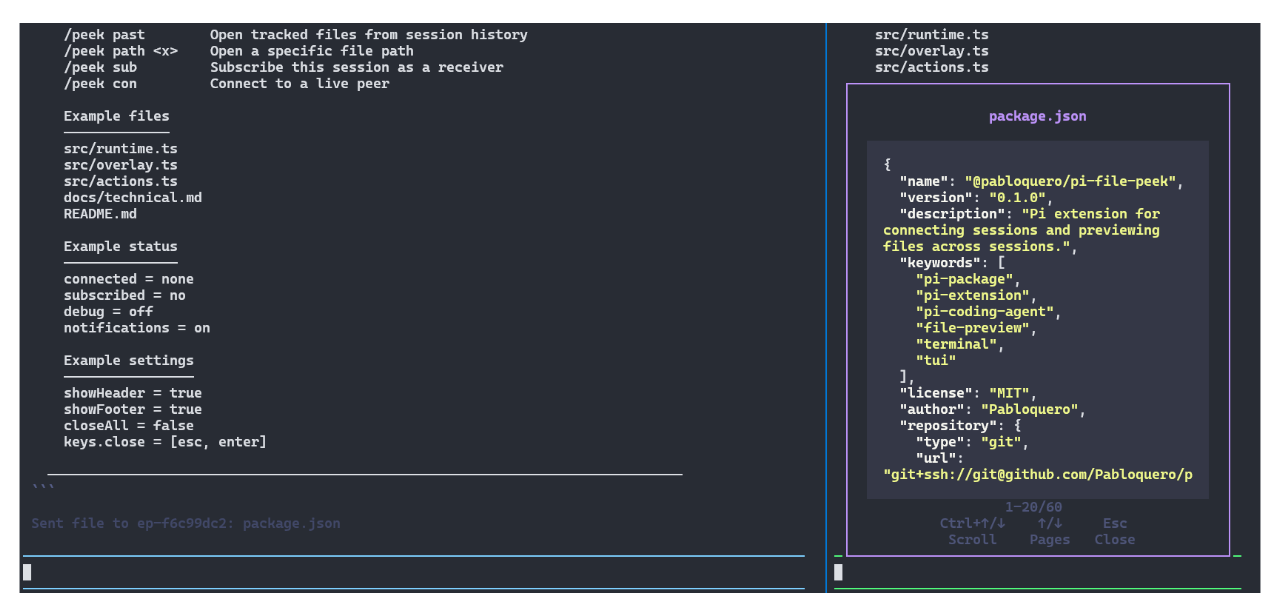
If no peer is connected, Peek opens files locally.
For detailed behavior and runtime notes, see docs/technical.md.
Commands
/peek— open menu/peek file— open or send files from the last assistant response/peek path <file-path>— open or send a specific file path/peek past— open or send tracked files from session history/peek sub— subscribe as receiver/peek con— connect to a live peer/peek disconnect— disconnect and unsubscribe/peek settings— toggle local settings/peek clear— clear tracked-file history for this workspace/peek status— show current state/peek debug— toggle debug mode
Settings
Peek settings live under the pi-file-peek key in:
- global:
~/.pi/agent/settings.json - project:
.pi/settings.json
Project settings override global settings.
| Setting | Default | Options | Explanation |
|---|---|---|---|
autoSub |
false |
true, false |
Subscribe this session automatically on startup. |
autoCon |
false |
true, false |
Try to auto-connect to a live peer. |
debug |
false |
true, false |
Show debug information in status and notifications. |
notifications |
true |
true, false |
Enable Peek notifications. |
showHeader |
true |
true, false |
Show the overlay header. |
showFooter |
true |
true, false |
Show overlay help rows in the footer. Line info still stays visible. |
closeAll |
false |
true, false |
Close all stacked overlays at once instead of one by one. |
keys.scrollUp |
"up" |
Key name or Array with key names as String | Keys used to scroll one line up. |
keys.scrollDown |
"down" |
Key name or Array with key names as String | Keys used to scroll one line down. |
keys.pageUp |
"pageUp" |
Key name or Array with key names as String | Keys used to scroll one page up. |
keys.pageDown |
"pageDown" |
Key name or Array with key names as String | Keys used to scroll one page down. |
keys.close |
"esc" |
Key name or Array with key names as String | Keys used to close the overlay. |
customTools |
[] |
array | Extra rules for recognizing files touched by custom tools. |
extraLanguages |
[] |
array | Extra extension-to-highlight.js language mappings for runtime extra languages. |
Copy-paste example:
{
  "pi-file-peek": {
    "autoSub": false,
    "autoCon": false,
    "debug": false,
    "notifications": true,
    "showHeader": true,
    "showFooter": true,
    "closeAll": false,
    "keys": {
      "scrollUp": "up",
      "scrollDown": "down",
      "pageUp": "pageUp",
      "pageDown": "pageDown",
      "close": "esc"
    },
    "customTools": [],
    "extraLanguages": [
      {
        ".gd": "gdscript"
      }
    ]
  }
}
Advanced custom tool tracking
If your workflow uses custom tools that read or modify files, you can tell Peek how to recognize those files so they show up in /peek file and /peek past.
Example for apply_patch input:
{
  "pi-file-peek": {
    "customTools": [
      {
        "tool": "apply_patch",
        "from": "input",
        "field": "input",
        "mode": "patch",
        "actions": ["add", "update"]
      }
    ]
  }
}
toolis the tool namefromsays whether Peek should inspect tool input or outputfieldis the field that contains the text to inspectmodetells Peek how to read that textactionsfilters which patch operations should count
For more detail, see docs/technical.md.
Supported files
Peek supports:
- plain text files
- markdown files with terminal-friendly markdown rendering
- syntax-highlighted source files supported by Pi's built-in highlighter
Common mappings include:
.md.json.js.ts.py.sh/.bash.html.xml.yaml/.yml.css.diff
Add your own languages
If Pi's built-in highlighting does not cover a language you need, Peek can load extra highlight assets from a custom extra/build/ folder.
If the file extension does not directly match a loaded highlight.js language name or alias, add an extraLanguages mapping:
{
  "pi-file-peek": {
    "extraLanguages": [
      { ".gd": "gdscript" }
    ]
  }
}
See extra/README.md for the expected structure.
For runtime behavior and file locations, see docs/technical.md.
Development
Check the npm package contents with:
npm run pack:dry
Run a local typecheck with:
npm run typecheck
License
MIT