@pi-archimedes/diff
Shiki-powered diff rendering for pi-archimedes
Package details
Install @pi-archimedes/diff from npm and Pi will load the resources declared by the package manifest.
$ pi install npm:@pi-archimedes/diff- Package
@pi-archimedes/diff- Version
2.7.0- Published
- Sep 12, 2026
- Downloads
- 1,850/mo · 410/wk
- Author
- danmademe
- License
- unknown
- Types
- extension
- Size
- 113.1 KB
- Dependencies
- 4 dependencies · 2 peers
Pi manifest JSON
{
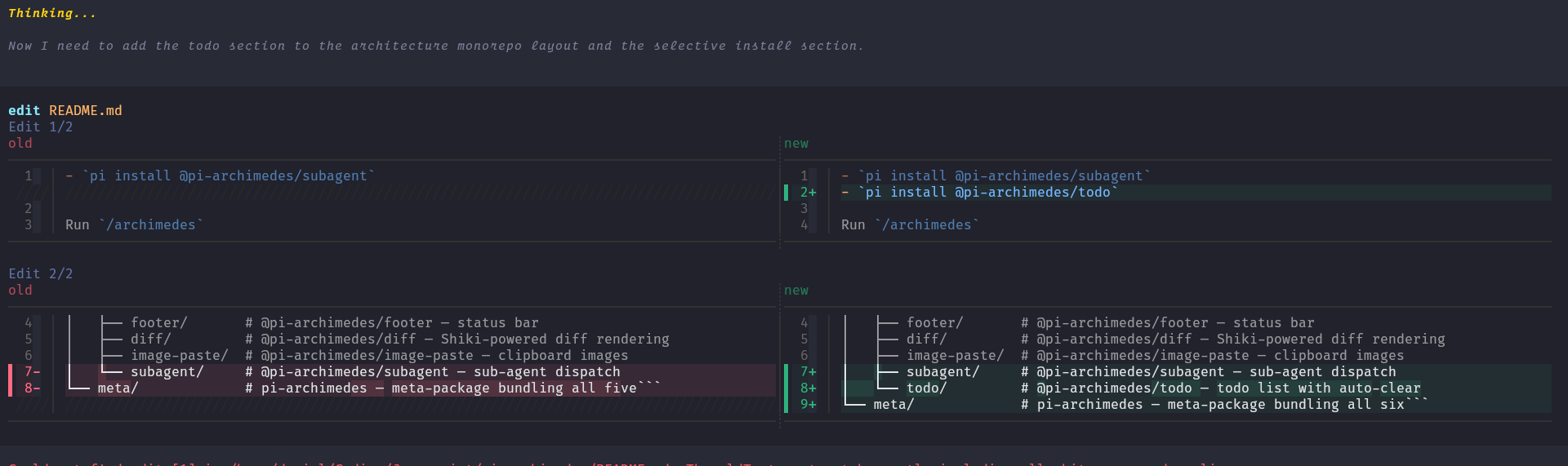
  "image": "https://raw.githubusercontent.com/danielcherubini/pi-archimedes/main/docs/images/diff-edit.png",
  "extensions": [
    "./src/index.ts"
  ]
}
Security note
Pi packages can execute code and influence agent behavior. Review the source before installing third-party packages.
README
@pi-archimedes/diff
See what changed. Not just that something changed.
Raw text diffs make it easy to miss the one line that matters. Diff puts Shiki-syntax-highlighted changes in front of you — side by side when there's room, unified when there isn't — with word-level emphasis on the parts that actually moved inside each line.
Install
Standalone:
pi install npm:@pi-archimedes/diff
Or the full suite instead:
pi install npm:pi-archimedes
New to Pi? Pi itself is a one-time global install and needs Node.js ≥ 22.19.0:
npm install -g --ignore-scripts @earendil-works/pi-coding-agent
After installing Pi, choose one installation command above, then cd into your project and run pi. Inside the session, /login signs you in and /model picks a model — the setup section walks through the first run. A running session picks the diff renderer up with /reload.
What you get
- Split view, and unified when it isn't — side-by-side diffs when the terminal is wide enough; a traditional unified view when it isn't. The choice is made automatically from the column width.
- Syntax highlighting — language-aware colouring of the diff body, from a Shiki theme.
- Word-level emphasis — sub-line highlighting that shows exactly which tokens changed inside an otherwise similar line.
- Graceful fallback — when Shiki is unavailable or the format isn't recognised, the change is shown as a plain text diff.
What it does (and doesn't) do
The renderer displays edit and write tool changes in the tool UI, including call previews. It is not an approval gate — it helps you read changes as they happen; it doesn't hold changes back.
Appearance
Standalone, the renderer runs on fixed defaults — the github-dark theme, a 150-column minimum for split view, and 60 code columns per side — and it does not read settings, because standalone has no config reader. In the suite, its archimedes.diff namespace supplies the same three values (diffTheme, diffSplitMinWidth, diffSplitMinCodeWidth) through the suite's config reader:
| Setting | Type | Default | Description |
|---|---|---|---|
diffTheme |
string | github-dark |
Shiki syntax-highlighting theme |
diffSplitMinWidth |
number | 150 |
Minimum terminal columns for split view (≥ 100) |
diffSplitMinCodeWidth |
number | 60 |
Minimum code columns per side in split view (≥ 30) |
The palette is derived from the chosen Shiki theme; it does not automatically pick up Pi's active theme colours. If you want a different look, pick a closer theme rather than expecting a live match.
On/off is managed by the suite: toggle via /plugins (archimedes.diff.enabled, default on).