@pi-archimedes/todo
Todo list tool with auto-clear and subagent visibility
Package details
Install @pi-archimedes/todo from npm and Pi will load the resources declared by the package manifest.
$ pi install npm:@pi-archimedes/todo- Package
@pi-archimedes/todo- Version
2.7.0- Published
- Sep 12, 2026
- Downloads
- 1,886/mo · 361/wk
- Author
- danmademe
- License
- unknown
- Types
- extension
- Size
- 67.6 KB
- Dependencies
- 1 dependency · 3 peers
Pi manifest JSON
{
  "image": "https://raw.githubusercontent.com/danielcherubini/pi-archimedes/main/docs/images/todos-and-subagent.png",
  "extensions": [
    "./src/index.ts"
  ]
}
Security note
Pi packages can execute code and influence agent behavior. Review the source before installing third-party packages.
README
@pi-archimedes/todo
Keep the plan in view.
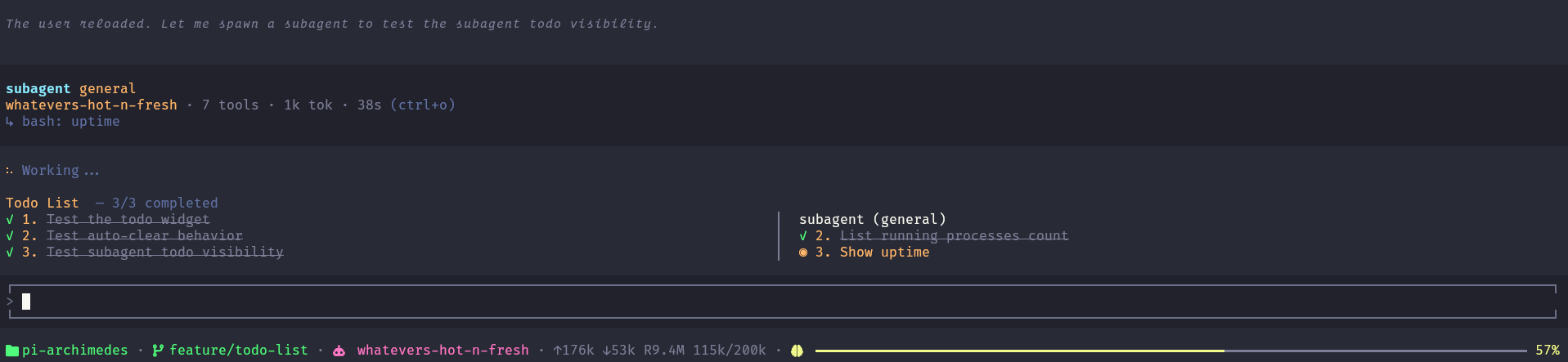
A live task board in the terminal: your agent's plan in the main column, and a named column for each subagent running alongside — so what's asked, what's in flight, and what's finished never leaves the screen. When everything is done, the board clears itself.
Install
Standalone:
pi install npm:@pi-archimedes/todo
Or the full suite instead:
pi install npm:pi-archimedes
New to Pi? Pi itself is a one-time global install and needs Node.js ≥ 22.19.0:
npm install -g --ignore-scripts @earendil-works/pi-coding-agent
After installing Pi, choose one installation command above, then cd into your project and run pi. Inside the session, /login signs you in and /model picks a model — the setup section covers the first run. /reload works two ways here: it picks the extension up, and it restores the todo list, which survives /reload through session state reconstruction.
The manage_todo_list tool
Two operations, write and read:
{ "operation": "read" }
{
  "operation": "write",
  "todoList": [
    { "content": "Parse config files", "description": "Read and validate settings", "status": "completed" },
    { "content": "Build state manager", "description": "Implement reactive store", "status": "in_progress" },
    { "content": "Connect UI widget", "description": "Bind to core bus events", "status": "pending" }
  ]
}
Writes replace the whole list. There is no partial update: every write must carry the complete list — existing items included — or they are replaced and gone.
States are pending, in_progress, and completed. Finished items render struck through; the current one stays highlighted.
Commands
/todos— refreshes the todo widget and reports its status (e.g.3/7 todos completed.). It is not a visibility toggle; the board shows while there is content./todos clear— clears the list.
Auto-clear
When every task reaches completed, the widget shows a brief confirmation, then clears itself after 2 seconds to give the screen back.
Part of the suite
With subagents running alongside in the full suite, each child gets its own named column to the right of yours — it appears on the child's first non-empty todo update over core's bus (empty updates are ignored; it does not appear when the worker merely starts), and it is removed when the child exits. The 2-second auto-clear is local to whatever list completed — a child clearing its own list does not dismiss the column in your session. On/off is managed by the suite: toggle via /plugins (archimedes.todo.enabled, default on).