@pi-atelier/rpiv-ask-user
Fork of @juicesharp/rpiv-ask-user-question with a programmatic answer channel (submitAskUserAnswer) for remote front-ends.
Package details
Install @pi-atelier/rpiv-ask-user from npm and Pi will load the resources declared by the package manifest.
$ pi install npm:@pi-atelier/rpiv-ask-user- Package
@pi-atelier/rpiv-ask-user- Version
3.0.1- Published
- Oct 9, 2026
- Downloads
- 264/mo · 35/wk
- Author
- lain-residue
- License
- MIT
- Types
- extension
- Size
- 253.2 KB
- Dependencies
- 1 dependency · 4 peers
Pi manifest JSON
{
  "extensions": [
    "./index.ts"
  ]
}
Security note
Pi packages can execute code and influence agent behavior. Review the source before installing third-party packages.
README
@pi-atelier/rpiv-ask-user
Fork of
@juicesharp/rpiv-ask-user-questionv2.5.0,唯一新增:程序化应答通道 —— 让远程前端(如 pi-feishu 飞书网关)可以代终端用户回答正在等待的问卷。上游合并 PR 后将 unfork。
Fork API
import { getActiveAskParams, hasActiveAsk, submitAskUserAnswer } from "@pi-atelier/rpiv-ask-user";

// submitAskUserAnswer(result): 有活跃问卷且答案合法时返回 true(overlay 自动关闭、工具返回结构化答案)
//   - 已答/无问卷/答案不合法 → false(幂等 no-op,不抛异常)
// getActiveAskParams(): 当前等待中问卷的 params 快照(无则 null)
// hasActiveAsk(): 是否有问卷在等待
v3.0.0 Breaking Changes(必读迁移指南)
v3 落实上游 PR #180 review 项,与 v2.x 不兼容。三处 breaking:
删除全局 API 对象 ——
getGlobalAskUserApi()已移除(模块加载副作用、first-loader-wins 隐患一并删除)。改为直接 import 命名导出:// v2.x(已废弃) import "@pi-atelier/rpiv-ask-user"; const api = getGlobalAskUserApi(); api.submitAskUserAnswer(result); // v3.0.0 import { submitAskUserAnswer } from "@pi-atelier/rpiv-ask-user"; submitAskUserAnswer(result);跨实例一致性仍由包内共享同一 globalThis symbol 槽位(
@pi-atelier/rpiv-ask-user/activeAsk,key 未变,v2 部署的消费者读旧 key 仍通)保证,命名导出只是访问入口,天然规避 first-loader-wins。registerActiveAsk/clearActiveAsk不再从包入口导出 —— 它们是工具扩展内部的接线细节(ask-user-question.ts使用),外部消费者只需要submitAskUserAnswer/getActiveAskParams/hasActiveAsk。答案校验收紧 ——
submitAskUserAnswer现在对照注册的问卷 params 逐条校验答案(答案来自远程聊天用户,不可信):伪造 label、越界questionIndex、null/畸形条目一律返回false且不消费槽位;v2.x 宽松通过的部分答案现在会被拒。cancelled: true的结果跳过逐条校验(Esc 等价)。另外新增并发保护:并行 ask(pi
executeToolCallsParallel)时各持有自己的句柄,先结束的 ask 不会误清后者的注册;迟到答案幂等返回false。RPC 主机(VS Code pendant、Zed/Paseo ACP)上问卷不注册 activeAsk(
getActiveAskParams()返回 null),代答通道仅在 TUI 路径可用 —— 桥接作者勿假设该通道在 RPC 主机上存在。
以下为上游原版 README:


Let the model ask you instead of guessing. This extension gives Pi Agent one tool — ask_user_question — that opens a terminal dialog of up to four questions with written-out options, and hands your choices back as structured data. Install it if you would rather spend fifteen seconds picking than an hour undoing a wrong assumption.
Install
pi install npm:@juicesharp/rpiv-ask-user-questionRestart your Pi session.
Quick start
Nothing to set up — the tool is live as soon as Pi restarts. Hand the model a task with a real decision buried in it:
Add caching to the API client.
Rather than picking a strategy on your behalf, the model calls ask_user_question and a dialog takes over the bottom of your terminal. Move with ↑/↓, choose with Enter, press n to attach a note, or land on the Type something. row to answer in your own words. While typing, Shift+Enter adds a line, Ctrl+G opens Pi's configured external editor, and Ctrl+U clears the draft; browsing another option and returning keeps what you wrote. Esc abandons the questionnaire entirely.
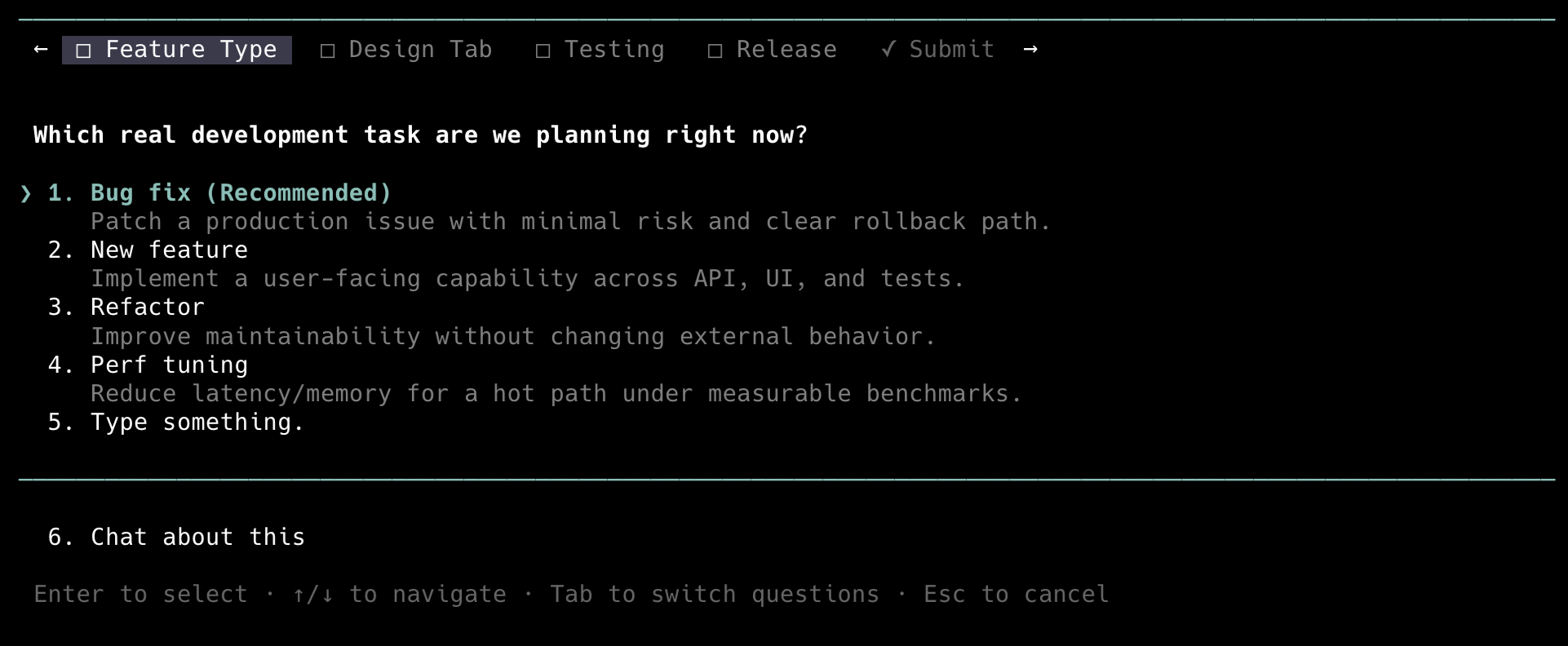
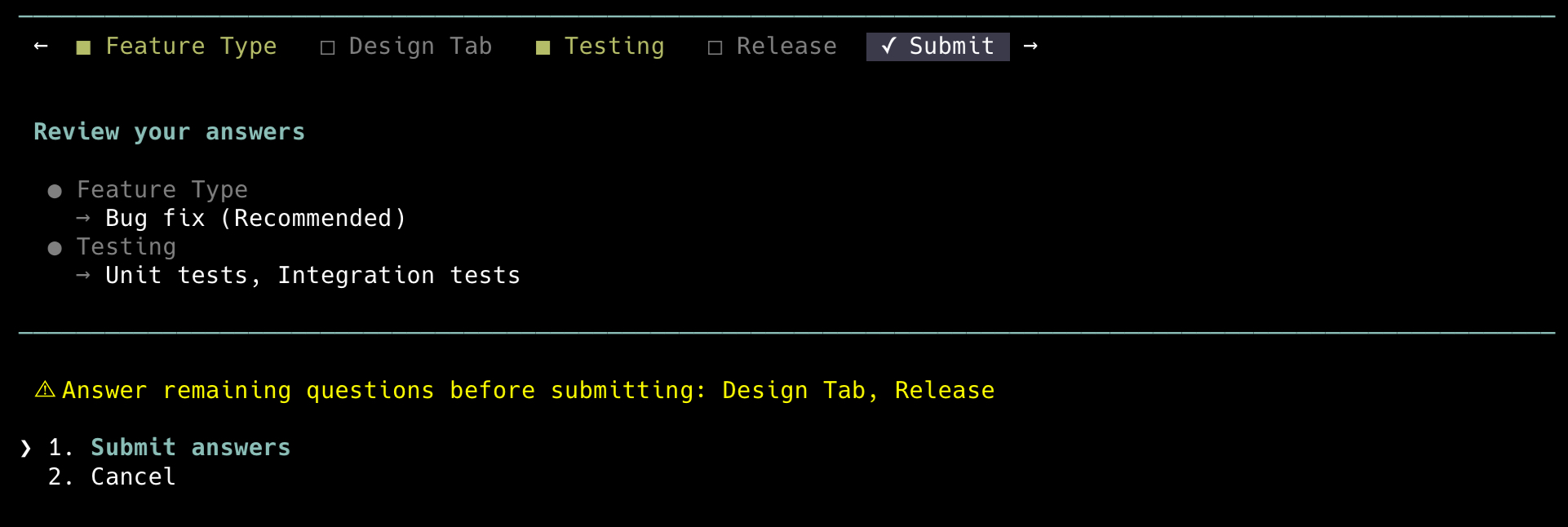
When the model asks several things at once, Tab moves between them and a Submit tab reviews everything before it goes back:
What you get
- Typed options instead of a wall of prose — each question carries 2-4 authored choices, and every choice comes with a description of what it means or what it costs you.
- You can always answer in your own words — a
Type something.row is appended to every question, single- or multi-select, widens to the full pane while you type, keeps its multiline draft visible in that row while you browse, and supports Pi'sShift+Enternewline andCtrl+Gexternal-editor flows. - Compare real artifacts, not just labels — an option can carry a markdown
preview(ASCII mockup, code, diagram, config) that renders in a bordered box beside the option list. - One interruption, not five — up to four questions arrive in a single tabbed dialog, and the Submit tab lists your answers and names anything still blank before you commit.
- Notes on any answer —
nopens a multiline note editor on any question tab; the note travels back to the model alongside the choice without marking the question answered. - Read the transcript behind the dialog —
Ctrl+]collapses the overlay so you can scroll the conversation, then brings it back with your answers intact. - Works outside the terminal too — in RPC and ACP hosts such as the VS Code pendant or Zed the questionnaire walks through the host's native dialogs, and in non-interactive runs the tool is removed from the model's tool list instead of failing every call.
Configuration
Optional. Settings live in ~/.config/rpiv-ask-user-question/config.json; the file is read, never written.
| Setting | What it does | Default |
|---|---|---|
collapseKey |
Key that collapses and expands the dialog. Accepts Pi keybinding ids such as alt+o; "off" disables the shortcut. |
"ctrl+]" |
guidance.promptSnippet |
One-line description of the tool in the system prompt — tune how eagerly the model asks. | built-in snippet |
guidance.promptGuidelines |
Usage guidelines given to the model, as a list of strings. | 4 built-in guidelines |
{ "collapseKey": "alt+o" }Malformed JSON falls back to the defaults with a warning; an individual unusable value is silently dropped back to its default. Never an error.
Reference
- Tool schema — parameters, limits, reserved labels, validation errors, the result envelope, and the
rpiv:ask-user:promptevent. - Keyboard and layout — every key, the rows the dialog appends, notes, collapse mode, and how previews and overflow adapt to terminal size.
- Configuration — file lookup and
XDG_CONFIG_HOME, thecollapseKeygrammar, theguidance.*prompt overrides, and how invalid values are handled. - Hosts and runtime behavior — terminal vs RPC vs non-interactive, what degrades in each, and the load-failure envelopes.
- Localization — the nine shipped languages, how the locale is chosen, and how to add one.
Requirements
- Node.js 22 or newer.
- Pi Agent, with an interactive terminal or an RPC/ACP host. Non-interactive runs never see the tool.
- A terminal at least 100 columns wide for side-by-side previews; narrower terminals stack the preview under the options.
No native dependencies, no compiler, no API keys — the extension makes no model calls of its own.
Troubleshooting
The model says the questionnaire UI failed to load and asks its questions as chat text. The dialog's modules were replaced on disk while Pi was running, usually by a package-manager install touching the store. Repair the install if it is broken, then restart Pi; the failure is not recoverable inside the running process.
Ctrl+] does nothing. On keyboard layouts where ] sits on the shifted layer (Latin American among them) the default is unreachable. Set collapseKey to something you can type, for example "alt+o".
Related
@juicesharp/rpiv-i18n— optional; installing it renders the dialog chrome in your language and adds/languages.@juicesharp/rpiv-pi— the umbrella package whose workflow skills useask_user_questionas their developer checkpoint./rpiv-setupoffers to install this extension.
License
MIT — see LICENSE.