@pi-sysadmin/prompt-buffet
Next-prompt suggestions for Pi: LLM-generated follow-ups after each agent turn.
Package details
Install @pi-sysadmin/prompt-buffet from npm and Pi will load the resources declared by the package manifest.
$ pi install npm:@pi-sysadmin/prompt-buffet- Package
@pi-sysadmin/prompt-buffet- Version
0.2.0- Published
- Sep 13, 2026
- Downloads
- 191/mo · 178/wk
- Author
- dan.naumov
- License
- unknown
- Types
- extension
- Size
- 174.4 KB
- Dependencies
- 0 dependencies · 3 peers
Pi manifest JSON
{
  "extensions": [
    "./index.ts"
  ]
}
Security note
Pi packages can execute code and influence agent behavior. Review the source before installing third-party packages.
README
Prompt Buffet documentation
Table of Contents
About
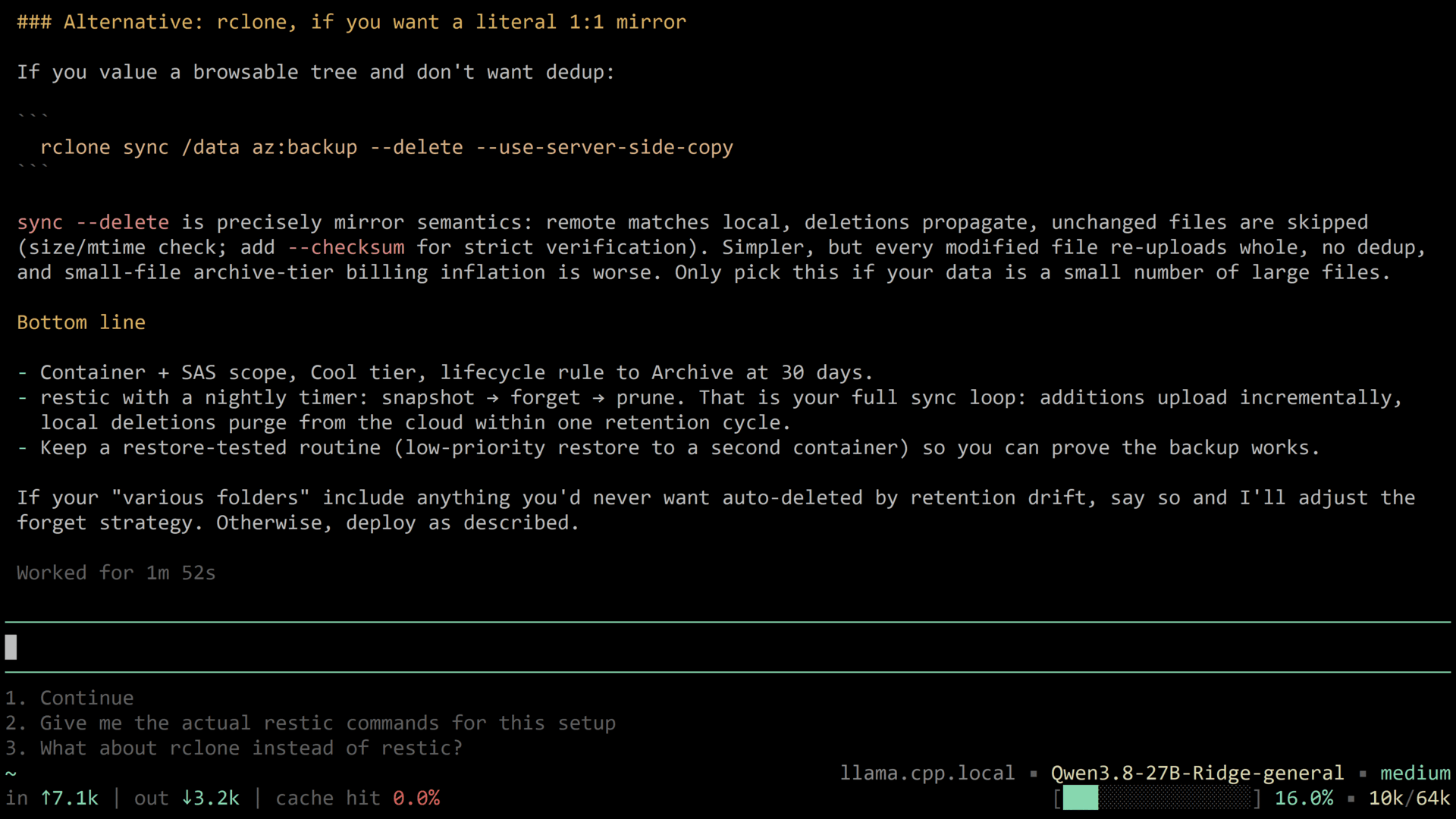
Prompt Buffet is a Pi extension that suggests what you are likely to type next. After every completed agent turn it asks a model to read the recent conversation and produce up to a few short, natural next prompts. Those suggestions appear in a numbered list directly below the input editor.
The goal is to shorten repetitive typing: continue a workflow, answer the assistant's question, commit, run tests, say "yes" - without composing each prompt from scratch. It is best-effort and designed to never interrupt normal use; if generation fails, nothing is shown and the session continues.
The extension is designed with purely TUI use in mind, it is skipped in RPC, JSON, and print modes.
Much thanks go out to SteelDynamite/pi-prompt-suggestions for the idea and the original clanker slop this particular clanker slop is built upon.
Installation
Recommended - latest release From NPM:
(installs under: ~/.pi/agent/npm/node_modules/prompt-buffet/)
pi install npm:@pi-sysadmin/prompt-buffet
You may also install by pointing pi install directly at this git repo, but since this implies potentially running bleeding edge untested code and more complicated versioning and update procedures, precise instructions are omitted. You should know how to do this if you really need it.
Settings
Command
/prompt-buffet on|off (Default: on)
Toggles the feature and persists the choice to the config file. The change applies from the next turn. With no valid argument, it reports the current state. Note that this is only ment as a temporary measure in case the extension interferes with your current workflow. If you need to disable it entirely (freeing up context, etc), you still need to use pi config.
Config file: ~/.pi/agent/extensions/prompt-buffet.json
The file is created automatically (and it is assumed ~/.pi/agent/ is writeable) on first use with all defaults, and is resynced on load: missing keys are backfilled, and keys the extension no longer understands are removed. Invalid values are ignored (with a warning in the TUI) and the default is used.
| Key | Type | Default |
|---|---|---|
enabled |
boolean | true |
model |
string | "default" |
maxChars |
integer > 0 | 80 |
maxTokens |
integer > 0 | 1024 |
maxSuggestions |
integer 1-6 | 3 |
Details
enabled (default: true)
Master switch for suggestion generation. Toggle from the TUI with /prompt-buffet on|off.
model (default: "default")
Which model generates suggestions. When using a particularly heavy or expensive model, you might want to delegate suggestion generation to a secondary, more nimble model. Note that for models that support variable levels of reasoning, "minimal" is the hardcoded value for performance reasons.
"default"(or any missing/invalid value): uses the model of the current session."provider/model"(e.g."openai/gpt-5-mini"): an explicit dedicated model, looked up in the session's model registry. Falls back to the session model if not found.
maxChars (default: 80)
Hard cap on the length of a single suggestion; longer items are dropped. Also injected into the suggestion system prompt, so the model is told the limit up front.
maxTokens (default: 1024)
Maximum output tokens the suggestion request may produce. If you intend to increase maxSuggestions you may want to increase this. Note that unlike maxCandidates and maxSuggestions described below, this is more-of a safety valve and not a budget setting.
maxSuggestions (default: 3)
How many numbered suggestions to show (1-6). The model is asked for a larger candidate pool, ranked most to least likely: the extension's internal system prompt {maxCandidates} placeholder resolves to 2 × maxSuggestions (floored at 2). The extension then sanitizes the candidates, drops near-duplicates, and shows the top maxSuggestions.
Example config
{
  "model": "openai/gpt-5-mini",
  "enabled": true,
  "maxChars": 80,
  "maxTokens": 1024,
  "maxSuggestions": 3
}
Functionality
Generation
After each agent turn (the "agent_end" event), the extension:
- Skips generation if disabled, if messages are pending, or if the input editor already contains text.
- Assembles the most recent conversation (last 8 messages, truncated) as context.
- Calls a model with a dedicated suggestion system prompt and requests a JSON array of candidate prompts.
- Parses, sanitizes, and ranks the result, then shows it.
Display
Suggestions render as a numbered list (1., 2., 3., ...) in a widget below the editor, dimmed text, one line each.
Selection
- When the input editor is empty, pressing a number key (1-9) fills the editor with that numbered suggestion.
- Any normal edit keystroke (typing, backspace, delete, enter, tab) clears the suggestion list.
- Leaving the editor non-empty also suppresses new generations.
Sanitization
Every candidate is cleaned before display:
- Markdown fences, stray quotes, and trailing periods removed.
- Items longer than
maxChars, with newlines, or markdown artifacts are dropped. - Praise, meta, and error phrasings are rejected ("done", "looks good", "thanks", "api error: ..." etc.).
- Items over 25 words are dropped.
- Single-word suggestions are only kept from a fixed allowlist (yes, sure, ok, continue, commit, deploy, stop, quit, ...) or if they start with "/" (commands).
- The first letter is capitalized.
Suggestion rules
The built-in system prompt instructs the model to predict what the user would naturally type (not what they "should" do), continue the active workflow, answer the assistant's open questions with the top 1-2 plausible replies, avoid thanks/praise, avoid unrequested new ideas, and avoid unsafe or sensitive actions. It must reply with a plain JSON array of strings, or [] when nothing fits.
Debugging
Set the environment variable PROMPT_BUFFET_DEBUG=1 when starting Pi. Then each generation step is reported in the status line ("next-suggestions"), as info notifications, and appended to prompt-buffet-debug.log in the working directory. Useful for seeing why suggestions were skipped or rejected.
Related files
The ... is the extension's install root, see the Installation section.
~/.pi/agent/extensions/prompt-buffet.jsonYour currently active settings..../prompt-buffet/prompts/suggestion-system-prompt.md- the prompt used to generate suggestions. The prompt uses two placeholders, substituted at load:{maxChars}from themaxCharssetting, and{maxCandidates}derived frommaxSuggestions x 2. If the file is missing, a short built-in fallback prompt is used. Editing this file lets you tune suggestion style without touching code.prompt-buffet-debug.log(created in the working directory) Debug trace; only written whenPROMPT_BUFFET_DEBUG=1.
End of documentation