@pi-vault/pi-plan
Pi extension that adds a read-only plan mode for exploring first and producing a decision-complete implementation plan
Package details
Install @pi-vault/pi-plan from npm and Pi will load the resources declared by the package manifest.
$ pi install npm:@pi-vault/pi-plan- Package
@pi-vault/pi-plan- Version
0.3.0- Published
- Jul 7, 2026
- Downloads
- 460/mo · 166/wk
- Author
- lanhhoang
- License
- MIT
- Types
- extension
- Size
- 688.4 KB
- Dependencies
- 0 dependencies · 2 peers
Pi manifest JSON
{
  "extensions": [
    "./src/index.ts"
  ]
}
Security note
Pi packages can execute code and influence agent behavior. Review the source before installing third-party packages.
README
@pi-vault/pi-plan




Description
Plan first, change code second. @pi-vault/pi-plan adds a read-only planning workflow to Pi so the agent can inspect the repo, clarify the request, and return a decision-complete implementation plan before any write-capable work starts.
Screenshots


Install, Upgrade, And Reload
Install or upgrade the extension:
pi install npm:@pi-vault/pi-plan
Reload Pi after installing or upgrading:
/reload
Quick Start
Start plan mode:
/plan
Start plan mode and send the planning prompt immediately:
/plan prepare the next release notes and docs
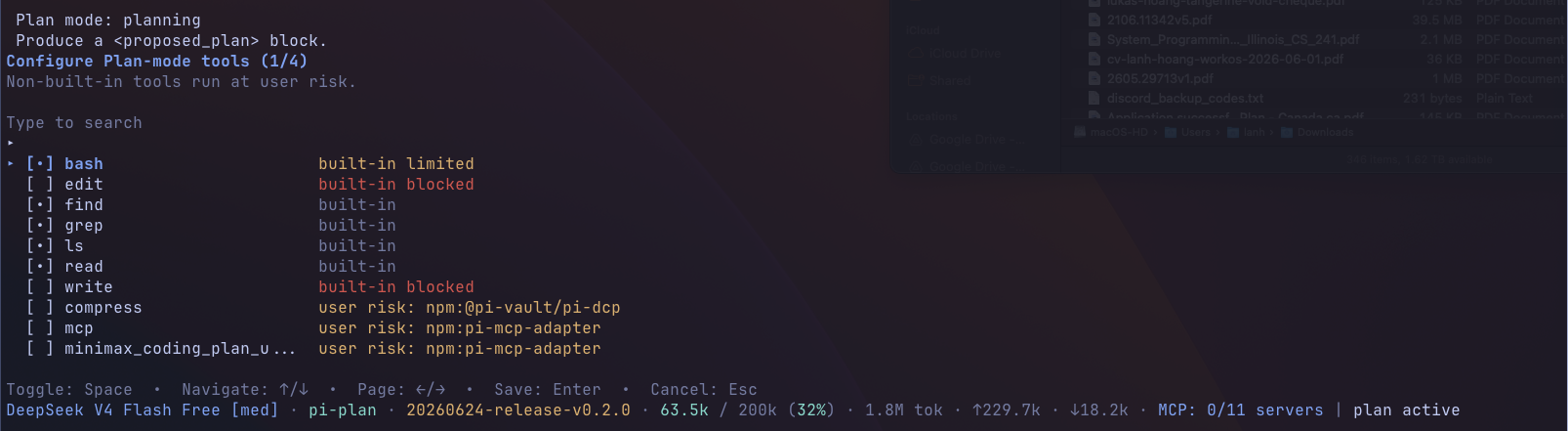
Open the optional tool selector for plan mode:
/plan:tools
Exit plan mode and restore normal tool access:
/plan:exit
Start Pi directly in plan mode:
pi --plan
How Plan Mode Works
When plan mode is active, the agent stays in an explore-first workflow until you explicitly exit or choose to implement the latest proposed plan.
A typical flow looks like this:
- Enter plan mode with
/planorpi --plan. - Let the agent inspect the repo and ask clarifying questions.
- Receive exactly one
<proposed_plan>block when the plan is ready. - Choose whether to implement it, stay in plan mode, or exit.
If you choose Implement this plan, pi-plan turns plan mode off first, restores full tool access, and sends the saved plan back into the conversation as the next implementation instruction.
What’s New In Current Behavior
The current release behavior includes a few workflow improvements beyond the original 0.2.0 command surface:
- Optional plan-mode tool selections persist across Pi sessions.
- The latest proposed plan is shown in the session timeline as a display-only message.
- On implement and exit paths, the extension can prompt you to save the latest plan to a file.
- Once plan mode is off,
<proposed_plan>blocks are stripped from normal assistant context so later turns do not carry stale planning markup forward.
Command Reference
/plan
- If plan mode is off,
/planturns it on. - If you pass text after
/plan, that text is sent as the planning prompt. - If plan mode is already on and you run
/planwith no arguments, Pi opens the plan-mode menu.
/plan:tools
- Opens the plan-mode tool selector.
- If plan mode is not active yet, Pi enables it first.
- Safe built-in planning tools stay available by default.
- Optional extension tools are opt-in and can remain selected across session restarts.
/plan:exit
- Turns off plan mode.
- Restores the tool set that was active before planning started.
- If a latest plan exists, the extension can prompt you to save it to a file before exit completes.
pi --plan
Starts Pi directly in plan mode at session startup.
Safety Model
Plan mode keeps the default workflow read-only:
- built-in
editandwriteare blocked bashis limited to allowlisted read-only commands- mutating shell commands are blocked with a plan-mode error
- safe built-in planning tools remain available:
read,bash,grep,find, andls
Optional extension tools are off by default. You can enable them with /plan:tools, and those selections persist across sessions. Built-in edit and write remain blocked even when extra tools are enabled, but non-built-in tools may still expose broader capabilities through their own interfaces, so treat them as deliberate opt-ins.
Development And Verification
pnpm install
pnpm check
pnpm run pack:dry-run
pnpm run release:check
Changelog
See CHANGELOG.md for release notes.
License
MIT — see LICENSE.