@pi-vault/pi-plan
Pi extension that adds a read-only plan mode for exploring first and producing a decision-complete implementation plan
Package details
Install @pi-vault/pi-plan from npm and Pi will load the resources declared by the package manifest.
$ pi install npm:@pi-vault/pi-plan- Package
@pi-vault/pi-plan- Version
0.2.0- Published
- Jun 25, 2026
- Downloads
- not available
- Author
- lanhhoang
- License
- MIT
- Types
- extension
- Size
- 682.1 KB
- Dependencies
- 0 dependencies · 2 peers
Pi manifest JSON
{
  "extensions": [
    "./src/index.ts"
  ]
}
Security note
Pi packages can execute code and influence agent behavior. Review the source before installing third-party packages.
README
@pi-vault/pi-plan




Description
@pi-vault/pi-plan adds a read-only plan mode to Pi so you can explore a codebase, clarify the request, and get a decision-complete implementation plan before any code changes happen.
Screenshots


Install
pi install npm:@pi-vault/pi-plan
Reload Pi after installing or upgrading:
/reload
Quick Start
Start plan mode:
/plan
Start plan mode and send the planning prompt immediately:
/plan prepare the next release notes and docs
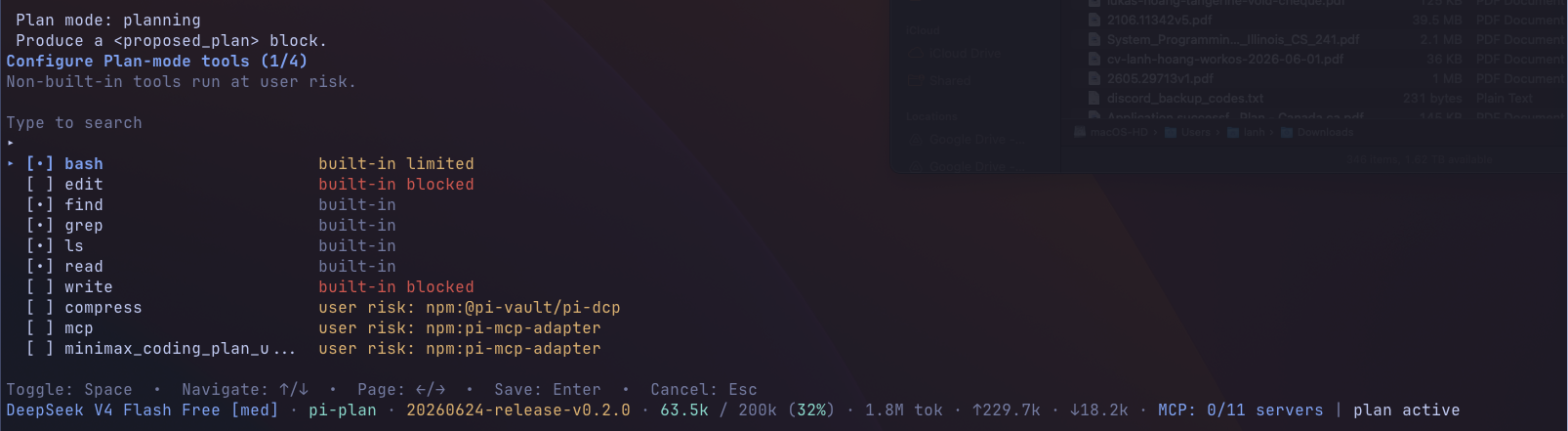
Configure additional optional tools that are available during plan mode:
/plan:tools
Exit plan mode and restore full tool access:
/plan:exit
Start Pi directly in plan mode:
pi --plan
What Plan Mode Does
When plan mode is active, the agent stays in exploration and planning mode until you explicitly exit or choose to implement the proposed plan.
Plan mode is designed for work that benefits from an explore-first workflow:
- inspect the repo before changing anything
- clarify requirements and tradeoffs
- produce a single decision-complete
<proposed_plan>block - hand the approved plan back into normal execution when you are ready
Command Reference
/plan
- If plan mode is off,
/planturns it on. - If you pass text after
/plan, that text is sent as the planning prompt. - If plan mode is already on and you run
/planwith no arguments, Pi opens the plan-mode menu.
/plan:tools
Opens the plan-mode tool selector. If plan mode is not active yet, Pi enables plan mode first and then opens the selector.
Use this when you want to allow additional tools during planning. Built-in edit and write stay blocked, but extra tools may have broader capabilities, so enable them deliberately.
/plan:exit
Turns off plan mode and restores the tool set that was active before planning started.
Safety Rules During Plan Mode
Plan mode keeps the agent in a read-only workflow by changing which tools are available:
- built-in
editandwriteare blocked bashis limited to allowlisted read-only commands- mutating shell commands are blocked with an explicit plan-mode error
- safe built-in planning tools remain available:
read,bash,grep,find, andls
Additional optional tools are off by default. You can selectively enable them with /plan:tools. Built-in edit and write remain blocked, but enabled extra tools may still be able to mutate state through their own interfaces.
Proposed Plan Detection And Handoff
The extension adds a plan-mode system prompt that tells the agent to produce exactly one <proposed_plan> block.
When the agent returns a proposed plan, @pi-vault/pi-plan automatically:
- detects the plan block
- stores the latest proposed plan in session state
- updates the status and widget UI to show that a plan is ready
- opens a ready menu so you can implement the plan, stay in plan mode, or exit
If you choose Implement this plan, plan mode is disabled first, full tool access is restored, and the saved plan is sent back into the conversation as the next implementation instruction.
Tool Selector
/plan:tools opens a custom TUI selector for additional optional tools.
Safe built-in planning tools always stay available, blocked built-ins stay blocked, and any extra tools you enable persist across turns and session restore. Non-built-in tools run at your discretion and may provide capabilities beyond the default read-only planning tool set.
Development
pnpm install
pnpm check
pnpm run pack:dry-run
pnpm run release:check
License
MIT