@pi-vault/pi-usage
Pi extension that displays aggregated usage statistics across all sessions
Package details
Install @pi-vault/pi-usage from npm and Pi will load the resources declared by the package manifest.
$ pi install npm:@pi-vault/pi-usage- Package
@pi-vault/pi-usage- Version
0.3.0- Published
- Jun 8, 2026
- Downloads
- 460/mo · 460/wk
- Author
- lanhhoang
- License
- MIT
- Types
- extension
- Size
- 610.6 KB
- Dependencies
- 0 dependencies · 2 peers
Pi manifest JSON
{
  "extensions": [
    "./src/index.ts"
  ]
}
Security note
Pi packages can execute code and influence agent behavior. Review the source before installing third-party packages.
README
@pi-vault/pi-usage




Show aggregated Pi usage stats across your sessions — token and cost breakdowns by provider and model, plus live quota snapshots for configured providers, all from a single in-app dashboard.
Install
pi install npm:@pi-vault/pi-usage
Then reload Pi:
/reload
Commands
/usage— open the usage dashboard without forcing a live refresh. Use this for fast, side-effect-light inspection./usage:refresh— force live provider refresh, rescan local history, then open the usage dashboard. Use this when you want the latest usage data (requires providers already configured in Pi).
Dashboard
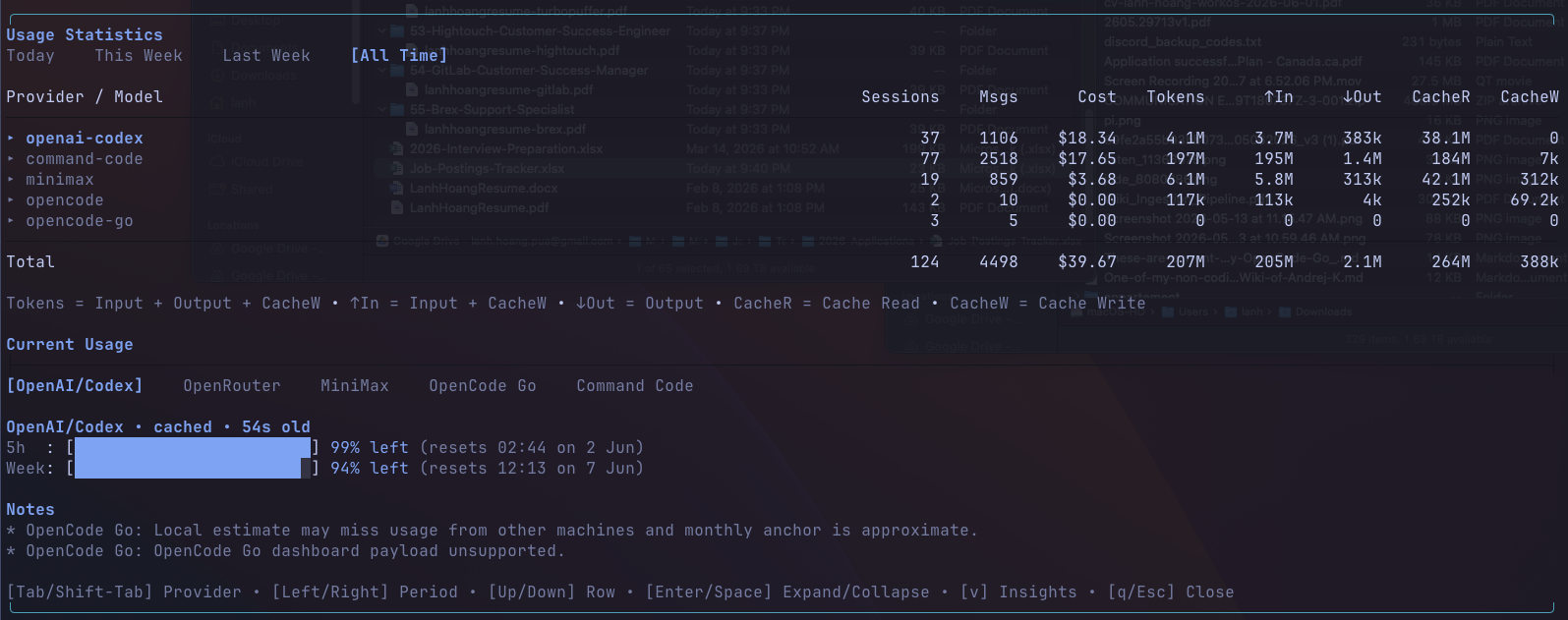
The dashboard opens in a TUI overlay over the current Pi session and is split into three bordered sections plus a footer of keyboard hints.
Usage statistics
The top section is an aggregated table of all token and cost usage across your local Pi sessions.
- Period switching —
Today/This Week/Last Week/All Timeis selectable with the arrow keys. - Provider rows — one row per provider found in your local Pi history, sorted by cost. Rows are expandable to show per-model rows.
- Per-row columns — sessions, messages, cost, total tokens, input, output, cache reads, and cache writes.
- Total row — a summary line at the bottom that aggregates every visible column for the active period.
Current usage
A live view focused on rolling-window quota bars and balances for whichever providers are already configured in Pi.
- Provider tabs — switch between configured providers (
OpenAI/Codex,MiniMax,StepFun,OpenCode Go,Command Code,OpenRouter) withTab/Shift-Tab. - Quota bars —
5hand weekly windows with the percentage remaining and a compact reset description. - Balances — credits/remaining balance rows for providers that report a balance (for example, OpenRouter credits and the local Command Code fallback).
- Live status — each card reports whether the data is live, cached, stale, or a local-only fallback, with the cache age when relevant.
- Live refresh cadence — live provider snapshots are cached for 30 minutes and background refresh checks run every 30 minutes.
/usage:refreshstill forces an immediate refresh.
Notes
Per-provider diagnostics and caveats (e.g. live status, cache age, source) are surfaced inline so the dashboard can explain why a card is empty or showing a fallback.
Keyboard navigation
[Tab/Shift-Tab]— switch between providers in the current usage tabs.[Left/Right]— change the selected period in the usage table.[Up/Down]— move through table rows.[Enter/Space]— expand or collapse provider rows.[v]— toggle the insights view.[q/Esc]— close the dashboard.
Setup
Offline totals always work from local Pi history. Live provider cards are shown only for providers you have already configured in Pi.
Live provider setup
OpenAI/Codex
Pi usage can reuse existing Pi or Codex auth automatically. Optional overrides:
OPENAI_CODEX_OAUTH_TOKENOPENAI_CODEX_ACCESS_TOKENCODEX_OAUTH_TOKENCODEX_ACCESS_TOKENOPENAI_CODEX_ACCOUNT_IDCHATGPT_ACCOUNT_ID
MiniMax
Set one of:
MINIMAX_CODING_API_KEYMINIMAX_API_KEY
Optional override:
MINIMAX_API_HOST
StepFun
Set one of:
STEPFUN_TOKENSTEPFUN_USERNAMEandSTEPFUN_PASSWORD
OpenCode Go
Set:
OPENCODE_GO_COOKIE_HEADEROPENCODE_GO_WORKSPACE_ID
OPENCODE_GO_WORKSPACE_ID may be either the raw wrk_... id or the full workspace URL.
Command Code
Set:
COMMAND_CODE_COOKIE_HEADER
OpenRouter
Set:
OPENROUTER_API_KEY
Optional overrides:
OPENROUTER_API_URLOPENROUTER_X_TITLEOPENROUTER_HTTP_REFERER
Event API
@pi-vault/pi-usage emits:
usage-core:readyusage-core:update-current
Both events send { state } where state is a cloned UsageCoreState snapshot.
For late subscribers, request the current snapshot via usage-core:request:
import {
  USAGE_CORE_REQUEST_EVENT,
  type UsageCorePayload,
} from "@pi-vault/pi-usage/events";

pi.events.emit(USAGE_CORE_REQUEST_EVENT, {
  type: "current",
  reply: ({ state }: UsageCorePayload) => {
    // Render from latest cloned snapshot.
  },
});
Acknowledgements
This package borrows ideas from these projects for Pi UX and provider usage fetching approaches:
Development Setup
pnpm install
pnpm test
pnpm check
pnpm pack --dry-run
License
MIT