@pi-vault/pi-usage
Pi extension that displays aggregated usage statistics across all sessions
Package details
Install @pi-vault/pi-usage from npm and Pi will load the resources declared by the package manifest.
$ pi install npm:@pi-vault/pi-usage- Package
@pi-vault/pi-usage- Version
0.4.0- Published
- Jun 14, 2026
- Downloads
- 709/mo · 204/wk
- Author
- lanhhoang
- License
- MIT
- Types
- extension
- Size
- 612.4 KB
- Dependencies
- 0 dependencies · 2 peers
Pi manifest JSON
{
  "extensions": [
    "./src/index.ts"
  ]
}
Security note
Pi packages can execute code and influence agent behavior. Review the source before installing third-party packages.
README
@pi-vault/pi-usage




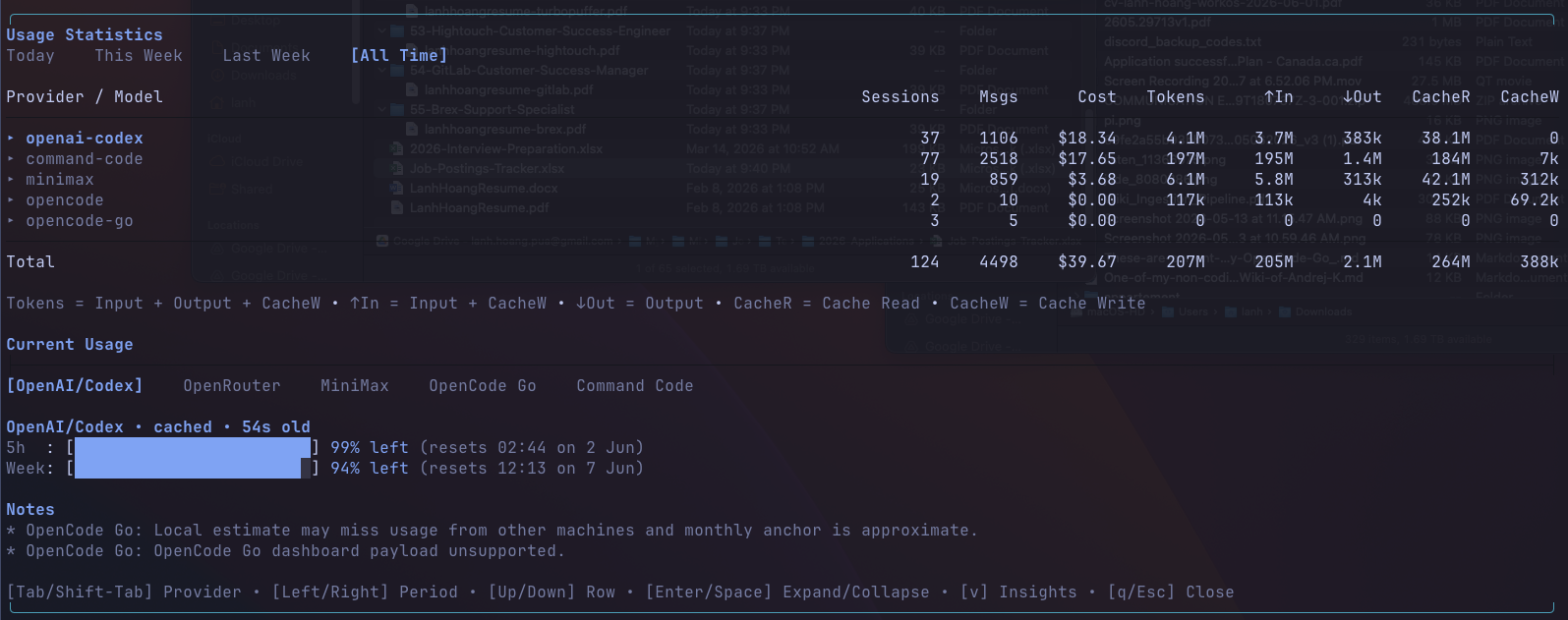
Track Pi usage across your sessions in one dashboard. @pi-vault/pi-usage combines offline history with live provider snapshots so you can see costs, tokens, session activity, and rolling quota status without leaving Pi.
Install
pi install npm:@pi-vault/pi-usage
Then reload Pi:
/reload
Commands
/usageopens the dashboard using cached live data when available. Use it for quick inspection./usage:refreshforces a live refresh, rescans local history, and then opens the dashboard.
What You Get
Usage statistics
The top section aggregates all local Pi session history for the selected period.
- switch between
Today,This Week,Last Week, andAll Time - expand provider rows to inspect model-level usage
- compare sessions, messages, cost, total tokens, input, output, cache reads, and cache writes
- keep a running total row for everything currently shown
Current usage
The lower section shows live quota and balance information for providers you have already configured in Pi.
- switch between
OpenAI/Codex,MiniMax,StepFun,OpenCode Go,Command Code, andOpenRouter - view rolling-window quota bars like
5hand weekly usage - see balance-style fields where the provider exposes them
- get inline status for live, cached, stale, or fallback data
Keyboard shortcuts
[Tab/Shift-Tab]switch provider tabs[Left/Right]switch time period[Up/Down]move through rows[Enter/Space]expand or collapse provider rows[v]toggle insights[q/Esc]close the dashboard
Provider Setup
Offline history works without extra setup. Live provider cards appear only for providers you have already configured.
OpenAI/Codex
Pi usage can reuse existing Pi or Codex auth. Optional overrides:
OPENAI_CODEX_OAUTH_TOKENOPENAI_CODEX_ACCESS_TOKENCODEX_OAUTH_TOKENCODEX_ACCESS_TOKENOPENAI_CODEX_ACCOUNT_IDCHATGPT_ACCOUNT_ID
MiniMax
Set one of:
MINIMAX_CODING_API_KEYMINIMAX_API_KEY
Optional override:
MINIMAX_API_HOST
StepFun
Set one of:
STEPFUN_TOKENSTEPFUN_USERNAMEandSTEPFUN_PASSWORD
OpenCode Go
Set:
OPENCODE_GO_COOKIE_HEADEROPENCODE_GO_WORKSPACE_ID
OPENCODE_GO_WORKSPACE_ID accepts either the raw wrk_... id or the full workspace URL.
Command Code
Set:
COMMAND_CODE_COOKIE_HEADER
OpenRouter
Set:
OPENROUTER_API_KEY
Optional overrides:
OPENROUTER_API_URLOPENROUTER_X_TITLEOPENROUTER_HTTP_REFERER
Development
pnpm install
pnpm check
pnpm pack --dry-run
License
MIT