@pi-vault/pi-usage
Pi extension that tracks Pi usage across your sessions in one dashboard
Package details
Install @pi-vault/pi-usage from npm and Pi will load the resources declared by the package manifest.
$ pi install npm:@pi-vault/pi-usage- Package
@pi-vault/pi-usage- Version
0.7.0- Published
- Jul 28, 2026
- Downloads
- 501/mo · 75/wk
- Author
- lanhhoang
- License
- MIT
- Types
- extension
- Size
- 819.3 KB
- Dependencies
- 0 dependencies · 2 peers
Pi manifest JSON
{
  "extensions": [
    "./src/index.ts"
  ]
}
Security note
Pi packages can execute code and influence agent behavior. Review the source before installing third-party packages.
README
@pi-vault/pi-usage




@pi-vault/pi-usage tracks Pi usage across local sessions and supported live providers in one dashboard. Use it to review costs, tokens, session activity, current quotas, balances, and usage insights without leaving Pi.
Install
Install the extension with Pi:
pi install npm:@pi-vault/pi-usage
Reload Pi after installation or an update:
/reload
Use it
Open the dashboard with cached data when available:
/usage
Force live-provider refresh, rescan local session history, and open the dashboard:
/usage:refresh
Use /usage for a quick inspection and /usage:refresh when you need current provider data or a fresh offline-history scan.
Dashboard
The dashboard is a tabbed overlay. Press Tab or Shift-Tab to move between its three views.
Usage Statistics
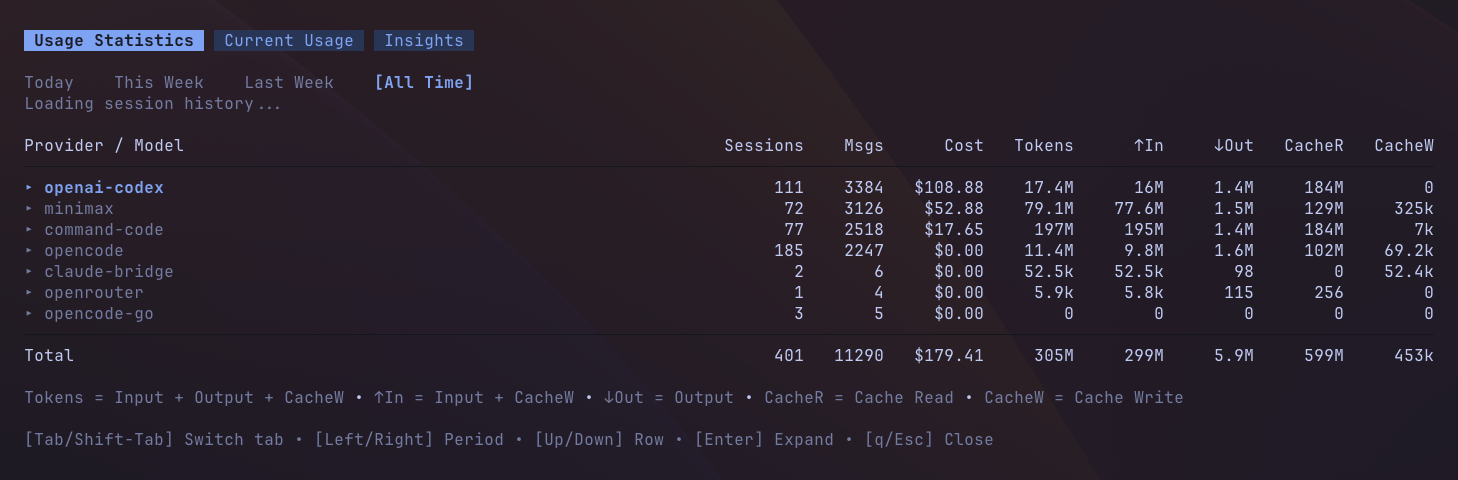
Aggregates local Pi session history for the selected period:
Today,This Week,Last Week, orAll Time.- Provider/model rows that can be expanded and collapsed.
- Totals for sessions, messages, cost, total tokens, input, output, cache reads, and cache writes.
Current Usage

Shows the selected live provider's quota and balance information. Provider data can be live, cached, stale, local, or unavailable, depending on credentials, refresh state, and provider support.
- Select
OpenAI/Codex,MiniMax,StepFun,OpenCode Go,Command Code, orOpenRouter. - View rolling quota windows such as
5hand weekly limits. - View balance-style fields when a provider exposes them.
- View StepFun's monthly
Creditsusage when its browser session is configured.
Insights
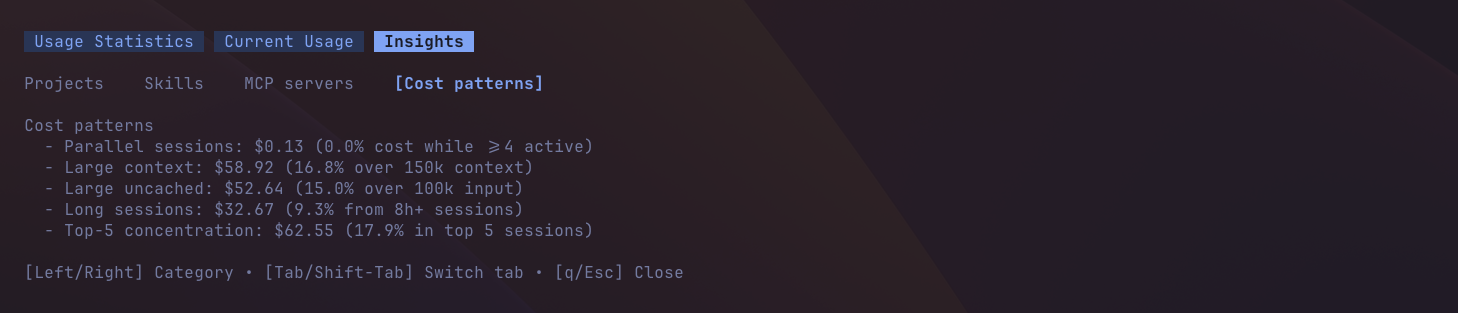
Shows all-time breakdowns from local Pi session history. Press Left or Right to switch between populated categories:
ProjectsSkillsMCP serversCost patterns
Only categories with data appear. Each category keeps a capped list of rows and shows an overflow summary when more data exists.
Keyboard shortcuts
Global:
[Tab]— next tab.[Shift-Tab]— previous tab.[q]/[Esc]— close the dashboard.
Usage Statistics:
[Left/Right]— switch period.[Up/Down]— move through rows.[Enter]/[Space]— expand or collapse the selected provider row.
Current Usage:
[Left/Right]— switch provider.
Insights:
[Left/Right]— switch category.
The dashboard footer shows shortcuts for the active tab.
Configuration
usage.json
Create $PI_CODING_AGENT_DIR/extensions/usage.json to disable live providers that you do not want queried.
Default behavior:
- Missing file: all providers stay enabled.
{}: all providers stay enabled.- Omitted provider: that provider stays enabled.
- Malformed JSON: Pi Usage ignores it and uses the default behavior.
Default example:
{}
Explicit all-providers-enabled example:
{
  "providers": {
    "openai-codex": { "enabled": true },
    "minimax": { "enabled": true },
    "stepfun": { "enabled": true },
    "opencode-go": { "enabled": true },
    "command-code": { "enabled": true },
    "openrouter": { "enabled": true }
  }
}
Disable MiniMax only:
{
  "providers": {
    "minimax": { "enabled": false }
  }
}
Provider setup
Offline history works without provider credentials. All supported live providers appear unless disabled in usage.json. Providers without valid credentials may show unavailable or a local fallback state.
OpenAI/Codex
Pi Usage can reuse existing Pi or Codex authentication. Optional overrides:
OPENAI_CODEX_OAUTH_TOKENOPENAI_CODEX_ACCESS_TOKENCODEX_OAUTH_TOKENCODEX_ACCESS_TOKENOPENAI_CODEX_ACCOUNT_IDCHATGPT_ACCOUNT_ID
MiniMax
Set one of:
MINIMAX_CODING_API_KEYMINIMAX_API_KEY
Optional override:
MINIMAX_API_HOST
StepFun
Pi Usage reads Step Plan monthly Credits from your logged-in StepFun Platform browser session.
Sign in at platform.stepfun.ai.
Open browser DevTools → Application → Storage → Cookies →
https://platform.stepfun.ai.Copy the
Oasis-TokenandOasis-Webidcookie values.Export them before starting Pi:
export STEPFUN_TOKEN='your-oasis-token'
export STEPFUN_WEB_ID='your-oasis-web-id'
Both values are secrets. Do not commit or share them. When the browser session expires, copy and export fresh cookie values.
OpenCode Go
Set:
OPENCODE_GO_COOKIE_HEADEROPENCODE_GO_WORKSPACE_ID
OPENCODE_GO_WORKSPACE_ID accepts either the raw wrk_... ID or the full workspace URL.
Command Code
Set:
COMMAND_CODE_COOKIE_HEADER
OpenRouter
Set:
OPENROUTER_API_KEY
Optional overrides:
OPENROUTER_API_URLOPENROUTER_X_TITLEOPENROUTER_HTTP_REFERER
Changelog
See CHANGELOG.md for release-by-release notes.
License
MIT — see LICENSE.