@pratikgajjar/pi-recall
pi extension: search your past AI chat history (Cursor, Claude Code, Codex, pi) via the recall CLI
Package details
Install @pratikgajjar/pi-recall from npm and Pi will load the resources declared by the package manifest.
$ pi install npm:@pratikgajjar/pi-recall- Package
@pratikgajjar/pi-recall- Version
0.7.1- Published
- Aug 2, 2026
- Downloads
- 786/mo · 198/wk
- Author
- pratikgajjar
- License
- MIT
- Types
- extension
- Size
- 39.5 MB
- Dependencies
- 0 dependencies · 3 peers
Pi manifest JSON
{
  "extensions": [
    "./src/index.ts"
  ],
  "image": "https://raw.githubusercontent.com/pratikgajjar/recall/main/packages/pi-recall/assets/demo.png"
}
Security note
Pi packages can execute code and influence agent behavior. Review the source before installing third-party packages.
README
pi-recall
A pi extension that lets the agent search your past AI chat history — across Cursor, Claude Code, Codex, and pi — without you copy-pasting transcripts.
It's a thin wrapper over the recall CLI, which indexes your conversations into a local SQLite FTS5 index. The extension shells out to that binary and exposes the index to the agent as tools.

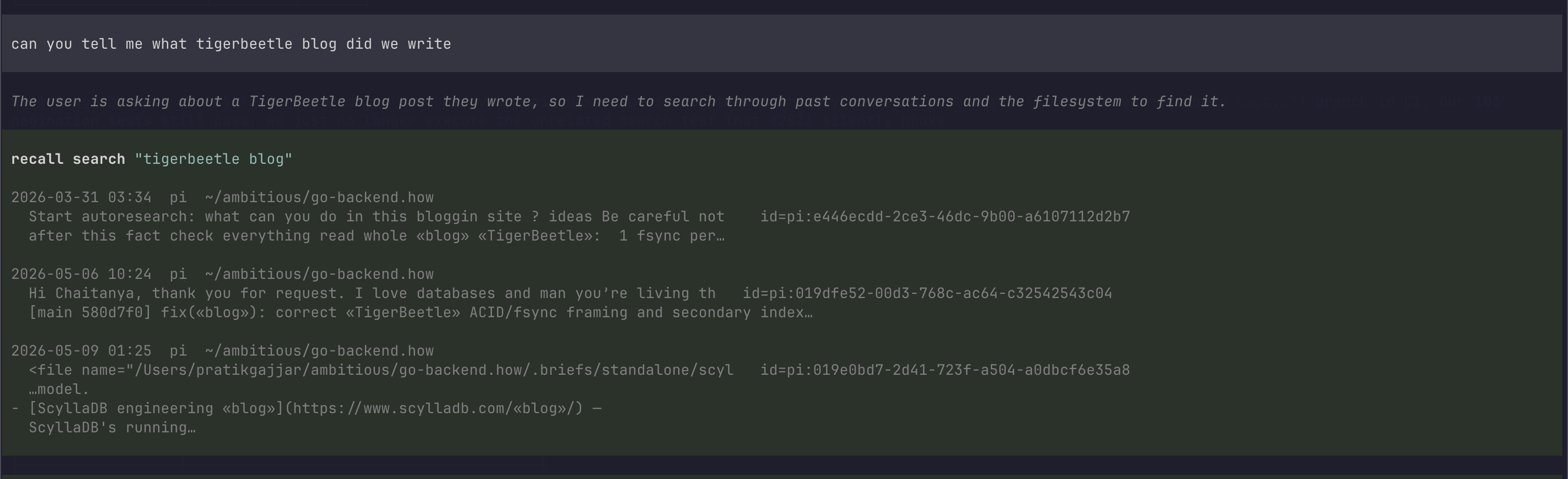
The agent runs recall to find a past conversation, then reads it back — no copy-paste.
Install
pi install npm:@pratikgajjar/pi-recall
The prebuilt recall binary for your platform ships inside the package, so
pi install / pi update keep the extension and the binary in lockstep —
no separate go install or brew. The extension resolves the binary in this
order: --recall-bin flag -> RECALL_BIN env -> bundled binary -> recall on PATH.
Then build the index once:
recall index        # one-time, ~1 minute on real data
recall doctor       # confirm sources are detected
For local development, load the extension ad-hoc:
pi -e ./packages/pi-recall/src/index.ts
What it does
Nothing an agent has to learn a schema for. On session start it installs the
recall skill and refreshes the index; after each agent turn it refreshes again
in the background, so the index already reflects the conversation you are having.
It registers no tools. The agent runs the CLI:
recall "connection pool timeout" --limit 5      # search
recall show pi:019f… --range 300:340            # read a slice
recall "pool timeout" --in pi:019f… --context 5 # find and read, one call
A tool schema is re-sent on every single turn whether or not it is used, and it is a second description of flags the CLI already documents — two surfaces to keep in step, drifting apart. The skill is read once, when a task calls for it.
Commands: /recall-health, /recall-index.
Flags: --recall-bin, --recall-auto-index.
Every search accepts --repo (. for the current project), --since (e.g.
7d), and --tag (repeatable; AND). A tag may be a user tag or a reserved
facet like source:cursor.
Navigating large sessions
Some sessions are huge (thousands of messages). To find a known topic inside one, search it — do not outline it:
recall "connection pool timeout" --in pi:019f… --context 5
That is one call. Measured over real navigations: searching inside a session
costs ~400 characters against ~4,000 to outline it, and --context removes the
follow-up read entirely. --in . scopes to the current
session — how you recover something said before a compaction.
Outline is for a session you know nothing about. recall show takes three
flags to slice instead of dumping everything:
range— Python-style slice over the message list:":100"first 100,"-50:"last 50,"305:315"window. Negative indices count from the end.outline— a table of contents: one line per turn, with runs of tool activity collapsed to[12-38] tool ×27 (4.2k chars: bash×19, read×8). Long sessions degrade to chapter markers (the user's turns) to stay bounded.role— comma-separated allowlist:"user,assistant"(skip tool noise),"user"(just the prompts),"tool". Tool-related labels (toolResult,toolCall,function_call, …) all collapse totool. In long agent loops, ~50% of messages are tool noise; in some, 98% — a 30k-msg session shrinks to ~600 withrole="user".
Every rendered message carries its own ## msg N/TOTAL role header so any
slice is self-locating. Output is bounded by default and always says how to get
the rest: sessions over 200 messages return the outline, a read over ~20k chars
stops with a Continue with range='X:Y', and tool results are clipped at 600
chars with an elision marker (tool_chars: 0 to opt out). After a hit at
msg_idx=N, range: "N-5:N+5".
Recommended agent prompt
Drop into your project's AGENTS.md / CLAUDE.md:
When the user refers to earlier work ("how did we fix…", "continue the…"),
use the recall tools to find and read the relevant past AI session first.
Staying fresh
Because the extension is a long-lived process, it keeps the index warm in the background so searches always reflect your latest conversations — you never pay an index rebuild on the query path:
- On session start it runs an incremental
recall indexto catch up on anything that changed since your last pi session. - After each agent turn it debounces a background refresh, so the session you're in right now is searchable moments later.
The incremental index is append-only (it reads just the new lines of changed
session files), so each refresh is typically tens of milliseconds. Disable it
with --recall-auto-index=false or RECALL_AUTO_INDEX=0 and refresh manually
via /recall-index.
Commands
/recall-health— runsrecall doctor(CLI status + detected sources)./recall-index— rebuilds the index (recall index; pass--fullfor a full rebuild).
Configuration
--recall-bin PATH flag / RECALL_BIN env |
Path to the recall binary. Default: recall on PATH. |
--recall-auto-index=false flag / RECALL_AUTO_INDEX=0 env |
Turn off the background index refresh (on by default). |
License
MIT.