@pratikgajjar/pi-recall
pi extension: search your past AI chat history (Cursor, Claude Code, Codex, pi) via the recall CLI
Package details
Install @pratikgajjar/pi-recall from npm and Pi will load the resources declared by the package manifest.
$ pi install npm:@pratikgajjar/pi-recall- Package
@pratikgajjar/pi-recall- Version
0.8.3- Published
- Nov 4, 2026
- Downloads
- 334/mo · 117/wk
- Author
- pratikgajjar
- License
- MIT
- Types
- extension
- Size
- 40.4 MB
- Dependencies
- 0 dependencies · 3 peers
Pi manifest JSON
{
  "image": "https://raw.githubusercontent.com/pratikgajjar/recall/main/packages/pi-recall/assets/demo.png",
  "extensions": [
    "./src/index.ts"
  ]
}
Security note
Pi packages can execute code and influence agent behavior. Review the source before installing third-party packages.
README
pi-recall
A pi extension for recall. With it, a pi agent can find and read your past AI sessions from pi, Claude Code, Codex and Cursor. You do not have to copy and paste transcripts.

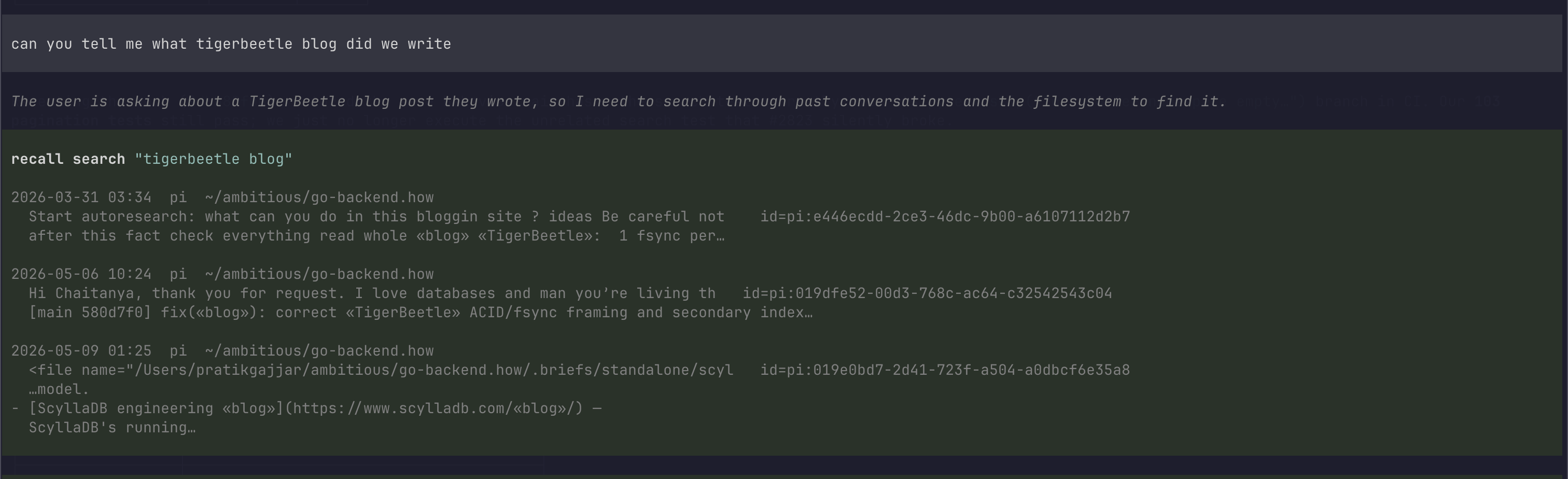
A real pi session on a synthetic demo history. The agent runs recall find,
reads the matching messages, and answers with the commit.
Install
pi install npm:@pratikgajjar/pi-recallThe package contains the recall binary for your platform. pi update
updates the extension and the binary together. The extension uses the first
binary that it finds in this order:
- The
--recall-binflag. - The
RECALL_BINenvironment variable. - The binary in this package.
recallon yourPATH.
Build the index one time:
recall index    # about 1 minute for 6,000 sessions
recall doctor   # show the sources that recall found
To load the extension from a source checkout:
pi -e ./packages/pi-recall/src/index.tsWhat the extension does
- At session start, it installs the recall skill and updates the index.
- After each agent turn, it updates the index in the background. The current session is then searchable.
- It adds the
/recall-healthand/recall-indexcommands.
The extension registers no tools. The agent runs the CLI from its shell tool, and the skill tells it which commands to use:
recall "connection pool timeout" --limit 5          # search
recall show pi:019f... --range 300:340              # read part of a session
recall "pool timeout" --in pi:019f... --context 5   # search one session and read the hits
A tool schema goes to the model on each turn, also when the agent does not use it. The skill goes to the model only when a task needs it.
Read a long session
Some sessions have thousands of messages. To find a topic in one session, search the session:
recall "connection pool timeout" --in pi:019f... --context 5This is one command. Measured on real agent work, a search in a session
returned about 400 characters, and an outline about 4,000. --in . searches
the current session. Use it to find text from before a compaction.
Use the outline only for a session that you know nothing about. These
recall show flags select part of a session:
--range FROM:TOis a Python slice::100is the first 100 messages,-50:is the last 50,305:315is a window.--outlineshows one line for each turn. A run of tool calls is one line, for example[12-38] tool ×27 (4.2k chars: bash×19, read×8). A long session shows only the user turns.--role user,assistantremoves tool output. In long agent sessions, tool messages are often half of all messages or more.
Each message has a ## N role header. Output has limits, and it always tells
you how to get the rest:
- A session with more than 200 messages shows the outline first.
- A read stops at 20,000 characters and shows the next
--range. - A tool result stops at 600 characters.
--tool-chars 0shows all of it.
After a hit at message N, read --range N-5:N+5, or search with
--context 5.
Agent instructions
Add this text to the AGENTS.md or CLAUDE.md file of your project:
When the user refers to earlier work ("how did we fix…", "continue the…"),
use recall to find and read the past AI session first.
Index updates
recall index reads only the new lines of each changed session file. When
nothing changed, a run takes about 50 ms. The extension runs it at session
start, and 1.5 s after each agent turn. If two runs start at the same time,
the second run waits for the first.
To stop the background updates, set --recall-auto-index=false or
RECALL_AUTO_INDEX=0. Then use /recall-index to update the index.
Commands
| Command | Effect |
|---|---|
/recall-health |
Runs recall doctor: the CLI version, the sources and the index size. |
/recall-index |
Runs recall index. Add --full to index all sessions again. |
Configuration
| Setting | Effect |
|---|---|
--recall-bin PATH or RECALL_BIN |
The path to the recall binary. |
--recall-auto-index=false or RECALL_AUTO_INDEX=0 |
Stops the background index updates. They are on by default. |
Licence
MIT.