@pratikgajjar/pi-recall
pi extension: search your past AI chat history (Cursor, Claude Code, Codex, pi) via the recall CLI
Package details
Install @pratikgajjar/pi-recall from npm and Pi will load the resources declared by the package manifest.
$ pi install npm:@pratikgajjar/pi-recall- Package
@pratikgajjar/pi-recall- Version
0.1.0- Published
- May 30, 2026
- Downloads
- not available
- Author
- pratikgajjar
- License
- MIT
- Types
- extension
- Size
- 22.1 KB
- Dependencies
- 0 dependencies · 3 peers
Pi manifest JSON
{
  "extensions": [
    "./src/index.ts"
  ],
  "image": "https://raw.githubusercontent.com/pratikgajjar/recall/main/packages/pi-recall/assets/demo.png"
}
Security note
Pi packages can execute code and influence agent behavior. Review the source before installing third-party packages.
README
pi-recall
A pi extension that lets the agent search your past AI chat history — across Cursor, Claude Code, Codex, and pi — without you copy-pasting transcripts.
It's a thin wrapper over the recall CLI, which indexes your conversations into a local SQLite FTS5 index. The extension shells out to that binary and exposes the index to the agent as tools.

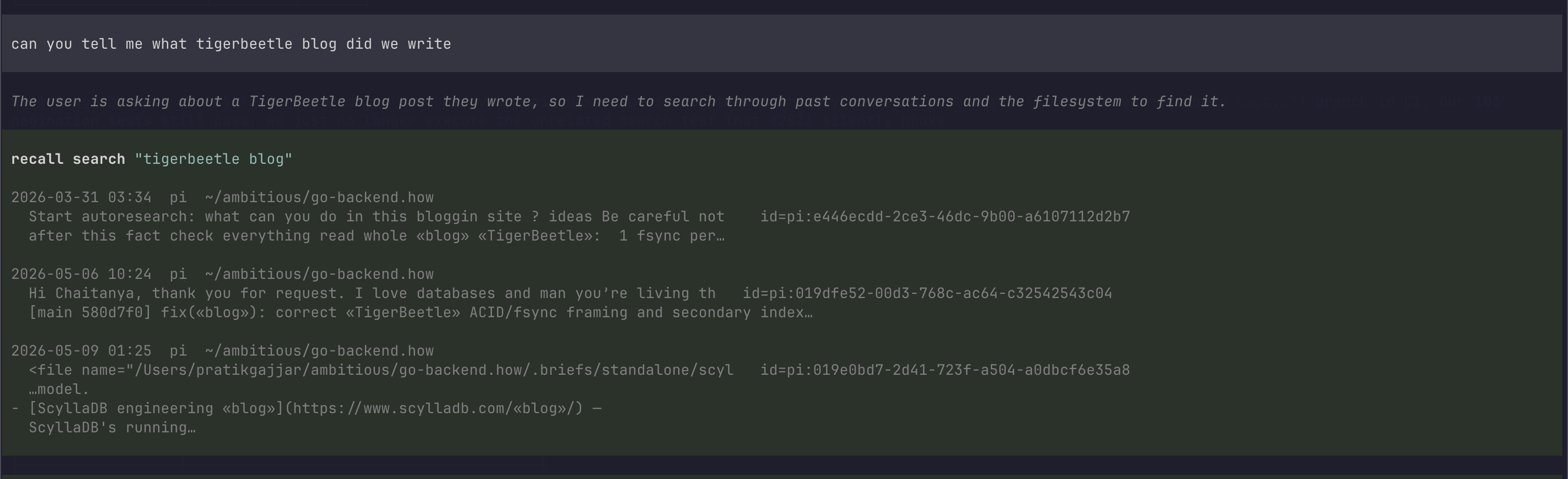
The agent calls recall_search to find a past conversation, then reads it in full with recall_transcript — no copy-paste.
Prerequisites
Install the recall CLI and build its index once:
go install github.com/pratikgajjar/recall@latest
recall index        # one-time, ~1 minute on real data
recall doctor        # confirm sources are detected
Install
pi install npm:@pratikgajjar/pi-recall
Or, for local development, drop it in .pi/extensions/ or load it ad-hoc:
pi -e ./packages/pi-recall/src/index.ts
Tools
| Tool | What it does |
|---|---|
recall_search |
Full-text search over past sessions. Returns ranked hits with matched excerpts and a session id. |
recall_transcript |
Read a session in full — by session_id, or omit it for the most recent session (filterable by repo/source/since). |
recall_sessions |
List recent sessions (titles + ids, no bodies). |
recall_related |
Given a session id, find other sessions on the same topic. |
All tools accept repo (pass "." for the current project), source (cursor | claude | codex | pi), and since (e.g. 7d).
Recommended agent prompt
Drop into your project's AGENTS.md / CLAUDE.md:
When the user refers to earlier work ("how did we fix…", "continue the…"),
use the recall tools to find and read the relevant past AI session first.
Staying fresh
Because the extension is a long-lived process, it keeps the index warm in the background so searches always reflect your latest conversations — you never pay an index rebuild on the query path:
- On session start it runs an incremental
recall indexto catch up on anything that changed since your last pi session. - After each agent turn it debounces a background refresh, so the session you're in right now is searchable moments later.
The incremental index is append-only (it reads just the new lines of changed
session files), so each refresh is typically tens of milliseconds. Disable it
with --recall-auto-index=false or RECALL_AUTO_INDEX=0 and refresh manually
via /recall-index.
Commands
/recall-health— runsrecall doctor(CLI status + detected sources)./recall-index— rebuilds the index (recall index; pass--fullfor a full rebuild).
Configuration
--recall-bin PATH flag / RECALL_BIN env |
Path to the recall binary. Default: recall on PATH. |
--recall-auto-index=false flag / RECALL_AUTO_INDEX=0 env |
Turn off the background index refresh (on by default). |
License
MIT.