@ravan08/pi-langfuse
Langfuse observability extension for Pi coding agent. Sends traces to Langfuse for monitoring tokens, costs, latency, and tool calls.
Package details
Install @ravan08/pi-langfuse from npm and Pi will load the resources declared by the package manifest.
$ pi install npm:@ravan08/pi-langfuse- Package
@ravan08/pi-langfuse- Version
1.0.3- Published
- Apr 27, 2026
- Downloads
- 398/mo · 179/wk
- Author
- saravananravi11
- License
- MIT
- Types
- extension
- Size
- 438.2 KB
- Dependencies
- 1 dependency · 1 peer
Pi manifest JSON
{
  "extensions": [
    "./index.ts"
  ],
  "image": "https://raw.githubusercontent.com/saravananravi08/pi-langfuse-extension/main/docs/screenshot1.jpg"
}
Security note
Pi packages can execute code and influence agent behavior. Review the source before installing third-party packages.
README
@ravan08/pi-langfuse


Langfuse observability extension for Pi Coding Agent. Sends traces to Langfuse for monitoring tokens, costs, latency, and tool calls.
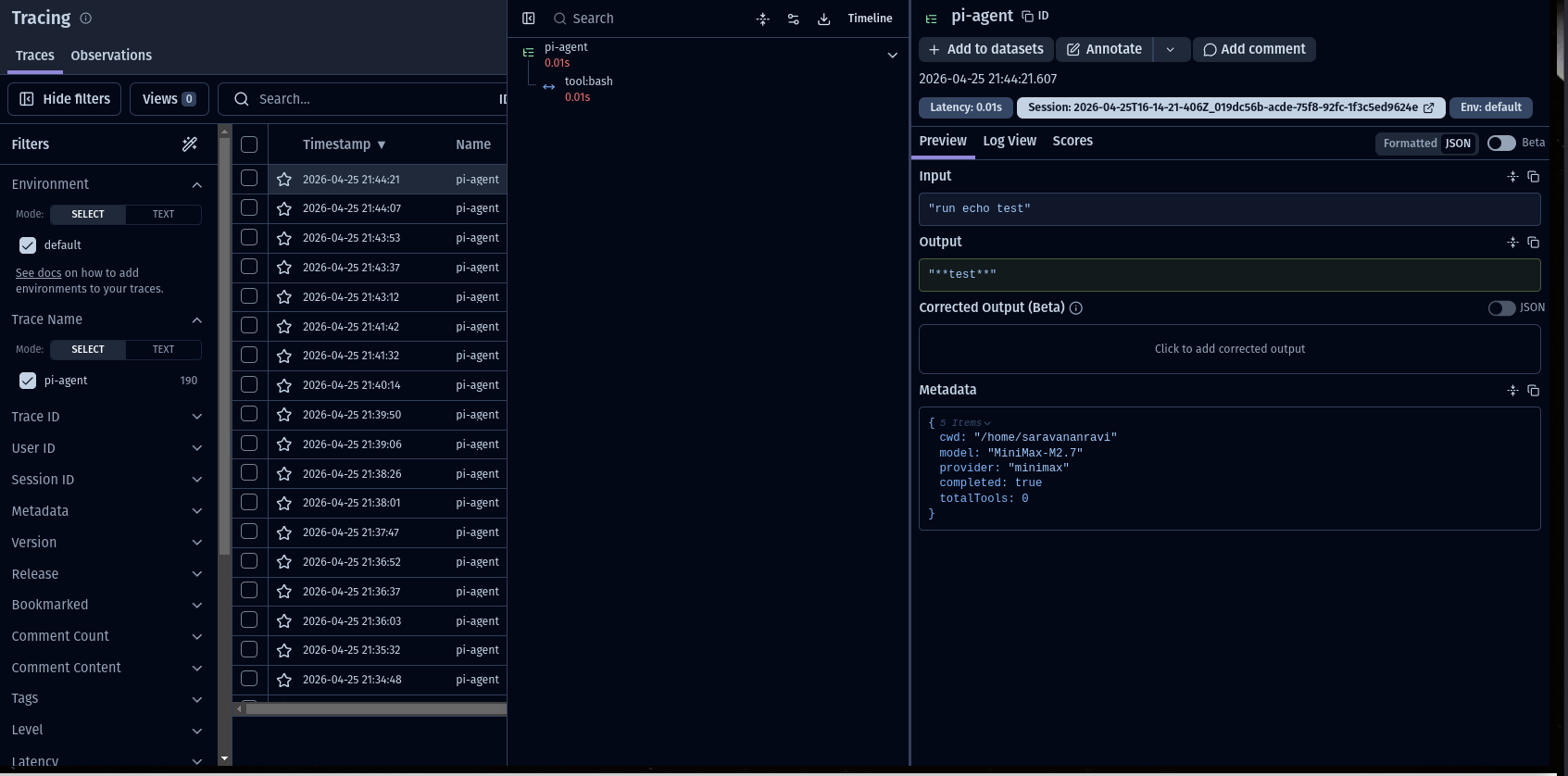
Why Langfuse?
Langfuse provides open-source observability for LLM applications. This extension allows you to trace, monitor, and debug your Pi sessions with production-grade detail, helping you understand exactly how your agent is performing, what it's costing you, and where it might be failing.
Features
- Hierarchical Tracing: Maps user prompts to per-turn spans and nested tool executions for deep visibility.
- LLM Metadata: Automatically records model name, provider, token usage, and API costs per turn.
- Tool Observability: Detailed logs for every tool call, including arguments, results, and error states.
- Session Correlation: Groups all prompts from the same Pi session into a single Langfuse session.
- Cost Tracking: Records input/output/total costs in USD per generation.
- Token Usage: Tracks input and output tokens per turn.
Quick Install
Via npm (recommended)
pi install npm:@ravan08/pi-langfuse
Via git
pi install git:github.com/saravananravi08/pi-langfuse-extension
Configuration
Get your keys from Langfuse Cloud → Settings → API Keys.
Create config.json in the extension directory:
{
  "publicKey": "pk-lf-xxxx",
  "secretKey": "sk-lf-xxxx",
  "host": "https://cloud.langfuse.com"
}
For npm install, find the extension at:
~/.pi/agent/npm/@ravan08/pi-langfuse/index.ts
Usage
Run pi with tracing enabled
pi "your prompt"
Pi auto-loads the extension. All sessions will be traced to Langfuse.
Trace Model
Trace (name: "pi-agent")
├── Session ID: <pi-session-id>
├── Metadata: model, provider, cwd
└── Span (name: "tool:<name>")
    └── Input/Output logs

Generation (name: "llm-response")
├── Model: MiniMax-M2.7
├── Usage: input/output tokens
└── Cost: input/output/total USD
What Gets Tracked
Trace Level
input- User promptoutput- Assistant responsesessionId- Pi session identifiermetadata- Model, provider, cwd
Generation Observations (LLM Calls)
model- Model identifier (e.g., "MiniMax-M2.7")usage- Token counts (input/output/total)costDetails- Cost breakdown in USD
Span Observations (Tool Calls)
name- Tool name (e.g., "tool:bash")input- Tool parameters (JSON)output- Tool resultmetadata.isError- Whether tool failed
Langfuse Dashboard
After running, check your Langfuse project for:
- Traces - All pi agent runs with I/O
- Sessions - Traces grouped by session ID
- Observations - Tool calls and LLM generations
- Scores - Token counts and costs
- Model Usage - Usage breakdown by model
Architecture
For a deep dive into the tracing model and data flow, see docs/architecture.md.
Troubleshooting
No traces appearing?
- Verify API keys are correct in
config.json - Check Langfuse project is active
- Ensure API keys have write permissions
Extension not loading?
- Run
pi listto check installed packages - Try restarting pi
Model/cost not showing?
- Not all providers expose cost info
- Check Langfuse traces API for raw observation data
Dependencies
- langfuse - Langfuse SDK
- @mariozechner/pi-coding-agent - Pi extension API
License
MIT