@rmirandasv/pi-sdlc
Ask and plan modes for Pi: clarify requirements, produce an implementation plan, then execute it.
Package details
Install @rmirandasv/pi-sdlc from npm and Pi will load the resources declared by the package manifest.
$ pi install npm:@rmirandasv/pi-sdlc- Package
@rmirandasv/pi-sdlc- Version
0.0.2- Published
- Aug 23, 2026
- Downloads
- 314/mo · 5/wk
- Author
- rmirandasv
- License
- MIT
- Types
- extension
- Size
- 93.3 KB
- Dependencies
- 0 dependencies · 3 peers
Pi manifest JSON
{
  "extensions": [
    "./extensions"
  ],
  "image": "https://raw.githubusercontent.com/rmirandasv/pi-sdlc/main/pi-sdlc.gif"
}Security note
Pi packages can execute code and influence agent behavior. Review the source before installing third-party packages.
README
@rmirandasv/pi-sdlc
Ask, plan, and SDLC modes for Pi: explore a codebase, clarify requirements, write a PRD and specs, then execute.

Status
This is 0.0.1. It ships ask mode, plan mode, the /sdlc loop (fuzzy requirement → PRD → specs → execute), and web search.
/plan is unchanged: it is still the short path from a plan to implementing code. /sdlc is the longer gated pipeline.
Install
Requires Pi.
pi install npm:@rmirandasv/pi-sdlc
Or try it for the current run only:
pi -e npm:@rmirandasv/pi-sdlc
Commands
| Command | What it does |
|---|---|
/ask |
Enter ask mode. Read-only tools only. Explore and research without changing files. |
/ask:exit |
Leave ask mode and restore the default toolset. |
/plan |
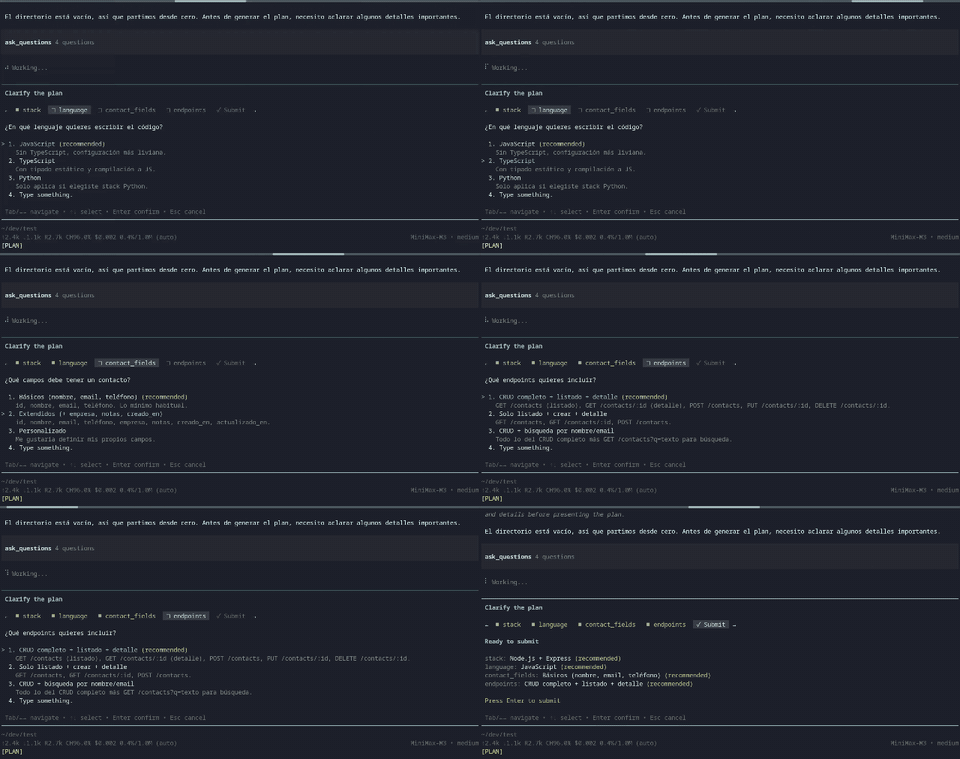
Enter plan mode. Clarify the work, ask questions, and write a plan. Execute implements that plan. |
/plan:exit |
Leave plan mode, discard the draft, and restore the default toolset. |
/sdlc |
Enter the SDLC loop at the PRD stage. Optional arguments seed the requirement. |
/sdlc:specs |
Skip the PRD stage. Pick an existing PRD and plan specs for it. |
/sdlc:exit |
Leave SDLC, keep any PRD/specs already written, and restore the default toolset. |
Ask, plan, and SDLC are mutually exclusive. Entering one exits the other.
/ask is an optional prelude. The SDLC loop starts in a plan-like gated stage, not in ask mode.
Plan flow
/plan is the short path. It does not write a PRD.
/plan— the agent explores the repo and asks clarifying questions when it needs a decision.- When the plan is ready, it writes a temporary markdown draft (
present_plan). - Choose one of:
- Execute the plan — leave plan mode and implement it now.
- Save to project... — copy the draft to a path you choose (default
docs/plans/<title>.md). - Request changes — stay in plan mode and refine the draft.
- Discard and exit — delete the draft and return to normal mode.
SDLC flow
/sdlc is the long path: fuzzy requirement → PRD → specs → execute.
/sdlc— the agent explores the repo, asks clarifying questions, and presents a PRD (present_artifact). The draft is the PRD, not a plan for writing one.- Approve PRD writes
docs/sdlc/prd/<slug>.mdand opens specs planning. Request changes stays in the PRD stage. Discard exits and deletes the draft (files already on disk stay). - The agent reads the PRD and presents a specs breakdown. Approve writes one file per spec under
docs/sdlc/specs/<slug>/viawrite_spec. - When the specs are on disk, choose:
- Execute specs — leave SDLC and implement them now.
- Refine specs — go back to specs planning.
- Exit — keep the files and return to normal mode.
/sdlc:specs starts at step 3 with a PRD already in docs/sdlc/prd/.
Default artifact paths:
docs/sdlc/prd/<slug>.md
docs/sdlc/specs/<slug>/01-session-api.md
docs/sdlc/specs/<slug>/02-ui.md
PRD and specs stages do not get generic write / edit tools. The only project writes are the approved PRD (copied by the extension) and write_spec after the specs plan is approved.
Web search
web_search uses the Tavily API. Set TAVILY_API_KEY in the environment.
Ask, plan, and SDLC still work without the key. Search calls fail until it is set.
License
MIT. See LICENSE.
Issues and source: github.com/rmirandasv/pi-sdlc.