@robhowley/pi-openrouter
Live OpenRouter spend/account TUI overlays, user-scoped or free-only model sync, api key management, and session tagging for Pi.
Package details
Install @robhowley/pi-openrouter from npm and Pi will load the resources declared by the package manifest.
$ pi install npm:@robhowley/pi-openrouter- Package
@robhowley/pi-openrouter- Version
0.14.3- Published
- Sep 9, 2026
- Downloads
- 6,319/mo · 460/wk
- Author
- robhowley
- License
- MIT
- Types
- extension
- Size
- 523.2 KB
- Dependencies
- 2 dependencies · 2 peers
Pi manifest JSON
{
  "extensions": [
    "./extensions/openrouter"
  ],
  "image": "https://raw.githubusercontent.com/robhowley/pi-userland/main/packages/pi-openrouter/img/openrouter-usage-tui.png"
}
Security note
Pi packages can execute code and influence agent behavior. Review the source before installing third-party packages.
README
pi-openrouter
A Pi extension for live OpenRouter visibility and environment sync: usage/account TUI overlays, automatic session_id tagging, full or free-only model catalog sync, API key management, and local model field overrides.
Installation
pi install npm:@robhowley/pi-openrouter
Requirements
Set one of these environment variables:
OPENROUTER_MANAGEMENT_KEY(preferred) — provides full usage/analytics and can be used for model syncOPENROUTER_API_KEY— basic usage data and user-scoped model sync
export OPENROUTER_MANAGEMENT_KEY=sk-or-...
Key selection:
- Usage/account commands prefer
OPENROUTER_MANAGEMENT_KEYfor full analytics, falling back toOPENROUTER_API_KEY - Model sync prefers
OPENROUTER_API_KEYbut will attemptOPENROUTER_MANAGEMENT_KEYif only that is set
Commands
/openrouter usage                    # usage/spend overlay
/openrouter account                  # credits, key limits, account health, key toggle UI
/openrouter session                  # current OpenRouter session_id
/openrouter api-key-create           # create an API key (management key required)
/openrouter models-sync              # sync user-scoped OpenRouter models into Pi
/openrouter models-sync --free       # sync only openrouter/free plus explicit :free models
/openrouter models-status            # show model sync/cache status
/openrouter models-status --free     # show only registered/skipped free models
/openrouter models-status --skipped  # show skipped model reasons
/openrouter model-override-set       # set local model field overrides
/openrouter model-override-list      # list local model field overrides
/openrouter model-override-clear     # clear local model field overrides
Model catalog sync
pi-openrouter can sync Pi’s OpenRouter model catalog from your user-scoped OpenRouter model list.
/openrouter models-sync
The sync uses OpenRouter’s authenticated user model catalog, so Pi can see the models available to your account instead of only the default provider list. This intentionally replaces Pi's OpenRouter provider model list with your user-scoped catalog plus OpenRouter's built-in router aliases (openrouter/auto, openrouter/free, and openrouter/owl-alpha). It does not merge in every built-in model unless that model is returned by your OpenRouter account catalog.
Free models only
To sync only OpenRouter's free route and explicit free model variants:
/openrouter models-sync --free
This registers openrouter/free plus available *:free models.
Use openrouter/free for OpenRouter's built-in free model router, or select a specific :free model when you want direct control.
Free models are best-effort and rate-limited by OpenRouter. They are useful for experiments and low-stakes work, not guaranteed coding loops.
Example free-only status output:
OpenRouter models healthy
28 registered · 3 skipped · free-only catalog · cache age: 4m
Run /openrouter models-sync again to restore the full user-scoped catalog.
/openrouter models-status
Model count and cache health live here. The Pi footer/status bar does not persistently show OpenRouter {N} models anymore.
Example status output:
OpenRouter models healthy
363 registered · 12 skipped · full catalog · cache age: 4m
To see why models were skipped:
/openrouter models-status --skipped
Skipped output may include a grouped suggestion when Pi can offer a safe next step, such as adding a local contextWindow override for incomplete metadata.
Skipped models do not make the sync fail; models are skipped when required metadata cannot be safely mapped into Pi’s provider model config. The last successful catalog is cached so Pi can keep using it if a later refresh fails, and the cache persists across sessions. If a session starts with a cached catalog that has not been registered yet, /openrouter models-status will show:
OpenRouter models cached
368 models in cache · age: 4m
Run '/openrouter models-sync' to register models
Usage overlay
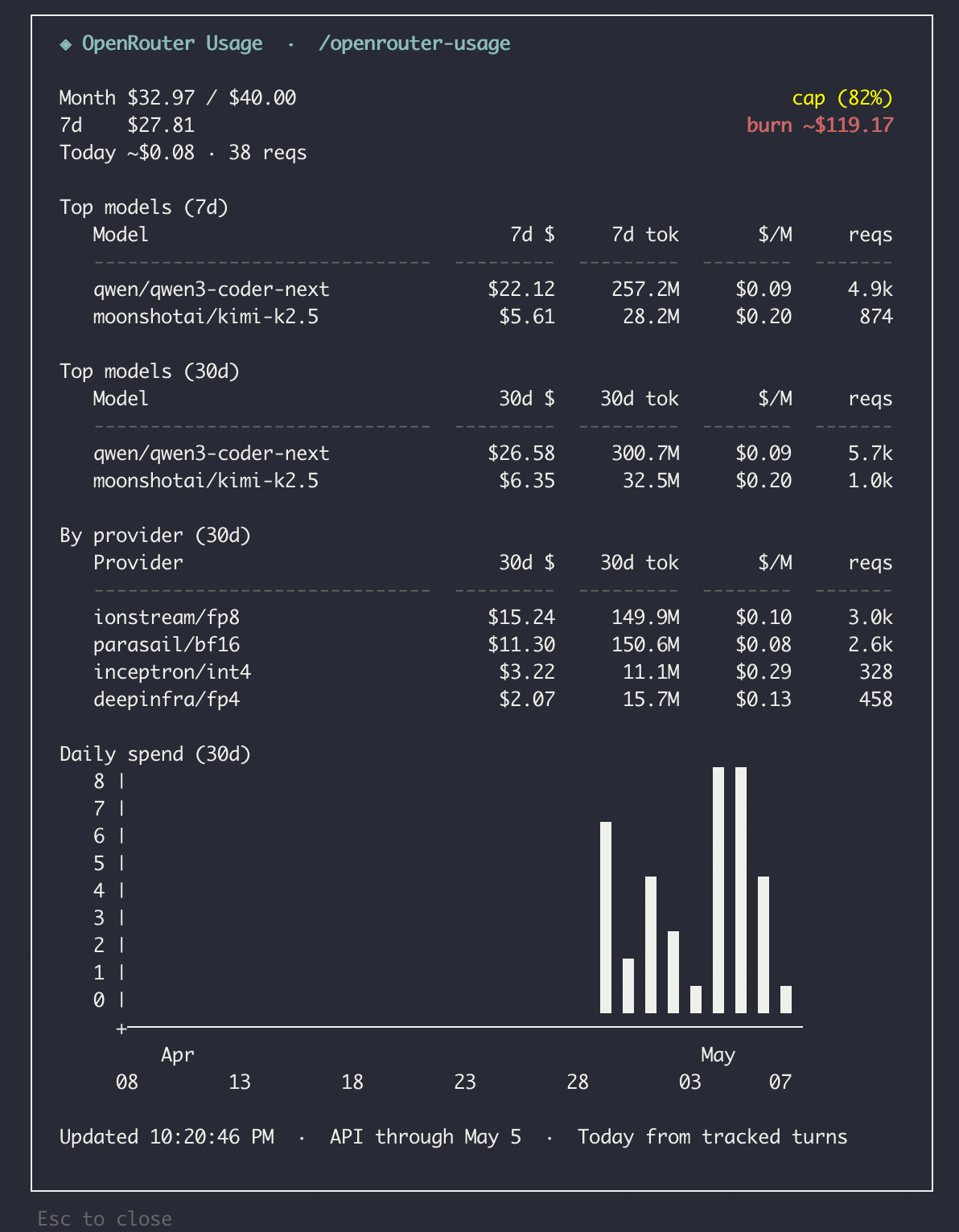
Type /openrouter usage in Pi to open the usage overlay.
The overlay shows:
- Month spend vs cap with percentage
- 7-day spend with burn rate projection
- Today's spend from live tracked turns while Activity API data catches up
- Top models (7d and 30d)
- Usage by provider (30d)
- Daily spend (30d)
The extension refreshes data in the background every 30 seconds (with exponential backoff on errors).
Account health
Type /openrouter account in Pi to open the account health overlay.
The overlay shows:
- Credits balance
- Total usage against available credits
- Status by key
- Selected key details
- Key spend vs configured limit
- Reset cadence
- BYOK limit behavior
- All visible keys, when a management key is configured
Use /openrouter account, select a key with the arrow keys, press t to toggle enabled/disabled, and press Enter to confirm. You can still inspect the selected key's limit, usage, reset cadence, and BYOK behavior from the same overlay.
API key management
API key management requires OPENROUTER_MANAGEMENT_KEY. OPENROUTER_API_KEY alone is not enough for key creation or account-level toggles.
/openrouter api-key-create <name> [limit=<usd|none>] [reset=<daily|weekly|monthly|none>] [byok=<incl|excl>] [workspace=<id>] [expires=<UTC ISO>]
Wrap <name> in quotes when it contains spaces, for example /openrouter api-key-create "Team Key" limit=25.
To enable or disable a key, use /openrouter account, select the key with the arrow keys, press t to toggle it, and press Enter to confirm.
When you create a key, Pi shows the returned secret once in an ephemeral overlay. Copy/store it immediately, do not expect Pi or OpenRouter to reveal it again, and avoid logging it or writing it to local files/debug output.
Session tracking
pi-openrouter automatically tags OpenRouter requests with a session_id derived from the Pi session ID.
Request detection is intentionally broad: the extension checks provider metadata, openrouter/... model ids, configured OpenRouter base URLs, Shopify's ZDR provider flag, and request URLs/endpoints so tagging still works across different Pi event shapes.
View the OpenRouter session tag with:
/openrouter session

# OpenRouter session_id
pi:[uuid]
Local usage tracking
The extension logs completed OpenRouter turns to local JSONL files in ~/.pi/openrouter/usage/ to provide near-real-time usage data for the footer/status bar and for "Today's spend" in the usage overlay. This supplements the OpenRouter Activity API, which typically has a delay.
When positive local spend exists in the last 30 UTC days, the footer/status bar shows local-only Today spend and a 30-day average multiplier, for example OR $2.14 today · 1.3x 30d avg.
To hide only the footer/status bar, set pi-openrouter.statusEnabled to false in either ~/.pi/agent/settings.json or .pi/settings.json:
{
  "pi-openrouter": {
    "statusEnabled": false
  }
}
The default is enabled. Setting false hides only the footer/status bar; /openrouter usage, /openrouter models-status, model sync, and local usage tracking remain available.
Project-local .pi/settings.json only overrides the global setting when Pi treats the project as trusted. If trust state is unavailable, pi-openrouter falls back to the global setting.
Model count and cache health remain available through /openrouter models-status.
Retention: Local usage files are automatically cleaned up after 90 days.
Debug logging: By default, file operations are quiet (fail-open). To enable verbose logging for troubleshooting:
export PI_OPENROUTER_DEBUG_USAGE=1
This logs write/read errors, malformed lines, and cleanup operations to the console.
Model field overrides
Some OpenRouter models don't have complete metadata in Pi's built-in registry or the OpenRouter model catalog. You can manually configure supported PiModelConfig fields using scoped syntax:
# Override thinking levels for DeepSeek V4 Pro
/openrouter model-override-set deepseek/deepseek-v4-pro thinking.high=high thinking.max=max

# Same thing with exact field names
/openrouter model-override-set deepseek/deepseek-v4-pro thinkingLevelMap.high=high thinkingLevelMap.max=max

# Override context window or max tokens
/openrouter model-override-set custom/model contextWindow=128000 maxTokens=8192
Scoped field names:
thinking.off,thinking.minimal,thinking.low,thinking.medium,thinking.high,thinking.xhigh,thinking.max→ map tothinkingLevelMap.*thinkingLevelMap.off,thinkingLevelMap.minimal,thinkingLevelMap.low,thinkingLevelMap.medium,thinkingLevelMap.high,thinkingLevelMap.xhigh,thinkingLevelMap.max→ map tothinkingLevelMap.*contextWindow→contextWindow(number)maxTokens→maxTokens(number)reasoning→reasoning(boolean)
For CLI thinking.* / thinkingLevelMap.* assignments, pi-openrouter only accepts the conservative documented value set: off, minimal, low, medium, high, max, xhigh, or null.
Use null to hide a level from Pi's UI:
/openrouter model-override-set deepseek/deepseek-v4-pro thinking.off=null
If you need an advanced or experimental thinking value outside that CLI set, edit ~/.pi/openrouter/model-overrides.json directly. The JSON file is the escape hatch; the CLI intentionally stays conservative.
List your overrides:
/openrouter model-override-list                    # all models
/openrouter model-override-list --fields           # available fields
/openrouter model-override-list deepseek/deepseek-v4-pro  # specific model
Clear overrides:
/openrouter model-override-clear deepseek/deepseek-v4-pro
Overrides are stored in ~/.pi/openrouter/model-overrides.json.
Precedence is:
- Pi's built-in registry
- OpenRouter's user-scoped model catalog
- Local overrides from
~/.pi/openrouter/model-overrides.json
That means local overrides win. Run /openrouter models-sync after changing overrides to apply them to the registered OpenRouter model list.
License
MIT